Try the sheet here, on the example
The sheet is open below with sample numbers. Change any white cell and watch the results update, or press the blank-copy button to type your own data from scratch. Nothing you type leaves your browser.
Example from the sheet
| المشروع | قيمة التعاقد | ميزانية التكلفة | نسبة الإنجاز | المصروف الفعلي | الربح المتوقع | المستحق على العميل | الحالة |
|---|---|---|---|---|---|---|---|
| تشطيب فيلا - التجمع | 1,200,000.00 | 900,000.00 | 88.0% | 780,000.00 | 300,000.00 | 96,000.00 | متأخر |
| تشطيب شقة - مدينة نصر | 350,000.00 | 260,000.00 | 45.0% | 185,000.00 | 90,000.00 | 0.00 | في الموعد |
| تجديد مكتب - الدقي | 480,000.00 | 340,000.00 | 100.0% | 355,000.00 | 125,000.00 | 48,000.00 | مسلّم |
| مبنى سكني - 6 أكتوبر | 2,500,000.00 | 1,900,000.00 | 61.0% | 1,835,000.00 | 600,000.00 | 0.00 | في الموعد |
| تشطيب محل - المعادي | 150,000.00 | 110,000.00 | 20.0% | 32,000.00 | 40,000.00 | 0.00 | في الموعد |
Example from the “المشاريع” tab (Arabic), with the numbers and formulas that are in the file.
What is inside
- "الإعدادات" (Settings): Today's date (typed as the example date; you can enter =TODAY()) and the budget percentage at which the sheet warns you (90% in the example).
- "المشاريع" (Projects): For each project: code, name, client, contract value, cost budget, start date, agreed delivery date and actual delivery date. Then completion percentage, actual spend, budget used, expected profit, amount collected, balance due from the client, remaining contract amount, days of delay, status and budget alert.
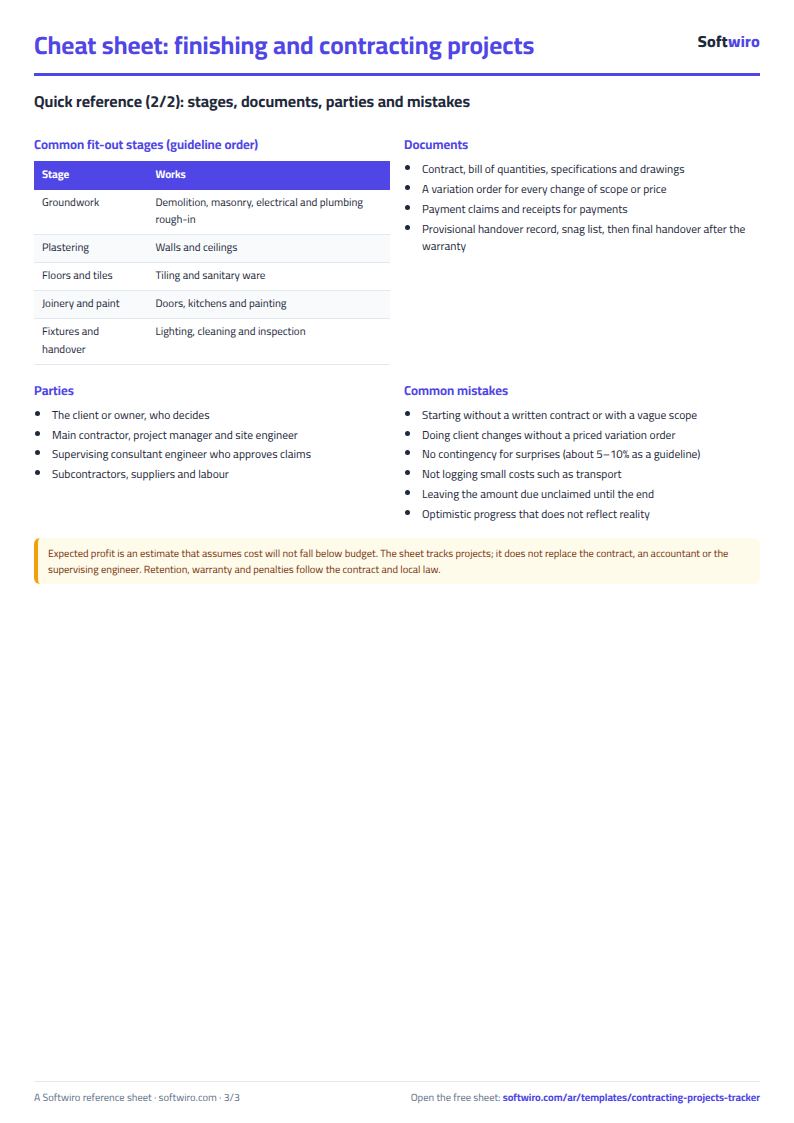
- "المراحل" (Stages): The stages of each project with the weight of each stage and its completion percentage, plus the project name (filled in automatically) and the stage's contribution to project completion.
- "المصروفات" (Expenses): Each expense with its date, project code, item (materials, labor, subcontractor or transport), amount and a note, plus the project name, which fills in automatically.
- "الدفعات" (Payments): Each payment received from the client with its date, project code, amount and payment method, plus the project name, which fills in automatically.
- "الملخص" (Summary): The number of projects delivered, in progress, delayed and over budget; total contracts, cost, expected profit, amount collected and amount due from clients; and expenses split across the four items.
The file opens on a start tab (“ابدأ هنا”, Start here) that explains how to use it.
What makes it different
Open the "المشاريع" (Projects) sheet and see, in one row per project, how much is done, how much has been spent against the budget, the expected profit, how much the client owes you and whether the project is late. You do not have to add up expenses and payments for each project by hand. The budget alert shows which project is close to its cost limit before it is finished.
How to use it
- In "الإعدادات" (Settings), enter today's date (or =TODAY() so it updates itself) and the budget percentage at which you want a warning.
- In "المشاريع" (Projects), enter for each project the code, name, client, contract value, cost budget, start date and agreed delivery date.
- In "المراحل" (Stages), split each project into stages. Enter each stage's weight in the project and its completion percentage, and update it as the work moves forward.
- In "المصروفات" (Expenses), log every expense: date, project code, item (materials, labor, subcontractor or transport) and amount.
- In "الدفعات" (Payments), log every payment you receive from the client with its date and amount. When a project is delivered, enter the actual delivery date in "المشاريع" (Projects).
- The projects sheet calculates completion, actual spend, expected profit, the amount due from the client and days of delay for each project, and the summary sheet combines them for all projects.
Before you start:
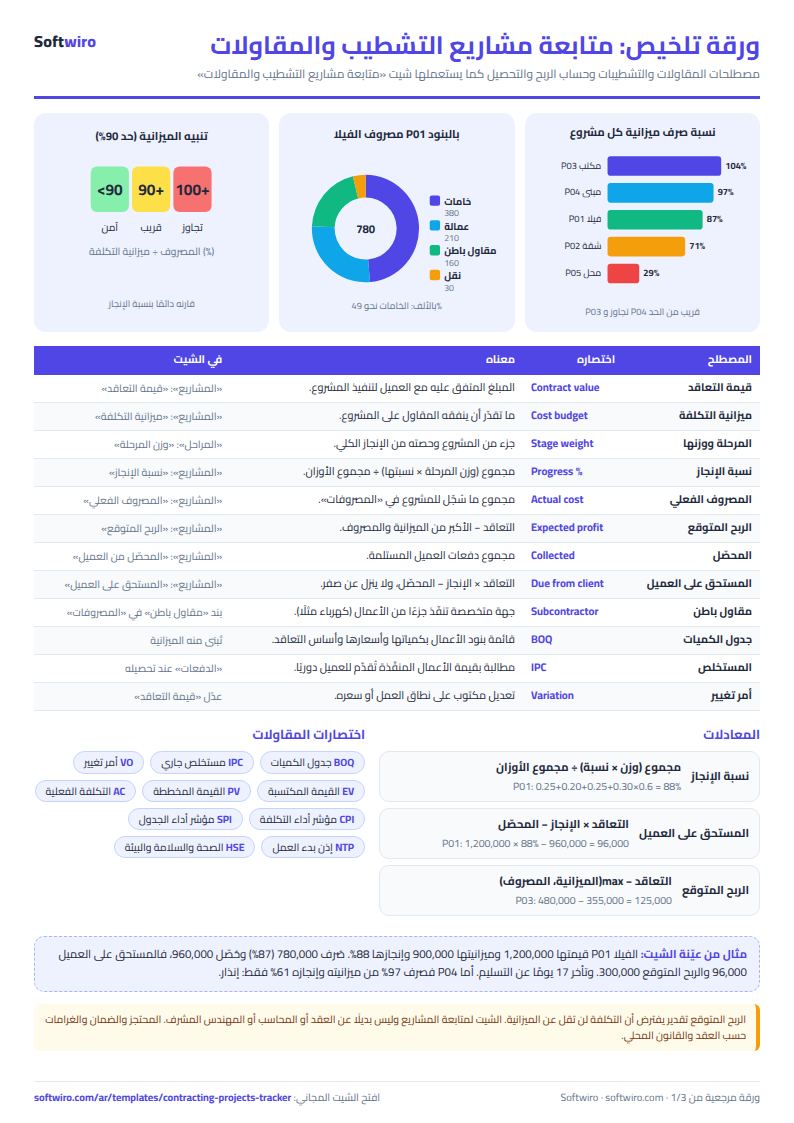
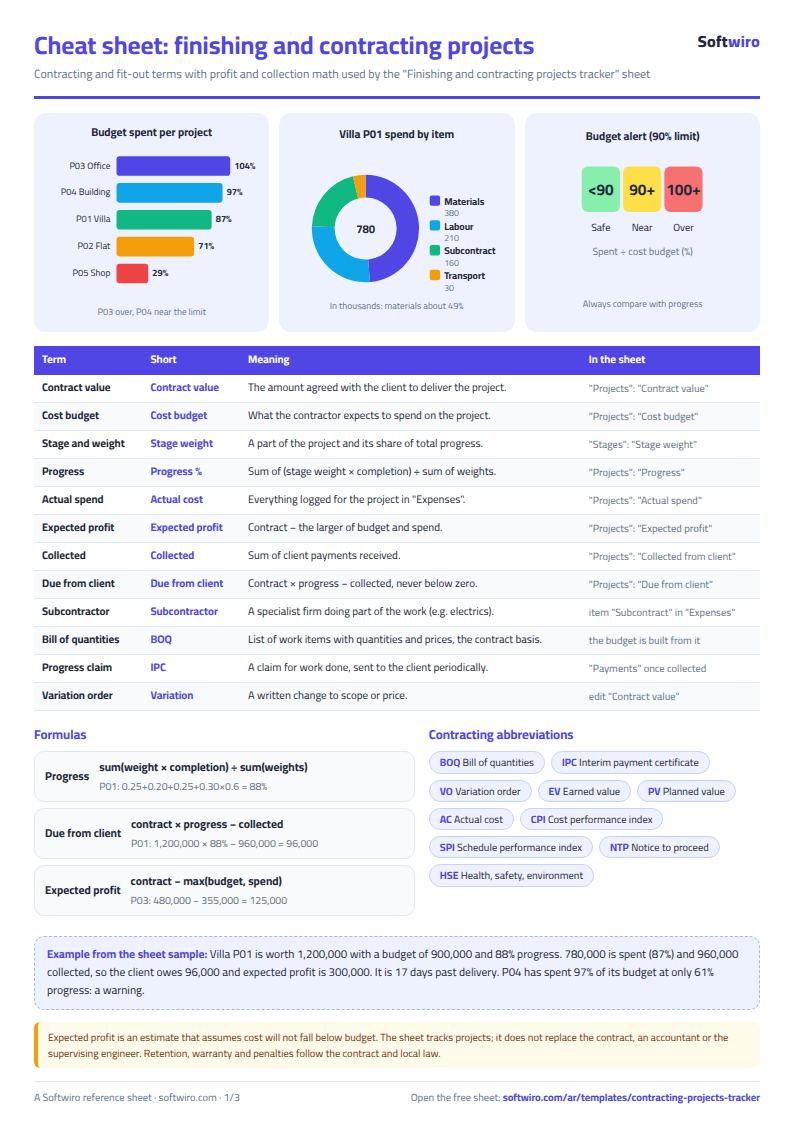
- Project completion = the sum of (stage weight × stage percentage) ÷ the sum of the weights. The weights do not have to add up to exactly 100%, but it is better if they do.
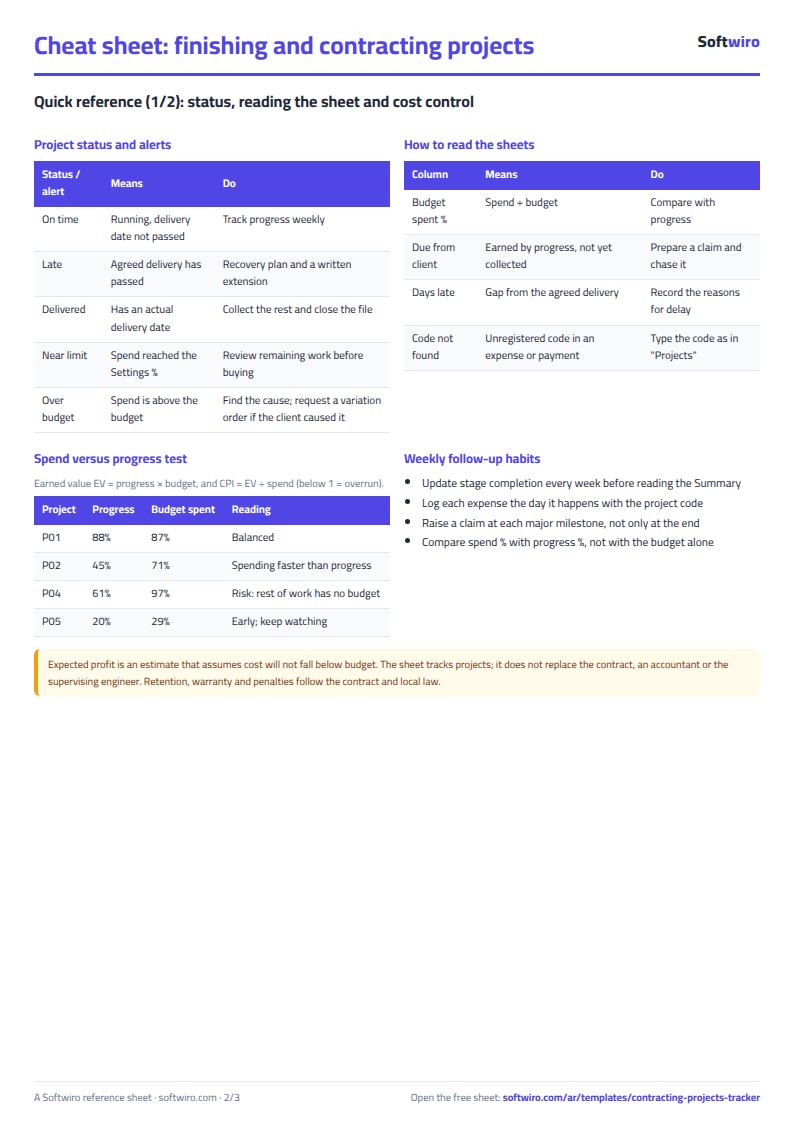
- Expected profit = contract value − the larger of the cost budget and actual spend. The sheet assumes the cost will not be below the budget, and if it goes over, the overrun is counted.
- Amount due from the client = contract value × completion percentage − amount collected (never below zero). "Remaining contract amount" is contract value − amount collected, and it includes amounts not yet due.
- Days of delay: for a delivered project, the difference between actual and agreed delivery. For a project in progress, the difference between today's date and the agreed delivery date, if that date has passed.
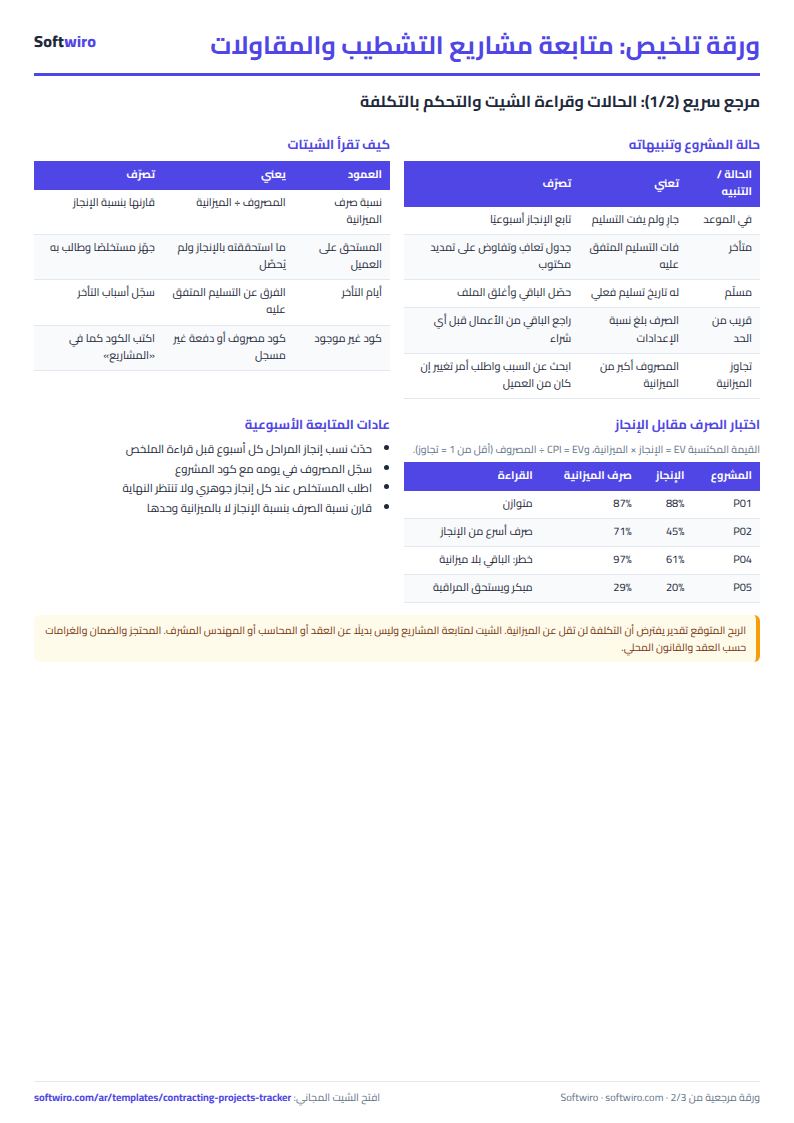
- Budget alert: "over budget" when spending is higher than the cost budget, and "near the limit" when it reaches the percentage set in the settings or more.
- The sheet holds 200 projects, 1,000 stages, 2,000 expenses and 1,000 payments. Write the project code in exactly the same way in every sheet.
Free cheat sheet for this field
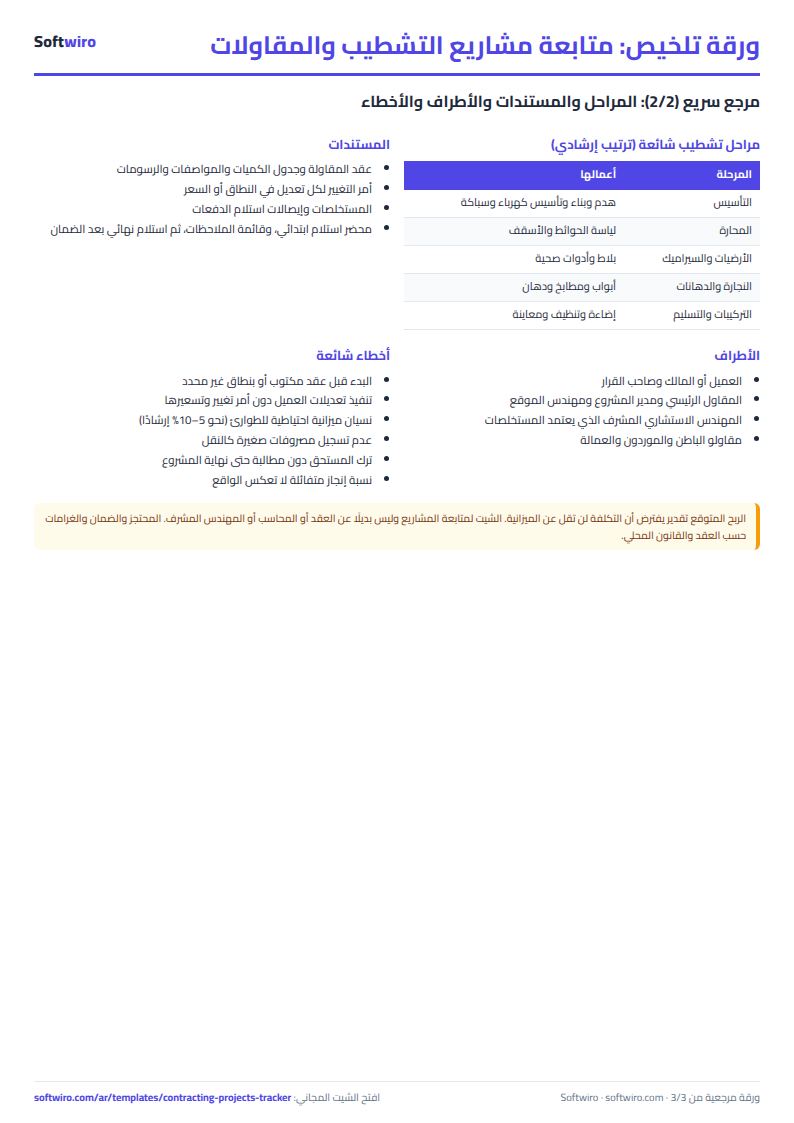
Terms, abbreviations, tables and diagrams over several pages, in Arabic and English. Download it as a PDF or images, including a phone-size version.
Still running this on Excel?
This sheet suits a start and a limited amount of data. If your way of working grows, or you need more than one person working on it at the same time, Softwiro can build you a program that fits the way you work.
| In this sheet | In Custom Software from Softwiro |
|---|---|
| One file that one person edits at a time, and copies reach you on WhatsApp. | A program with a login for each user and permissions you define, and everyone sees the same data. |
| You type everything and check the numbers by hand. | We design the screens around your work steps, so each person records only what concerns them. |
| Columns and formulas are fixed as the sheet was designed. | We build what you need: reports, alerts and screens your way. |
| Backups and security are your own responsibility. | The program runs on a secured server with regular backups. |
Frequently asked questions
How is expected profit calculated?
Expected profit = contract value − the larger of the cost budget and actual spend. The sheet assumes the project cost will not be lower than its budget, and if spending goes over the budget, profit is calculated on the actual spend. It is a simple estimate and does not predict the cost of the work still to be done.
What is the difference between the amount due from the client and the remaining contract amount?
Amount due from the client = contract value × completion percentage − amount collected (never below zero), that is, work you have completed but not yet been paid for. Remaining contract amount = contract value − amount collected, which also includes amounts that are not due yet.
How is project completion calculated?
In the "المراحل" (Stages) sheet you enter the weight and completion percentage of each stage, and the sheet calculates the sum of (weight × percentage) ÷ the sum of the weights. A stage with a 30% weight that is 50% complete adds 15% to the project.
Can I add new projects?
Yes. The sheet holds 200 projects, 1,000 stages, 2,000 expenses and 1,000 payments. Enter the new project code in "المشاريع" (Projects), then use it in the other sheets.
Is the template free?
Yes, with no sign-up and no email address. Use it, edit it and share it as you like.
Does it work in Google Sheets and on mobile?
The sheet uses formulas supported by Excel 2016 and later, Google Sheets and LibreOffice, so you can upload it to Google Drive and open it with Google Sheets on a computer or a phone.
What is the difference between the white and the gray cells?
You type in the white cells; the gray cells are calculated automatically. Don't type in a gray cell, or you will erase its formula.
Can I use the sheet from an AI assistant?
Yes. Add our MCP server (URL https://softwiro.com/api/mcp, no key needed) to your assistant and ask it to do the calculation in this template. The numbers come from the sheet's own formulas, and we do not store your data. The steps and a ready-made prompt are in this article: https://softwiro.com/blog/mcp-excel-templates-ai-agent-guide.html
More free templates for: Contracting and finishing
More free templates
- Project budget vs actual sheet
- Household budget and savings sheet
- Owners' association dues collection tracker
- Owners' association budget and expenses sheet
- Reserve and emergency fund sheet for owners' associations
- Maintenance requests and complaints log for owners' associations
- Service contracts and suppliers tracker for owners' associations
- Owners association meetings and decisions tracker
- Shared electricity and water bill splitter for building units