Try the sheet here, on the example
The sheet is open below with sample numbers. Change any white cell and watch the results update, or press the blank-copy button to type your own data from scratch. Nothing you type leaves your browser.
Example from the sheet
| الكود | اسم الصنف | الفئة | سعر الشراء | سعر البيع | هامش الربح | الرصيد الحالي | الحالة |
|---|---|---|---|---|---|---|---|
| S01 | ساندوتش جبنة رومي | ساندوتشات | 6.00 | 10.00 | 40.0% | 24 | متوفر |
| S02 | ساندوتش فول | ساندوتشات | 3.00 | 5.00 | 40.0% | 31 | متوفر |
| S03 | ساندوتش بيض | ساندوتشات | 5.00 | 8.00 | 37.5% | 6 | اطلب |
| S04 | ساندوتش بسطرمة | ساندوتشات | 12.00 | 18.00 | 33.3% | 0 | نفد |
| B01 | عصير علبة | مشروبات | 4.50 | 6.00 | 25.0% | 52 | متوفر |
| B02 | مياه معدنية | مشروبات | 2.50 | 4.00 | 37.5% | 66 | متوفر |
| B03 | لبن عبوة | ألبان | 5.00 | 7.00 | 28.6% | 14 | اطلب |
| B04 | مشروب غازي | مشروبات | 8.00 | 10.00 | 20.0% | 30 | متوفر |
| K01 | شيبسي | وجبات خفيفة | 4.00 | 5.00 | 20.0% | 61 | متوفر |
| K02 | بسكويت | وجبات خفيفة | 2.50 | 4.00 | 37.5% | 22 | اطلب |
| K03 | ويفر | وجبات خفيفة | 3.00 | 5.00 | 40.0% | 35 | متوفر |
| H01 | كيك | حلويات ومخبوزات | 5.00 | 8.00 | 37.5% | 19 | متوفر |
| H02 | شوكولاتة | حلويات ومخبوزات | 8.00 | 12.00 | 33.3% | 17 | متوفر |
Example from the “الأصناف” tab (Arabic), with the numbers and formulas that are in the file.
What is inside
- الإعدادات (Settings): Canteen name, the summary month and the first month of the rent table, the rent type (percentage of sales or a fixed amount) and its rate or amount, the low-balance threshold and the minimum-order multiplier, and the lists of item categories and waste reasons.
- الأصناف (Items): Code, name, category, unit, purchase price, selling price, whether it spoils quickly, opening stock and minimum level. The sheet calculates unit profit, margin, purchases, sales, waste, stock and its value, the status (available, reorder, out of stock or negative stock) and a suggested quantity. Holds 30 items.
- المشتريات (Purchases): One line per delivery: date, item code, quantity, unit price and supplier. The item name and total appear, with an alert for a code that does not exist. Holds 800 deliveries.
- المبيعات اليومية (Daily sales): One line per trading day: the date, then the quantity sold of each item in its own column. Total sales, cost, gross profit and number of pieces for the day appear. Holds 400 days.
- حسابات الرصيد (Balance accounts): Account code, name, class or department, type (student or employee), phone and opening balance. The sheet calculates top-ups, purchases, balance and its status (good, low or negative). Holds 300 accounts.
- حركة الحسابات (Account transactions): Every balance top-up and every purchase on account, with its date and amount. The account holder's name appears, with an alert for a wrong code. Holds 2,000 transactions.
- الرصيد المنخفض (Low balance): A list sorted from lowest balance of the accounts below the threshold or negative, with phone numbers so you can alert the parent or employee.
- التقفيل اليومي (Daily close): For each trading day: sales, sales on account, cash sales, cash top-ups and the expected amount in the drawer. You then enter the actual amount and the difference and its status (matches, shortage or surplus) appear.
- التالف (Waste): What spoiled, expired or went missing, with its date, item code, quantity and reason. The cost value is shown and the quantity is deducted from the item's stock. Holds 500 records.
- الجرد (Stock count): Enter the actual stock of each item and the difference from book stock appears with its value and status (matches, shortage or surplus), and the total shortage value.
- الربحية (Profitability): For each item in the summary month: quantity, sales, cost, gross profit, margin, waste value, profit after waste and the ranking by quantity and profit, then profitability by category and its share of sales.
- الإيجار والعمولة (Rent and commission): For each of 12 months: the month's sales, the rent or commission due, the amount paid, the remainder and its status.
- الملخص (Summary): The month's sales, gross profit, waste, rent and net profit, drawer differences, account balances and the low ones, stock value and missing items, and the top five items by sales, with charts of categories, best sellers and monthly sales.
The file opens on a start tab (“ابدأ هنا”, Start here) that explains how to use it.
What makes it different
Sales, prepaid balances, the day's drawer, stock and rent are in one file. A purchase on account is deducted from the student's balance and excluded from the expected cash in the drawer, so you see the real difference at the end of the day, how much you owe the school and how much is left for you.
How to use it
- In «الإعدادات» (Settings) enter the canteen name, the summary month (its first day) and the first month for the rent table, choose the rent type (percentage of sales or a fixed amount) with its rate or amount and the low-balance threshold, and edit the list of categories.
- In «الأصناف» (Items) enter each item with purchase price, selling price, category, whether it spoils quickly (such as sandwiches), opening quantity and minimum level. The order here is the order of the columns in «المبيعات اليومية» (Daily sales).
- In «المشتريات» (Purchases) record each delivery with its date, item code, quantity and unit price.
- In «المبيعات اليومية» (Daily sales) enter each day on one line: the date, then the quantity sold of each item. The day's total sales, cost and profit appear.
- In «حسابات الرصيد» (Balance accounts) register the balance holders (students and employees), and in «حركة الحسابات» (Account transactions) record top-ups and what the holder bought. The balance and the low-balance alert appear.
- In «التقفيل اليومي» (Daily close) enter the actual cash in the drawer and the difference from expected appears. Record spoiled items in «التالف» (Waste), and open «الجرد» (Stock count), «الربحية» (Profitability), «الإيجار والعمولة» (Rent and commission) and «الملخص» (Summary).
Before you start:
- Daily sales are calculated at the selling price entered in «الأصناف» (Items) at the time you look, so do not change an item's price retroactively if you want to keep the figures of past days.
- Current stock = opening + purchases − sales − waste. A stock count shortage is settled by recording it in «التالف» (Waste) with the reason "عجز جرد" (stock count shortage).
- Expected in the drawer = cash sales (total sales − account holders' purchases that day) + cash balance top-ups that day. Record every top-up and every purchase on balance in «حركة الحسابات» (Account transactions).
- An account holder's purchases are part of the day's sales and are deducted from their balance. So record them twice: item quantities in «المبيعات اليومية» (Daily sales) and their value in «حركة الحسابات» (Account transactions).
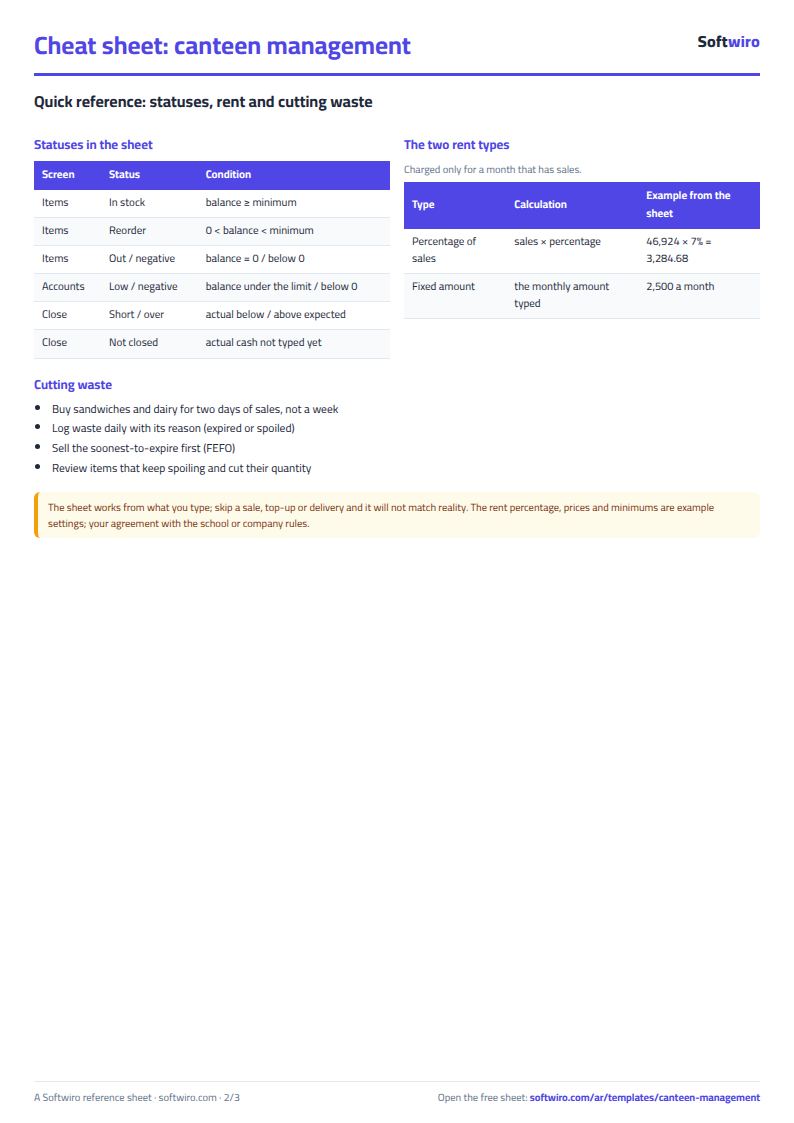
- Rent: as a percentage = sales × rate, as a fixed amount = the amount, and it is calculated only for a month that has sales. Net profit = gross profit − waste value − rent, before staff pay and other operating costs. The agreement with the school or company is the reference.
- The sheet holds 30 items, 400 trading days, 300 accounts, 2,000 account transactions, 800 deliveries and 500 waste records. The low-balance list shows the first 30 accounts.
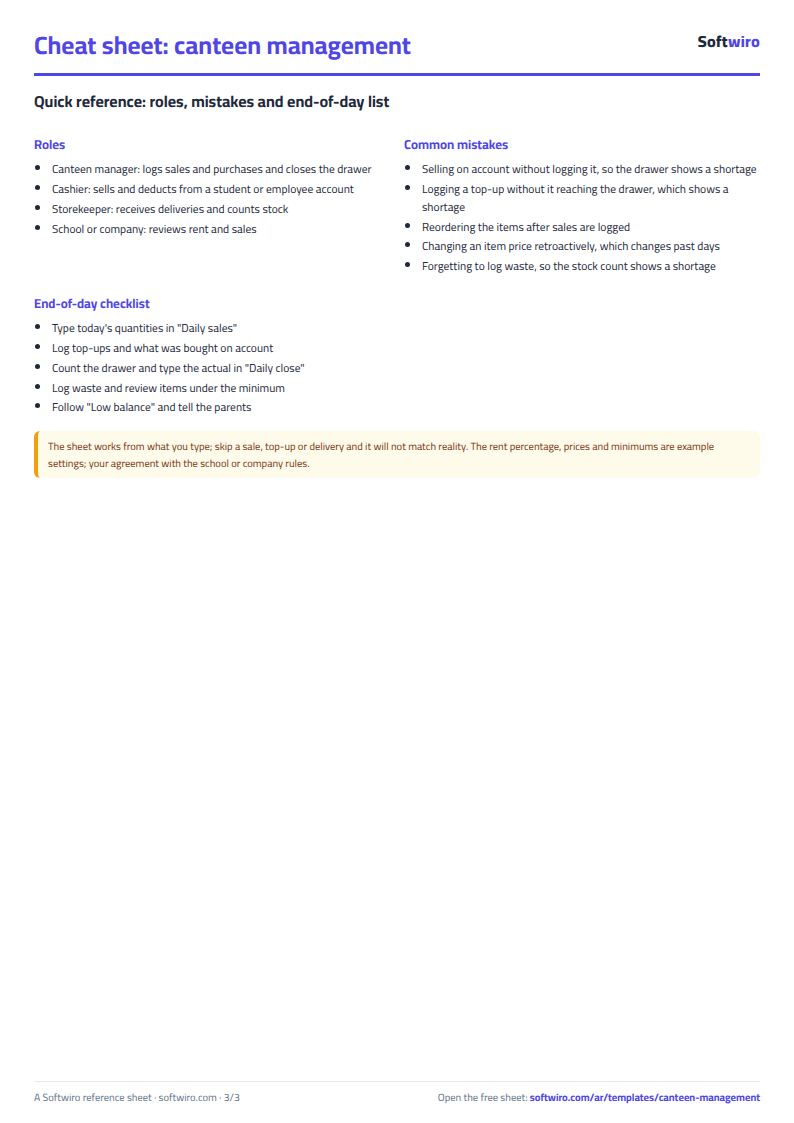
Free cheat sheet for this field
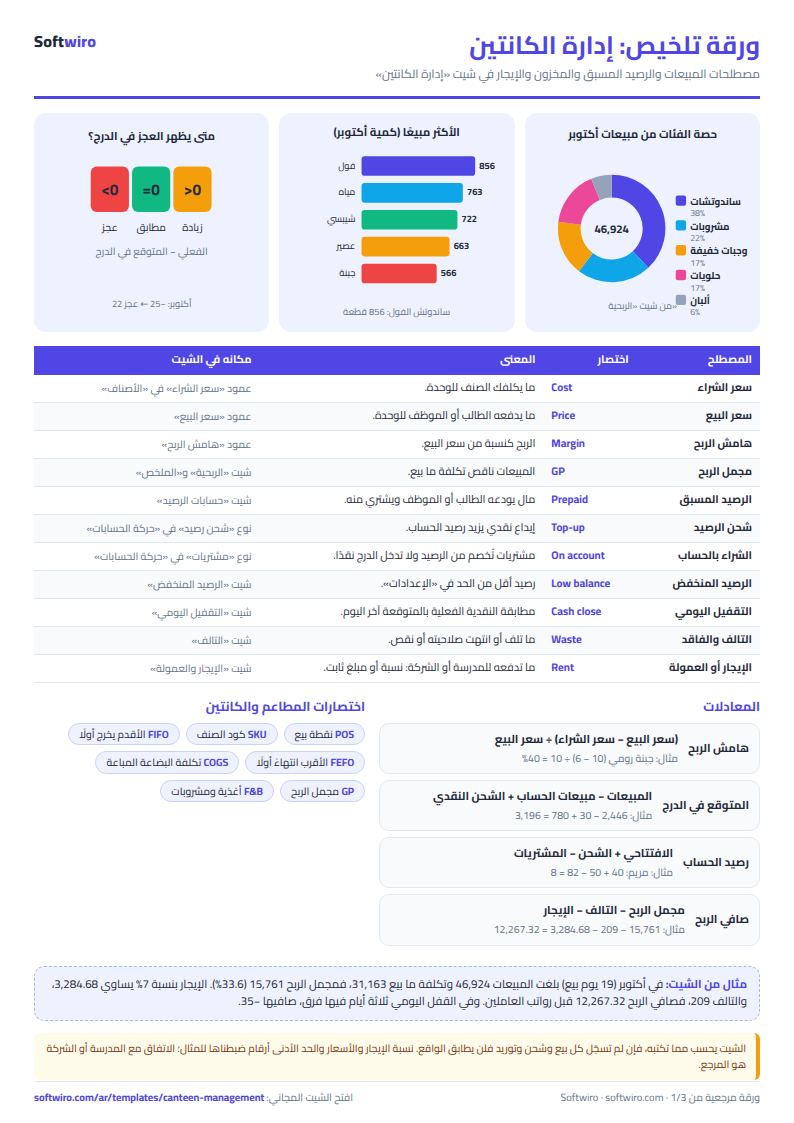
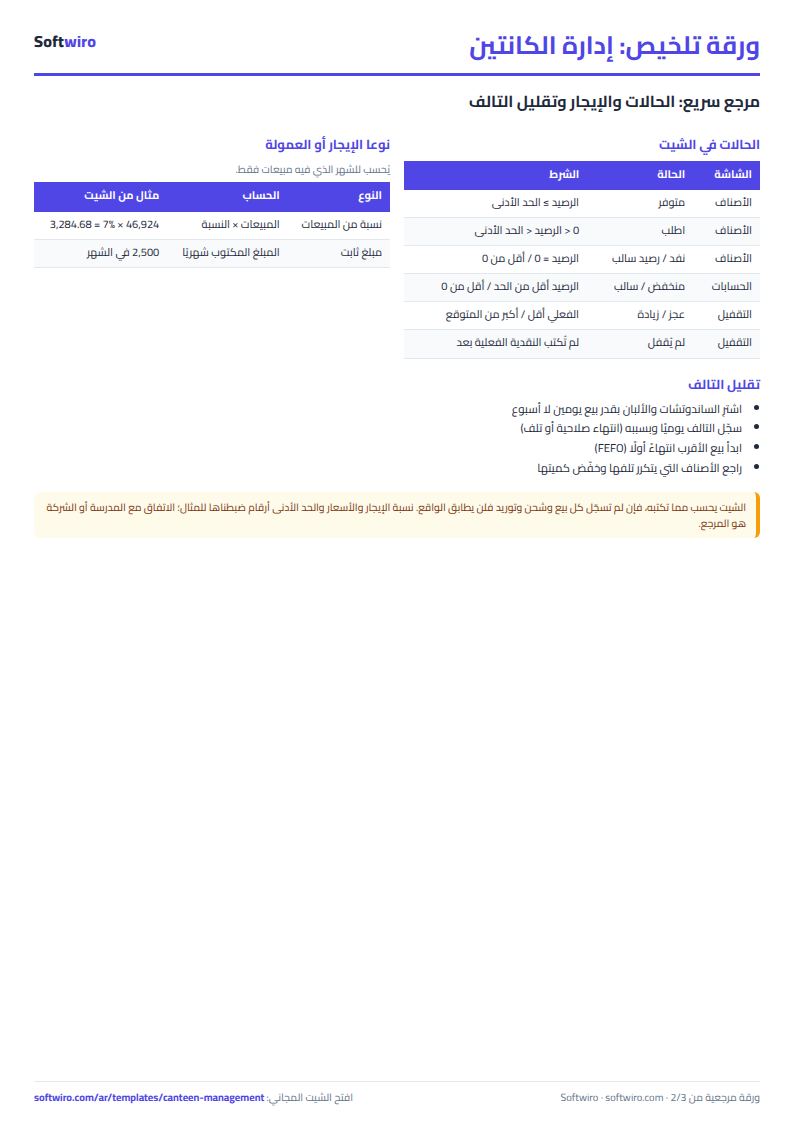
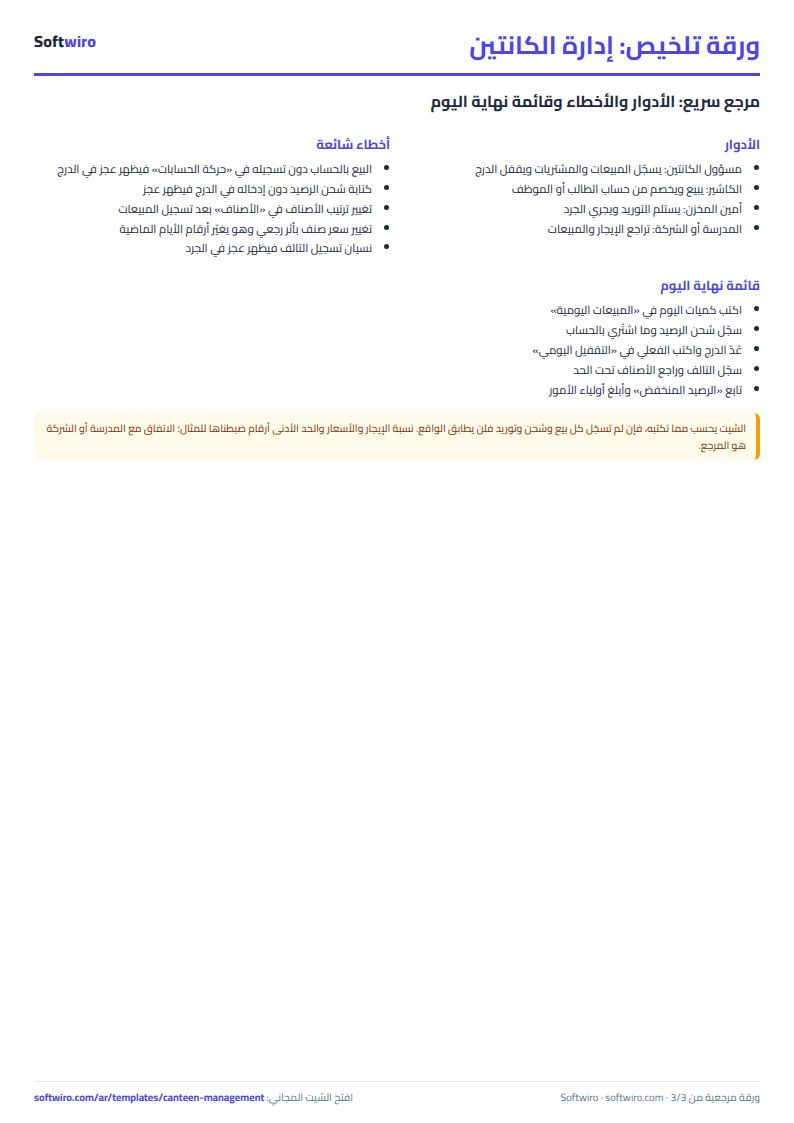
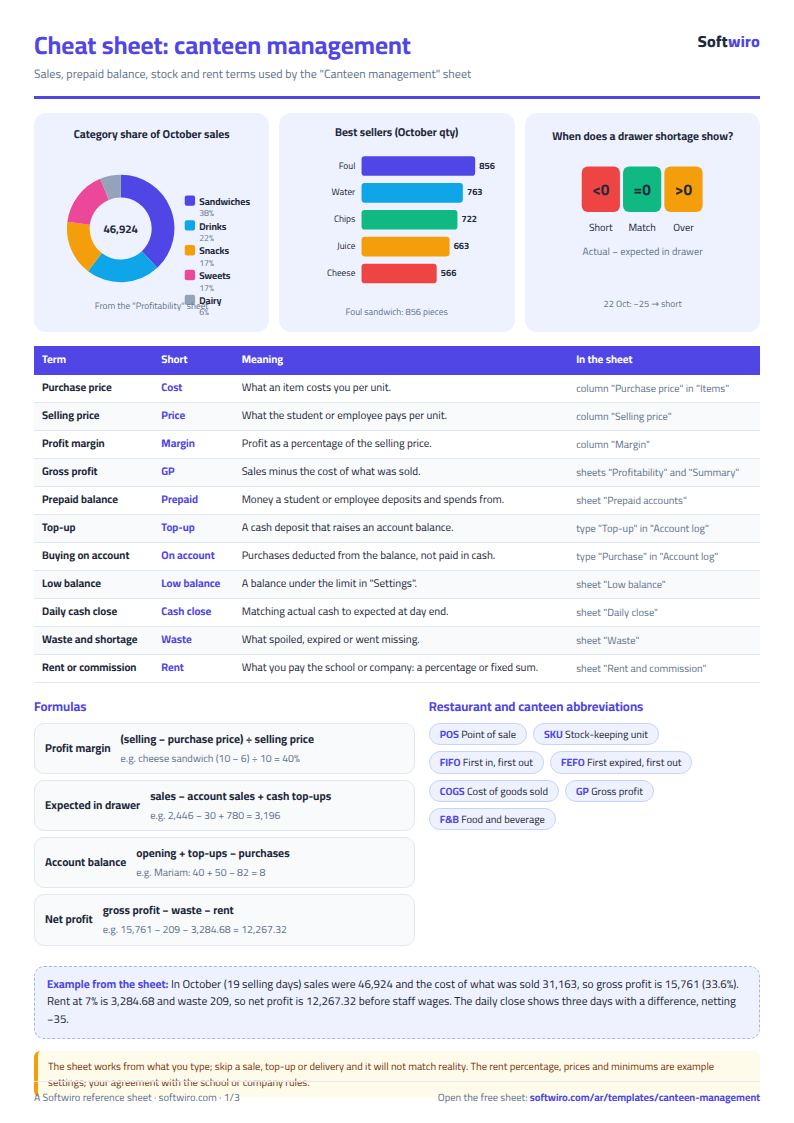
Terms, abbreviations, tables and diagrams over several pages, in Arabic and English. Download it as a PDF or images, including a phone-size version.
Still running this on Excel?
This sheet suits a start and a limited amount of data. If your way of working grows, or you need more than one person working on it at the same time, Softwiro can build you a program that fits the way you work.
| In this sheet | In Custom Software from Softwiro |
|---|---|
| One file that one person edits at a time, and copies reach you on WhatsApp. | A program with a login for each user and permissions you define, and everyone sees the same data. |
| You type everything and check the numbers by hand. | We design the screens around your work steps, so each person records only what concerns them. |
| Columns and formulas are fixed as the sheet was designed. | We build what you need: reports, alerts and screens your way. |
| Backups and security are your own responsibility. | The program runs on a secured server with regular backups. |
Frequently asked questions
How do I track students' prepaid balances for a school canteen in Excel?
Open an account for each student in «حسابات الرصيد» (Balance accounts) and record every top-up and every purchase on account in «حركة الحسابات» (Account transactions). The sheet calculates balance = opening + top-ups − purchases, and low and negative accounts appear in the «الرصيد المنخفض» (Low balance) list with phone numbers.
How do I find the canteen drawer difference at the end of the day?
Enter the day's quantities in «المبيعات اليومية» (Daily sales), then enter the actual cash in «التقفيل اليومي» (Daily close). Expected = sales − sales on account + cash top-ups, and difference = actual − expected, showing "عجز" (shortage), "زيادة" (surplus) or "مطابق" (matches).
How do I calculate the rent or commission owed to the school?
In «الإعدادات» (Settings) choose the rent type: a percentage of sales, where rent = sales × rate, or a fixed amount for each month that has sales. Enter what you paid in «الإيجار والعمولة» (Rent and commission) and the remainder appears.
How do I calculate the profit of each canteen item?
Enter the purchase price and selling price in «الأصناف» (Items) and unit profit and margin appear. In «الربحية» (Profitability) the gross profit of each item and category for the month = sales − cost of what was sold, followed by profit after deducting waste.
Is the template free?
Yes, with no sign-up and no email address. Use it, edit it and share it as you like.
Does it work in Google Sheets and on mobile?
The sheet uses formulas supported by Excel 2016 and later, Google Sheets and LibreOffice, so you can upload it to Google Drive and open it with Google Sheets on a computer or a phone.
What is the difference between the white and the gray cells?
You type in the white cells; the gray cells are calculated automatically. Don't type in a gray cell, or you will erase its formula.
Can I use the sheet from an AI assistant?
Yes. Add our MCP server (URL https://softwiro.com/api/mcp, no key needed) to your assistant and ask it to do the calculation in this template. The numbers come from the sheet's own formulas, and we do not store your data. The steps and a ready-made prompt are in this article: https://softwiro.com/blog/mcp-excel-templates-ai-agent-guide.html
More free templates for: Restaurants and cafes
More free templates
- Recipe costing for restaurants and cafes (Excel)
- Restaurant and cafe inventory and waste sheet
- Restaurant and cafe table reservations sheet
- Lending library management sheet
- Study groups management sheet for a private teacher
- Graduation project manager sheet: tasks, team, phases and deliverables
- English vocabulary and expressions sheet in Excel: words by topic and spaced review
- Accounting rules and equations summary sheet: double entry, statements and financial ratios
- Media buyer rules sheet: ad formulas, scaling rules and testing discipline
- Gradebook Template for Excel (Weighted Categories, Letter Grades)
- Cash Book Template for Excel