Try the sheet here, on the example
The sheet is open below with sample numbers. Change any white cell and watch the results update, or press the blank-copy button to type your own data from scratch. Nothing you type leaves your browser.
Example from the sheet
| الشهر (أي تاريخ فيه) | كود الطالب | اسم الطالب | المجموعة | حضر | غاب | المستحق قبل الخصم | خصم الإخوة | الصافي المستحق | المتبقي | الحالة |
|---|---|---|---|---|---|---|---|---|---|---|
| 46296 | S001 | أحمد سامح | تانية ثانوي أ | 7 | 1 | 400.00 | 0.00 | 400.00 | 0.00 | مدفوع |
| 46296 | S002 | مريم عادل | تانية ثانوي أ | 8 | 0 | 400.00 | 0.00 | 400.00 | 0.00 | مدفوع |
| 46296 | S003 | يوسف حسن | تانية ثانوي أ | 6 | 2 | 400.00 | 0.00 | 400.00 | 200.00 | جزئي |
| 46296 | S004 | هنا طارق | تانية ثانوي أ | 7 | 0 | 400.00 | 0.00 | 400.00 | 0.00 | مدفوع |
| 46296 | S005 | كريم وليد | تالتة ثانوي ب | 7 | 1 | 500.00 | 0.00 | 500.00 | 0.00 | مدفوع |
| 46296 | S006 | سلمى ياسر | تالتة ثانوي ب | 8 | 0 | 500.00 | 0.00 | 500.00 | 0.00 | مدفوع |
| 46296 | S007 | عمر خالد | تالتة ثانوي ب | 5 | 2 | 500.00 | 0.00 | 500.00 | 500.00 | لم يدفع |
| 46296 | S008 | ملك أشرف | تالتة ثانوي ب | 7 | 1 | 500.00 | 0.00 | 500.00 | 0.00 | مدفوع |
| 46296 | S009 | نور حسن | تالتة إعدادي | 7 | 0 | 300.00 | 30.00 | 270.00 | 0.00 | مدفوع |
| 46296 | S010 | آية محمود | تالتة إعدادي | 8 | 0 | 300.00 | 0.00 | 300.00 | 0.00 | مدفوع |
| 46296 | S011 | زياد عصام | تالتة إعدادي | 5 | 3 | 300.00 | 0.00 | 300.00 | 150.00 | جزئي |
Example from the “الحضور والاشتراكات” tab (Arabic), with the numbers and formulas that are in the file.
What is inside
- "الإعدادات" (Settings): The month you are working on, the sibling discount percentage, the default full mark for a quiz, your name as it appears in the reminder message, the attendance threshold for warnings, and the list of expense types.
- "المجموعات" (Groups): Name, grade, days, time, venue, hall rent per session, fee type and amount, capacity and the assistant's pay per session. The sheet calculates students, empty seats, sessions in the month, attendance rate, fees due, collected, balance, hall and assistant cost, expenses, net income and average marks. Room for 20 groups.
- "الطلاب" (Students): Code, name, group, student's phone and parent's phone. The sheet calculates the student's rank within their family, sibling discount, total due, paid, balance, attendance rate, average marks and a warning (balance owed or poor attendance). Room for 200 students.
- "الحضور والاشتراكات" (Attendance and fees): One row per student per month: a date inside the month and the code, then up to 12 sessions marked ح (present), غ (absent) or ع (excused), and the amount paid and its date. It shows the name, group, number present and absent, attendance rate, fee before discount, sibling discount, net, balance, status and reminder message. Room for 1,000 rows.
- "المتأخرون" (Late payers): Students in the selected month who still owe money, with their group, parent's phone and the amount, and a ready reminder message beside each. It shows the first 100 students.
- "الاختبارات" (Quizzes): One row per mark: date, student code, quiz name, mark and full mark. The name, group and percentage appear automatically. Room for 1,000 marks.
- "التكاليف" (Costs): Other expenses: date, group (or blank for a general expense), type, description and amount. Room for 200 expenses.
- "الملخص" (Summary): The month's students, fees due, collected, balance, collection rate and sibling discounts; halls, assistants, expenses and the month's net income; attendance rate and average marks; a table of groups; and three charts.
The file opens on a start tab (“ابدأ هنا”, Start here) that explains how to use it.
What makes it different
Monthly or per-session fees are worked out from recorded attendance, the sibling discount is applied automatically at the percentage you set, and students who have not paid appear with their balance and a ready message. Each group's net income deducts the hall and the assistant for the sessions actually held, so you can see which group makes you money and which costs you.
How to use it
- In "الإعدادات" (Settings) enter any date inside the month you are working on, the sibling discount percentage, and your name so it appears in the reminder message.
- In "المجموعات" (Groups) enter each group with its grade, days, venue, hall rent per session, fee type (monthly or per session) and amount.
- In "الطلاب" (Students) enter each student with a code, group and parent's phone number. Students with the same parent number are treated as siblings.
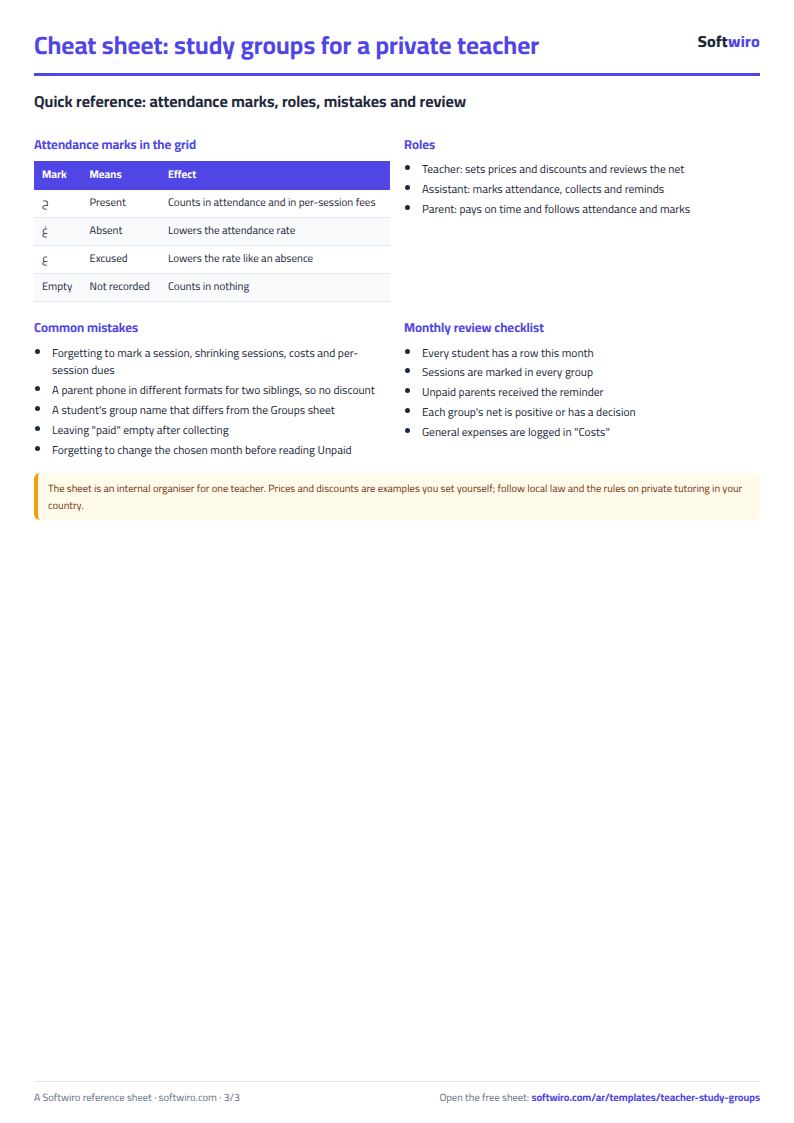
- In "الحضور والاشتراكات" (Attendance and fees) add a row for each student each month: a date inside the month and the student code, then mark each session ح (present), غ (absent) or ع (absent with an excuse), and enter the amount paid and its date.
- Record quiz results in "الاختبارات" (Quizzes) and other expenses in "التكاليف" (Costs).
- Open "المتأخرون" (Late payers) to copy the reminder message for each parent, "المجموعات" (Groups) for each group's net income, and "الملخص" (Summary) for the month.
Before you start:
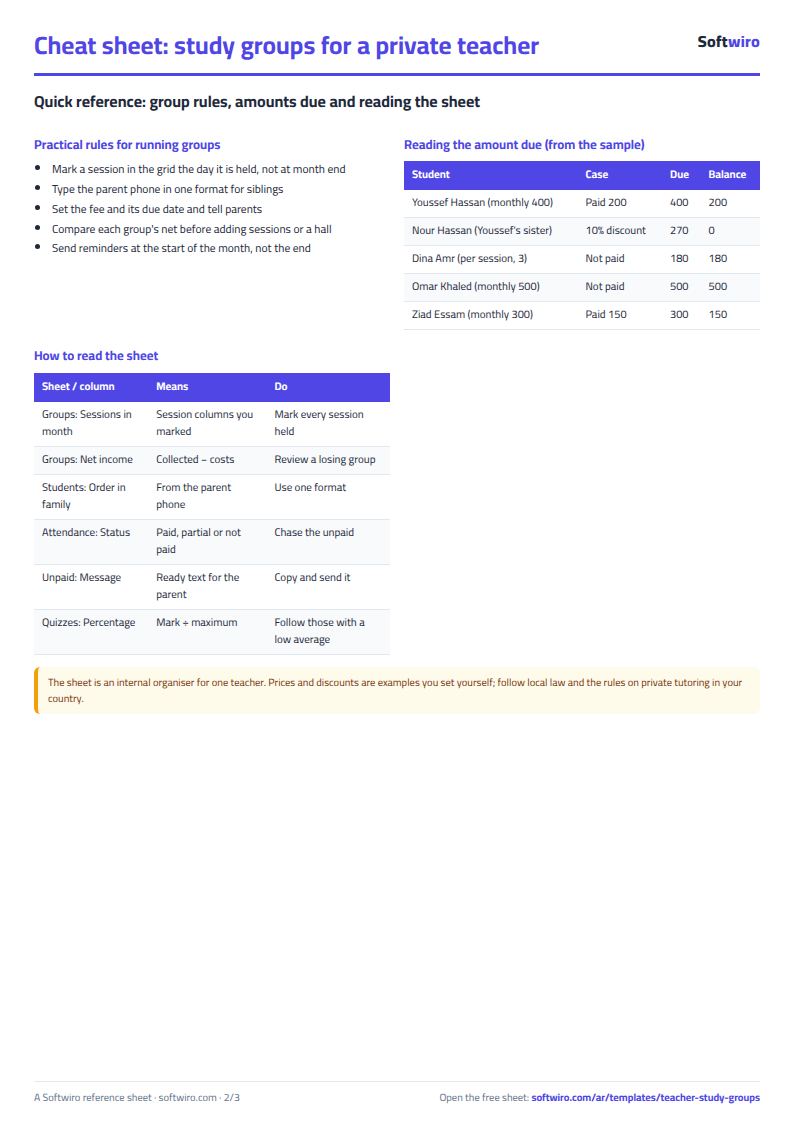
- A monthly fee is fixed for each student for the month. A per-session fee = the number of sessions the student attended (ح) × the session price.
- Sibling discount = the discount percentage from "الإعدادات" (Settings) × the student's fee. It applies to the second sibling onward (by their order in the "الطلاب" (Students) sheet) among students who share the same parent phone number.
- A group's sessions in the month = the number of session slots (1 to 12) in which you marked any student of the group in that month. Hall cost = sessions × rent per session, and assistant pay = sessions × the assistant's pay per session.
- Group net income = collected in the month − (hall + assistant + expenses entered under the group's name). Expenses with no group appear in "الملخص" (Summary) as general expenses.
- Attendance rate = ح sessions ÷ (ح + غ + ع). Average marks = the student's mark ÷ the quiz's full mark (or the default full mark if you left it blank).
- The sheet has room for 20 groups, 200 students, 1,000 monthly rows (a student in a month), 1,000 marks and 200 expenses, and "المتأخرون" (Late payers) shows the first 100 students.
- This sheet is for a single teacher. If you run a centre with several teachers, halls and pay rates, use the tutoring centre sheet (tutoring-center).
Free cheat sheet for this field
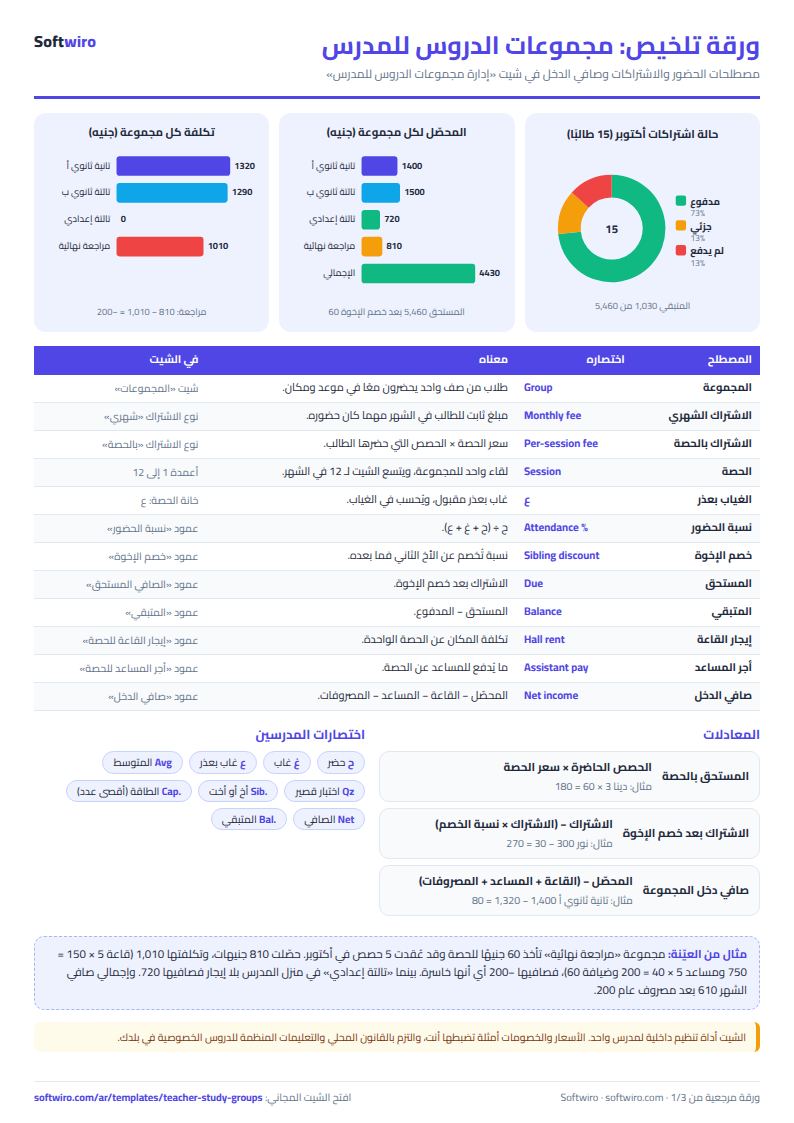
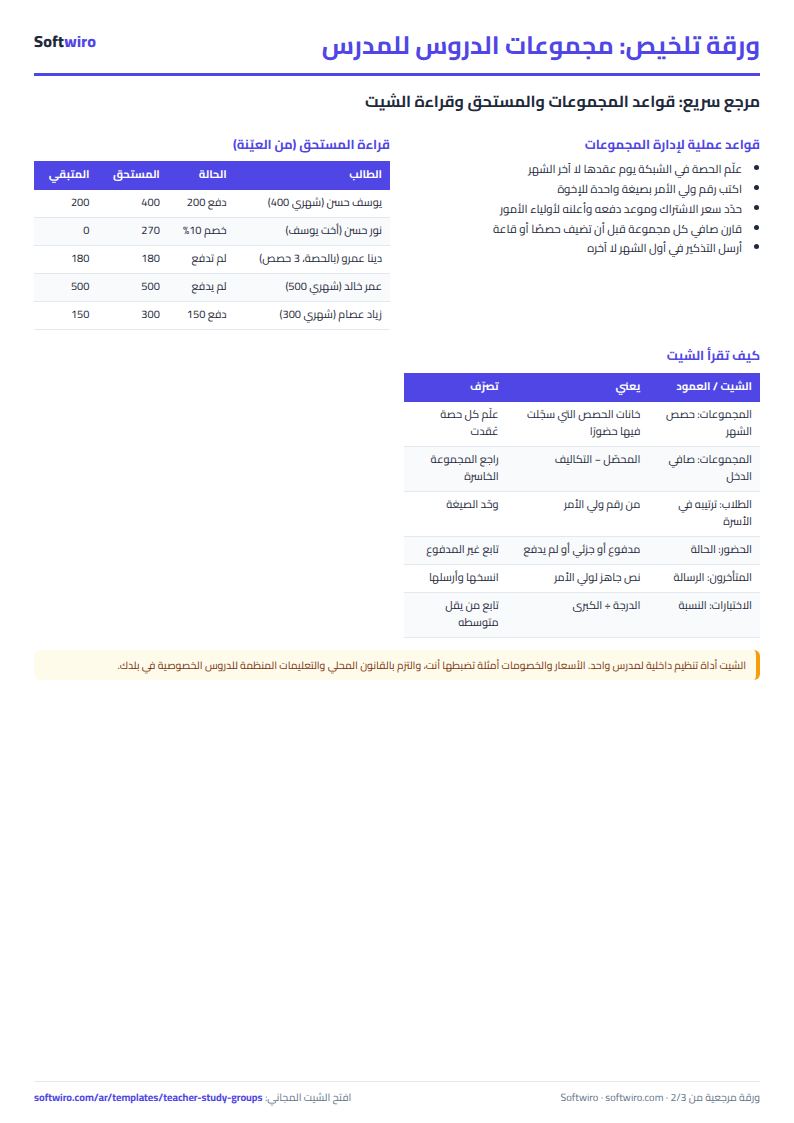
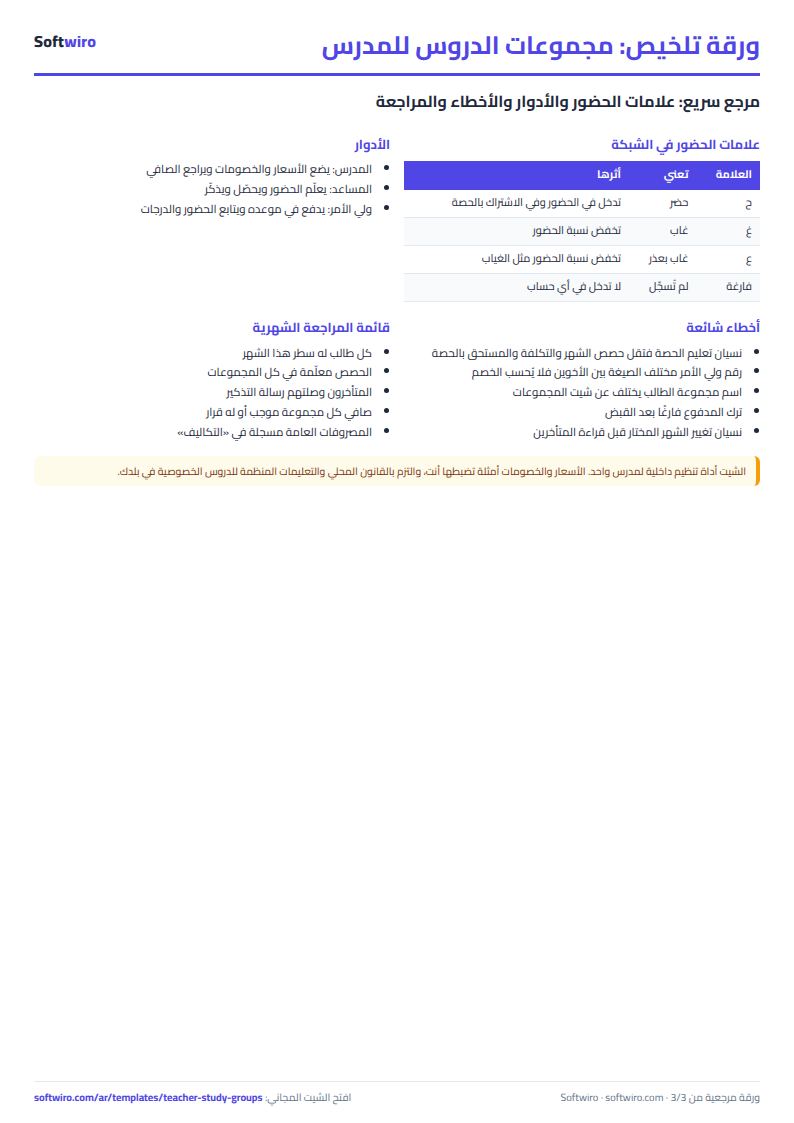
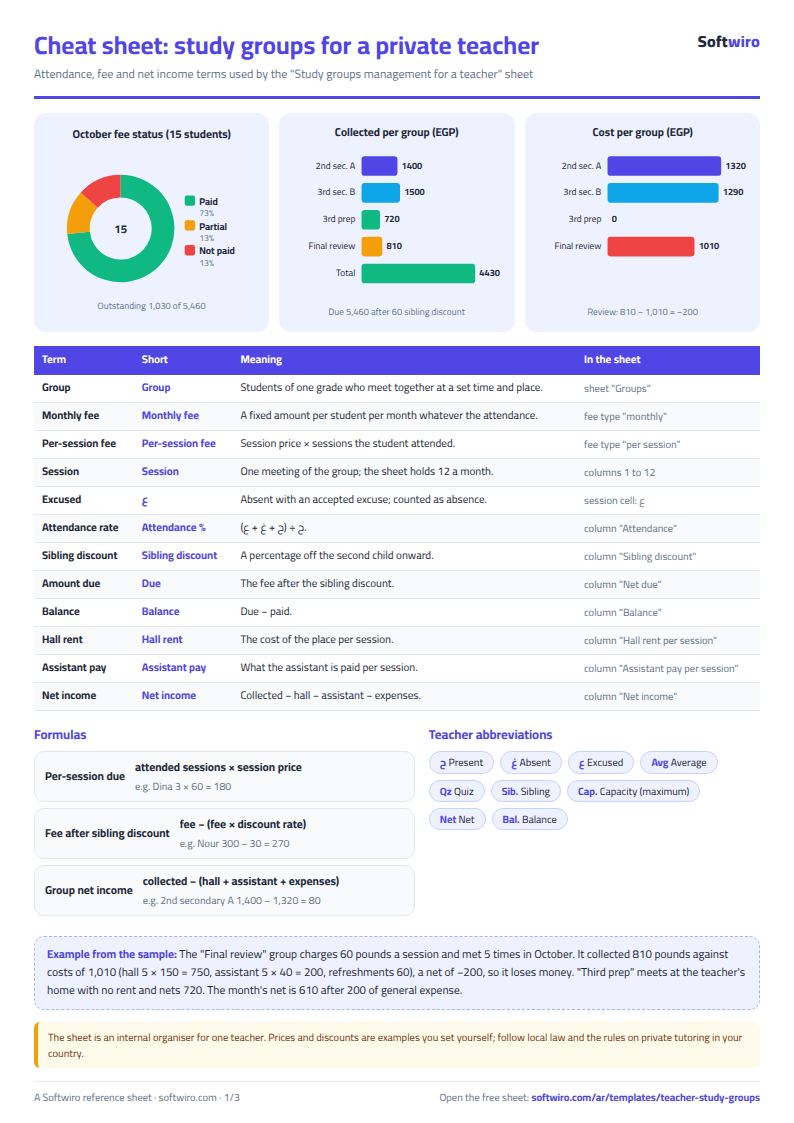
Terms, abbreviations, tables and diagrams over several pages, in Arabic and English. Download it as a PDF or images, including a phone-size version.
Still running this on Excel?
This sheet suits a start and a limited amount of data. If your way of working grows, or you need more than one person working on it at the same time, Softwiro can build you a program that fits the way you work.
| In this sheet | In Custom Software from Softwiro |
|---|---|
| One file that one person edits at a time, and copies reach you on WhatsApp. | A program with a login for each user and permissions you define, and everyone sees the same data. |
| You type everything and check the numbers by hand. | We design the screens around your work steps, so each person records only what concerns them. |
| Columns and formulas are fixed as the sheet was designed. | We build what you need: reports, alerts and screens your way. |
| Backups and security are your own responsibility. | The program runs on a secured server with regular backups. |
Frequently asked questions
How does the sheet calculate a per-session fee?
Set the group's fee type to "بالحصة" (per session) and enter the price per session. Amount due = the number of sessions you marked ح (present) for the student × the session price. With "شهري" (monthly), the amount due is the full fee whatever the attendance.
How does the sheet identify siblings and discount for them?
Students who share the same parent phone number in the "الطلاب" (Students) sheet are treated as siblings. The discount percentage from "الإعدادات" (Settings) is deducted for the second sibling onward (by their order in the sheet), and nothing is deducted for the first.
How are the hall cost and the assistant's pay calculated?
A group's sessions in the month are the number of session slots (1 to 12) in which you marked any of its students in the selected month. Hall cost = sessions × hall rent per session, and assistant pay = sessions × the assistant's pay per session.
Where is the reminder message, and does it send itself?
It appears in "المتأخرون" (Late payers) and in the last column of "الحضور والاشتراكات" (Attendance and fees) for every row with a balance. You copy it and send it yourself, for example on WhatsApp. The sheet does not send anything.
Is the template free?
Yes, with no sign-up and no email address. Use it, edit it and share it as you like.
Does it work in Google Sheets and on mobile?
The sheet uses formulas supported by Excel 2016 and later, Google Sheets and LibreOffice, so you can upload it to Google Drive and open it with Google Sheets on a computer or a phone.
What is the difference between the white and the gray cells?
You type in the white cells; the gray cells are calculated automatically. Don't type in a gray cell, or you will erase its formula.
Can I use the sheet from an AI assistant?
Yes. Add our MCP server (URL https://softwiro.com/api/mcp, no key needed) to your assistant and ask it to do the calculation in this template. The numbers come from the sheet's own formulas, and we do not store your data. The steps and a ready-made prompt are in this article: https://softwiro.com/blog/mcp-excel-templates-ai-agent-guide.html
All the templates in this group: Excel templates for teachers: gradebook, lesson planning and follow-up
More free templates for: Teachers
More free templates
- Teacher weighted gradebook (Excel)
- Lesson plan and curriculum coverage tracker for teachers (Excel)
- Parent communication log for teachers (Excel)
- Remedial sessions tracker for teachers (Excel)
- Graduation project manager sheet: tasks, team, phases and deliverables
- English vocabulary and expressions sheet in Excel: words by topic and spaced review
- Accounting rules and equations summary sheet: double entry, statements and financial ratios
- Media buyer rules sheet: ad formulas, scaling rules and testing discipline
- Gradebook Template for Excel (Weighted Categories, Letter Grades)
- Cash Book Template for Excel
- Invoice Template with Invoice Log (Excel)
- Garment style costing sheet