Try the sheet here, on the example
The sheet is open below with sample numbers. Change any white cell and watch the results update, or press the blank-copy button to type your own data from scratch. Nothing you type leaves your browser.
Example from the sheet
| رقم الطلب | العميل | الخدمة | عدد القطع | الحالة | إجمالي الطلب | المتبقي | التنبيه |
|---|---|---|---|---|---|---|---|
| L1001 | منى سعيد | بدلة | 2 | تم التسليم | 180.00 | 0.00 | |
| L1002 | كريم عادل | قميص | 10 | تم التسليم | 200.00 | 0.00 | |
| L1003 | هبة فؤاد | فستان | 3 | جاهز | 210.00 | 210.00 | متأخر الاستلام |
| L1004 | ياسر منصور | بطانية | 2 | جاهز | 200.00 | 100.00 | متأخر الاستلام |
| L1005 | نهى جلال | ستارة | 4 | جاهز | 240.00 | 0.00 | متأخر الاستلام |
| L1006 | عمرو فتحي | بنطلون | 6 | جاهز | 150.00 | 0.00 | متأخر الاستلام |
| L1007 | سلمى رضا | جاكيت | 2 | جاهز | 120.00 | 120.00 | |
| L1008 | أمجد زكي | قميص | 8 | قيد الغسيل | 160.00 | 160.00 | متأخر الغسيل |
| L1009 | دينا ماهر | بدلة | 1 | قيد الغسيل | 90.00 | 40.00 |
Example from the “الطلبات” tab (Arabic), with the numbers and formulas that are in the file.
What is inside
- الإعدادات (Settings): Today's date, the number of days after the promised date after which a ready order becomes "late pickup" (7 days in the example), and any date within the month you want summarized (October 2026 in the example).
- الخدمات (Services): The service types and the price per piece for each (seven types in the example), then the number of orders, pieces and order value for each service. The table holds 50 services.
- الطلبات (Orders): One row per order: number, received date, customer, phone, service, number of pieces, promised date, status (washing, ready or delivered) and amount paid. The sheet then calculates price per piece, order total, balance, days late against the promised date and the alert. It holds 1500 orders.
- للمتابعة (Follow-up): An automatic list of ready orders that are late for pickup, oldest promised date first, with order number, customer, phone, pieces, balance and days late.
- الملخص (Summary): The number of orders by status and the pieces currently in the laundry; the value of orders, amount paid and balance still owed by customers; the month's orders, pieces, revenue and average order; and the number and value of late-pickup orders and the number of late-wash orders.
The file opens on a start tab (“ابدأ هنا”, Start here) that explains how to use it.
What makes it different
You open the "للمتابعة" (Follow-up) tab and find the ready orders that have waited too long, with the owner's phone and what they still owe, without flipping through the order book page by page. From the summary you see how many pieces are in the shop, the value of the orders and how much customers still owe.
How to use it
- In the "الإعدادات" (Settings) tab, enter today's date (or =TODAY() so it updates itself), the number of days after the promised date after which a ready order counts as "late pickup", and any date within the month you want summarized.
- In the "الخدمات" (Services) tab, enter the service types and the price per piece for each (such as shirt, suit and blanket).
- In the "الطلبات" (Orders) tab, add a row for each order: number, received date, customer, phone, service, number of pieces, promised date, status and amount paid.
- Change the order status from "washing" to "ready" and then "delivered" as you work.
- The sheet calculates the price per piece, order total, balance and days late against the promised date, and writes the matching alert.
- Open "للمتابعة" (Follow-up) to find ready orders that are late for pickup, sorted from the oldest promised date, and review the "الملخص" (Summary) tab for orders, pieces and revenue.
Before you start:
- The price per piece is taken from the Services tab by the service name entered on the order, and order total = number of pieces × price per piece. If the service is not in the list, the alert "service not priced" appears.
- Balance = order total − amount paid. A delivered order that still has a balance shows the alert "delivered with balance due".
- A "late pickup" order is one whose status is "ready" and whose promised date was the number of days set in Settings ago, or more.
- A "late wash" order is one that is not yet ready and is past its promised date.
- An order with no status is treated as "washing" in the alerts, and is not counted in the status counters in the Summary.
- The month's revenue in the Summary is the value of orders received in that month, regardless of whether they were delivered or paid. The sheet holds 50 services and 1500 orders, and the Follow-up tab shows the first 30 orders.
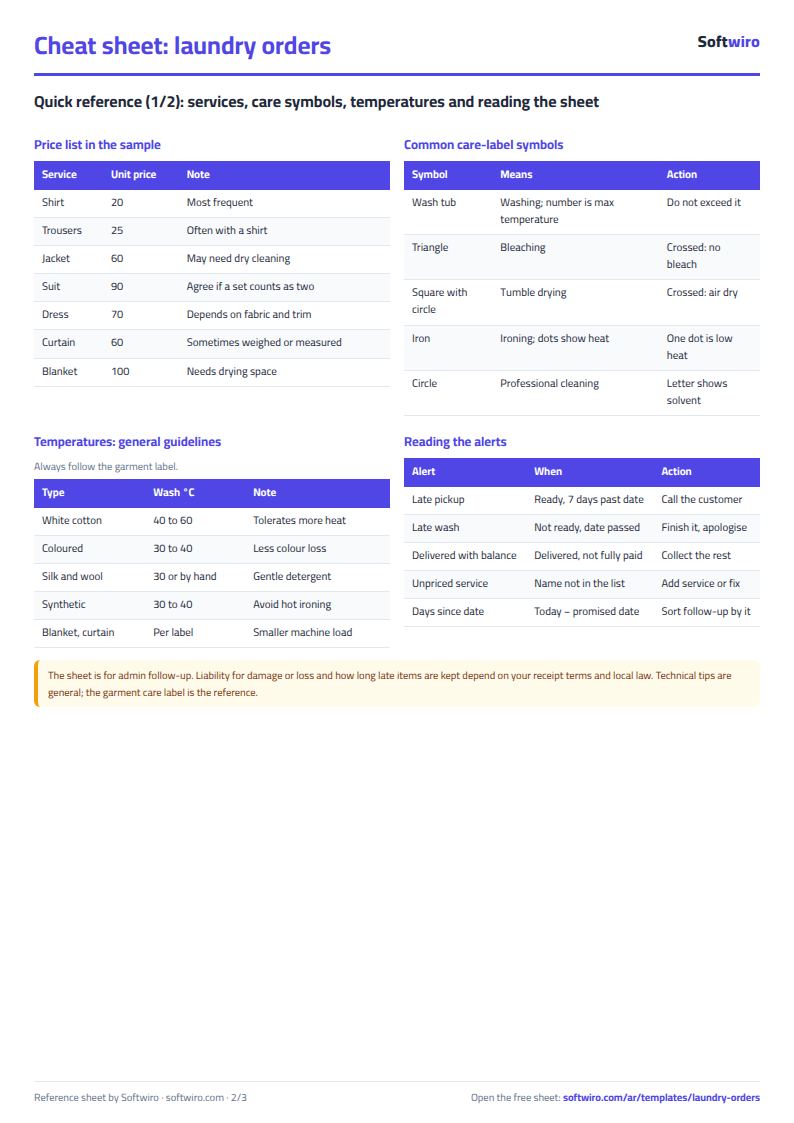
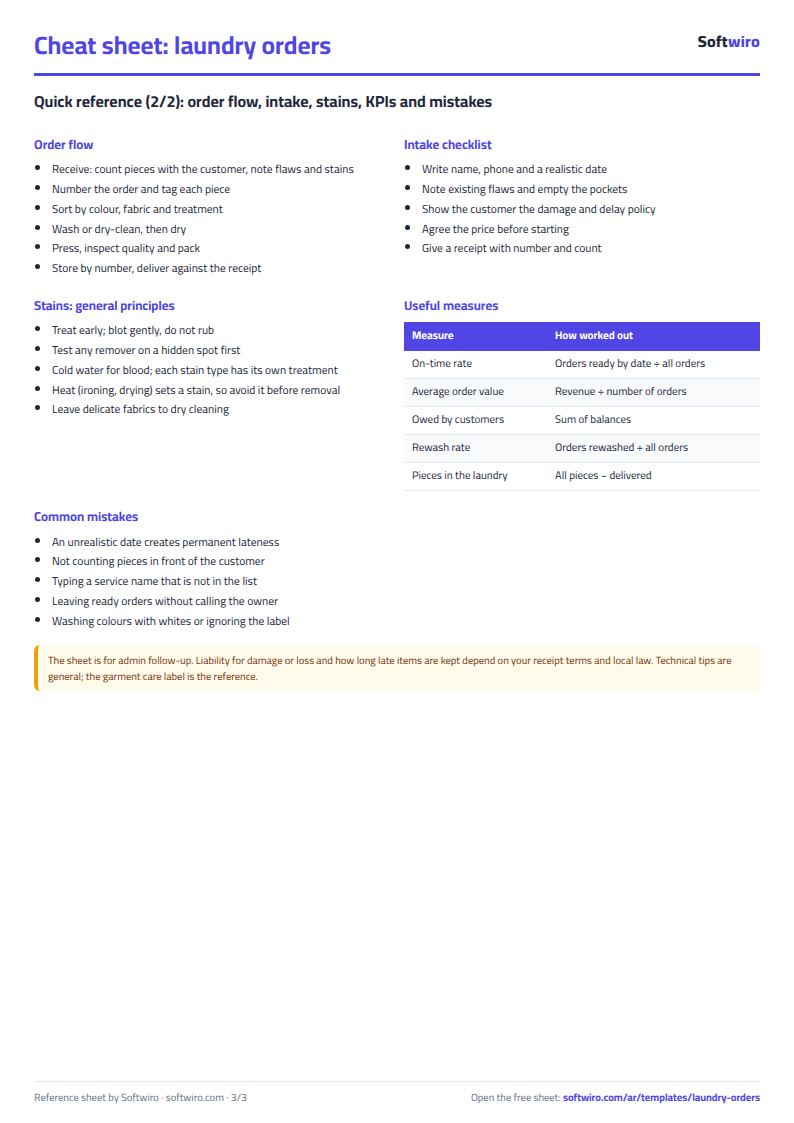
Free cheat sheet for this field
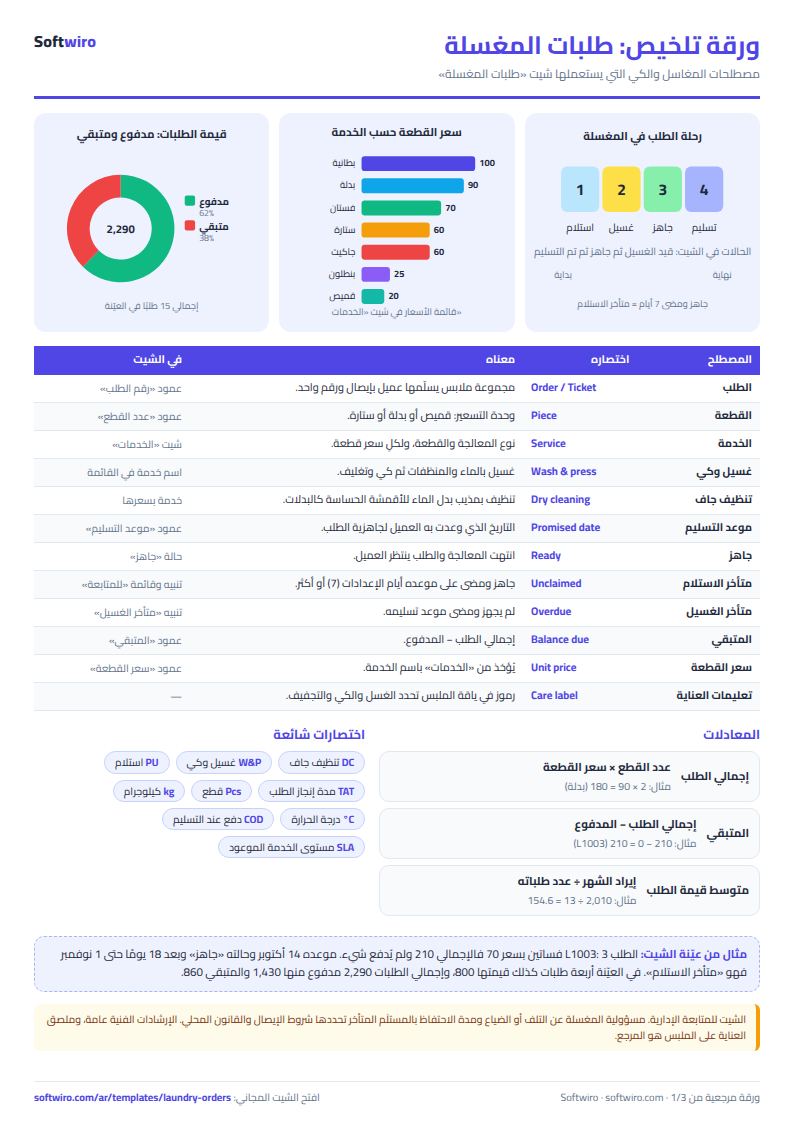
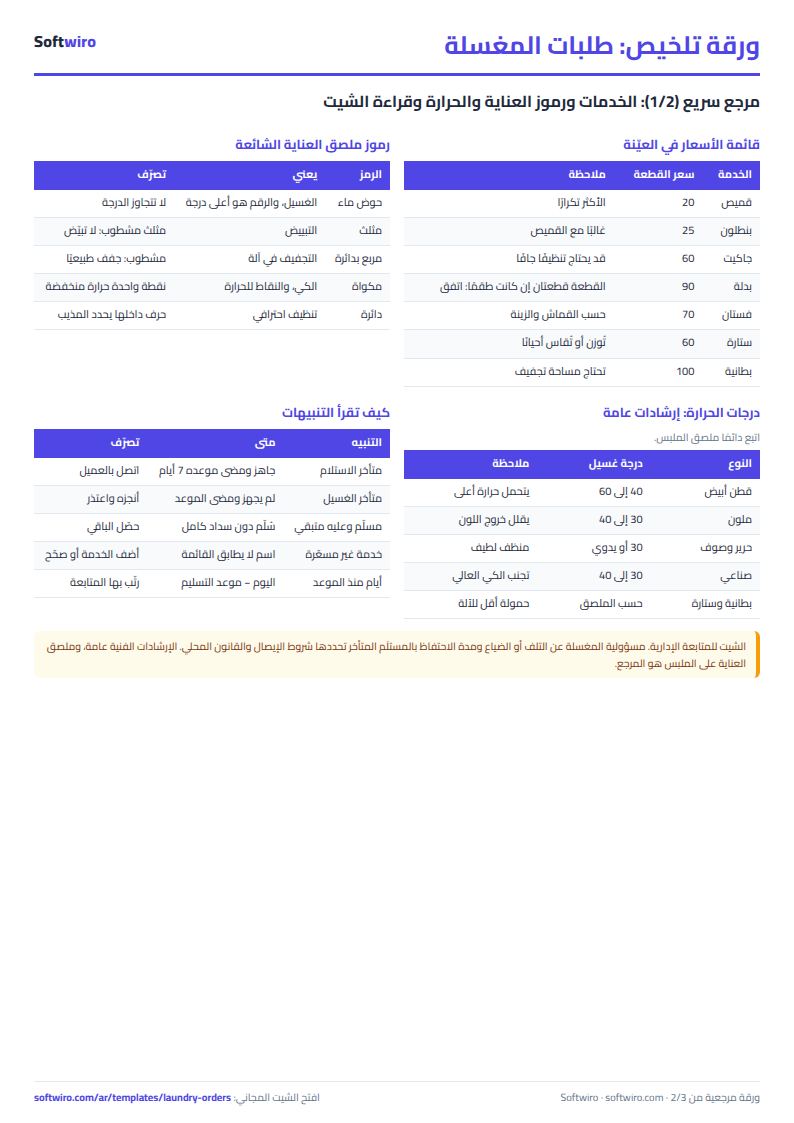
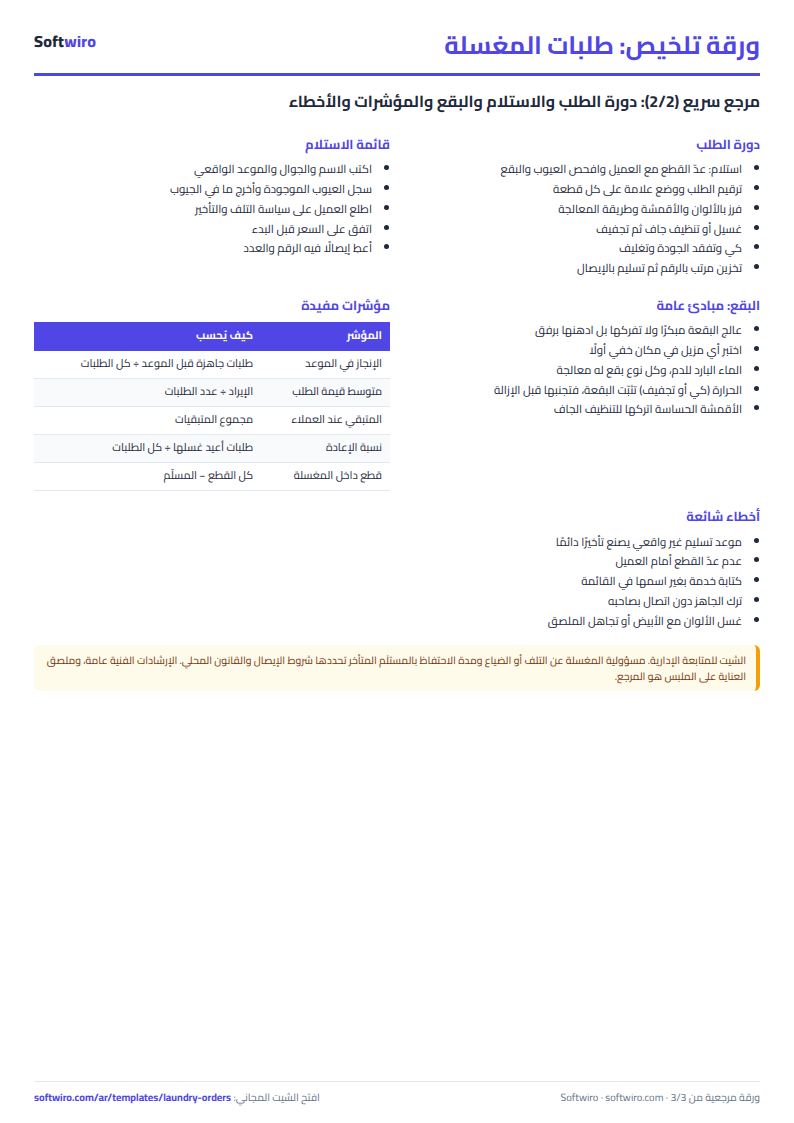
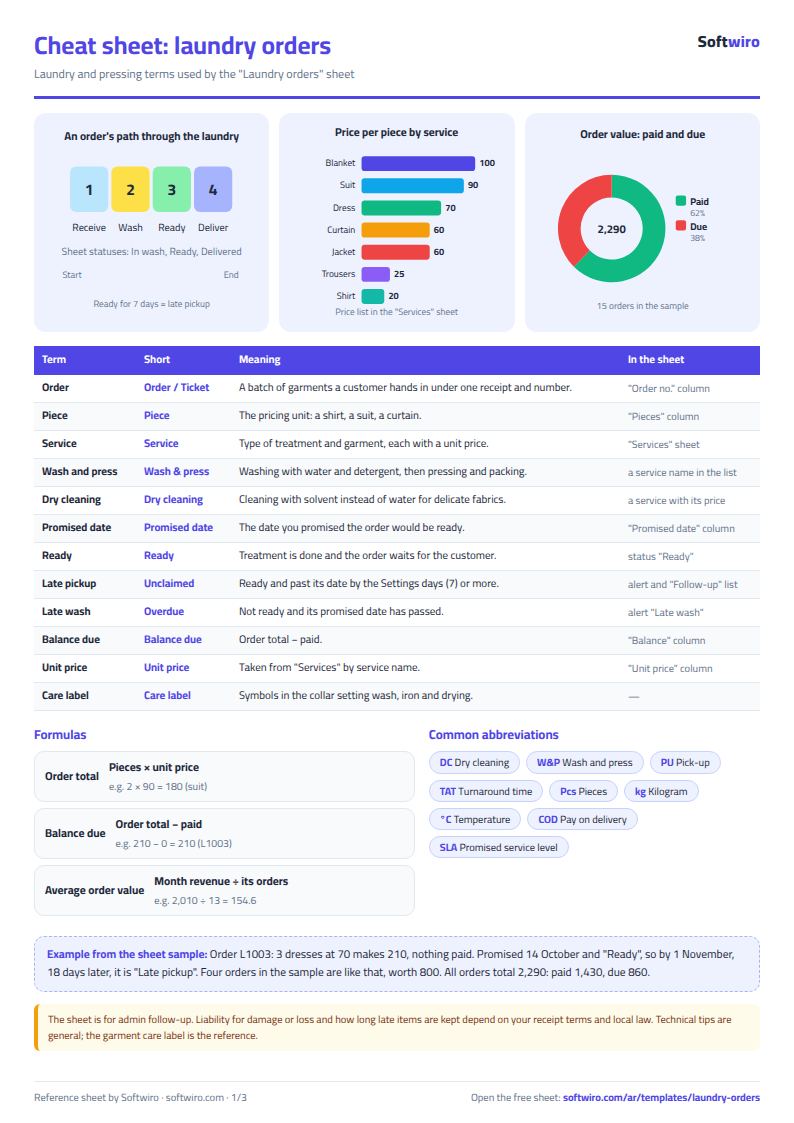
Terms, abbreviations, tables and diagrams over several pages, in Arabic and English. Download it as a PDF or images, including a phone-size version.
Still running this on Excel?
This sheet suits a start and a limited amount of data. If your way of working grows, or you need more than one person working on it at the same time, Softwiro can build you a program that fits the way you work.
| In this sheet | In Custom Software from Softwiro |
|---|---|
| One file that one person edits at a time, and copies reach you on WhatsApp. | A program with a login for each user and permissions you define, and everyone sees the same data. |
| You type everything and check the numbers by hand. | We design the screens around your work steps, so each person records only what concerns them. |
| Columns and formulas are fixed as the sheet was designed. | We build what you need: reports, alerts and screens your way. |
| Backups and security are your own responsibility. | The program runs on a secured server with regular backups. |
Frequently asked questions
How is the order total calculated?
The number of pieces multiplied by the price per piece listed in the "الخدمات" (Services) tab for the service you entered on the order. If the service is not in the list, the alert "service not priced" appears and no total is calculated. Balance = total − amount paid.
When is an order "late pickup"?
When its status is "ready" and the promised date was the number of days in the "الإعدادات" (Settings) tab ago, or more (7 days in the example). Change that number to suit your laundry. An order that is not yet ready and is past its promised date shows "late wash".
Does the sheet price by weight or add a rush charge?
No. The price in this sheet is a price per piece by service type, multiplied by the number of pieces. If you have a rush price, enter it as a separate service in the Services tab, such as "rush shirt".
Does it work for several branches or staff?
It is a single file that one person edits at a time, and it suits one laundry with a limited number of orders. If you need a login for each employee and permissions, that is what Softwiro builds as a custom program.
Is the template free?
Yes, with no sign-up and no email address. Use it, edit it and share it as you like.
Does it work in Google Sheets and on mobile?
The sheet uses formulas supported by Excel 2016 and later, Google Sheets and LibreOffice, so you can upload it to Google Drive and open it with Google Sheets on a computer or a phone.
What is the difference between the white and the gray cells?
You type in the white cells; the gray cells are calculated automatically. Don't type in a gray cell, or you will erase its formula.
Can I use the sheet from an AI assistant?
Yes. Add our MCP server (URL https://softwiro.com/api/mcp, no key needed) to your assistant and ask it to do the calculation in this template. The numbers come from the sheet's own formulas, and we do not store your data. The steps and a ready-made prompt are in this article: https://softwiro.com/blog/mcp-excel-templates-ai-agent-guide.html
More free templates for: Services and business
More free templates
- Lead and deal pipeline tracker
- Freelancer projects, hours and invoices tracker
- Photo studio bookings sheet
- General appointments scheduler sheet
- Car wash management sheet (packages, cards, workers, materials)
- Dental clinic treatment plans tracker (Excel)
- School class timetable (Excel)
- Exam schedule with committees and invigilators (Excel)
- Homework and behavior tracker for teachers (Excel)
- School bus subscriptions tracker (Excel)
- American diploma GPA calculator: unweighted, weighted and cumulative (Excel)
- IGCSE subject tracker with mock scores and target grades (Excel)
- IGCSE past papers log and error tracker (Excel)