Try the sheet here, on the example
The sheet is open below with sample numbers. Change any white cell and watch the results update, or press the blank-copy button to type your own data from scratch. Nothing you type leaves your browser.
Example from the sheet
| رقم الحجز | العميل | الوجهة / البرنامج | تاريخ السفر | إجمالي السعر | العمولة | المدفوع | المتبقي | حالة السداد |
|---|---|---|---|---|---|---|---|---|
| BK001 | محمود إبراهيم | عمرة 10 أيام | 46346 | 56,000.00 | 8,000.00 | 56,000.00 | 0.00 | مسدد |
| BK002 | هالة صلاح | شرم الشيخ 4 ليالي | 46336 | 18,000.00 | 3,000.00 | 12,000.00 | 6,000.00 | دفع جزءًا |
| BK003 | ياسر كمال | إسطنبول 7 أيام | 46371 | 50,000.00 | 7,000.00 | 15,000.00 | 35,000.00 | دفع جزءًا |
| BK004 | نهى فؤاد | القاهرة - دبي | 46351 | 14,500.00 | 1,500.00 | 14,500.00 | 0.00 | مسدد |
| BK005 | عماد رشاد | الأقصر وأسوان | 46320 | 14,000.00 | 2,400.00 | 12,000.00 | 2,000.00 | دفع جزءًا |
| BK006 | ليلى سمير | فندق الغردقة 5 ليالي | 46361 | 18,000.00 | 2,400.00 | 0.00 | 18,000.00 | لم يدفع |
| BK007 | أسامة نبيل | عمرة 15 يومًا | 46376 | 0.00 | 0.00 | 5,000.00 | ملغي - يُراجع المدفوع | |
| BK008 | دعاء عادل | تفليس 6 أيام | 46354 | 42,000.00 | 6,000.00 | 45,000.00 | -3,000.00 | مدفوع زيادة |
Example from the “الحجوزات” tab (Arabic), with the numbers and formulas that are in the file.
What is inside
- الإعدادات (Settings): Today's date (you can type =TODAY() instead), the number of days for the near-travel alert, and the list of the five booking types (domestic trip, international trip, umrah, flight ticket and hotel booking), whose names you can edit.
- الحجوزات (Bookings): A log of each booking: number, date, customer, phone, type, destination, travel date, number of travelers, price per person, cost per person and status (confirmed, pending or cancelled). Next to it the sheet calculates total price, cost, commission, amount paid, balance due, payment status, days to travel, the alert and the follow-up rank.
- الدفعات (Payments): A log of each payment you receive: date, booking number from a list, amount, payment method (cash, bank transfer or e-wallet) and a note. The customer name appears automatically, and a "number not found" alert shows if you enter an unregistered booking number.
- للمتابعة (Follow-up): Bookings with a balance due, sorted by the largest amount first (up to 50 bookings): booking number, customer, phone, destination, travel date, balance due, days to travel and the alert.
- الملخص (Summary): The number of bookings (active, cancelled, confirmed and pending) and the number of travelers; sales, cost, commission and its percentage; collected, balance due, overpaid, paid on cancelled bookings and collected in the last 30 days; the number of alerts; and a table by booking type with its number of bookings, sales, commission and balance due.
The file opens on a start tab (“ابدأ هنا”, Start here) that explains how to use it.
What makes it different
You know at any moment how much each customer still owes, and which booking is close to its travel date with money still due, so you call before the date, not after. You see the agency's actual commission on each booking and on each type. You also see what a customer who cancelled has paid, so it does not get lost among the papers, and what a customer paid above the price, so you can refund or deduct it.
How to use it
- In the "الإعدادات" (Settings) tab, enter today's date (or type =TODAY() so it updates itself), the number of days before travel that triggers the alert, and edit the booking types if you wish.
- In the "الحجوزات" (Bookings) tab, enter for each booking: number, date, customer, phone, type, destination, travel date, number of travelers, price per person for the customer, cost per person from the supplier, and status.
- In the "الدفعات" (Payments) tab, record each payment you receive: date, booking number, amount and payment method.
- The Bookings tab automatically calculates total price, cost, commission, amount paid, balance due, payment status, days to travel and the alert for each booking.
- Open the "للمتابعة" (Follow-up) tab to see bookings with a balance due, sorted by the largest amount, with their travel date and alert.
- Review the "الملخص" (Summary) tab for the number of bookings, sales, commission, collected and balance due, and their breakdown by booking type.
Before you start:
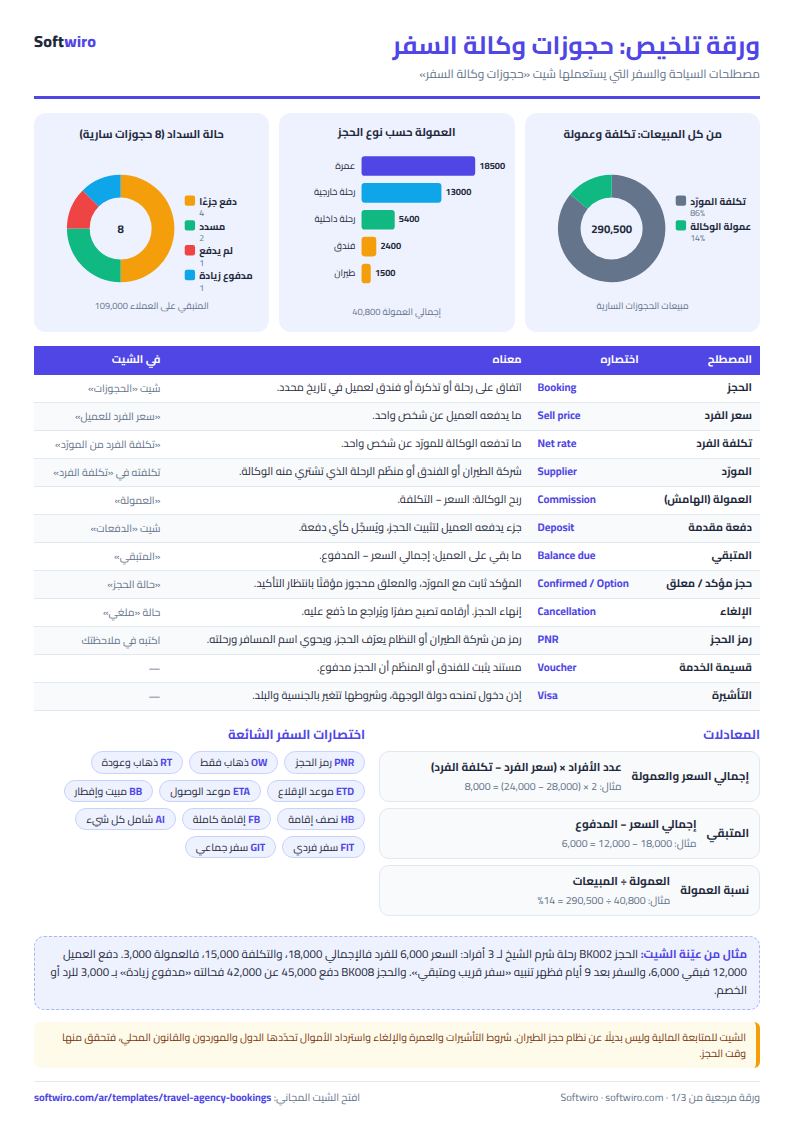
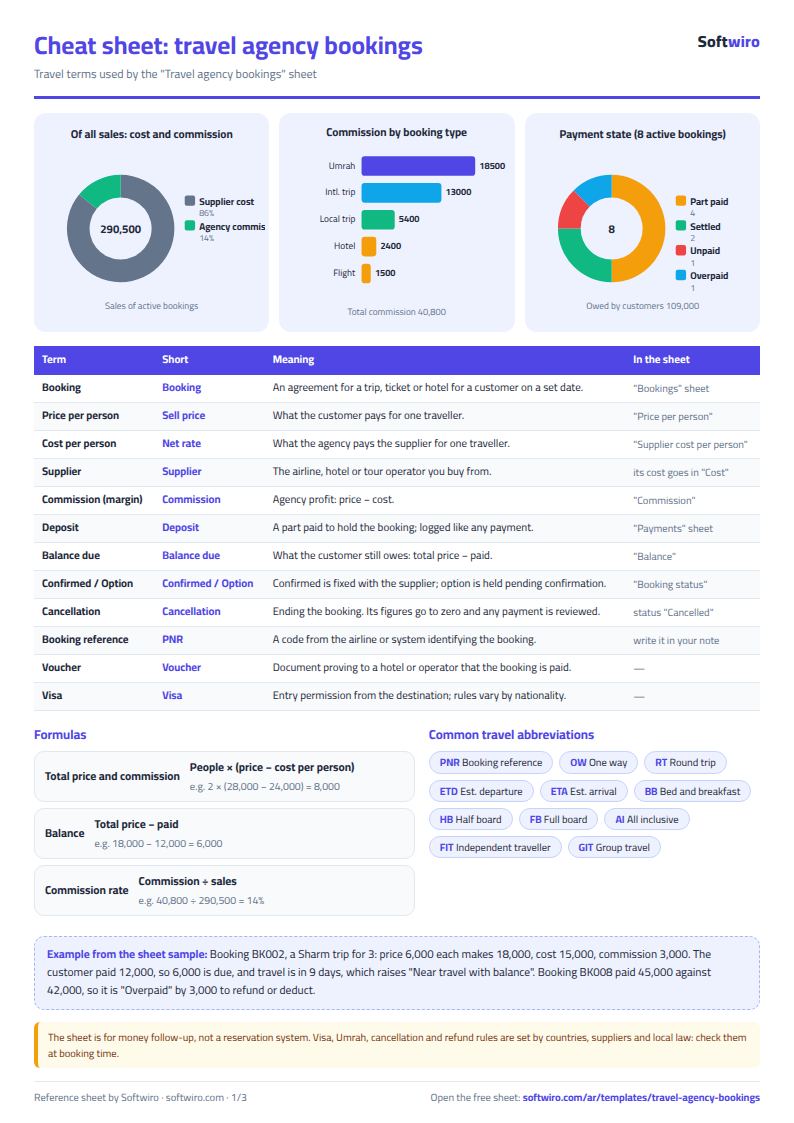
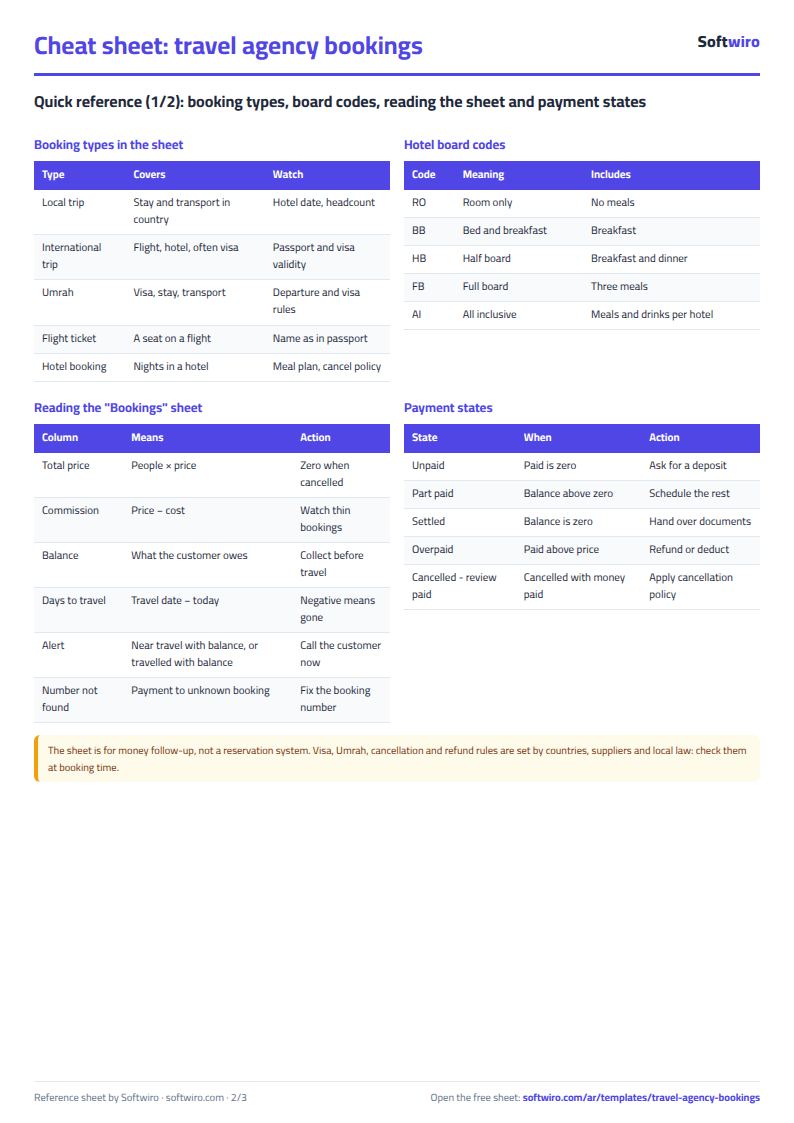
- Total price = number of travelers × price per person. Total cost = number of travelers × cost per person from the supplier. Commission = total price − total cost.
- Balance due = total price − amount paid. A negative balance means the customer paid more than the price, and its status shows "overpaid".
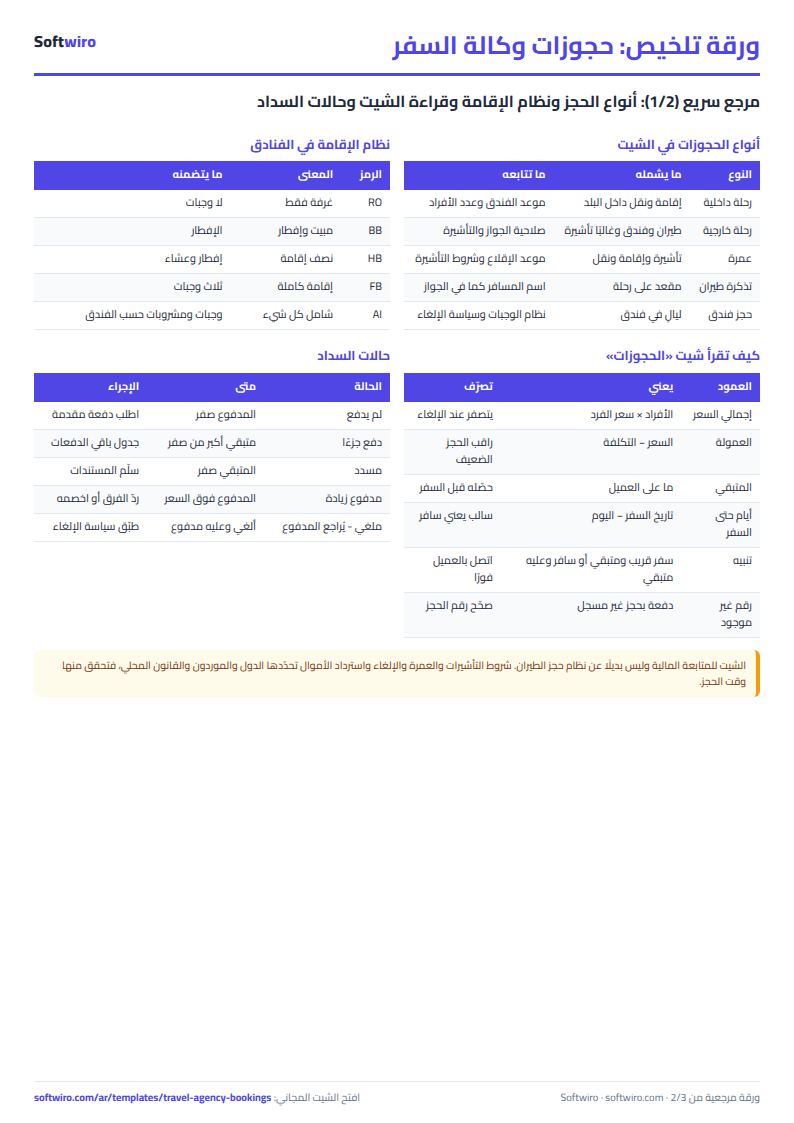
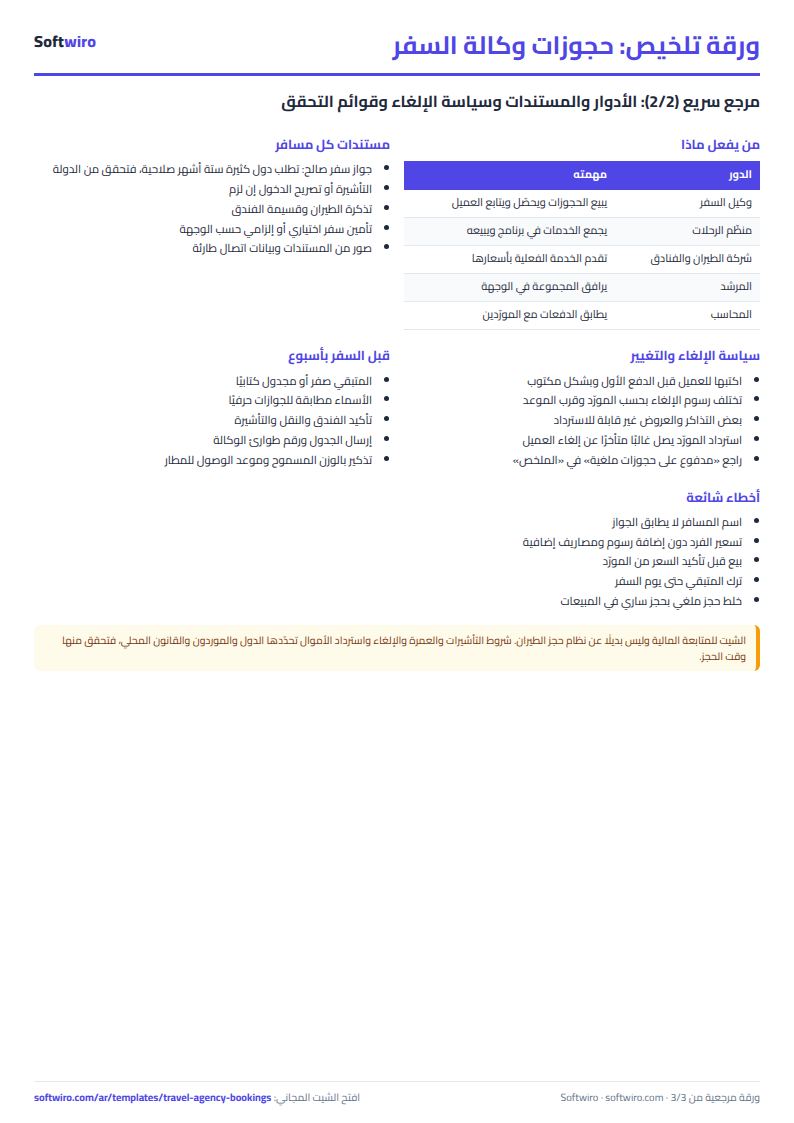
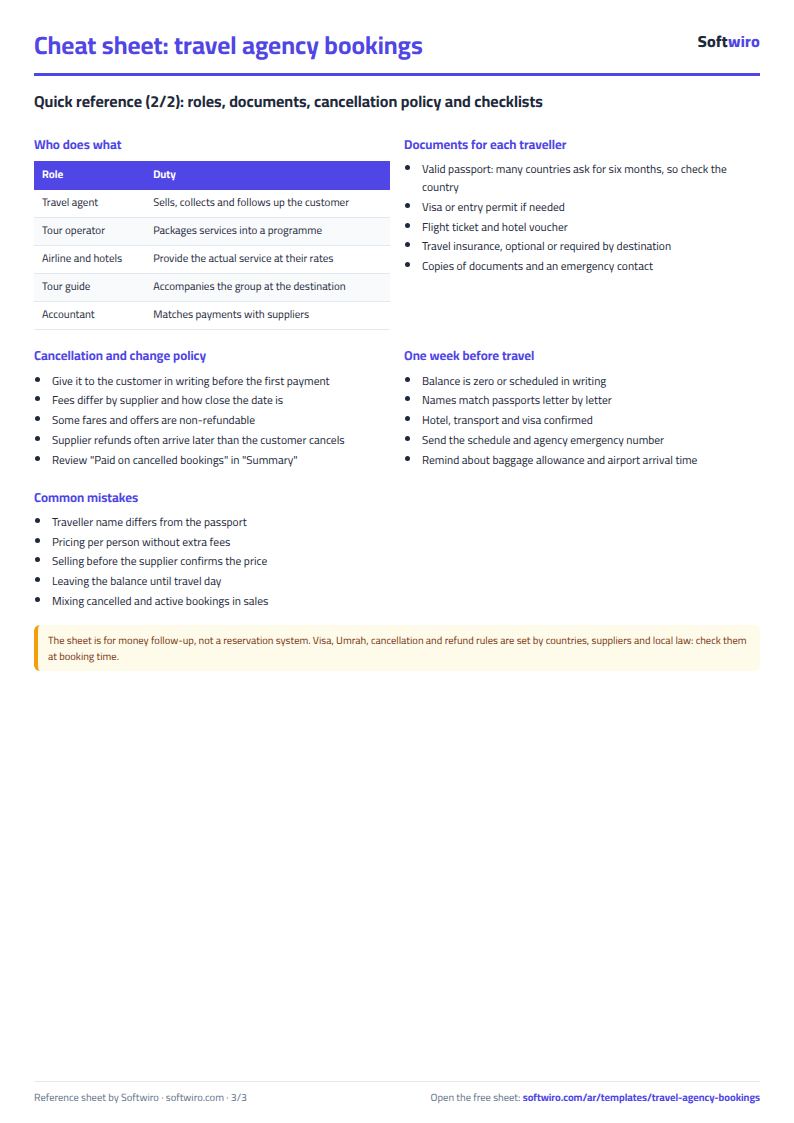
- A cancelled booking has its figures set to zero and does not count in sales, commission or balance due. What the customer paid on it appears in the Summary tab under "paid on cancelled bookings" so you can review it.
- The "near travel with balance due" alert appears when the balance due is above zero and the days to travel are less than or equal to the alert days. The "travelled with balance due" alert applies to a booking whose travel date has passed and which still has a balance.
- A payment entered with a booking number that is not in Bookings shows a "number not found" alert and does not count toward any booking.
- The sheet holds 1000 bookings and 2000 payments, and the Follow-up list shows the first 50 bookings with a balance due.
Free cheat sheet for this field
Terms, abbreviations, tables and diagrams over several pages, in Arabic and English. Download it as a PDF or images, including a phone-size version.
Still running this on Excel?
This sheet suits a start and a limited amount of data. If your way of working grows, or you need more than one person working on it at the same time, Softwiro can build you a program that fits the way you work.
| In this sheet | In Custom Software from Softwiro |
|---|---|
| One file that one person edits at a time, and copies reach you on WhatsApp. | A program with a login for each user and permissions you define, and everyone sees the same data. |
| You type everything and check the numbers by hand. | We design the screens around your work steps, so each person records only what concerns them. |
| Columns and formulas are fixed as the sheet was designed. | We build what you need: reports, alerts and screens your way. |
| Backups and security are your own responsibility. | The program runs on a secured server with regular backups. |
Frequently asked questions
How are commission and balance due calculated?
Total price = number of travelers × price per person for the customer. Total cost = number of travelers × cost per person from the supplier. Commission = total price − total cost. Balance due = total price − the sum of payments recorded under the booking number.
What happens to a cancelled booking?
Set its status to "ملغي" (cancelled). Its figures become zero and it drops out of sales, commission and balance due. What the customer paid on it appears in the "الملخص" (Summary) tab under "paid on cancelled bookings" so you can review it, and the booking status shows "cancelled - review payments".
When does the travel alert appear?
"Near travel with balance due" appears when the balance due is above zero and the days to travel are less than or equal to the alert days in Settings. "Travelled with balance due" appears if the travel date has passed and an amount remains.
Can I add a new booking type?
Yes. Rename one of the five types in Settings and the drop-down list and the summary table by type both change. The sheet holds 1000 bookings and 2000 payments.
Is the template free?
Yes, with no sign-up and no email address. Use it, edit it and share it as you like.
Does it work in Google Sheets and on mobile?
The sheet uses formulas supported by Excel 2016 and later, Google Sheets and LibreOffice, so you can upload it to Google Drive and open it with Google Sheets on a computer or a phone.
What is the difference between the white and the gray cells?
You type in the white cells; the gray cells are calculated automatically. Don't type in a gray cell, or you will erase its formula.
Can I use the sheet from an AI assistant?
Yes. Add our MCP server (URL https://softwiro.com/api/mcp, no key needed) to your assistant and ask it to do the calculation in this template. The numbers come from the sheet's own formulas, and we do not store your data. The steps and a ready-made prompt are in this article: https://softwiro.com/blog/mcp-excel-templates-ai-agent-guide.html
More free templates for: Travel agencies
More free templates
- Trip organizer sheet: participants, instalments, costs and itinerary
- Laundry orders tracker (Excel)
- Dental clinic treatment plans tracker (Excel)
- School class timetable (Excel)
- Exam schedule with committees and invigilators (Excel)
- Homework and behavior tracker for teachers (Excel)
- School bus subscriptions tracker (Excel)
- American diploma GPA calculator: unweighted, weighted and cumulative (Excel)
- IGCSE subject tracker with mock scores and target grades (Excel)