Try the sheet here, on the example
The sheet is open below with sample numbers. Change any white cell and watch the results update, or press the blank-copy button to type your own data from scratch. Nothing you type leaves your browser.
Example from the sheet
| القماش | الرصيد بالمتر | الرصيد بالكيلو | المطلوب بالمتر | العجز بالمتر | الحالة |
|---|---|---|---|---|---|
| جيرسيه قطن | 1,800.00 | 1,927.86 | 127.86 | ناقص | |
| ليكرا ميلانج | 400.00 | 837.53 | يكفي | ||
| جبردين | 800.00 | 748.50 | 0.00 | يكفي |
Example from the “المخزون والنواقص” tab (Arabic), with the numbers and formulas that are in the file.
What is inside
- "الماركرات" (Markers): Marker length, pieces per marker, end losses, fabric width and weight, from which consumption is calculated in metres and kilograms.
- "الأوامر" (Orders): For each order: the pieces required including rejects, the number of plies, and the fabric needed in metres and kilograms.
- "المخزون والنواقص" (Stock and shortages): The quantity required of each fabric across all orders against its stock balance, and the shortage if there is one.
The file opens on a start tab (“ابدأ هنا”, Start here) that explains how to use it.
What makes it different
It links the marker, the order and the stock in one file: you enter the marker once, every new order calculates its own fabric, and the shortages sheet tells you what to buy.
How to use it
- In the "الماركرات" (Markers) sheet, enter each style: the fabric, marker length, pieces per marker, end loss, fabric width and weight (GSM).
- In the "الأوامر" (Orders) sheet, enter the order number, choose the style, and enter the quantity and the reject %. The pieces, plies, metres and kilograms appear.
- In the "المخزون والنواقص" (Stock and shortages) sheet, enter each fabric's name exactly as you wrote it in "الماركرات" (Markers), then its stock balance in metres or kilograms.
- Check the last column: "ناقص" (Short) means the stock does not cover the orders entered.
Before you start:
- Percentages are typed as plain numbers: 5 means 5%.
- A style name in "الماركرات" (Markers) must not be repeated, and a fabric name in the stock sheet must match its name in "الماركرات" (Markers).
- For fabric bought by the kilogram, enter its stock in kilograms so it is compared with the kilograms required; for fabric bought by the metre, enter its stock in metres.
- Converting metres to kilograms needs the width and weight (GSM); if you leave them empty, the kilograms are not calculated for that fabric.
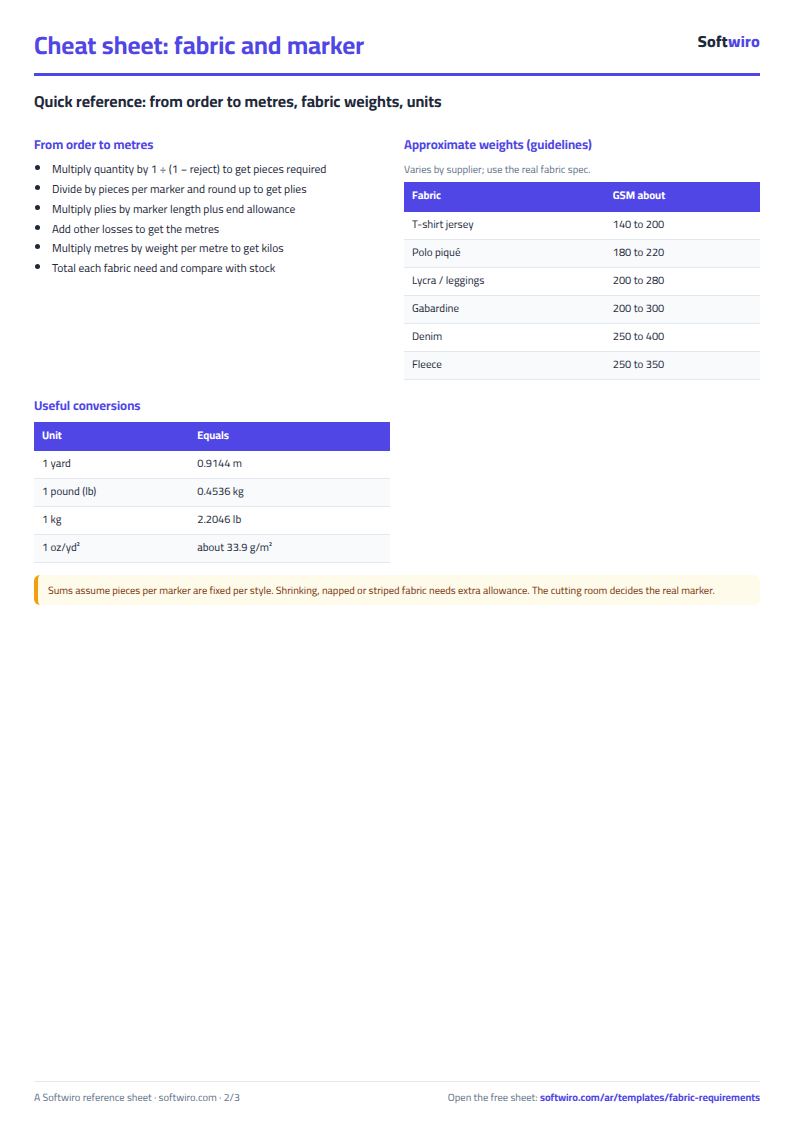
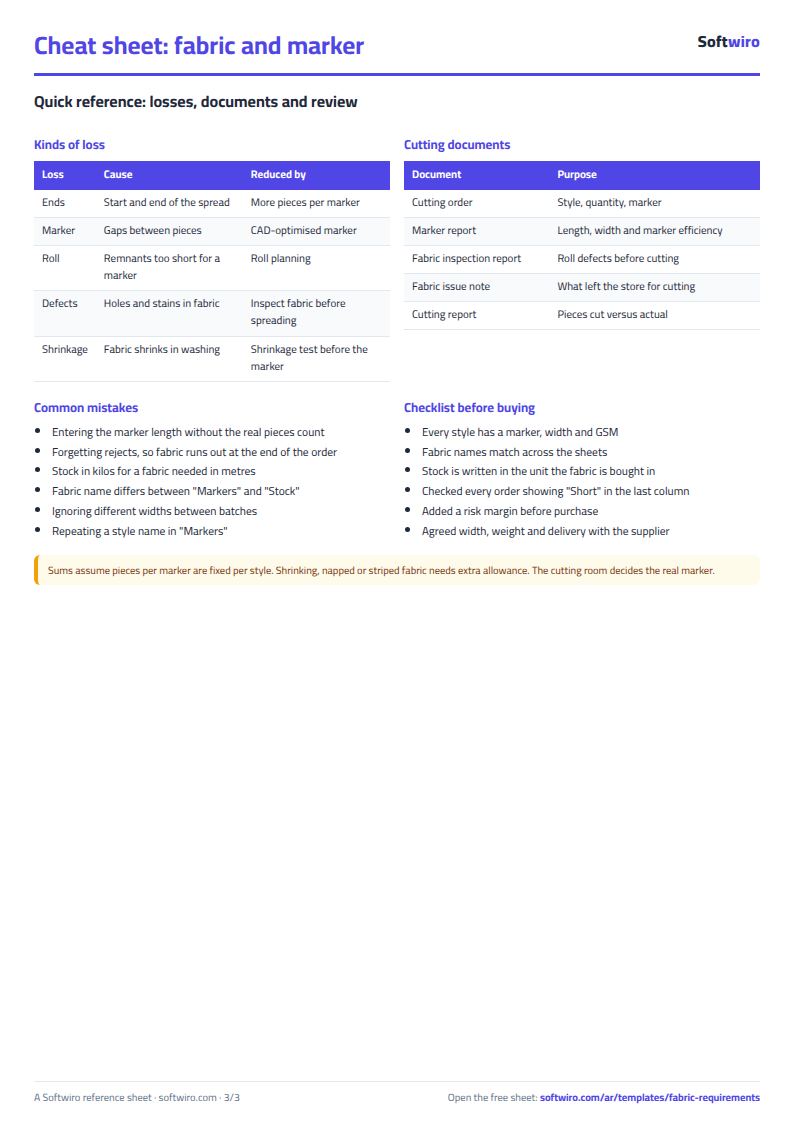
Free cheat sheet for this field
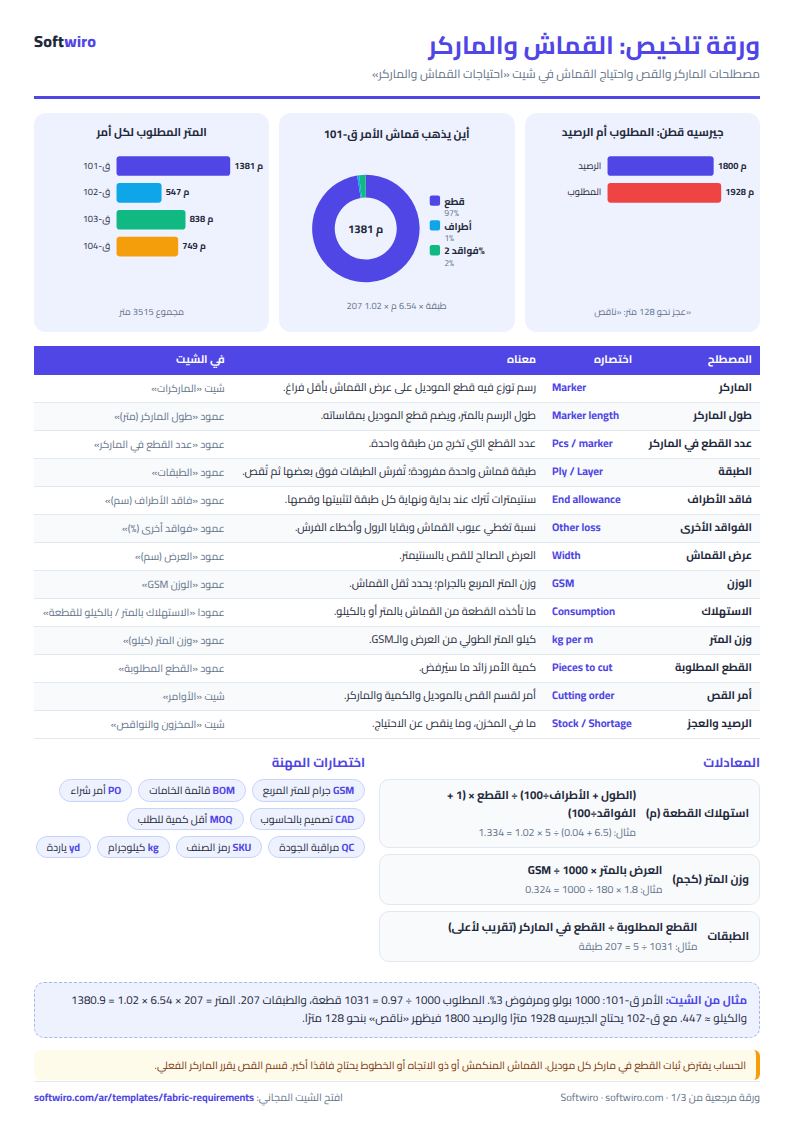
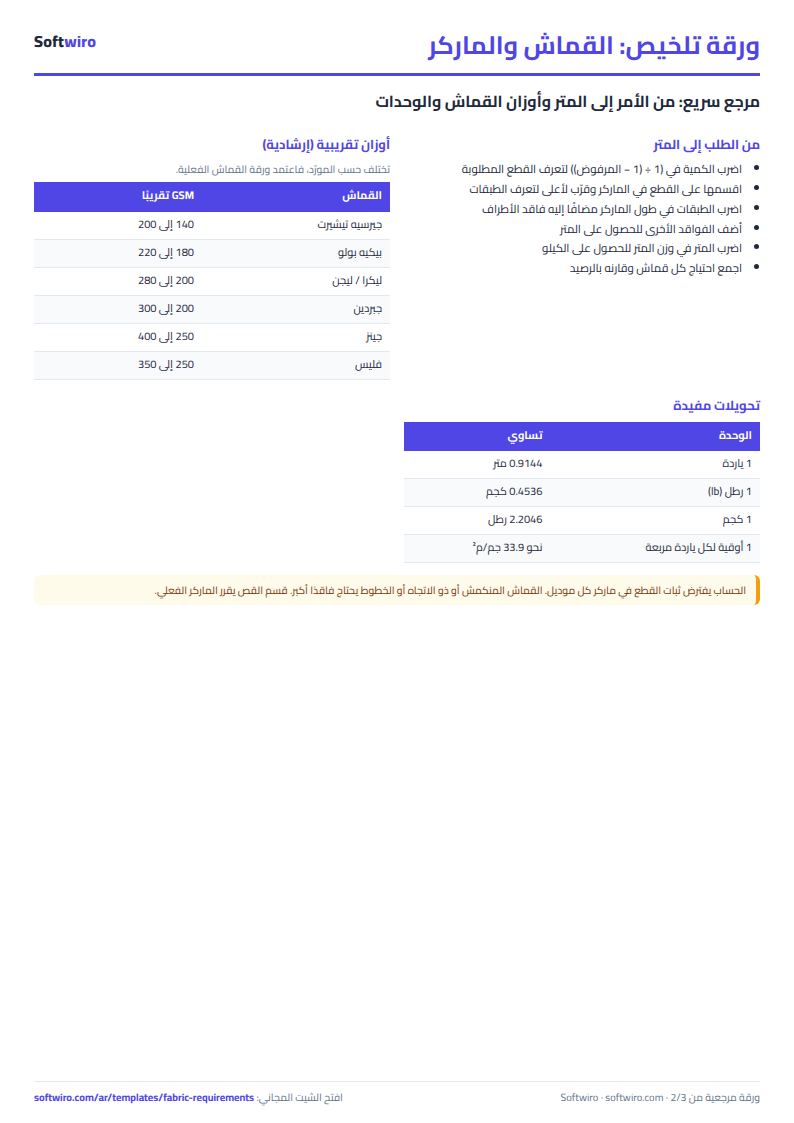
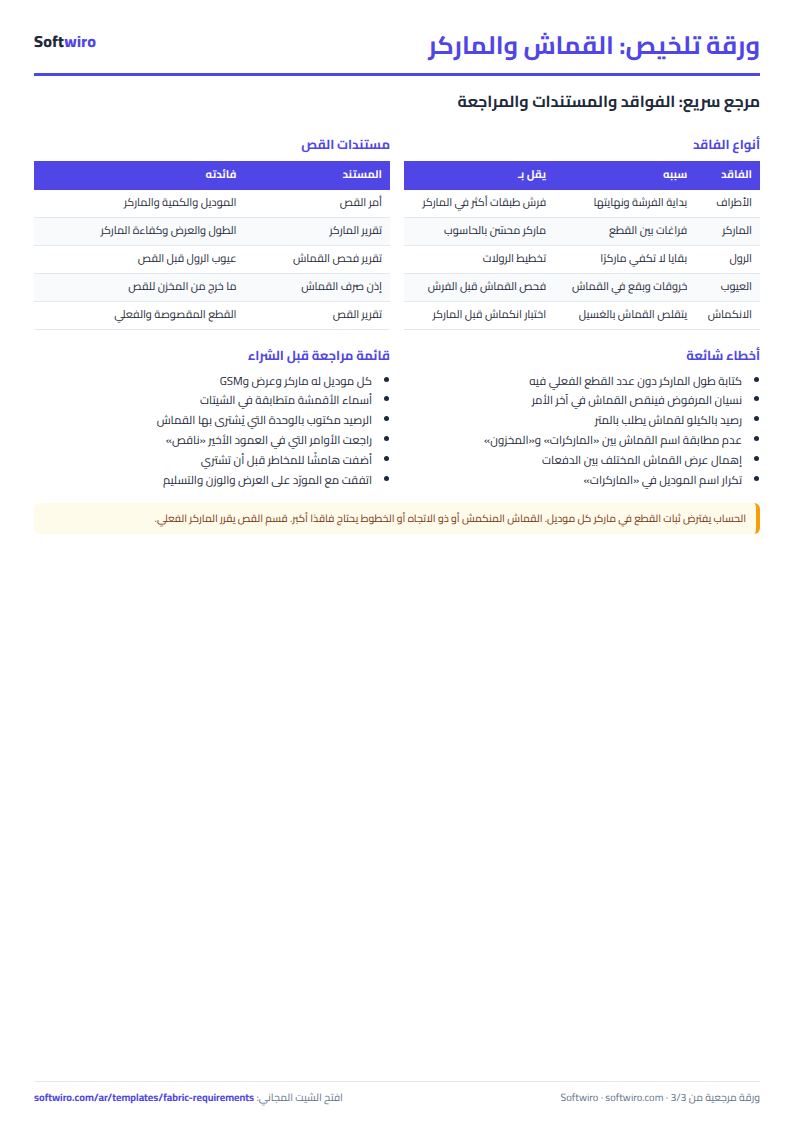
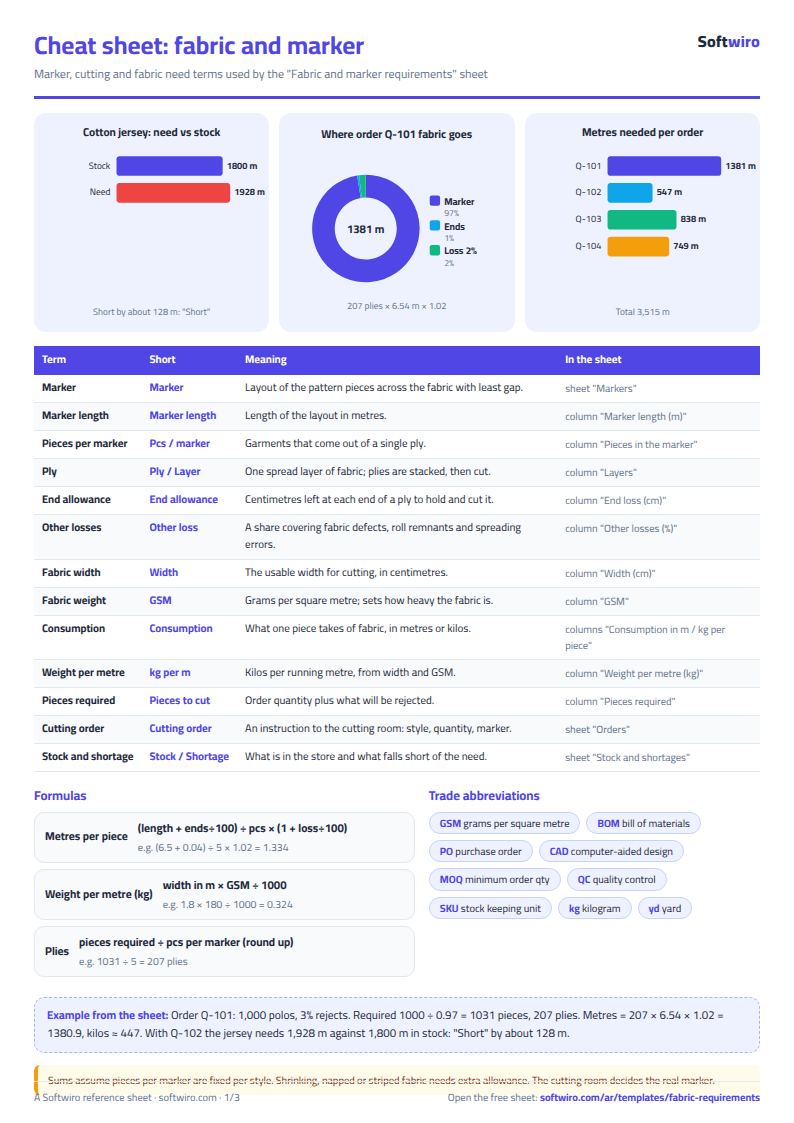
Terms, abbreviations, tables and diagrams over several pages, in Arabic and English. Download it as a PDF or images, including a phone-size version.
Still running this on Excel?
This sheet calculates requirements for the orders you type in yourself. In MESwiro, material requirements planning (MRP) breaks planned production orders down into their components and works out shortages against stock.
| In this sheet | In MESwiro |
|---|---|
| You type in every order and every balance by hand. | Material requirements planning (MRP) breaks planned production orders down into their components and calculates shortages against stock. |
| You ask suppliers for quotes by phone. | It requests quotes from several suppliers and compares price, lead time and minimum order side by side. |
| Line scheduling in a sheet hides conflicts. | It assigns work orders to lines and shifts by drag and drop, with a Gantt chart and a panel for unscheduled orders. |
| Efficiency and order cost are guesswork. | It calculates OEE for each line automatically and shows the material, labor and machine cost of each order. |
Frequently asked questions
Should I calculate in metres or kilograms?
Use the unit you buy the fabric in. For knit fabric sold by the kilogram, enter the width and weight (GSM) so the kilograms are calculated, and compare the kilogram stock with the kilograms required.
Is the template free?
Yes, with no sign-up and no email address. Use it, edit it and share it as you like.
Does it work in Google Sheets and on mobile?
The sheet uses formulas supported by Excel 2016 and later, Google Sheets and LibreOffice, so you can upload it to Google Drive and open it with Google Sheets on a computer or a phone.
What is the difference between the white and the gray cells?
You type in the white cells; the gray cells are calculated automatically. Don't type in a gray cell, or you will erase its formula.
Can I use the sheet from an AI assistant?
Yes. Add our MCP server (URL https://softwiro.com/api/mcp, no key needed) to your assistant and ask it to do the calculation in this template. The numbers come from the sheet's own formulas, and we do not store your data. The steps and a ready-made prompt are in this article: https://softwiro.com/blog/mcp-excel-templates-ai-agent-guide.html
More free templates for: Garment factories
More free templates
- Garment style costing sheet
- Production tracking sheet by stage
- Piece-rate payroll and worker efficiency sheet
- Garment printing shop sheet in Excel: DTF and screen print orders and cost
- Clothing shop inventory sheet by colour and size
- Customer accounts, credit sales and customer statement sheet
- Cash book and customer accounts sheet
- Delivery company sheet: shipments and cash collection
- Student attendance sheet
- Study planner and lesson tracker
- Journal entries, trial balance and financial statements sheet
- Weekly study routine sheet