Try the sheet here, on the example
The sheet is open below with sample numbers. Change any white cell and watch the results update, or press the blank-copy button to type your own data from scratch. Nothing you type leaves your browser.
Example from the sheet
| رقم الأمر | الموديل | الكمية | الخارج من آخر مرحلة | نسبة الإنجاز | المتبقي |
|---|---|---|---|---|---|
| PO-101 | قميص رجالي | 500 | 200 | 40.0% | 300 |
| PO-102 | بنطلون جينز | 300 | 300 | 100.0% | 0 |
| PO-103 | تيشيرت أطفال | 800 | 0 | 0.0% | 800 |
| PO-104 | بيجامة شتوية | 400 | 0 | 0.0% | 400 |
Example from the “لوحة المتابعة” tab (Arabic), with the numbers and formulas that are in the file.
What is inside
- "المراحل" (Stages): Your factory's stages in order. The last stage is the one completion is measured from.
- "أوامر الإنتاج" (Production orders): Order number, style, customer, quantity and delivery date.
- "حركة المراحل" (Stage log): Each quantity leaving a stage, with its date. You pick the order and the stage from a list.
- "لوحة المتابعة" (Tracking board): For each order, the quantity in every stage, the completion %, the remaining quantity and the status: done, in progress, near or late.
The file opens on a start tab (“ابدأ هنا”, Start here) that explains how to use it.
What makes it different
You enter each movement once, in a single log, and the board totals it for every order and stage. The sheet also colours any stage that has passed on more than the stage before it, because that usually points to a data-entry mistake.
How to use it
- In the "المراحل" (Stages) sheet, enter your factory's stage names in order (up to 12). The last stage you write is treated as the final stage.
- In the "أوامر الإنتاج" (Production orders) sheet, enter the order number, style, customer, quantity and delivery date.
- In the "حركة المراحل" (Stage log) sheet, record each day the quantity leaving each stage for each order, choosing the order number and the stage from the two lists.
- Open "لوحة المتابعة" (Tracking board) to see the status of each order. A cell turns red if a stage's quantity is higher than the previous stage's quantity, so check the entry.
Before you start:
- Enter the stages in consecutive cells with no empty cell between them.
- Status: "تم" (Done) when the full quantity has left the last stage, "متأخر" (Late) when the delivery date has passed, "قريب" (Near) when three days or fewer remain, and otherwise "جارٍ" (In progress).
- Days remaining are calculated from today's date, so they change automatically every day.
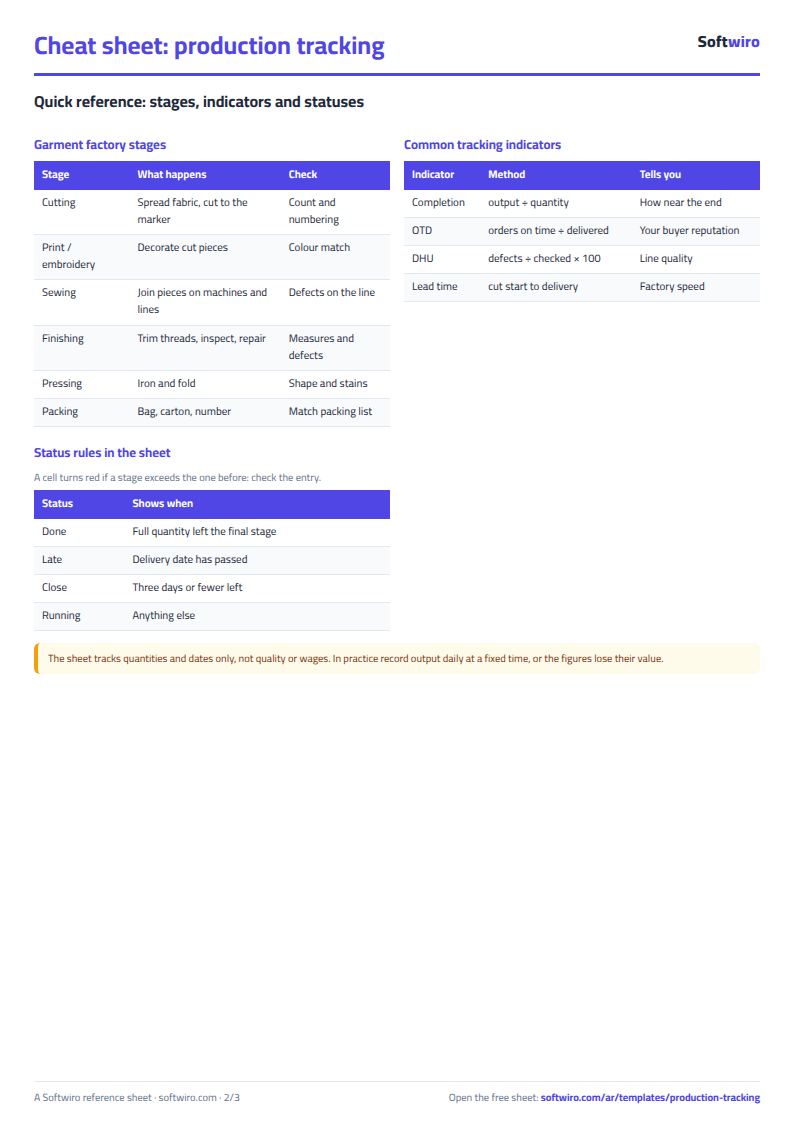
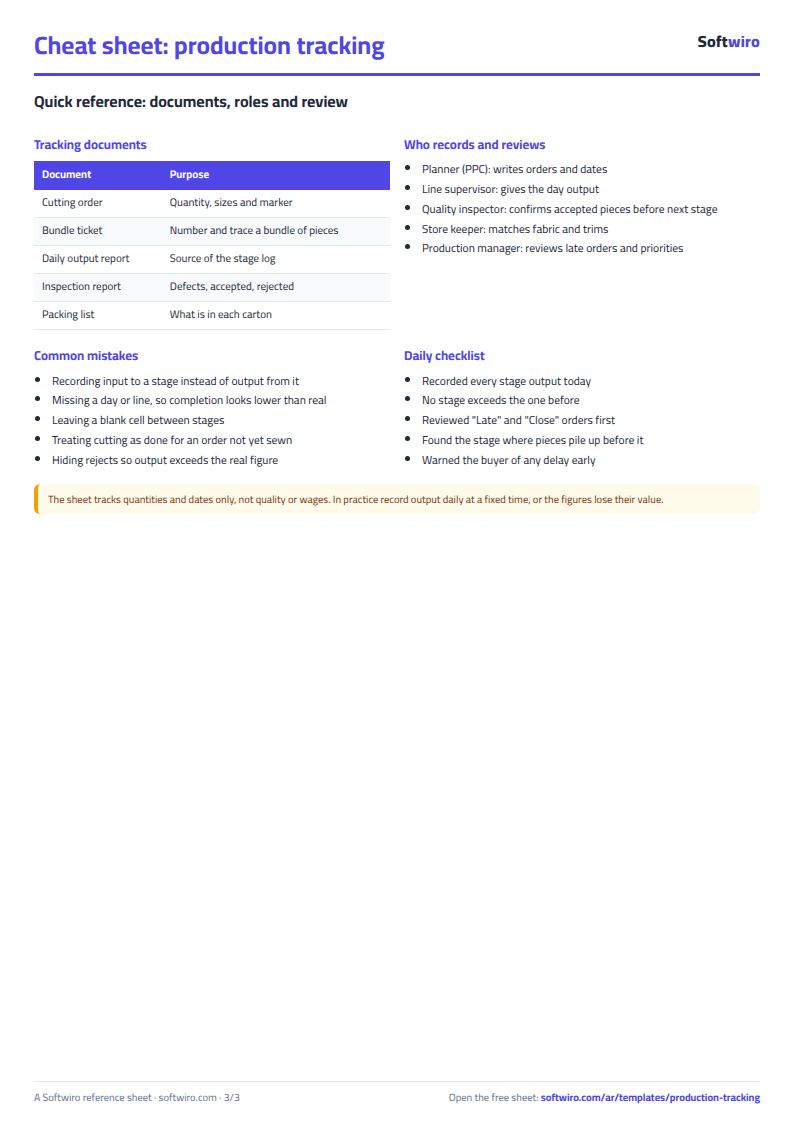
Free cheat sheet for this field
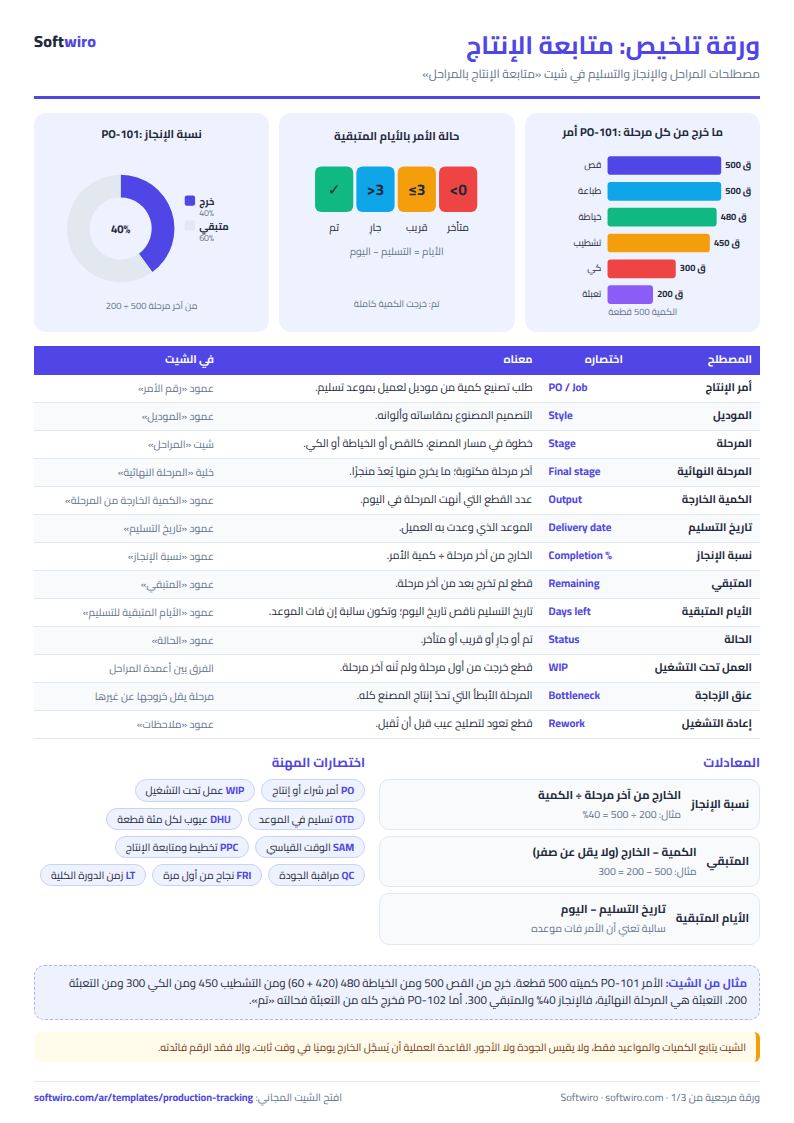
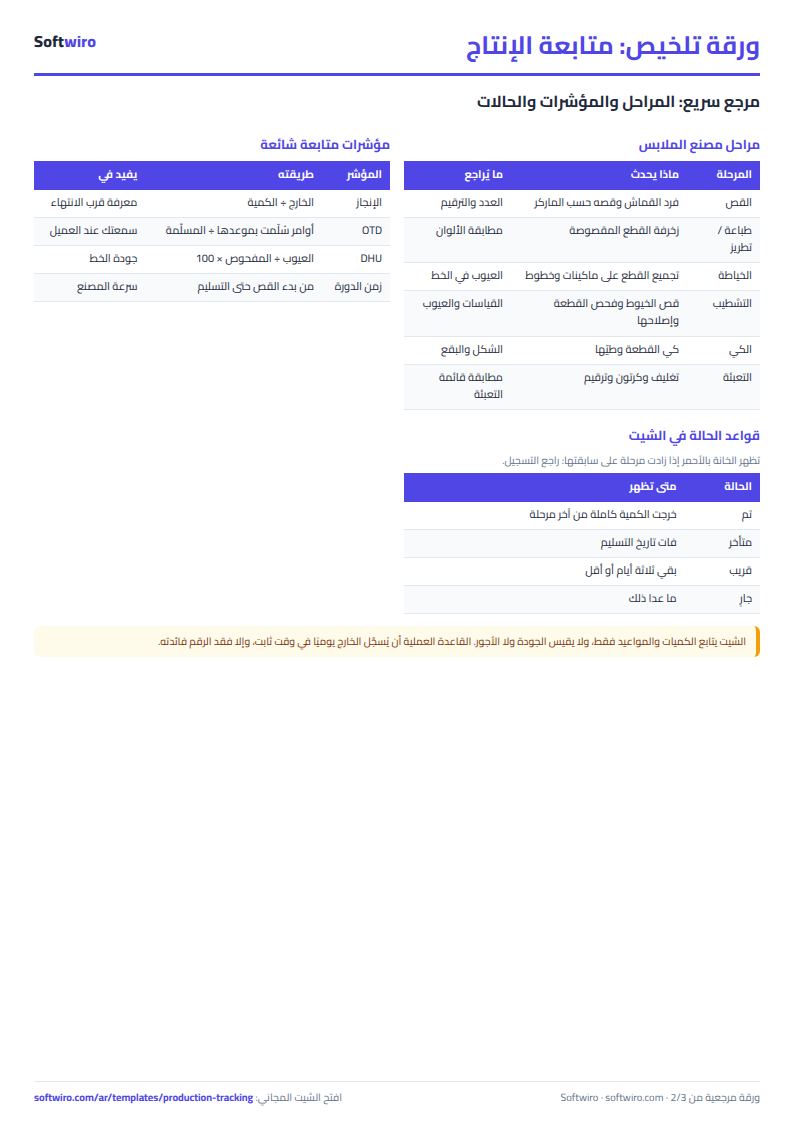
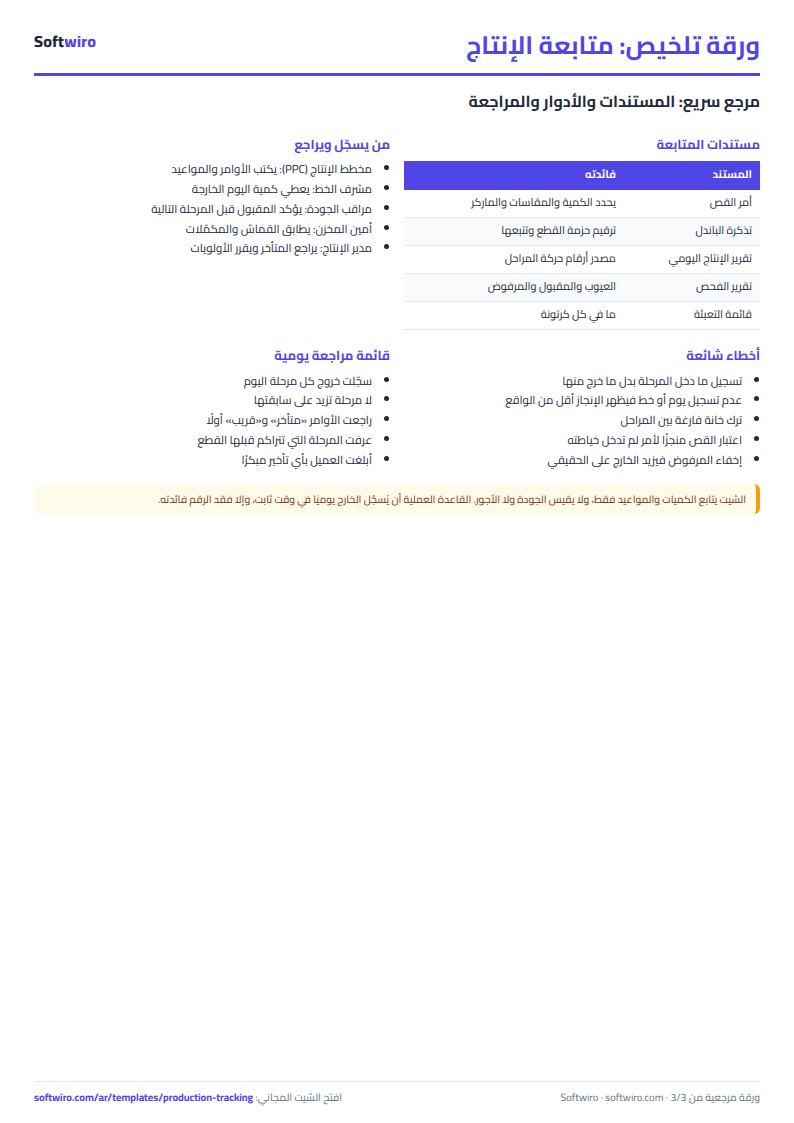
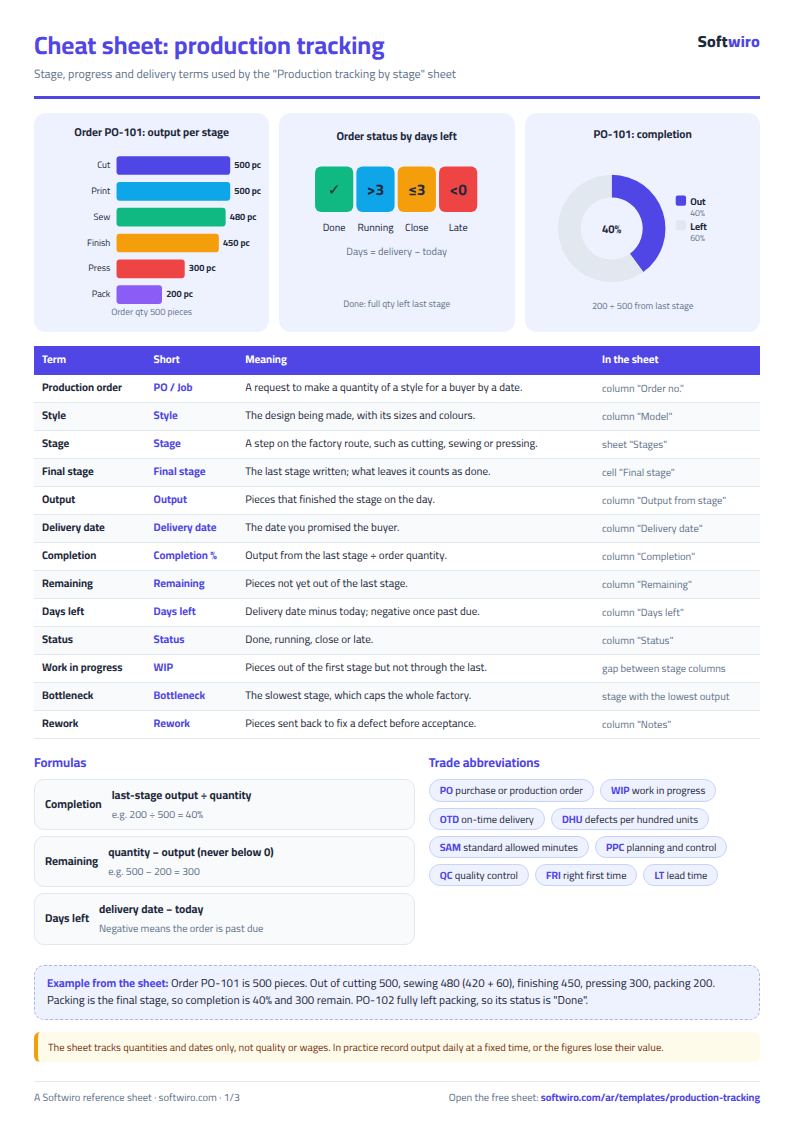
Terms, abbreviations, tables and diagrams over several pages, in Arabic and English. Download it as a PDF or images, including a phone-size version.
Still running this on Excel?
This sheet depends on someone collecting the numbers from each stage and typing them in. In Production Manager every worker logs receiving and handing over with one tap, so the numbers appear the moment they happen.
| In this sheet | In Production Manager |
|---|---|
| You learn the quantities after someone collects them and types them into the sheet. | The worker confirms receipt and hands over to the next stage with one tap, so every piece gets an entry time and an exit time at each stage. |
| You find out about a delay when you review the sheet, often on delivery day. | You see how many days each stage takes, which products are stalled or late, and where the bottleneck is. |
| Workers ask what to work on, or wait for it. | Each worker sees only the products that have reached their stage, with the model photo, quantity and size. |
| Breakdowns and quality problems are passed on by word of mouth. | The worker reports the problem from their screen, it reaches the management dashboard, and it can be shared over WhatsApp. |
Frequently asked questions
How many stages can the sheet hold?
Up to 12 stages. Enter them in the "المراحل" (Stages) sheet in order. The last stage is the one completion is measured from.
Is the template free?
Yes, with no sign-up and no email address. Use it, edit it and share it as you like.
Does it work in Google Sheets and on mobile?
The sheet uses formulas supported by Excel 2016 and later, Google Sheets and LibreOffice, so you can upload it to Google Drive and open it with Google Sheets on a computer or a phone.
What is the difference between the white and the gray cells?
You type in the white cells; the gray cells are calculated automatically. Don't type in a gray cell, or you will erase its formula.
Can I use the sheet from an AI assistant?
Yes. Add our MCP server (URL https://softwiro.com/api/mcp, no key needed) to your assistant and ask it to do the calculation in this template. The numbers come from the sheet's own formulas, and we do not store your data. The steps and a ready-made prompt are in this article: https://softwiro.com/blog/mcp-excel-templates-ai-agent-guide.html
All the templates in this group: Factory management sheets: production, cost and quality
More free templates for: Garment factories
More free templates
- Garment style costing sheet
- Piece-rate payroll and worker efficiency sheet
- Fabric requirements and marker sheet
- Garment printing shop sheet in Excel: DTF and screen print orders and cost
- Production tracking sheet for home textiles factories
- Clothing shop inventory sheet by colour and size
- Customer accounts, credit sales and customer statement sheet
- Cash book and customer accounts sheet
- Delivery company sheet: shipments and cash collection
- Student attendance sheet
- Study planner and lesson tracker
- Journal entries, trial balance and financial statements sheet