Try the sheet here, on the example
The sheet is open below with sample numbers. Change any white cell and watch the results update, or press the blank-copy button to type your own data from scratch. Nothing you type leaves your browser.
Example from the sheet
| التاريخ | الوقت | اللوحة | حجم السيارة | الباقة | العامل | سعر القائمة | المحصَّل | عمولة العامل |
|---|---|---|---|---|---|---|---|---|
| 46296 | 0 | أ س م 2010 | سيدان | غسيل كامل وتلميع | كريم | 350.00 | 350.00 | 0.00 |
| 46296 | 1 | ب م ن 3197 | دفع رباعي | غسيل وشمع | إبراهيم | 260.00 | 260.00 | 52.00 |
| 46297 | 0 | ب ح ر 3321 | سيدان | غسيل خارجي | حسن | 80.00 | 0.00 | 16.00 |
| 46297 | 1 | ج ل د 4410 | دفع رباعي | غسيل كامل وتلميع | إبراهيم | 450.00 | 450.00 | 90.00 |
| 46297 | 1 | ح ب ص 8865 | سيدان | غسيل خارجي | إبراهيم | 80.00 | 80.00 | 16.00 |
| 46297 | 1 | خ س ش 6531 | سيدان | غسيل خارجي | إبراهيم | 80.00 | 80.00 | 16.00 |
| 46297 | 1 | ي ن ق 1187 | سيدان | غسيل خارجي | حسن | 80.00 | 80.00 | 16.00 |
| 46298 | 1 | غ ف ق 1975 | دفع رباعي | داخلي وخارجي | كريم | 200.00 | 200.00 | 0.00 |
| 46298 | 1 | غ ف ق 1975 | دفع رباعي | غسيل خارجي | حسن | 110.00 | 100.00 | 20.00 |
| 46298 | 1 | ج ه و 4208 | فان | داخلي وخارجي | مصطفى | 250.00 | 250.00 | 62.50 |
| 46298 | 1 | أ س م 2010 | سيدان | غسيل خارجي | كريم | 80.00 | 80.00 | 0.00 |
Example from the “الغسلات” tab (Arabic), with the numbers and formulas that are in the file.
What is inside
- الإعدادات: Today's date, any date inside the summary month, how many days a subscription card stays valid, the car size names and the material-use factor for each size.
- المواد: Each material (shampoo, wax, polish, cleaners) with its price per litre, opening stock, what has arrived and its minimum level. The sheet shows what the logged washes have used, current stock, status (in stock, order or out) and the cost of what was used in the month.
- الباقات: Each package with its price for each car size, its duration and the millilitres of each material one wash uses, so you see the material cost of a wash and its profit before labour. Holds 20 packages.
- العمال: Each worker's pay type: commission as a percentage of the wash value, or a daily wage with the days worked. Next to it are the month's washes, what the worker collected, the commission share and the total owed.
- الاشتراكات: Each card with its number, customer, plate, package, price, number of washes and start date. The sheet works out the end date, washes used, washes remaining, price per wash and status (valid, ending soon, used up or expired). Holds 100 cards.
- الغسلات: One row per wash: date, time, plate, size, package, worker, discount, payment method and card number if any. It shows the list price, the amount collected, material cost, worker commission, the use of each material, and a warning for a missing package or an expired card. Holds 3000 washes.
- الإيراد: Every day of the chosen month with wash count, amount collected, running total, cost and commissions, a busy-hours table for each hour from 8 am to 10 pm, and a table for each day of the week.
- الملخص: The month's washes and their revenue, card sales, costs, profit and margin, the busiest hour and day, which materials need ordering and which cards are about to end, and the split of washes by payment method, size and package, with five charts.
The file opens on a start tab (“ابدأ هنا”, Start here) that explains how to use it.
What makes it different
The wash price, the commission and the material cost all come from one row you type: package, size and worker, so no shampoo or wax quantity gets lost in the numbers. The sheet also keeps the price of a card (revenue on the day it is sold) separate from the washes taken against it, so revenue is never counted twice while their cost and commission still show.
How to use it
- In the "الإعدادات" (Settings) sheet, enter today's date, any date inside the summary month, how long a subscription card stays valid, the car size names and the material-use factor for each size.
- In the "المواد" (Materials) sheet, enter each material (shampoo, wax, polish...) with its price per litre, opening stock, what has arrived and its minimum level.
- In the "الباقات" (Packages) sheet, enter each package, its price for each car size, its duration and the millilitres of each material one wash uses (for a sedan).
- In the "العمال" (Workers) sheet, enter each worker and their pay type: commission as a percentage of the wash value, or a daily wage with the days worked in the month.
- When you sell a subscription card, record it in the "الاشتراكات" (Subscriptions) sheet with its number, number of washes, price and start date.
- Log every wash in the "الغسلات" (Washes) sheet: date, time, plate, car size, package, worker, discount and payment method. If the customer pays with a subscription card, enter the card number.
- Check "الاشتراكات" (Subscriptions) for used and remaining washes, "المواد" (Materials) for what is about to run out, and "الإيراد" (Revenue) and "الملخص" (Summary) for revenue, profit and busy times.
Before you start:
- The wash price is read from the "الباقات" (Packages) sheet by package and size. Amount collected = price - discount, and it is zero for a wash paid with a card because the card price was added to revenue on the day it was sold.
- A card's price counts as revenue in the month of its start date (cash basis). The washes taken against it appear in the wash count, cost and commission without adding to revenue a second time.
- Washes remaining on a card = its number of washes - the washes logged with its number between its start date and its end date. A card expires after the validity period set in "الإعدادات" (Settings), counted from its start date.
- Material use per wash = millilitres in the package × size factor ÷ 1000 litres. Material stock = opening stock + received - everything used by the logged washes.
- Worker commission = (wash price - discount) × commission rate, for a worker whose pay type is "عمولة" (commission). A worker on "اليومية" (daily wage) earns the daily wage × the days worked in the month.
- Month profit = wash revenue + card sales - material cost - commissions - daily wages. It does not include rent, electricity or water.
- The sheet holds 20 packages, 5 materials, 20 workers, 100 cards and 3000 washes.
Free cheat sheet for this field
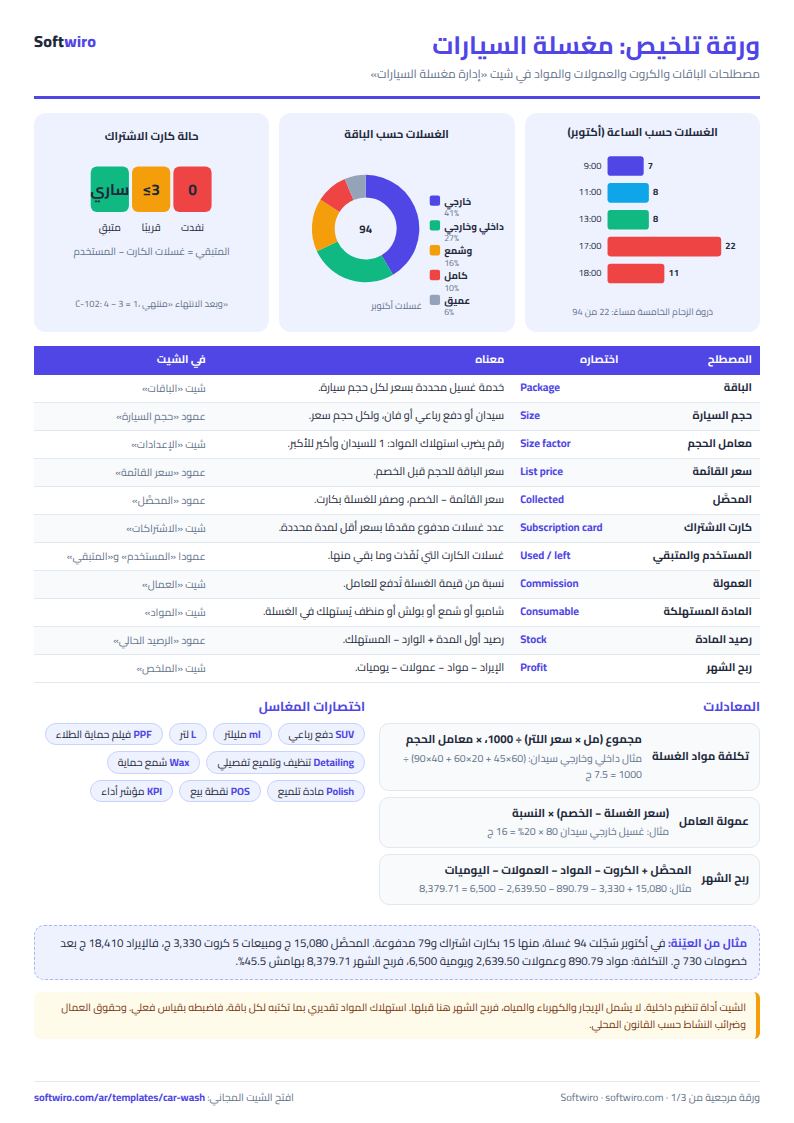
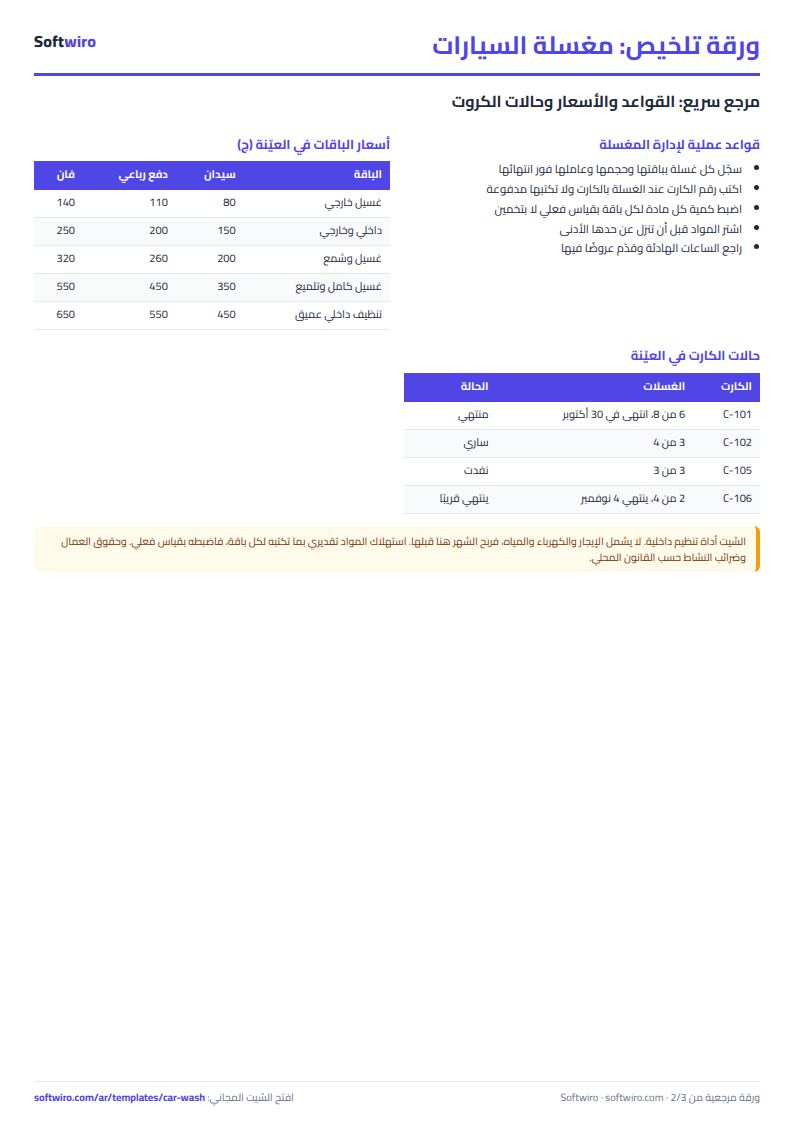
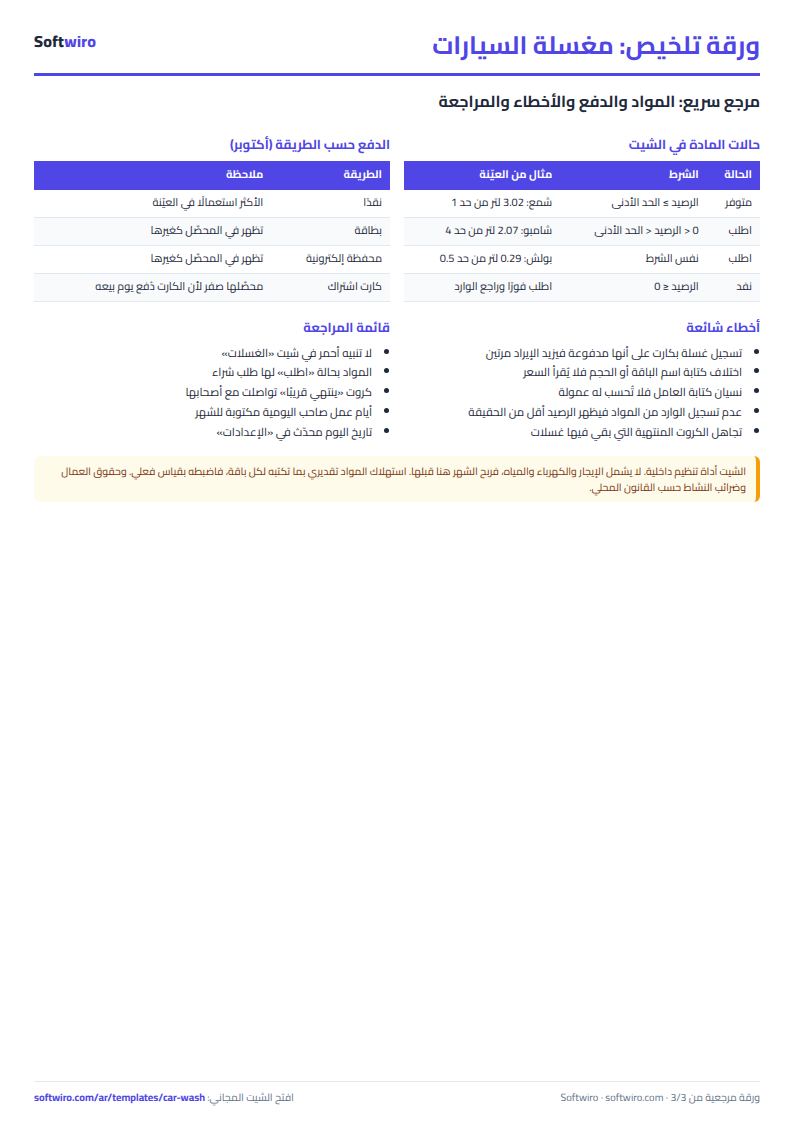
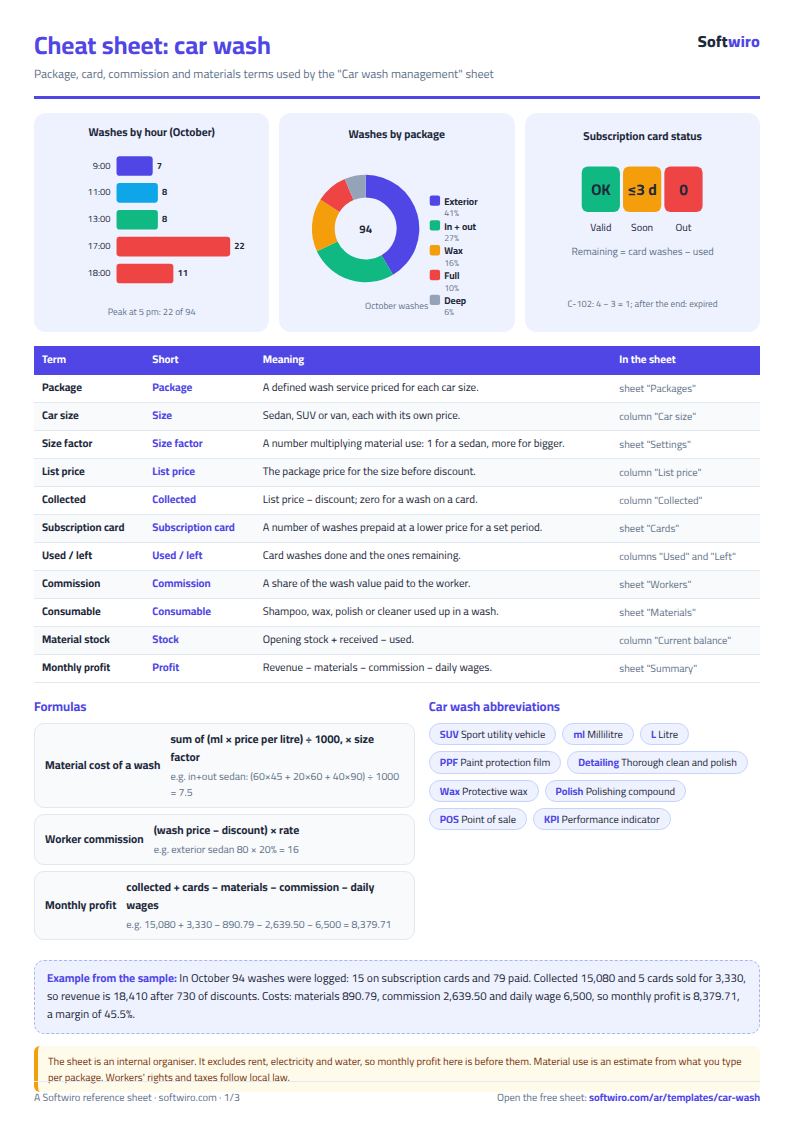
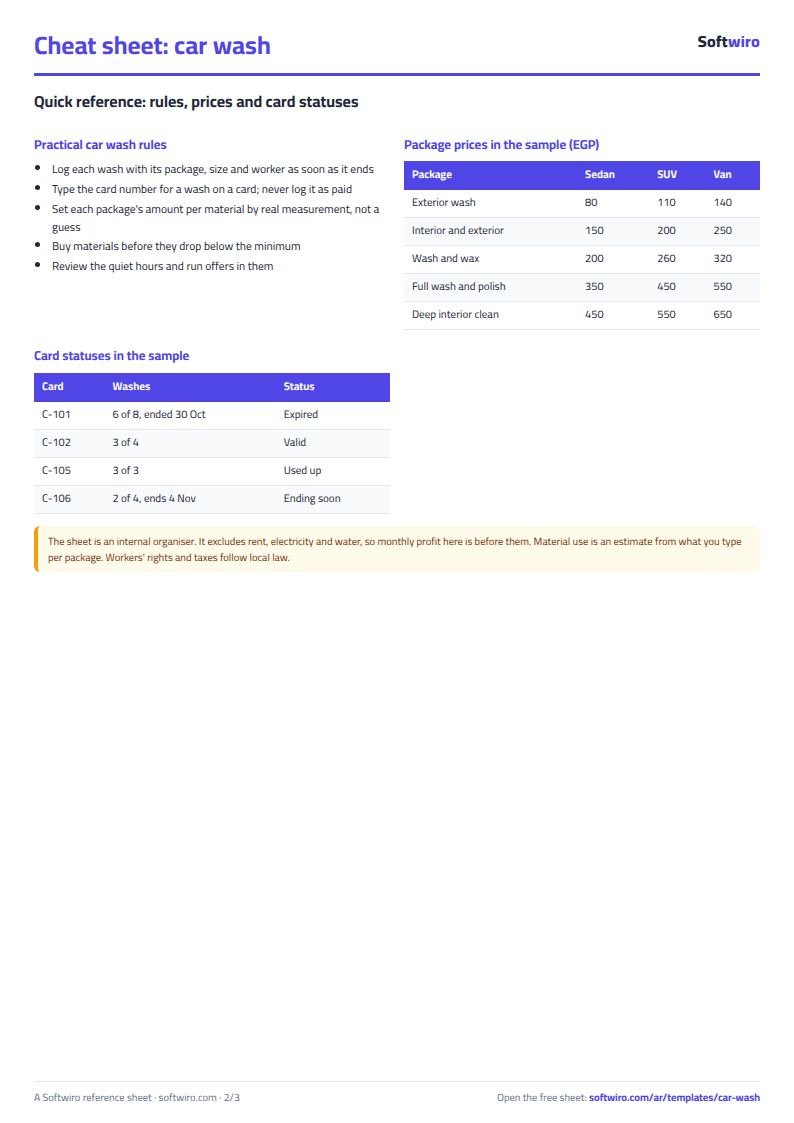
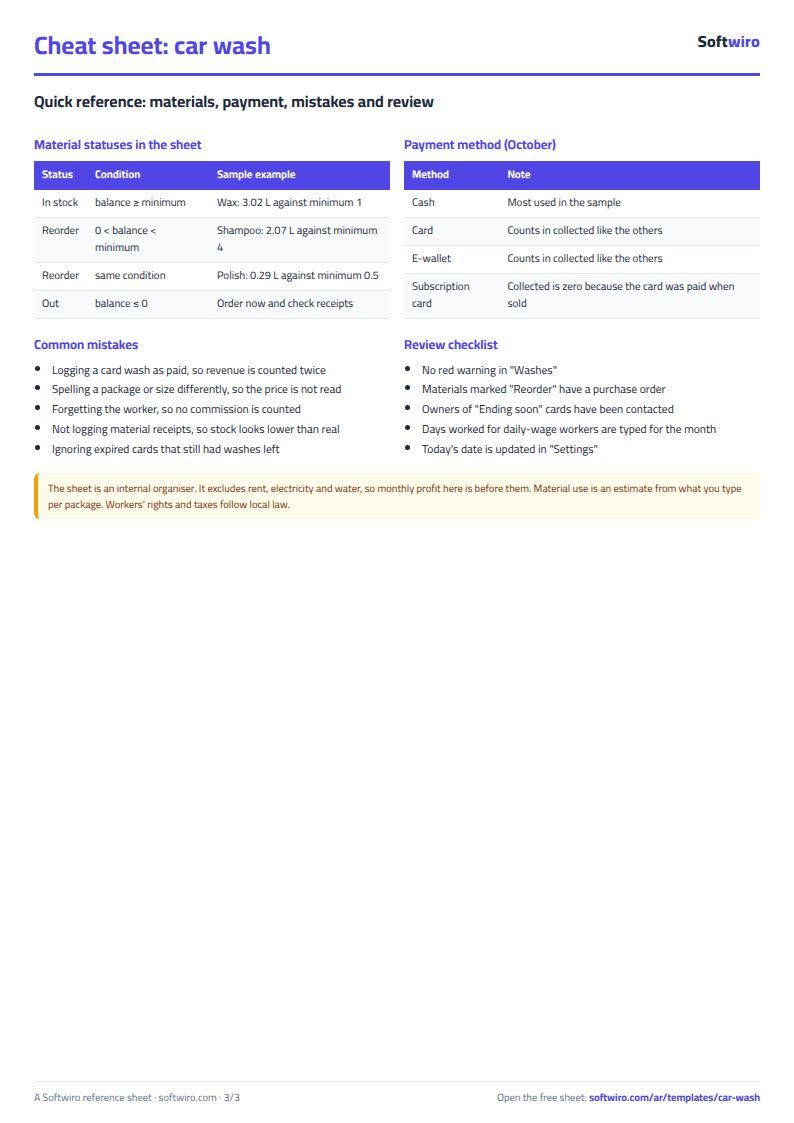
Terms, abbreviations, tables and diagrams over several pages, in Arabic and English. Download it as a PDF or images, including a phone-size version.
Still running this on Excel?
This sheet suits a start and a limited amount of data. If your way of working grows, or you need more than one person working on it at the same time, Softwiro can build you a program that fits the way you work.
| In this sheet | In Custom Software from Softwiro |
|---|---|
| One file that one person edits at a time, and copies reach you on WhatsApp. | A program with a login for each user and permissions you define, and everyone sees the same data. |
| You type everything and check the numbers by hand. | We design the screens around your work steps, so each person records only what concerns them. |
| Columns and formulas are fixed as the sheet was designed. | We build what you need: reports, alerts and screens your way. |
| Backups and security are your own responsibility. | The program runs on a secured server with regular backups. |
Frequently asked questions
How does the sheet work out the price of a wash?
It reads the package price from the "الباقات" (Packages) sheet for the car size. Amount collected = list price - discount. If the customer pays with a subscription card, the amount collected is zero because the card price was already counted as revenue on the day it was sold.
How do I know how many washes are left on a customer's card?
Type the card number in the "رقم الكارت" (Card number) column of the "الغسلات" (Washes) sheet for every wash taken with the card. The "الاشتراكات" (Subscriptions) sheet counts the washes used between the card's start and end dates, and remaining = washes on the card - used. It also shows the status: valid, ending soon, used up or expired.
How do I calculate shampoo and wax use per wash?
In the "الباقات" (Packages) sheet, enter the millilitres of each material one wash uses on a sedan. In "الإعدادات" (Settings), enter the size factor (for example 1 for a sedan and 1.3 for an SUV). Use per wash = quantity × factor ÷ 1000 litres, and it is deducted from the material's stock in the "المواد" (Materials) sheet.
How do I pay one worker by commission and another by daily wage?
In the "العمال" (Workers) sheet, choose the pay type for each worker. A commission worker earns their percentage of (wash price - discount) on every wash you log under their name. A daily-wage worker earns the daily wage × the days worked that you enter for the month.
Is the template free?
Yes, with no sign-up and no email address. Use it, edit it and share it as you like.
Does it work in Google Sheets and on mobile?
The sheet uses formulas supported by Excel 2016 and later, Google Sheets and LibreOffice, so you can upload it to Google Drive and open it with Google Sheets on a computer or a phone.
What is the difference between the white and the gray cells?
You type in the white cells; the gray cells are calculated automatically. Don't type in a gray cell, or you will erase its formula.
Can I use the sheet from an AI assistant?
Yes. Add our MCP server (URL https://softwiro.com/api/mcp, no key needed) to your assistant and ask it to do the calculation in this template. The numbers come from the sheet's own formulas, and we do not store your data. The steps and a ready-made prompt are in this article: https://softwiro.com/blog/mcp-excel-templates-ai-agent-guide.html
More free templates for: Services and business
More free templates
- Lead and deal pipeline tracker
- Freelancer projects, hours and invoices tracker
- Laundry orders tracker (Excel)
- Photo studio bookings sheet
- General appointments scheduler sheet
- Food factory sheet in Excel: recipes, batches, cost and shelf life
- Biscuit factory sheet: dough, lines, packing and scrap
- Detergent factory sheet: formulas, batches, cost and filling
- Detergent ingredients and their names: function, chemical name and use
- Pharma factory sheet: batch records, materials, QC and release
- Industrial waste management sheet: quantities, classification, recycling and cost
- Algebra rules summary sheet: laws, identities and solving equations with examples
- Solid geometry formulas sheet: areas and volumes with examples and a calculator