Try the sheet here, on the example
The sheet is open below with sample numbers. Change any white cell and watch the results update, or press the blank-copy button to type your own data from scratch. Nothing you type leaves your browser.
Example from the sheet
| التصنيف | النوع | الميزانية الشهرية | الفعلي في الشهر | الفرق | الحالة |
|---|---|---|---|---|---|
| إيجار | ثابت | 6,000.00 | 6,000.00 | 0.00 | ضمن الميزانية |
| فواتير | ثابت | 1,800.00 | 1,350.00 | 450.00 | ضمن الميزانية |
| أكل | متغير | 4,500.00 | 6,300.00 | -1,800.00 | تجاوز |
| مواصلات | متغير | 1,500.00 | 1,350.00 | 150.00 | ضمن الميزانية |
| تعليم | ثابت | 2,500.00 | 2,950.00 | -450.00 | تجاوز |
| ديون وأقساط | ثابت | 1,500.00 | 1,500.00 | 0.00 | ضمن الميزانية |
| صحة | متغير | 600.00 | 480.00 | 120.00 | ضمن الميزانية |
| ملابس | متغير | 700.00 | 650.00 | 50.00 | ضمن الميزانية |
| ترفيه | متغير | 600.00 | 550.00 | 50.00 | ضمن الميزانية |
| أخرى | متغير | 400.00 | 300.00 | 100.00 | ضمن الميزانية |
| تبرعات | متغير | 200.00 | 0.00 | 200.00 | لم يُصرف |
Example from the “الميزانية” tab (Arabic), with the numbers and formulas that are in the file.
What is inside
- "الإعدادات" (Settings): Today's date (typed as the example date; you can enter =TODAY()) and the month you are reviewing. The sheet works out the first day of that month and of the next month from it.
- "الدخل" (Income): Each income with its date, source (salary, extra work, property rent or other), amount and a note.
- "الميزانية" (Budget): Expense categories with their type (fixed or variable) and monthly budget, then the actual for the month, the difference, the percentage spent and the status (within budget, over budget or not spent), and the category's rank among the biggest spenders.
- "المصروفات" (Expenses): Each expense with its date, category, description and amount, plus the category type (fixed or variable), which fills in automatically.
- "الأهداف" (Goals): Each savings goal with its amount, target date and what you have saved, then the remaining amount, percentage reached, months left, the monthly amount needed and the status (in progress, achieved or past due).
- "الملخص" (Summary): The month's income and expenses, what is left of income, the savings rate and the difference from budget; fixed vs variable spending; the top three categories; and the total monthly amount the goals need, compared with what is left.
The file opens on a start tab (“ابدأ هنا”, Start here) that explains how to use it.
What makes it different
Open the "الملخص" (Summary) sheet to see how much of this month's income is left and what percentage that is, which categories took the most of your money, and whether what is left is enough for your savings goals. You do not have to add up bills and compare them with your budget by hand.
How to use it
- In "الإعدادات" (Settings), enter today's date (or =TODAY() so it updates itself) and the first day of the month you want to review.
- In "الميزانية" (Budget), enter your household expense categories, mark each one "ثابت" (fixed) or "متغير" (variable), and enter its monthly budget.
- In "الدخل" (Income), record every income you receive: date, source and amount.
- In "المصروفات" (Expenses), record every expense: date, category, description and amount.
- In "الأهداف" (Goals), enter each savings goal: its name, the amount needed, the target date and what you have saved so far. The sheet calculates the monthly amount needed.
- Open the budget sheet to see actual against budget for each category, and the summary to see what is left of income, the savings rate and the top three categories.
Before you start:
- The sheet reviews one month at a time: the month entered in the settings. Change the date to see another month. All months stay recorded in the income and expenses sheets.
- What is left of income = the month's income − the month's expenses. Savings rate = what is left ÷ the month's income, which is what actually remains of your income and not necessarily what you moved into savings.
- The "fixed" or "variable" type of a category is entered once in the budget sheet, and each expense's type then appears automatically in the expenses sheet.
- Monthly amount for each goal = the remaining amount ÷ the number of months until the target month (at least one month). If the date has passed and the goal is not complete, its status shows "past due" and the whole remaining amount is requested.
- An expense whose category is not listed in the budget sheet still counts in the month's expenses, and it shows in the summary as "expenses with no registered category".
- The sheet holds 40 categories, 2,000 expenses, 500 incomes and 100 goals. This sheet is for a household budget; for a business budget, see the [Project monthly expenses and budget](/templates/business-expenses-budget) sheet.
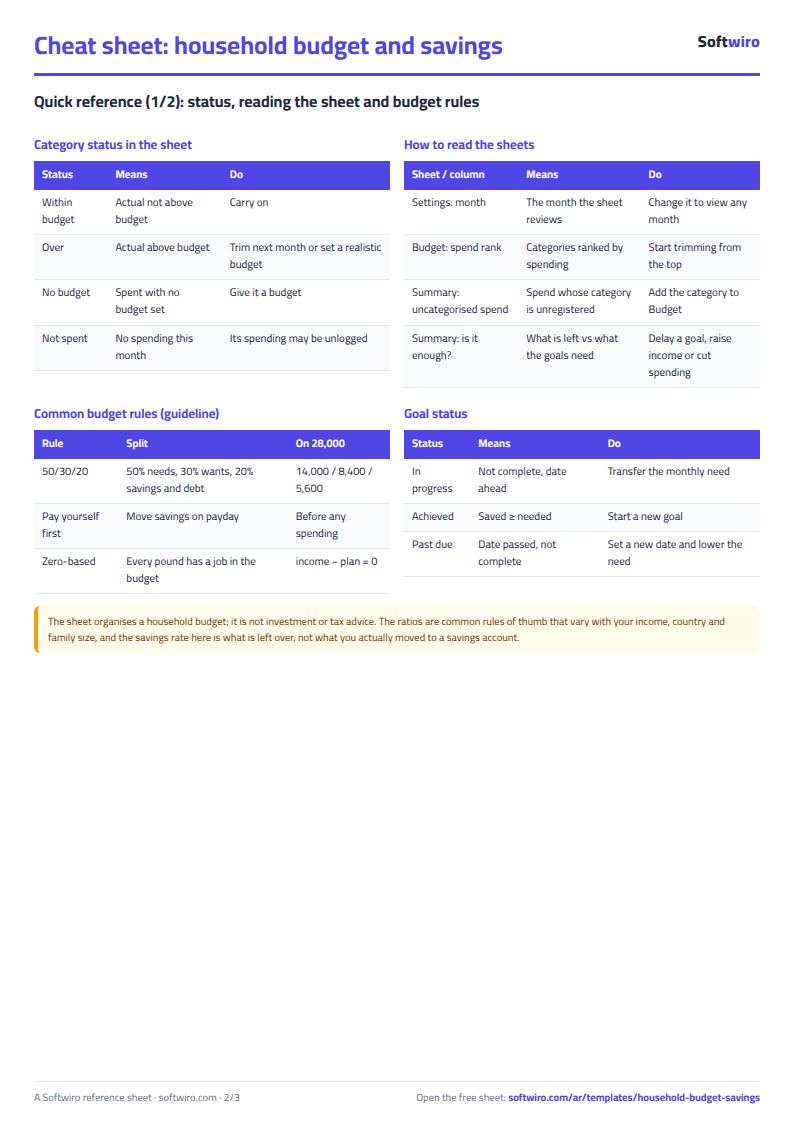
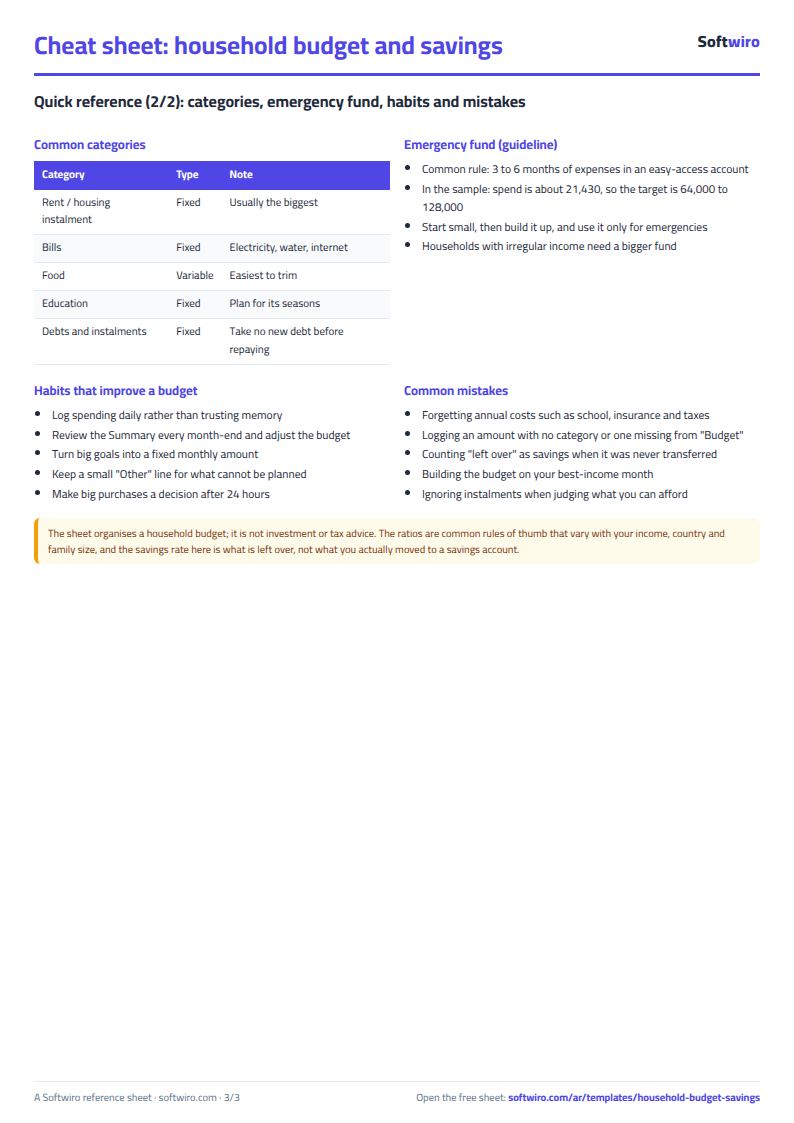
Free cheat sheet for this field
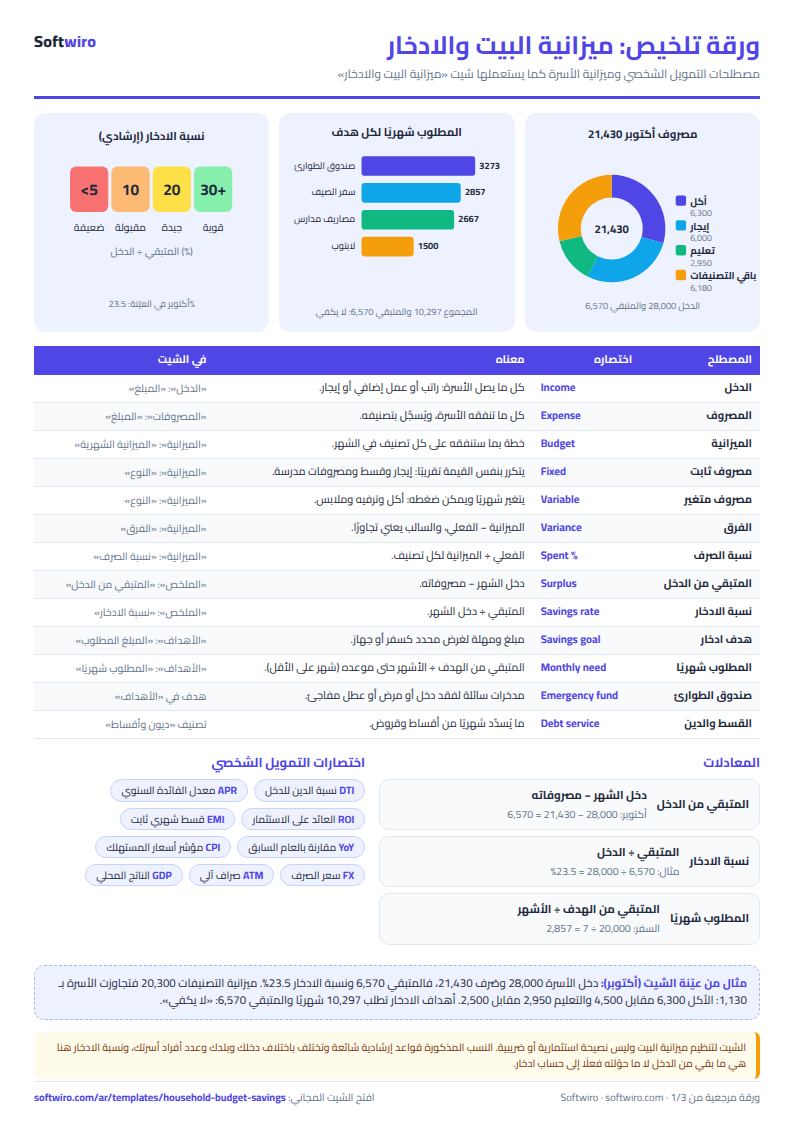
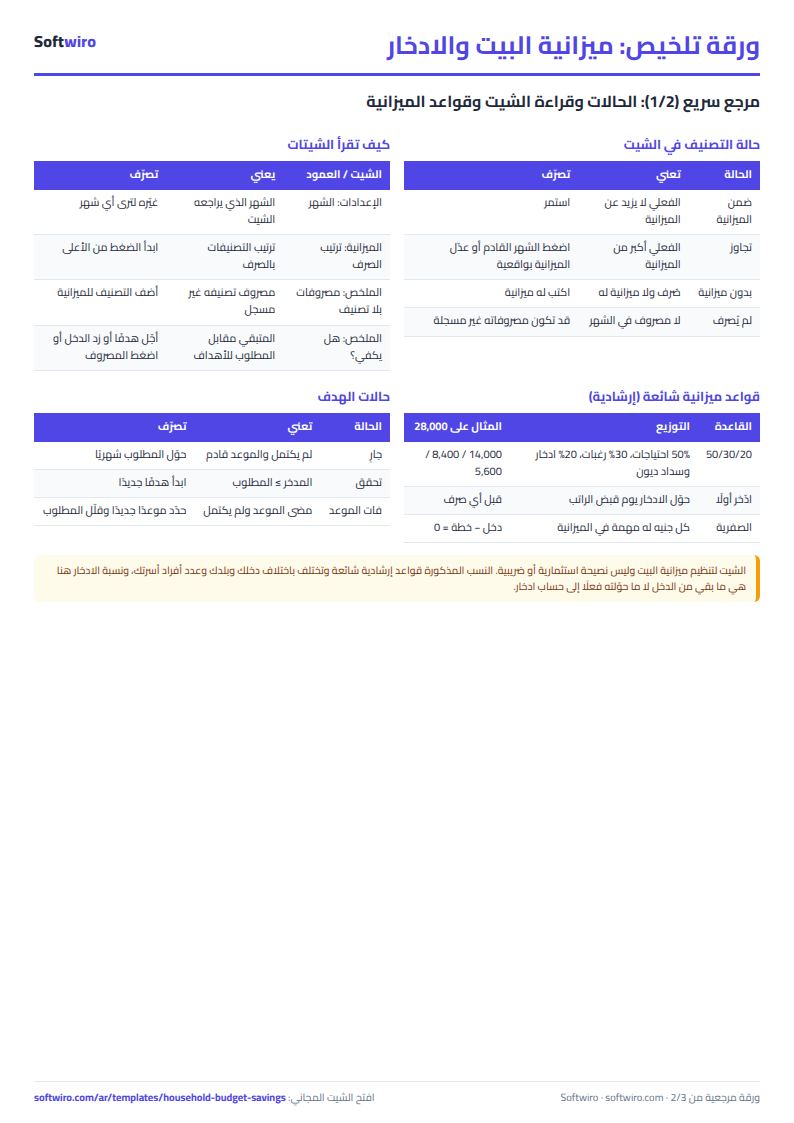
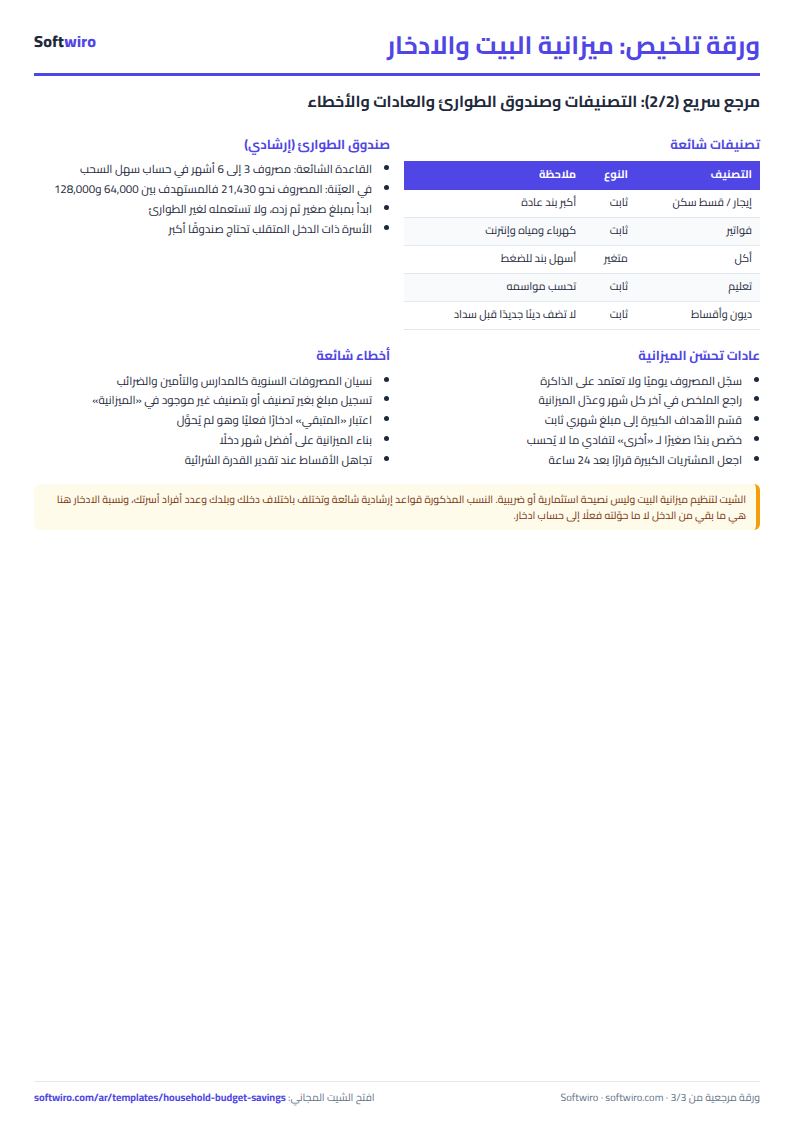
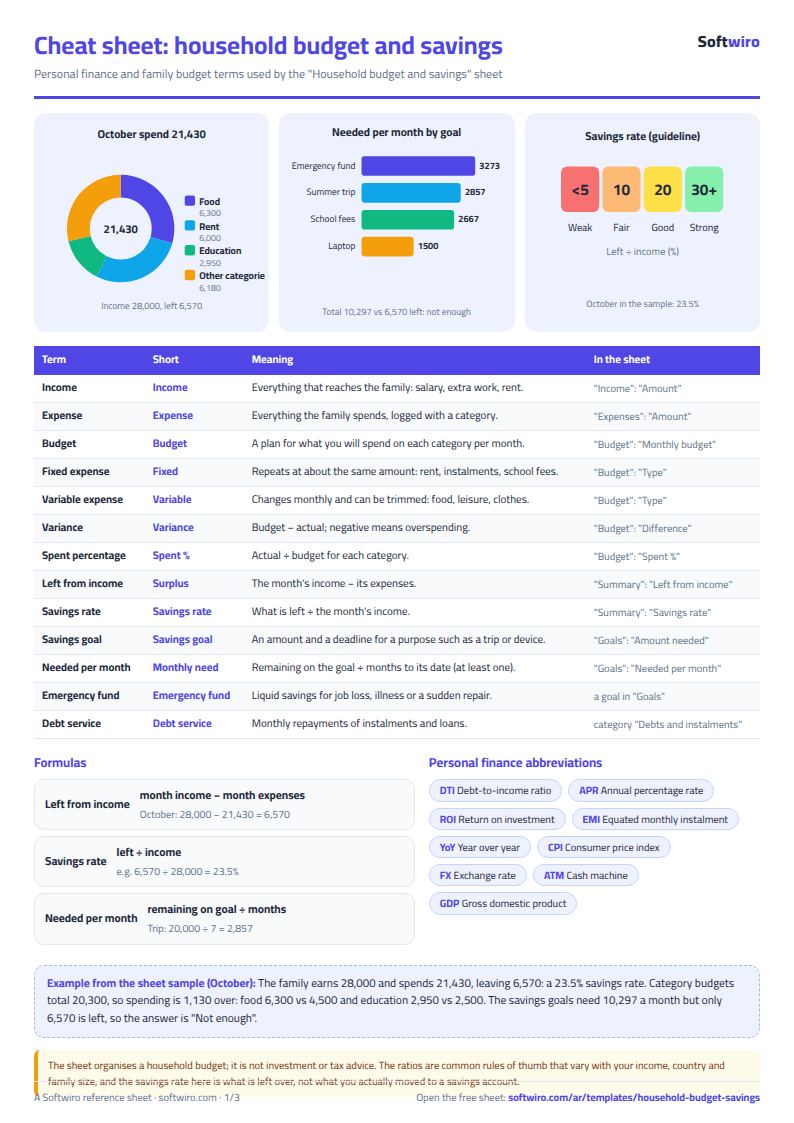
Terms, abbreviations, tables and diagrams over several pages, in Arabic and English. Download it as a PDF or images, including a phone-size version.
Still running this on Excel?
This sheet suits a start and a limited amount of data. If your way of working grows, or you need more than one person working on it at the same time, Softwiro can build you a program that fits the way you work.
| In this sheet | In Custom Software from Softwiro |
|---|---|
| One file that one person edits at a time, and copies reach you on WhatsApp. | A program with a login for each user and permissions you define, and everyone sees the same data. |
| You type everything and check the numbers by hand. | We design the screens around your work steps, so each person records only what concerns them. |
| Columns and formulas are fixed as the sheet was designed. | We build what you need: reports, alerts and screens your way. |
| Backups and security are your own responsibility. | The program runs on a secured server with regular backups. |
Frequently asked questions
How is the savings rate calculated?
Savings rate = what is left of income ÷ the month's income, where what is left = the month's income − its expenses. It shows what is actually left of your income, which is not necessarily what you transferred to a savings account.
How do I review another month?
Change the date in the "month you are reviewing" cell in the settings to any day in the month you want. All months stay recorded in the income and expenses sheets, and the sheet calculates actuals for the selected month only.
How is the monthly amount for a savings goal calculated?
The remaining amount of the goal ÷ the number of months from today's month to the target month (at least one month). If the date has passed and the goal is not complete, its status shows "past due" and the whole remaining amount is requested.
How is it different from the business budget sheet?
This sheet covers a family's income, household expenses and savings goals, with categories for the home and one month at a time. The Project monthly expenses and budget sheet is for a business, with revenue, expenses and a budget for each month of the year.
Is the template free?
Yes, with no sign-up and no email address. Use it, edit it and share it as you like.
Does it work in Google Sheets and on mobile?
The sheet uses formulas supported by Excel 2016 and later, Google Sheets and LibreOffice, so you can upload it to Google Drive and open it with Google Sheets on a computer or a phone.
What is the difference between the white and the gray cells?
You type in the white cells; the gray cells are calculated automatically. Don't type in a gray cell, or you will erase its formula.
Can I use the sheet from an AI assistant?
Yes. Add our MCP server (URL https://softwiro.com/api/mcp, no key needed) to your assistant and ask it to do the calculation in this template. The numbers come from the sheet's own formulas, and we do not store your data. The steps and a ready-made prompt are in this article: https://softwiro.com/blog/mcp-excel-templates-ai-agent-guide.html
More free templates for: Personal finance
More free templates
- Monthly savings circle (gamaeya) tracker
- Simple daily expense sheet (phone-first)
- Owners' association dues collection tracker
- Owners' association budget and expenses sheet
- Reserve and emergency fund sheet for owners' associations
- Maintenance requests and complaints log for owners' associations
- Service contracts and suppliers tracker for owners' associations
- Owners association meetings and decisions tracker
- Shared electricity and water bill splitter for building units
- Residents, units and vehicles register for an owners' association