Try the sheet here, on the example
The sheet is open below with sample numbers. Change any white cell and watch the results update, or press the blank-copy button to type your own data from scratch. Nothing you type leaves your browser.
Example from the sheet
| بداية الأسبوع | الحصص | الدقائق | الجولات | جولات السباراج | حمل التدريب | متوسط RPE | متوسط الوزن (كجم) | تغير الوزن عن الأسبوع السابق | تنبيه الوزن |
|---|---|---|---|---|---|---|---|---|---|
| 46333 | 5 | 285 | 26 | 14 | 1,850 | 6.4 | 69.40 | -0.20 | |
| 46326 | 5 | 305 | 26 | 14 | 2,135 | 6.8 | 69.60 | -0.20 | |
| 46319 | 5 | 325 | 26 | 14 | 2,130 | 6.6 | 69.80 | -1.50 | نزول سريع |
| 46312 | 5 | 285 | 26 | 14 | 1,850 | 6.4 | 71.30 | -0.20 | |
| 46305 | 5 | 305 | 26 | 14 | 2,135 | 6.8 | 71.50 | -0.30 | |
| 46298 | 5 | 325 | 26 | 14 | 2,130 | 6.6 | 71.80 | -0.00 | |
| 46291 | 6 | 325 | 29 | 14 | 2,210 | 6.8 | 71.80 | -0.10 | |
| 46284 | 5 | 305 | 26 | 14 | 2,135 | 6.8 | 71.90 | -0.10 | |
| 46277 | 5 | 325 | 26 | 14 | 2,130 | 6.6 | 72.00 | -0.10 | |
| 46270 | 5 | 285 | 26 | 14 | 1,850 | 6.4 | 72.10 |
Example from the “الأسبوعي” tab (Arabic), with the numbers and formulas that are in the file.
What is inside
- «الإعدادات» (Settings): The athlete's name, sport, weight class, target class weight, today's date and the competition date, plus the weekly weight-loss warning limit and default round length, and the lists of sports, session types, belts and grades.
- «الحصص» (Sessions): For each session: date, type from the list, length in minutes, number of rounds, round length, RPE, your weight and a note. For each row it calculates the session load (minutes x RPE) and the round time, and writes an alert if the date or length is missing. It holds 1,500 sessions.
- «الأسبوعي» (Weekly): For each of the last 10 weeks: sessions, minutes, rounds, sparring rounds, load, average RPE, average weight and its change from the previous week. Below it are the competition weight-cut panel and the table of belts and grades with your current belt.
The file opens on a start tab (“ابدأ هنا”, Start here) that explains how to use it.
What makes it different
Log each session once and get the training load, the weekly totals and a weight panel out of it, so you know whether your load is rising or falling and whether your cut to the competition class is steady or faster than it should be, instead of estimating from memory or loose papers.
How to use it
- In the «الإعدادات» (Settings) sheet, enter the athlete's name, sport, target class weight in kilograms, today's date and the competition date, and review the lists of session types and belts.
- In the «الحصص» (Sessions) sheet, log each session in one row: the date, its type from the list, its length in minutes, the number of rounds and the round length (leave it empty to use 3 minutes).
- Enter your perceived effort RPE from 1 (very light) to 10 (maximum effort), and your weight in kilograms on the days you weigh yourself.
- Leave the grey columns alone: session load = minutes x RPE, and round time = number of rounds x round length.
- Open the «الأسبوعي» (Weekly) sheet to see the last 10 weeks: sessions, minutes, rounds, sparring rounds, load, average weight and its change.
- In the weight-cut panel, check the kilograms remaining to the class, the days left and the weekly loss required, and log your belts and grades in their table at the bottom of the sheet.
Before you start:
- Warning: cutting weight quickly before a competition is a health risk (dehydration, exhaustion and injuries). The sheet is not medical advice; consult a doctor and your coach before any plan.
- The default warning limit is 1 kg per week, and many people consider 0.5 to 1 kg per week a reasonable limit. Change it in «الإعدادات» (Settings) as your doctor advises.
- Session load = minutes x RPE. It is a personal indicator for comparing weeks, not a precise scientific measure. A session without an RPE gets no load.
- The weekly average weight depends on the days you logged your weight, and the current weight is the weight on the last day recorded in the weight column.
- Sparring rounds count only sessions of the "sparring" type; competition bouts are included in total rounds, round time and load.
- The sheet holds 1,500 sessions; do not delete a row from the middle of the list. The sheet's week starts on Saturday and ends on Friday.
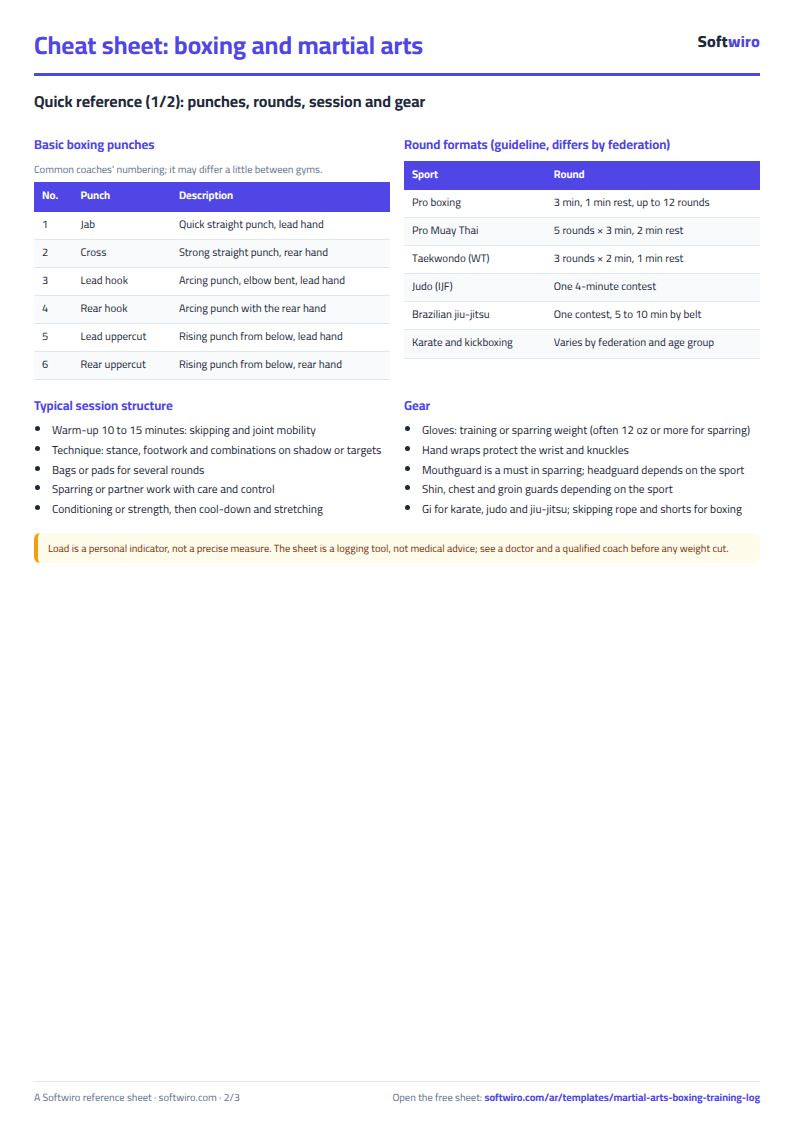
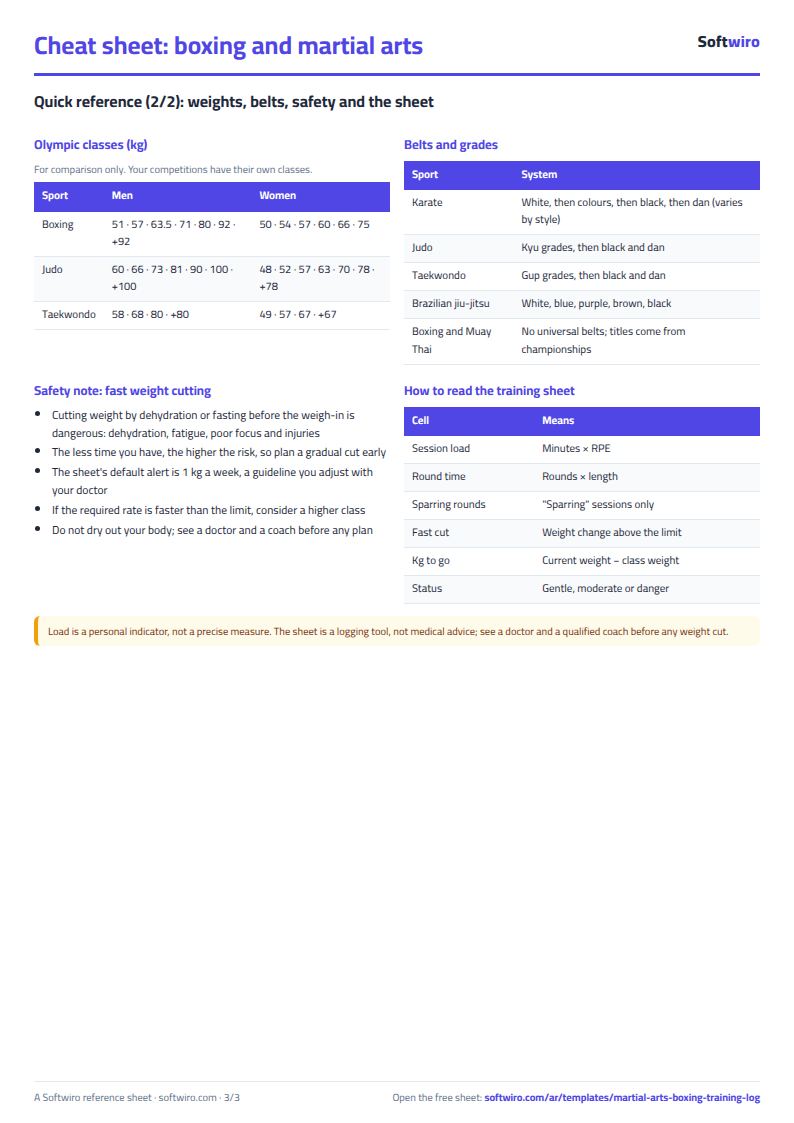
Free cheat sheet for this field
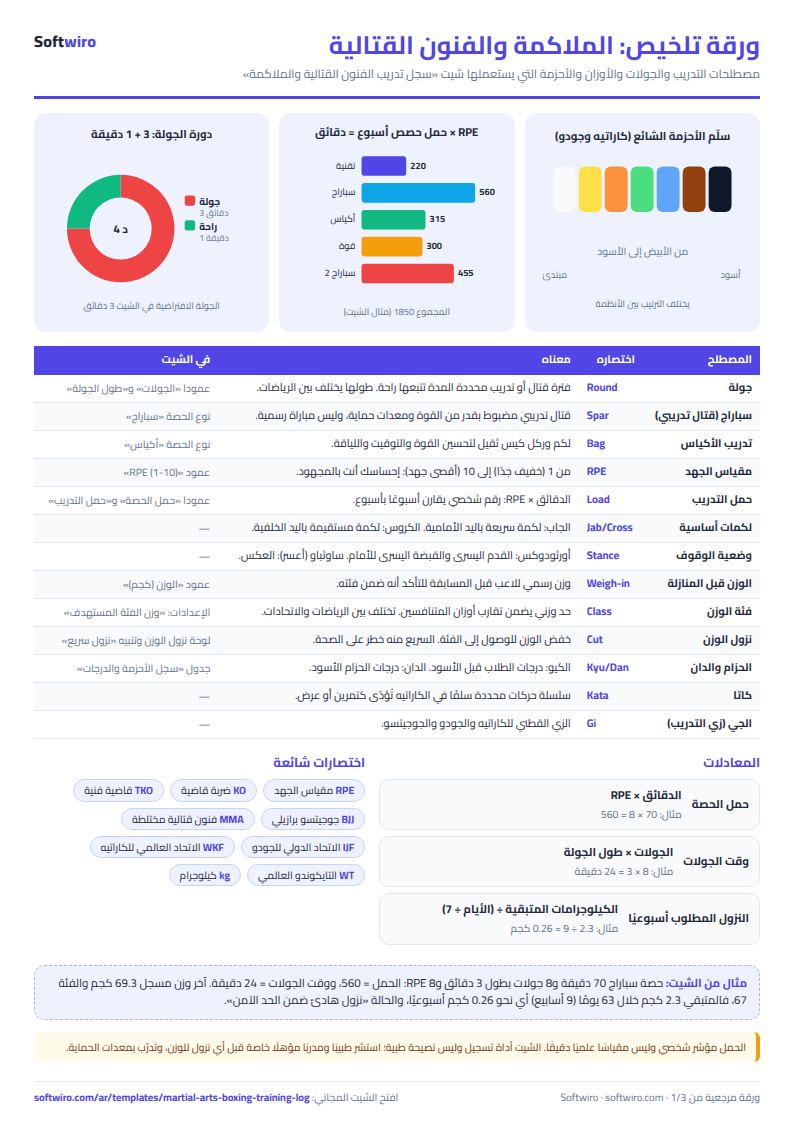
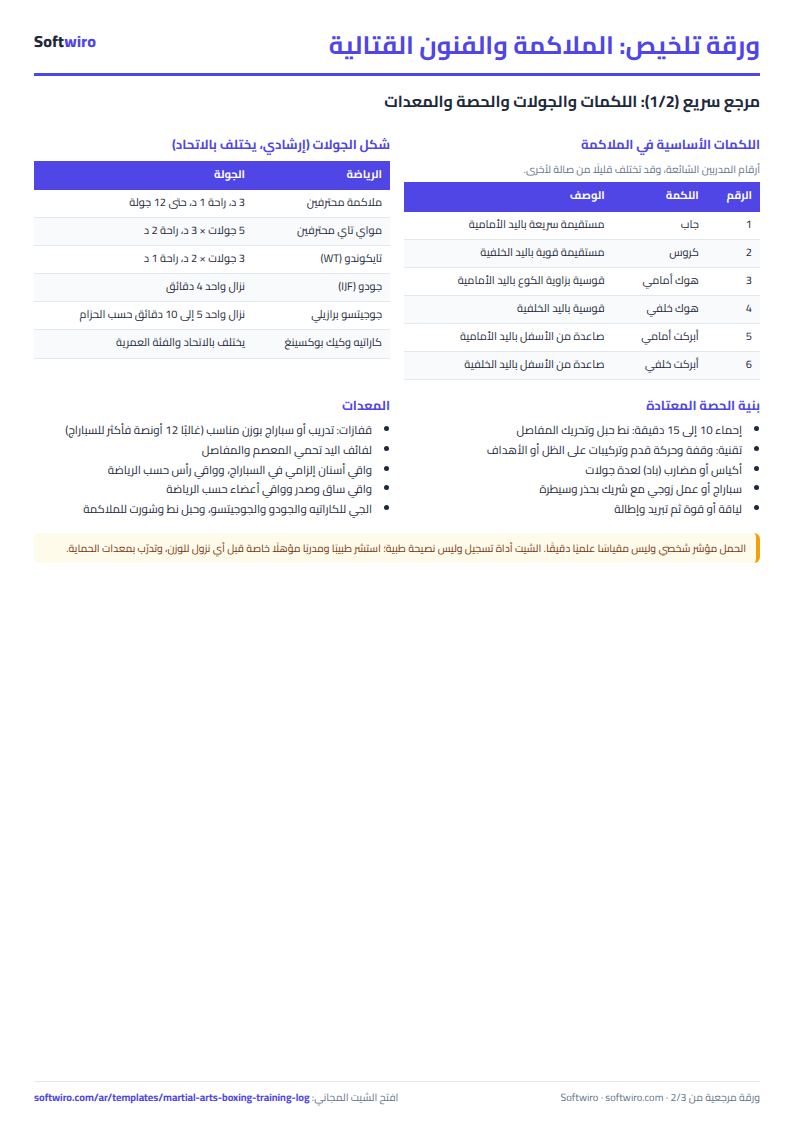
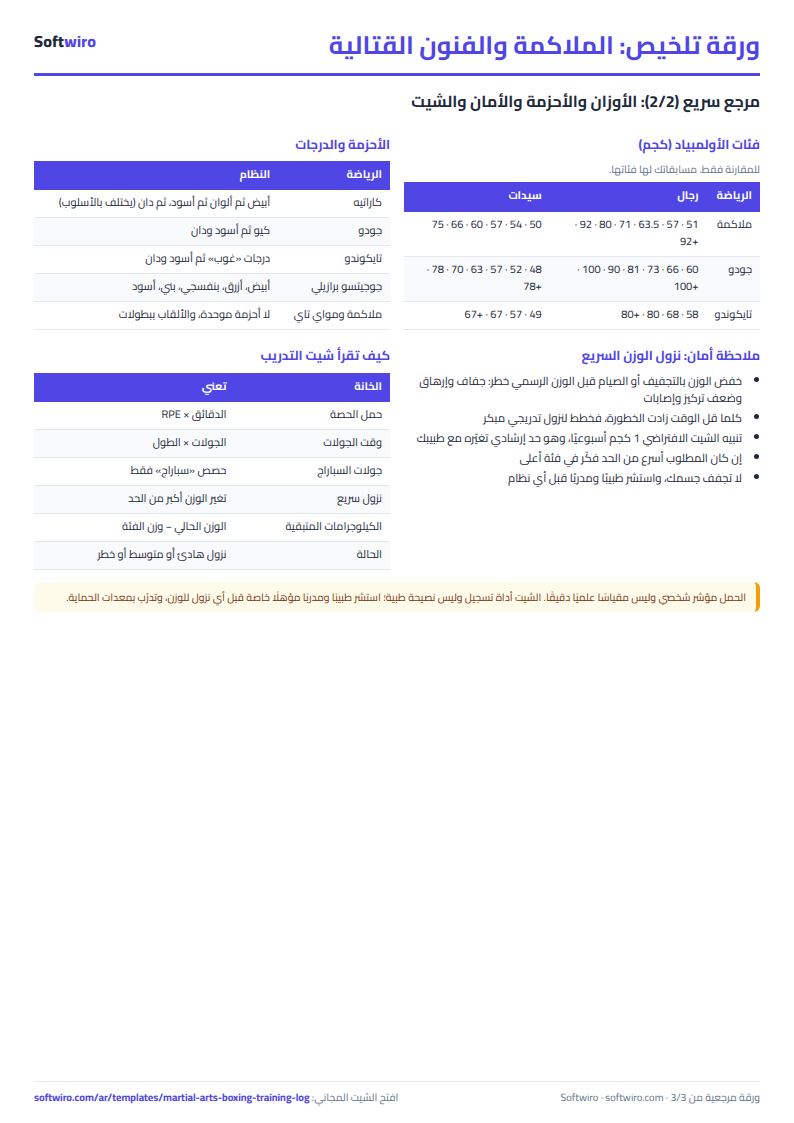
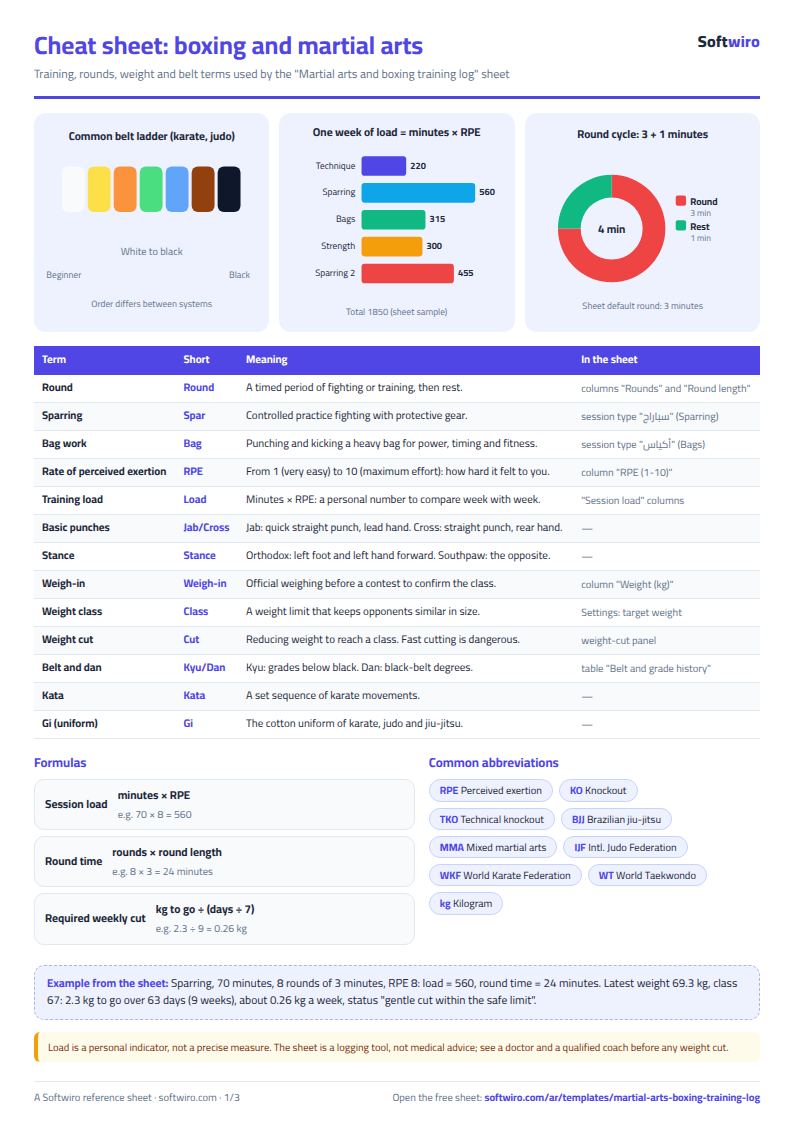
Terms, abbreviations, tables and diagrams over several pages, in Arabic and English. Download it as a PDF or images, including a phone-size version.
Still running this on Excel?
This sheet suits a start and a limited amount of data. If your way of working grows, or you need more than one person working on it at the same time, Softwiro can build you a program that fits the way you work.
| In this sheet | In Custom Software from Softwiro |
|---|---|
| One file that one person edits at a time, and copies reach you on WhatsApp. | A program with a login for each user and permissions you define, and everyone sees the same data. |
| You type everything and check the numbers by hand. | We design the screens around your work steps, so each person records only what concerns them. |
| Columns and formulas are fixed as the sheet was designed. | We build what you need: reports, alerts and screens your way. |
| Backups and security are your own responsibility. | The program runs on a secured server with regular backups. |
Frequently asked questions
How do I calculate training load with RPE in Excel?
Enter the session length in minutes and your RPE (perceived effort) from 1 to 10 in the «الحصص» (Sessions) sheet, and the sheet calculates load = minutes x RPE. For example, a 70-minute sparring session at an effort of 8 is 560. It is a personal indicator for comparing one week with another, not a precise scientific measure, and a session without an RPE gets no load.
How do I know how many kilograms I need to lose each week before a competition?
Enter the target class weight and the competition date in «الإعدادات» (Settings) and log your weight in «الحصص» (Sessions). The weight panel in «الأسبوعي» (Weekly) shows the kilograms remaining to the class, the days left and the weekly loss required, and compares it with a warning limit that you set (1 kg by default). If the required loss exceeds the limit, a danger message appears.
Is rapid weight loss safe, and can the sheet replace a coach or doctor?
No. Cutting weight quickly before a competition is a health risk and can cause dehydration, exhaustion and injuries. The sheet is only a tool for logging and calculating; it is not medical advice and does not replace a coach or doctor. Agree the warning limit and weight class with them before starting any plan.
Is it suitable for karate, judo and taekwondo, or only boxing?
It suits any combat sport. You can edit the lists of sports, session types, belts and grades in «الإعدادات» (Settings): boxing, karate, judo, taekwondo, jiu-jitsu, Muay Thai and kickboxing. It also has a table for your belt and grade history.
Is the template free?
Yes, with no sign-up and no email address. Use it, edit it and share it as you like.
Does it work in Google Sheets and on mobile?
The sheet uses formulas supported by Excel 2016 and later, Google Sheets and LibreOffice, so you can upload it to Google Drive and open it with Google Sheets on a computer or a phone.
What is the difference between the white and the gray cells?
You type in the white cells; the gray cells are calculated automatically. Don't type in a gray cell, or you will erase its formula.
Can I use the sheet from an AI assistant?
Yes. Add our MCP server (URL https://softwiro.com/api/mcp, no key needed) to your assistant and ask it to do the calculation in this template. The numbers come from the sheet's own formulas, and we do not store your data. The steps and a ready-made prompt are in this article: https://softwiro.com/blog/mcp-excel-templates-ai-agent-guide.html
More free templates for: Gyms and fitness
More free templates
- Gym memberships tracker (Excel)
- Strength workout log
- Running, cycling and swimming log
- Training load sheet for any sport (session-RPE)
- Athlete nutrition and macros sheet
- Football player match stats sheet
- Basketball player game stats
- Swimming times and personal bests
- Tennis and padel match log
- Athletics results and personal bests log
- Padel and 5-a-side court booking sheet (hourly)
- Ad budget media plan across platforms
- Ad campaign performance tracker
- Ads A/B test log
- Ads break-even and unit economics sheet
- Ad agency client management and reports
- UTM link builder and campaign naming
- Ad account audit checklist
- Ads creative production calendar