Try the sheet here, on the example
The sheet is open below with sample numbers. Change any white cell and watch the results update, or press the blank-copy button to type your own data from scratch. Nothing you type leaves your browser.
Example from the sheet
| الإجماليات | |
|---|---|
| مباريات مسجلة | 14 |
| فوز | 7 |
| تعادل | 4 |
| خسارة | 3 |
| نسبة الفوز | 50.0% |
| أهداف فريقك | 23 |
| أهداف دخلت مرماكم | 14 |
| مجموع الدقائق | 1,140 |
| أهداف اللاعب | 9 |
| تمريرات حاسمة | 6 |
| تصويبات | 42 |
| تصويبات على المرمى | 20 |
| تمريرات ناجحة | 313 |
| تمريرات محاولة | 398 |
| إنذارات | 4 |
| طرد | 1 |
| مساهمات الأهداف (أهداف + تمريرات حاسمة) | 15 |
Example from the “الملخص” tab (Arabic), with the numbers and formulas that are in the file.
What is inside
- «الإعدادات» (Settings): The player's name, position, team and season, plus the list of competitions the team plays in (up to 8).
- «المباريات» (Matches): One row per match: date, competition from the list, opponent, whether you played home or away, and both teams' goals. Then the player's numbers: minutes, goals, assists, shots (and shots on target), completed passes and attempted passes, yellow and red cards, and your rating from 1 to 10. The result and pass accuracy are calculated automatically, and the "تنبيه" (Alert) column flags a number that does not add up. It holds 300 matches.
- «الملخص» (Summary): Season totals and win rate; goals, assists and shots per 90 minutes; shooting accuracy, shot conversion, pass accuracy and average rating; the form of the last 5 matches; and two tables, one for home vs away and one per competition.
The file opens on a start tab (“ابدأ هنا”, Start here) that explains how to use it.
What makes it different
All of a player's matches in one file: see goals and passes per 90 minutes, whether form is improving over the last five matches, and whether the player does better at home or away, without counting numbers by hand.
How to use it
- In the «الإعدادات» (Settings) sheet, enter the player's name, position, team and season, then list the competitions the team plays in (up to 8).
- In the «المباريات» (Matches) sheet, log each match in one row: the date, the competition from the list, the opponent and whether you played home or away.
- Enter your team's goals and the opponent's goals, then the player's numbers: minutes, goals, assists, shots (and shots on target), completed and attempted passes, and cards.
- Enter your own rating of your performance from 1 to 10 for each match. The result (win, draw or loss) and pass accuracy are calculated automatically.
- Open the «الملخص» (Summary) sheet for totals, per-90 figures, the form of the last 5 matches, and the home vs away and per-competition comparisons.
- Check the "تنبيه" (Alert) column in «المباريات»: it appears if you enter a number that does not add up, such as more shots on target than total shots.
Before you start:
- Per-90 figures = the number / total minutes played x 90, which is fair to players who played fewer minutes.
- Shooting accuracy = shots on target / total shots. Pass accuracy = completed passes / attempted passes.
- The form of the last 5 matches is calculated by match date: a win counts three points, a draw one and a loss zero. If two dates are the same, the lower row is treated as later.
- The rating is your own opinion of your performance, not an official rating. The sheet does not assess the player medically or technically and does not replace the coach's view.
- A match whose competition is not in «الإعدادات» (Settings) is included in the totals and appears in an "unregistered competition" row in the competitions table.
- The sheet holds 300 matches and eight competitions, and is for one player; for a whole team you need a sheet per player or a custom program.
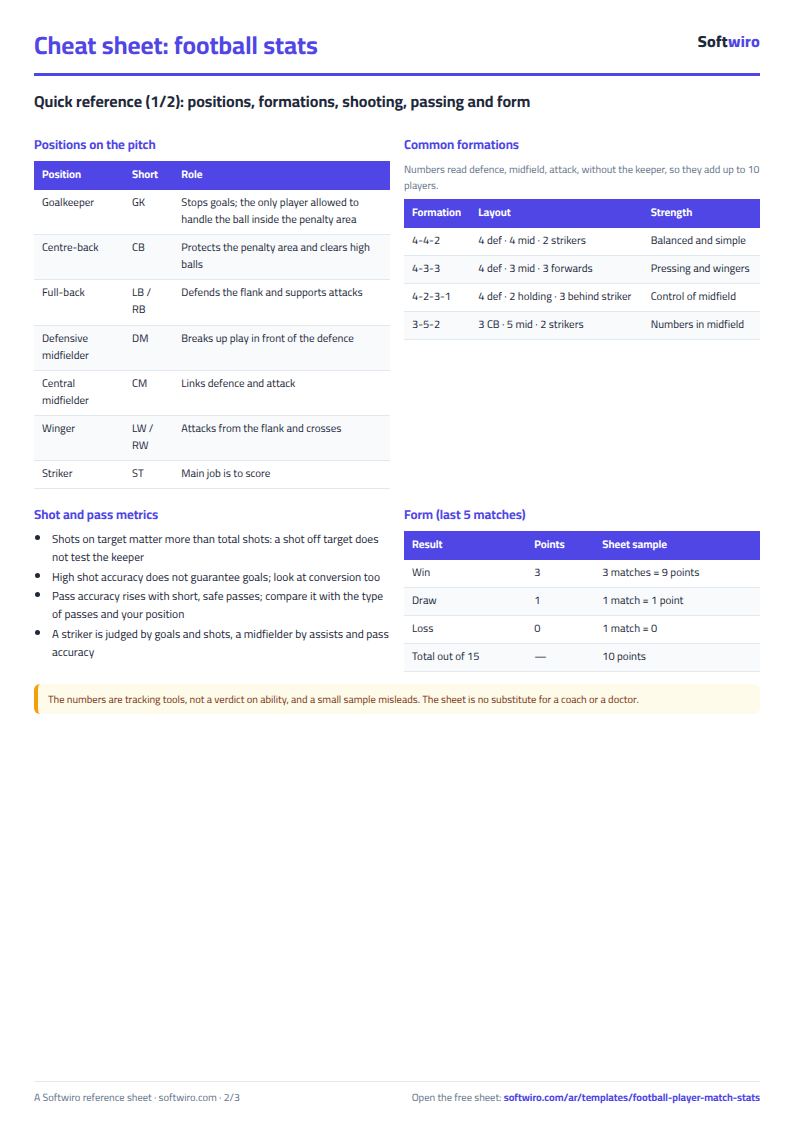
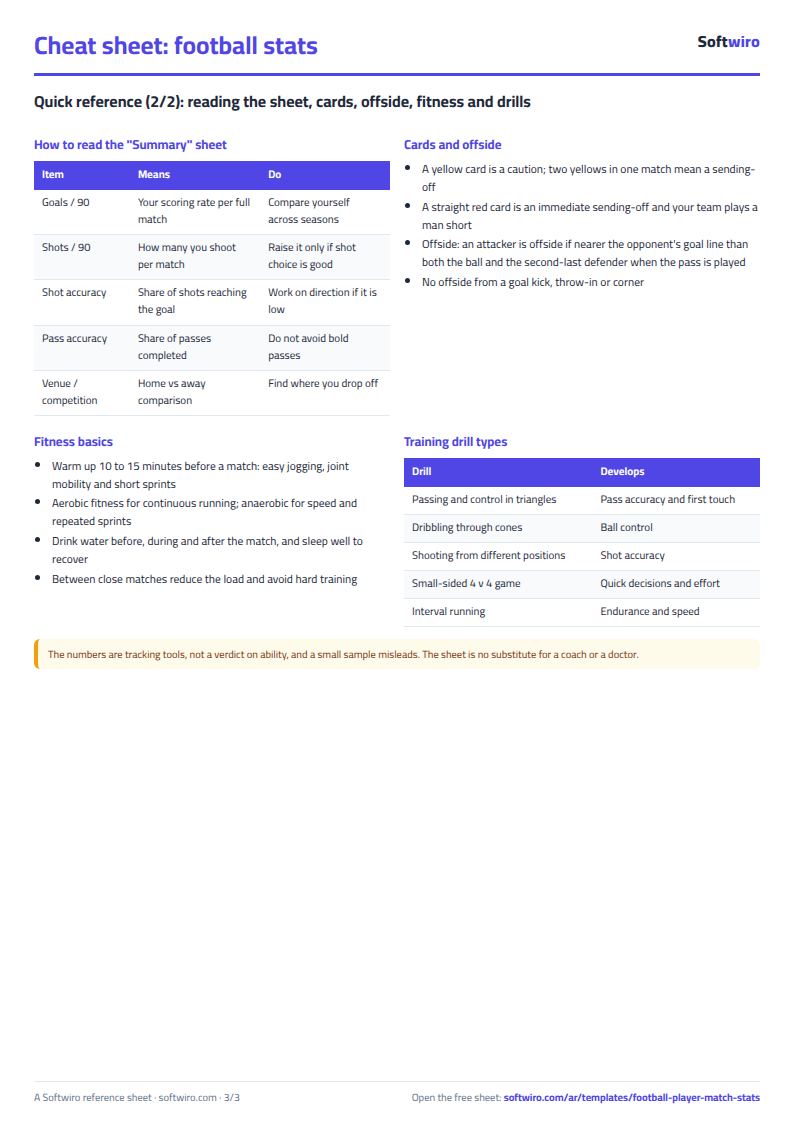
Free cheat sheet for this field
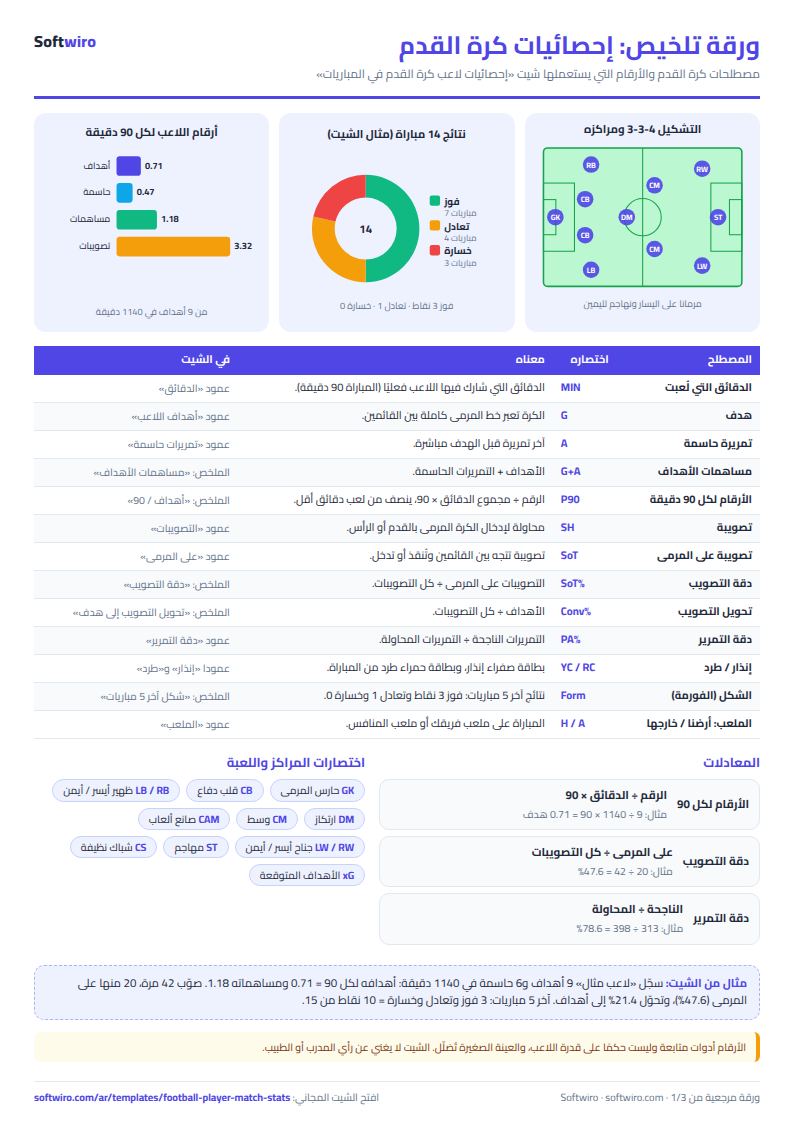
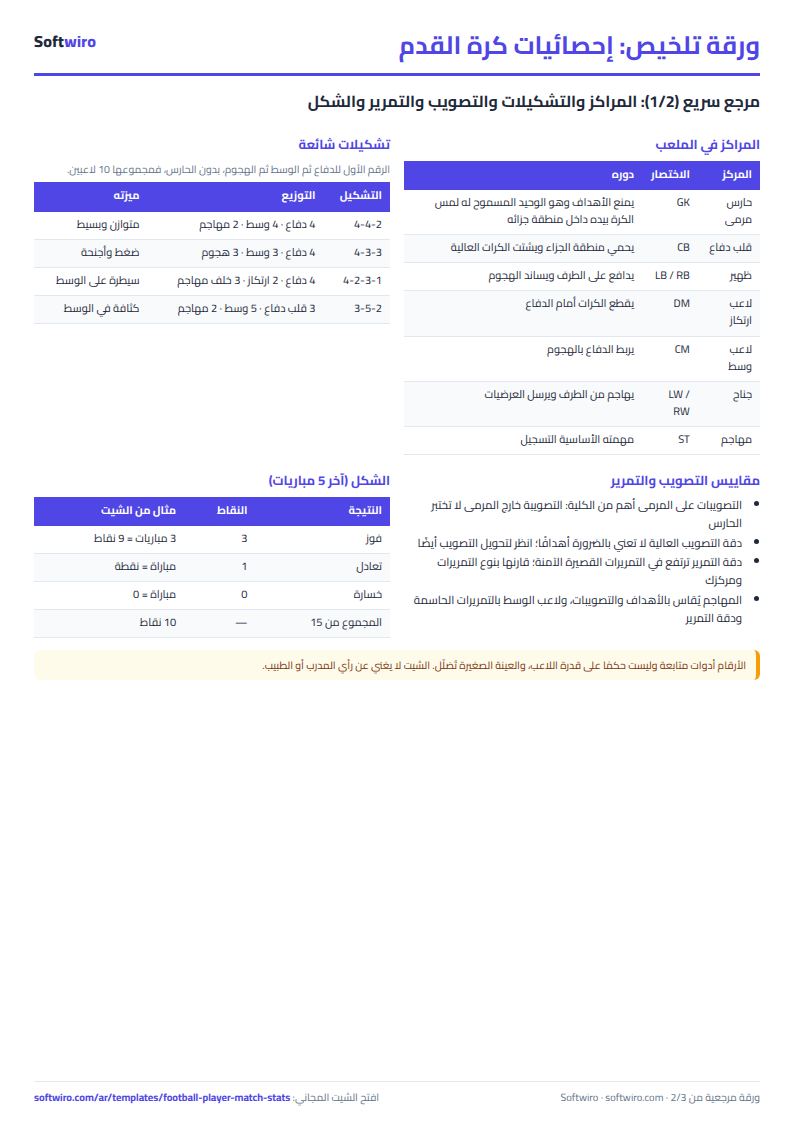
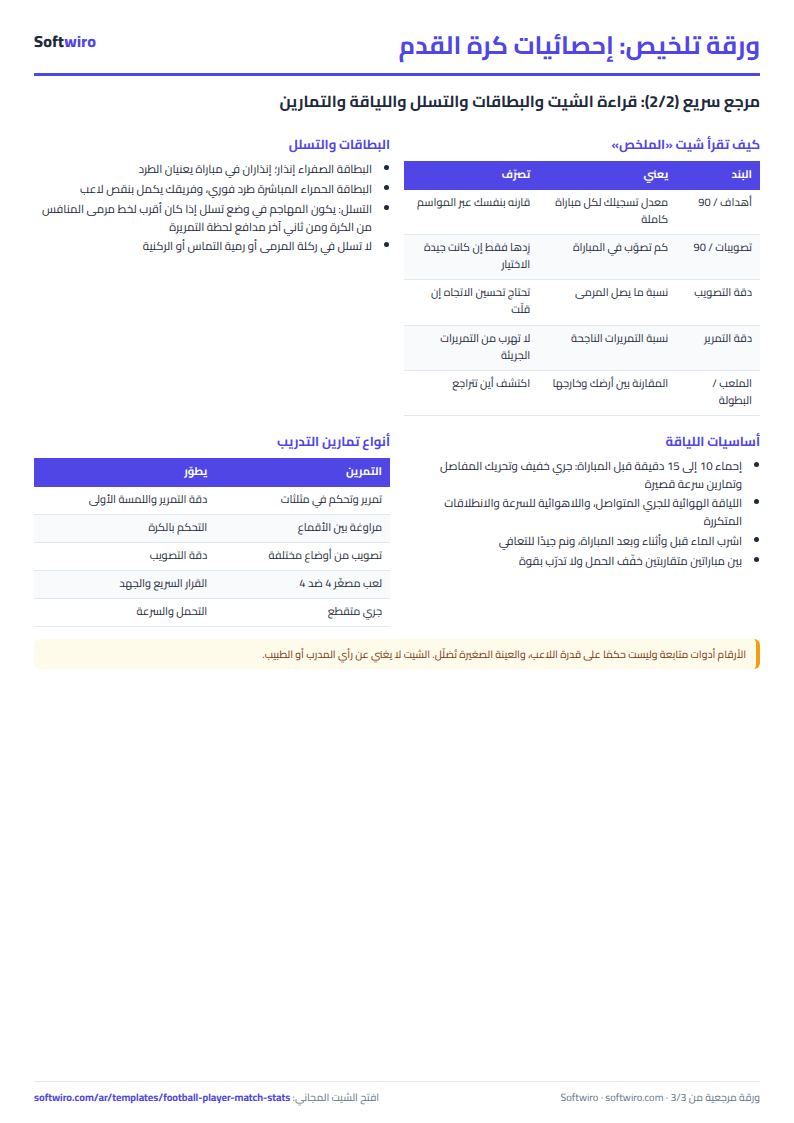
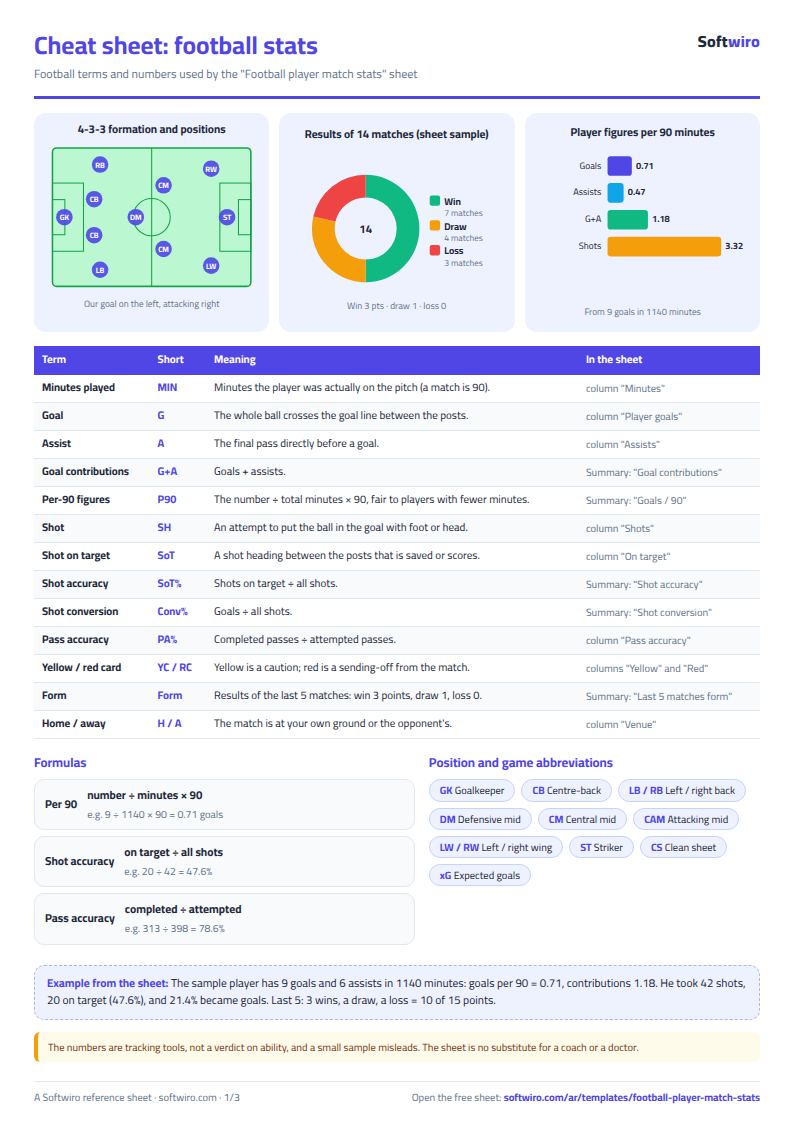
Terms, abbreviations, tables and diagrams over several pages, in Arabic and English. Download it as a PDF or images, including a phone-size version.
Still running this on Excel?
This sheet suits a start and a limited amount of data. If your way of working grows, or you need more than one person working on it at the same time, Softwiro can build you a program that fits the way you work.
| In this sheet | In Custom Software from Softwiro |
|---|---|
| One file that one person edits at a time, and copies reach you on WhatsApp. | A program with a login for each user and permissions you define, and everyone sees the same data. |
| You type everything and check the numbers by hand. | We design the screens around your work steps, so each person records only what concerns them. |
| Columns and formulas are fixed as the sheet was designed. | We build what you need: reports, alerts and screens your way. |
| Backups and security are your own responsibility. | The program runs on a secured server with regular backups. |
Frequently asked questions
What do per-90-minute figures mean and why use them?
The figure is the total divided by the total minutes played, times 90. It is fair to players who come on as substitutes or play fewer minutes: a goal in 45 minutes and a goal in 90 minutes cannot be compared using raw totals.
How do I tell whether a player's form is improving or declining?
Open «الملخص» (Summary) and look at the last-5-matches form: a win counts three points and a draw one, shown with the player's goals and average rating in those matches. Compare it with the season average.
Can the sheet replace a coach, sports doctor or nutritionist?
No. The sheet counts the numbers you enter and does not assess the player technically or medically. The rating is your own opinion of your performance, and decisions about training, injury and nutrition belong to the coach, doctor and nutritionist.
Does it work for a whole team?
It is built for one player. For a whole team you need one sheet per player, or a custom program that brings players and coaches together in one place with permissions and reports.
Is the template free?
Yes, with no sign-up and no email address. Use it, edit it and share it as you like.
Does it work in Google Sheets and on mobile?
The sheet uses formulas supported by Excel 2016 and later, Google Sheets and LibreOffice, so you can upload it to Google Drive and open it with Google Sheets on a computer or a phone.
What is the difference between the white and the gray cells?
You type in the white cells; the gray cells are calculated automatically. Don't type in a gray cell, or you will erase its formula.
Can I use the sheet from an AI assistant?
Yes. Add our MCP server (URL https://softwiro.com/api/mcp, no key needed) to your assistant and ask it to do the calculation in this template. The numbers come from the sheet's own formulas, and we do not store your data. The steps and a ready-made prompt are in this article: https://softwiro.com/blog/mcp-excel-templates-ai-agent-guide.html
More free templates for: Gyms and fitness
More free templates
- Gym memberships tracker (Excel)
- Strength workout log
- Running, cycling and swimming log
- Training load sheet for any sport (session-RPE)
- Athlete nutrition and macros sheet
- Basketball player game stats
- Swimming times and personal bests
- Martial arts and boxing training log
- Tennis and padel match log
- Athletics results and personal bests log
- Padel and 5-a-side court booking sheet (hourly)
- Ad budget media plan across platforms
- Ad campaign performance tracker
- Ads A/B test log
- Ads break-even and unit economics sheet
- Ad agency client management and reports
- UTM link builder and campaign naming
- Ad account audit checklist
- Ads creative production calendar