Try the sheet here, on the example
The sheet is open below with sample numbers. Change any white cell and watch the results update, or press the blank-copy button to type your own data from scratch. Nothing you type leaves your browser.
Example from the sheet
| الحدث | المحاولات | مكتوبًا | تاريخه | مكتوبة | التحسن عن الرقم السابق | متوسط آخر 3 | رقم شخصي جديد |
|---|---|---|---|---|---|---|---|
| 60م | 4 | 7.7 ث | 46158 | 7.74 ث | 0.08 | 7.74 | |
| 100م | 9 | 11.72 ث | 46312 | 11.72 ث | 0.06 | 11.76 | |
| 200م | 6 | 23.88 ث | 46312 | 23.88 ث | 0.07 | 24.01 | رقم شخصي جديد |
| 400م | 5 | 54.3 ث | 46298 | 54.3 ث | 0.30 | 54.60 | رقم شخصي جديد |
| 800م | 5 | 2:05.9 | 46338 | 2:05.9 | 0.40 | 126.57 | رقم شخصي جديد |
| 1500م | 4 | 4:26.8 | 46242 | 4:28 | 3.40 | 268.33 | |
| 5000م | 0 | ||||||
| الوثب الطويل | 6 | 6.12 م | 46130 | 6.08 م | 0.17 | 6.05 | |
| الوثب العالي | 4 | 1.85 م | 46214 | 1.82 م | 0.05 | 1.82 | |
| دفع الجلة | 4 | 12.3 م | 46305 | 12.3 م | 0.25 | 12.00 | رقم شخصي جديد |
| رمي الرمح | 1 | 32.4 م | 46256 | 32.40 | رقم شخصي جديد |
Example from the “الأرقام الشخصية” tab (Arabic), with the numbers and formulas that are in the file.
What is inside
- «الإعدادات» (Settings): The athlete's name and the season start date, plus the list of events (up to 12): whether each event is timed or measured by distance, and the race distance in metres for running events.
- «النتائج» (Results): For each result: date, meet or training, event from the list, the result in seconds or metres, and the wind speed and place if you have them. The sheet writes the result in a readable form (such as 2:05.9) and flags errors and wind above +2 m/s. It holds 800 results.
- «الأرقام الشخصية» (Personal bests): For each event: number of attempts, number of times you broke your record, personal best and its date, season best, improvement over the previous best, average of the last 3 results, latest result, and a "new personal best" flag. Below it are the speeds of your personal best, season best and latest result in kilometres per hour.
The file opens on a start tab (“ابدأ هنا”, Start here) that explains how to use it.
What makes it different
Log each result once and get your personal best for every event, your season best, your improvement and your speed, so you can see whether you are really progressing in each event instead of hunting for your numbers in papers and messages from your coach.
How to use it
- In the «الإعدادات» (Settings) sheet, enter the athlete's name and the season start date, and review the event list: the type of each event (timed or distance) and the race distance in metres.
- In the «النتائج» (Results) sheet, log each result in one row, ordered by date from oldest to newest: the date, the meet or training, and the event from the list.
- Enter the result in seconds for races (such as 11.85) and in metres for jumps and throws (such as 6.12), then the wind speed and place if you have them.
- Leave the grey columns alone: they show the result in readable form (such as 2:10.5) and work out whether the result is valid and breaks your record.
- Open the «الأرقام الشخصية» (Personal bests) sheet to see, for each event, the personal best and its date, the season best, the improvement and the average of the last 3 results.
- Watch the "new personal best" column at the end of the table, and the speed table in kilometres per hour for running events.
Before you start:
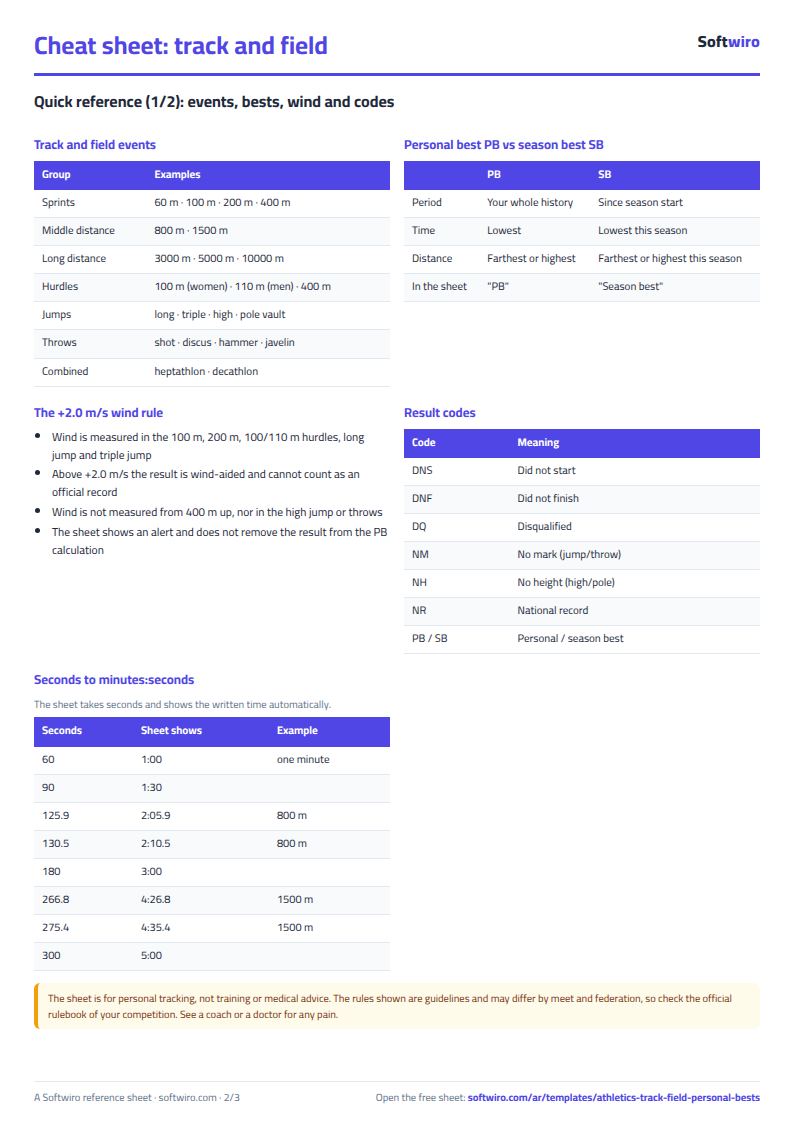
- Enter race times in seconds: an 800 m in 2:10.5 is entered as 130.5 (2 x 60 + 10.5), and a 1500 m in 4:35.4 is entered as 275.4.
- The personal best in timed events is the lowest time, and in jumps and throws it is the greatest distance or height. If two results are equal, the date of the first one is kept.
- Log results in date order: the sheet treats the top row as the oldest and compares each result with the ones above it. The "latest result" is the last row for the event.
- Speed = distance in metres / time in seconds x 3.6. The season best counts results from the season start date onwards.
- A result with wind above +2 m/s is marked with a note and is not accepted as an official record in competitions, but it is still included in the sheet's calculations.
- The sheet is for personal tracking, not training or medical advice. It holds 800 results and 12 events for one athlete; do not delete a row from the middle of the list.
Free cheat sheet for this field
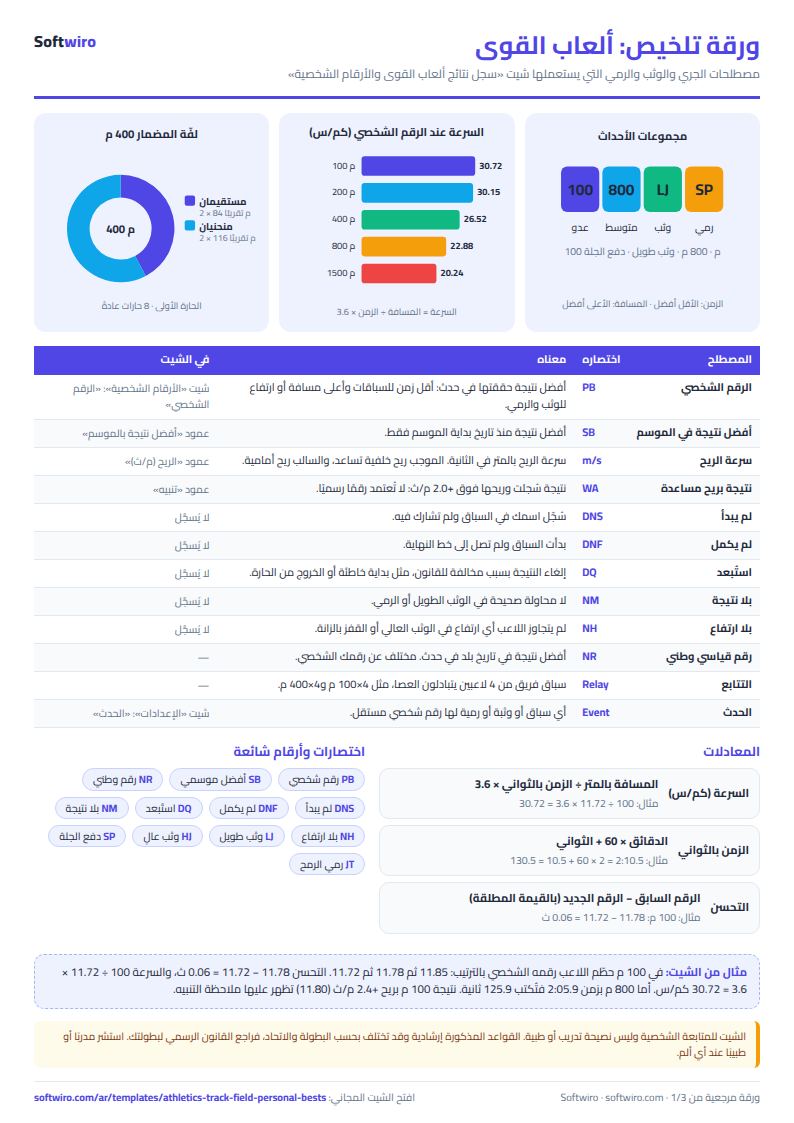
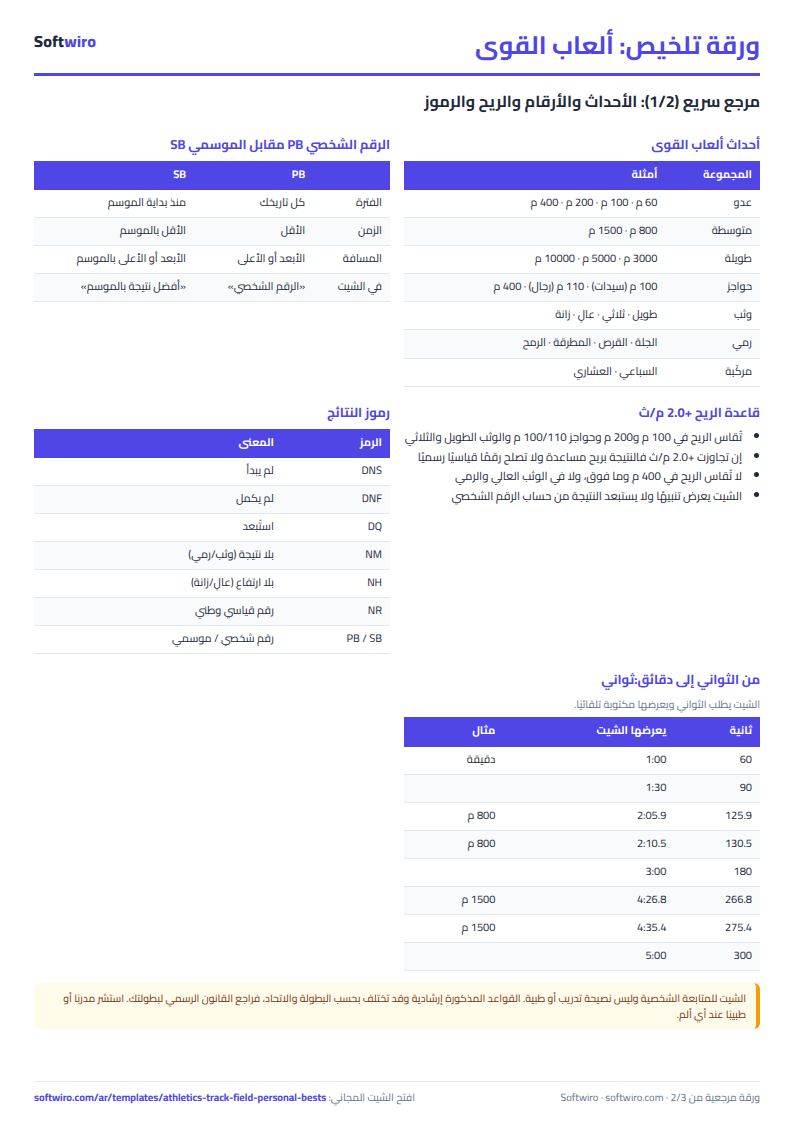
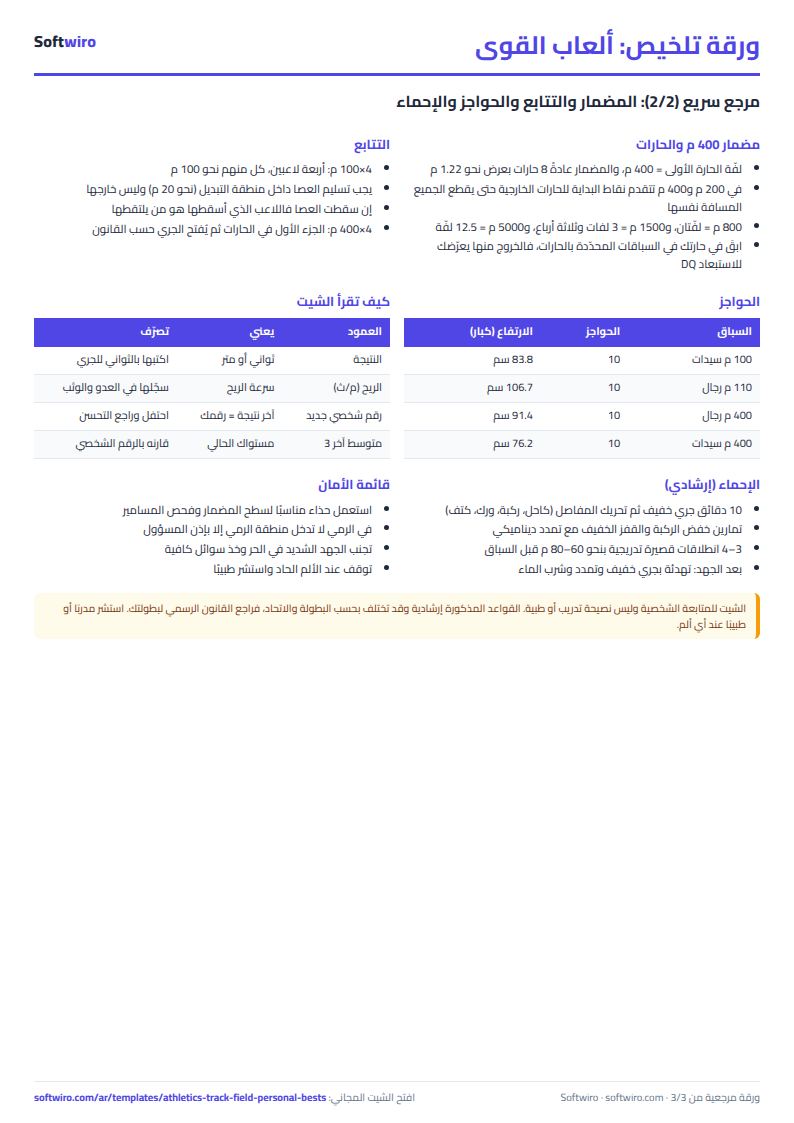
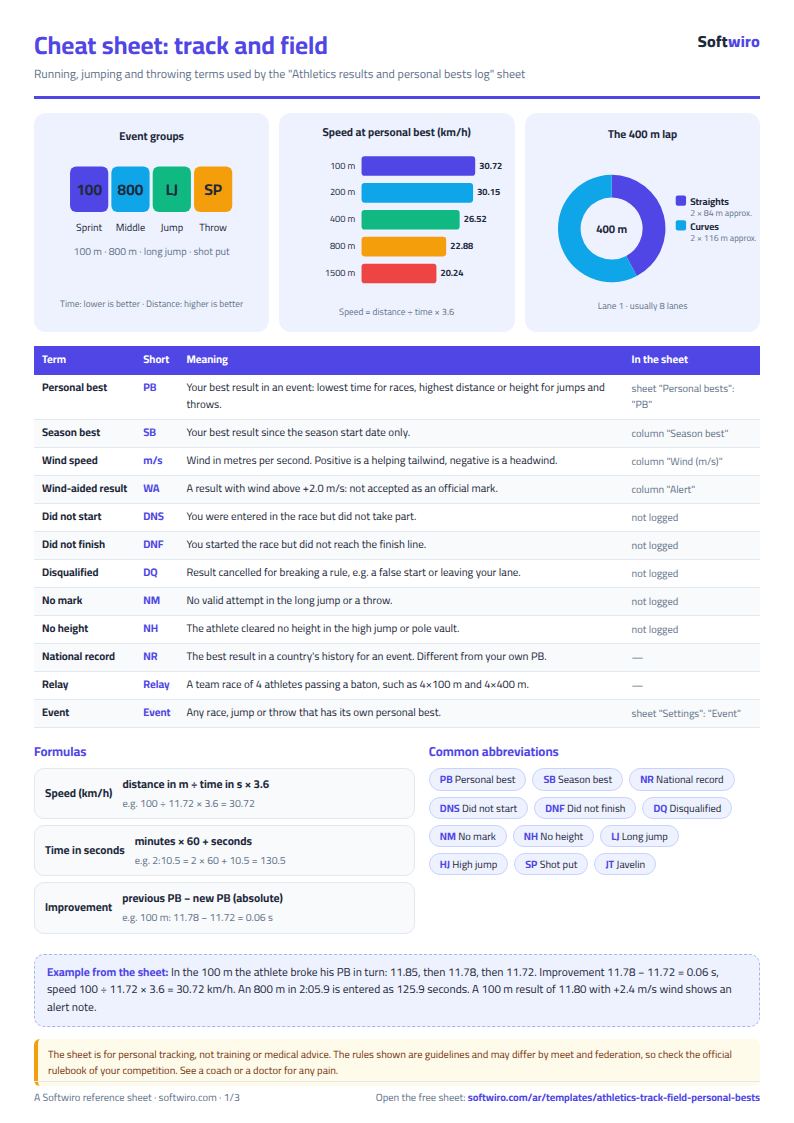
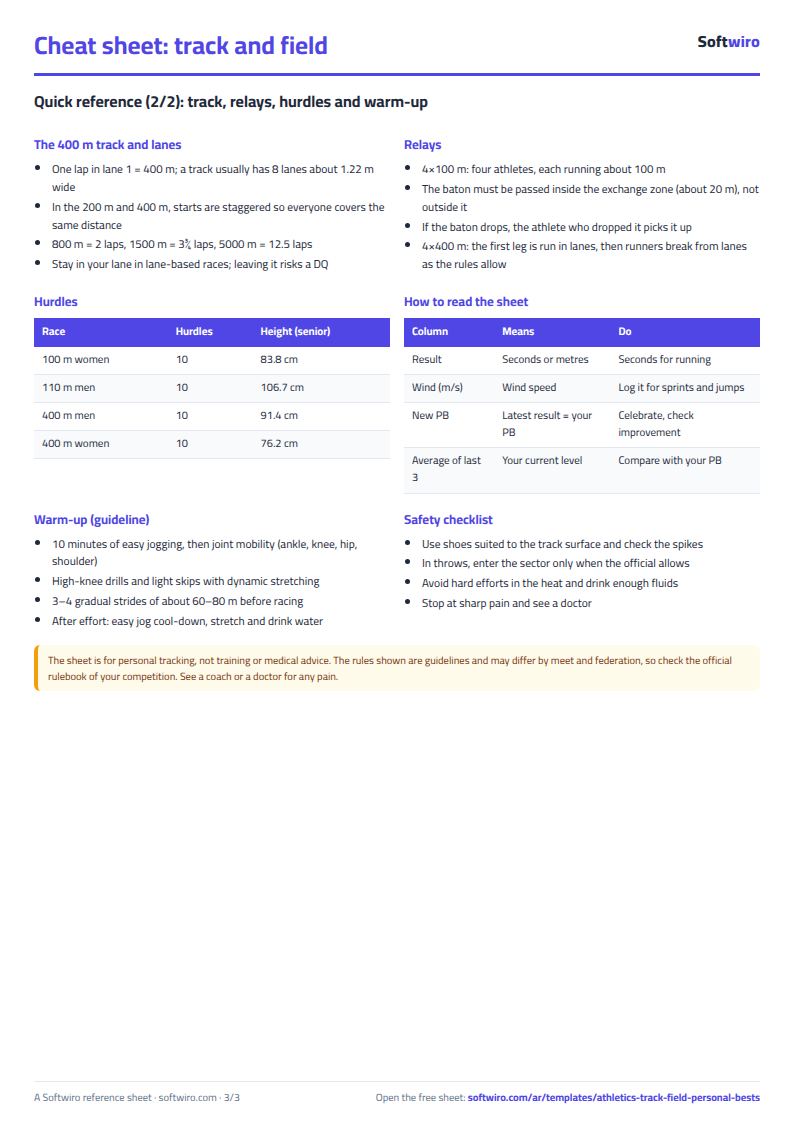
Terms, abbreviations, tables and diagrams over several pages, in Arabic and English. Download it as a PDF or images, including a phone-size version.
Still running this on Excel?
This sheet suits a start and a limited amount of data. If your way of working grows, or you need more than one person working on it at the same time, Softwiro can build you a program that fits the way you work.
| In this sheet | In Custom Software from Softwiro |
|---|---|
| One file that one person edits at a time, and copies reach you on WhatsApp. | A program with a login for each user and permissions you define, and everyone sees the same data. |
| You type everything and check the numbers by hand. | We design the screens around your work steps, so each person records only what concerns them. |
| Columns and formulas are fixed as the sheet was designed. | We build what you need: reports, alerts and screens your way. |
| Backups and security are your own responsibility. | The program runs on a secured server with regular backups. |
Frequently asked questions
How do I enter an 800 m race time in the sheet?
Enter the whole time in seconds: 2:10.5 is entered as 130.5 (2 x 60 + 10.5). The sheet then shows it in the "النتيجة مكتوبة" (Result as written) column in minutes and seconds. For jumps and throws, enter the result in metres, such as 6.12.
How does the sheet determine the personal best?
In timed events the personal best is the lowest time, and in jumps and throws it is the greatest distance or height. If two results are equal, the date of the first one is kept. The season best is calculated from the season start date onwards.
Can I treat a mark set with a strong tailwind as an official record?
No. The sheet puts a note on a result with wind above +2 m/s, and such a result is not accepted as an official record in competitions, but it is still included in the sheet's calculations. Check with your federation or the meet organiser about approving marks.
Can the sheet replace a coach or doctor?
No. The sheet is only for personal tracking of your results; it is not a training program or medical advice. Ask your coach about your training plan, and see a doctor if you have an injury or pain while running, jumping or throwing.
Is the template free?
Yes, with no sign-up and no email address. Use it, edit it and share it as you like.
Does it work in Google Sheets and on mobile?
The sheet uses formulas supported by Excel 2016 and later, Google Sheets and LibreOffice, so you can upload it to Google Drive and open it with Google Sheets on a computer or a phone.
What is the difference between the white and the gray cells?
You type in the white cells; the gray cells are calculated automatically. Don't type in a gray cell, or you will erase its formula.
Can I use the sheet from an AI assistant?
Yes. Add our MCP server (URL https://softwiro.com/api/mcp, no key needed) to your assistant and ask it to do the calculation in this template. The numbers come from the sheet's own formulas, and we do not store your data. The steps and a ready-made prompt are in this article: https://softwiro.com/blog/mcp-excel-templates-ai-agent-guide.html
More free templates for: Gyms and fitness
More free templates
- Gym memberships tracker (Excel)
- Strength workout log
- Running, cycling and swimming log
- Training load sheet for any sport (session-RPE)
- Athlete nutrition and macros sheet
- Football player match stats sheet
- Basketball player game stats
- Swimming times and personal bests
- Martial arts and boxing training log
- Tennis and padel match log
- Padel and 5-a-side court booking sheet (hourly)
- Ad budget media plan across platforms
- Ad campaign performance tracker
- Ads A/B test log
- Ads break-even and unit economics sheet
- Ad agency client management and reports
- UTM link builder and campaign naming
- Ad account audit checklist
- Ads creative production calendar