Try the sheet here, on the example
The sheet is open below with sample numbers. Change any white cell and watch the results update, or press the blank-copy button to type your own data from scratch. Nothing you type leaves your browser.
Example from the sheet
| التاريخ | سعرات | بروتين | نشويات | دهون | % السعرات | حالة السعرات |
|---|---|---|---|---|---|---|
| الهدف اليومي | 3,048 | 164 | 407 | 85 | ||
| 46325 | 3148.4 | 208.5 | 390.1 | 84.7 | 103.3% | ضمن |
| 46326 | 2831.2 | 187.1 | 349.6 | 76.7 | 92.9% | ضمن |
| 46327 | 3295.0 | 218.8 | 409.8 | 87.6 | 108.1% | ضمن |
| 46328 | 1913.5 | 125.6 | 235.5 | 52.8 | 62.8% | تحت |
| 46329 | 0.0 | 0.0 | 0.0 | 0.0 | لا تسجيل | |
| 46330 | 3148.4 | 208.5 | 390.1 | 84.7 | 103.3% | ضمن |
| 46331 | 3788.0 | 250.0 | 467.3 | 103.1 | 124.3% | فوق |
| 46332 | 3001.9 | 198.3 | 370.3 | 81.7 | 98.5% | ضمن |
| 46333 | 3148.4 | 208.5 | 390.1 | 84.7 | 103.3% | ضمن |
| 46334 | 1976.4 | 135.6 | 221.7 | 58.9 | 64.8% | تحت |
| 46335 | 3465.6 | 229.9 | 430.5 | 92.7 | 113.7% | فوق |
| 46336 | 3148.4 | 208.5 | 390.1 | 84.7 | 103.3% | ضمن |
| 46337 | 2699.6 | 177.3 | 332.5 | 74.2 | 88.6% | تحت |
| 46338 | 3148.4 | 208.5 | 390.1 | 84.7 | 103.3% | ضمن |
Example from the “اليوميات” tab (Arabic), with the numbers and formulas that are in the file.
What is inside
- «الإعدادات» (Settings): Your weight, height, age, sex, activity level, goal and the last day you want to review, with your daily targets calculated below. It also holds the food list (up to 60 items) with calories, protein, carbs and fat per 100 g, which you can edit and extend with your own foods.
- «الوجبات» (Meals): Log each meal with its date, type (breakfast, lunch, snack, dinner, pre-workout or post-workout), the food from the list and the weight in grams. Calories and macros are calculated automatically, and the sheet warns you about a food that is not in the list. It holds 1,500 rows.
- «اليوميات» (Daily log): The last 14 days ending on the date you chose: calories, protein, carbs and fat eaten, each as a percentage of your target, with a colour-coded status of under, on target or over. Averages and the number of days in each status sit below.
The file opens on a start tab (“ابدأ هنا”, Start here) that explains how to use it.
What makes it different
In a few minutes you know how many calories, protein, carbs and fat you need each day for your goal, and whether you actually stuck to them over the last two weeks, from one table you adjust with your own foods.
How to use it
- In the «الإعدادات» (Settings) sheet, enter your weight, height and age, choose your sex, activity level and goal, and set the last day you want to review. Your daily targets appear automatically.
- Review the food list in «الإعدادات» (up to 60 items) and edit its values or add your own foods: calories, protein, carbs and fat per 100 g.
- In the «الوجبات» (Meals) sheet, log each meal: the date, its type, the food from the list and the weight in grams. Its macros are calculated automatically.
- Open «اليوميات» (Daily log) to see the last 14 days: what you ate of each item, its percentage of the target, and its status of under, on target or over.
- Adjust your plan based on the result: if you stay "under" for several days in a row, increase your meals; if you stay "over", cut portions or swap foods.
Before you start:
- These are rough estimates, not medical advice. If you have a medical condition, are pregnant, take medication or want to lose a lot of weight, consult a doctor or dietitian.
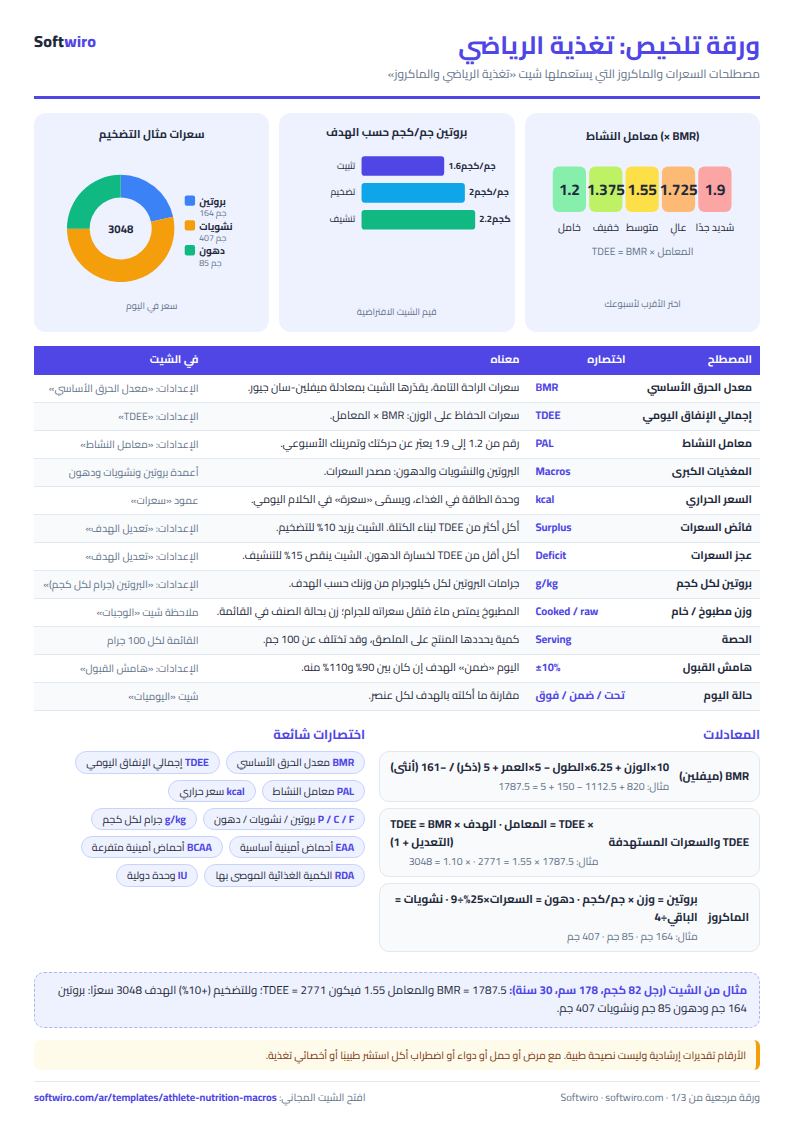
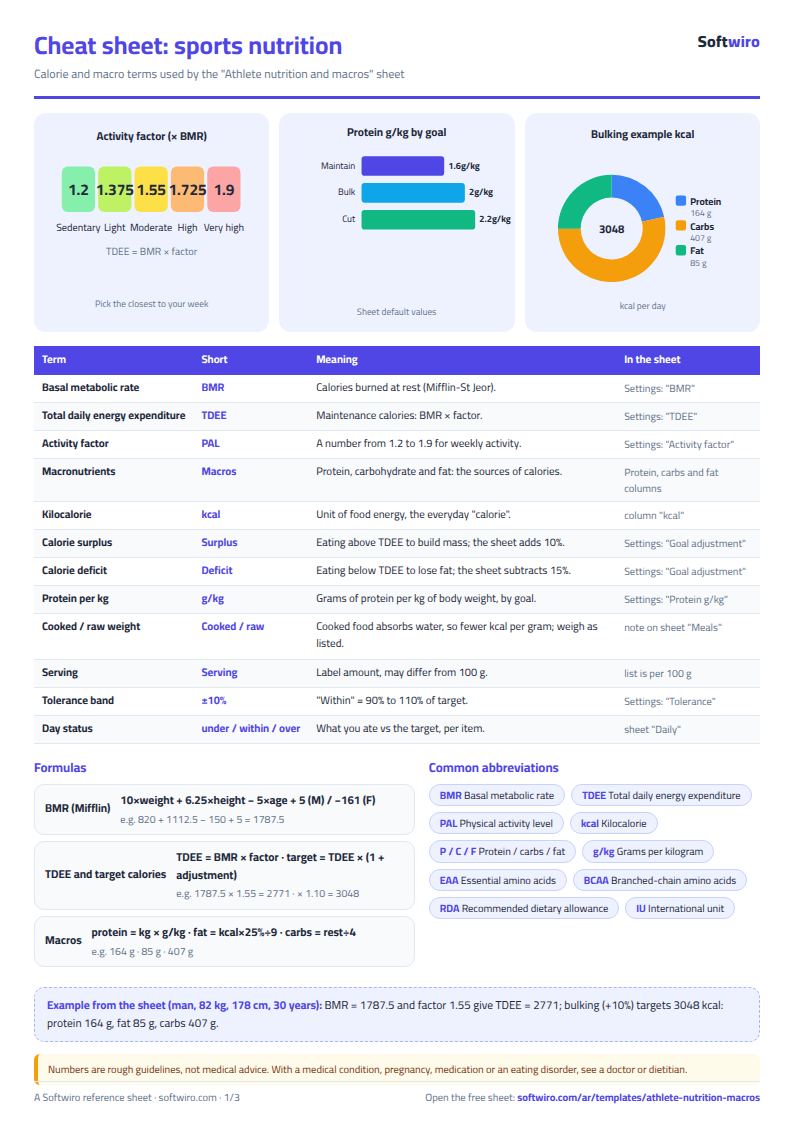
- Daily calories = basal metabolic rate (Mifflin-St Jeor equation) x activity factor, then +10% for a bulk, -15% for a cut, or no change to maintain.
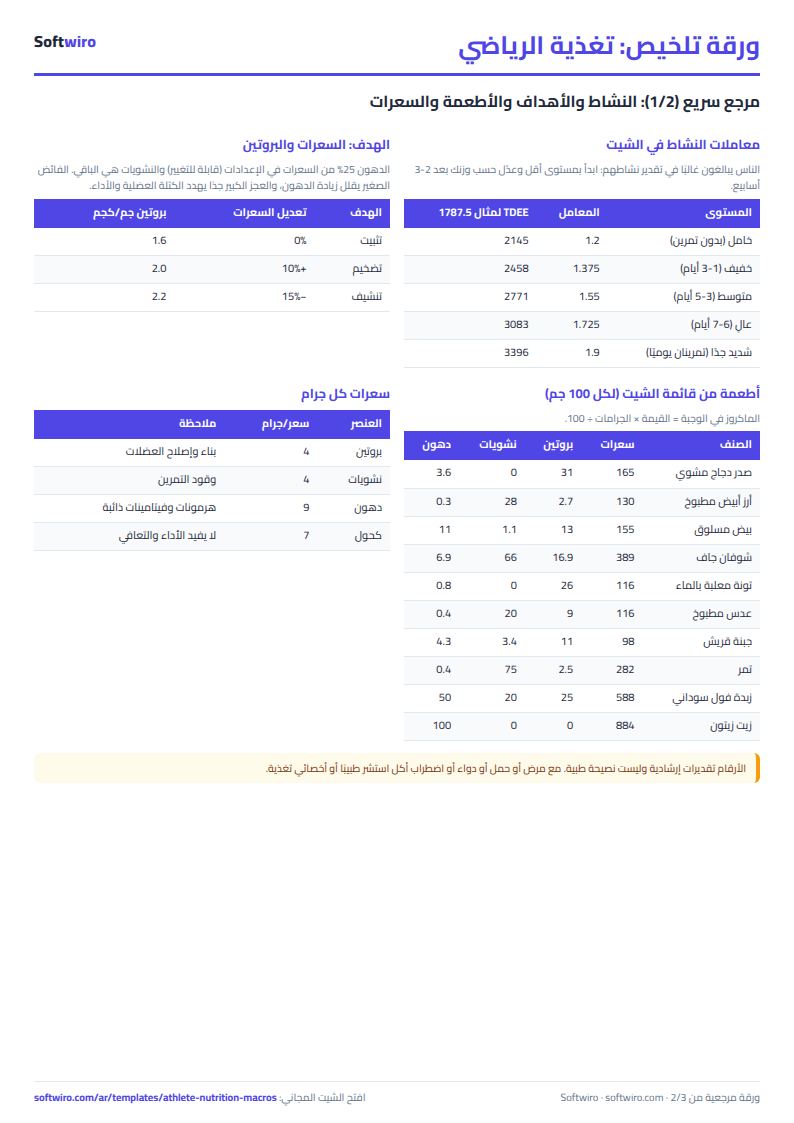
- Protein in grams per kg of body weight depends on the goal (maintain 1.6, bulk 2.0, cut 2.2). Fat is 25% of calories (1 g = 9 calories) and carbs are the remainder (1 g = 4 calories).
- The status compares each day with the target using a margin of +/-10%: below 90% is "under" and above 110% is "over". A day with no meals logged shows "no log" and is left out of the averages.
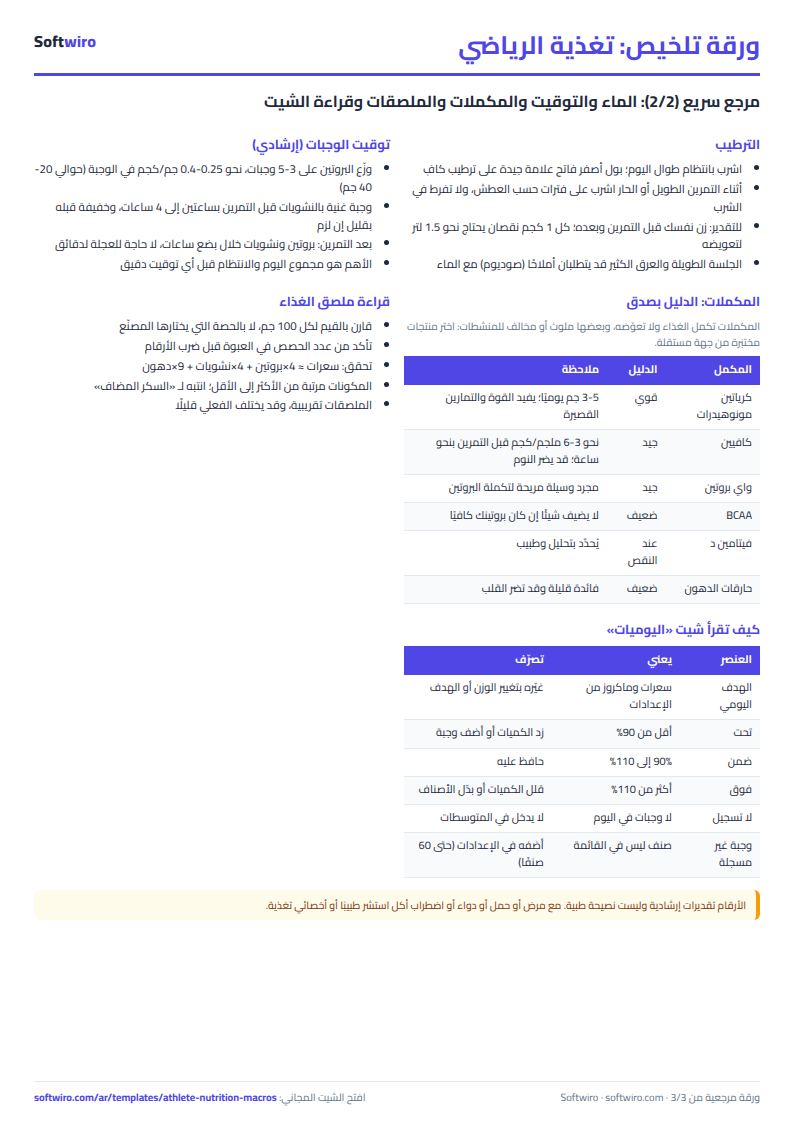
- Food values in the list are approximate and vary by brand and cooking method; enter the weight of cooked food separately from raw. A food that is not in the list shows "food not in list" beside it and its macros are not calculated.
- The sheet holds 1,500 meal rows and 60 foods, and shows 14 days ending on the date entered in the settings.
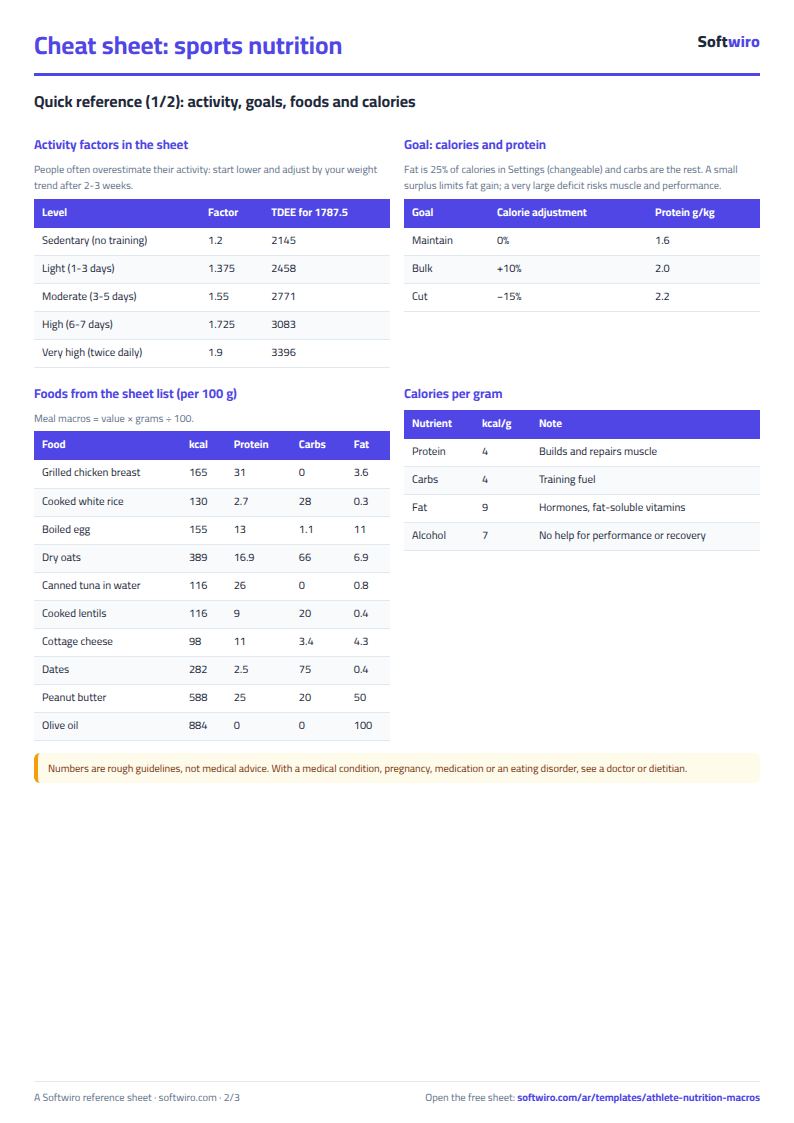
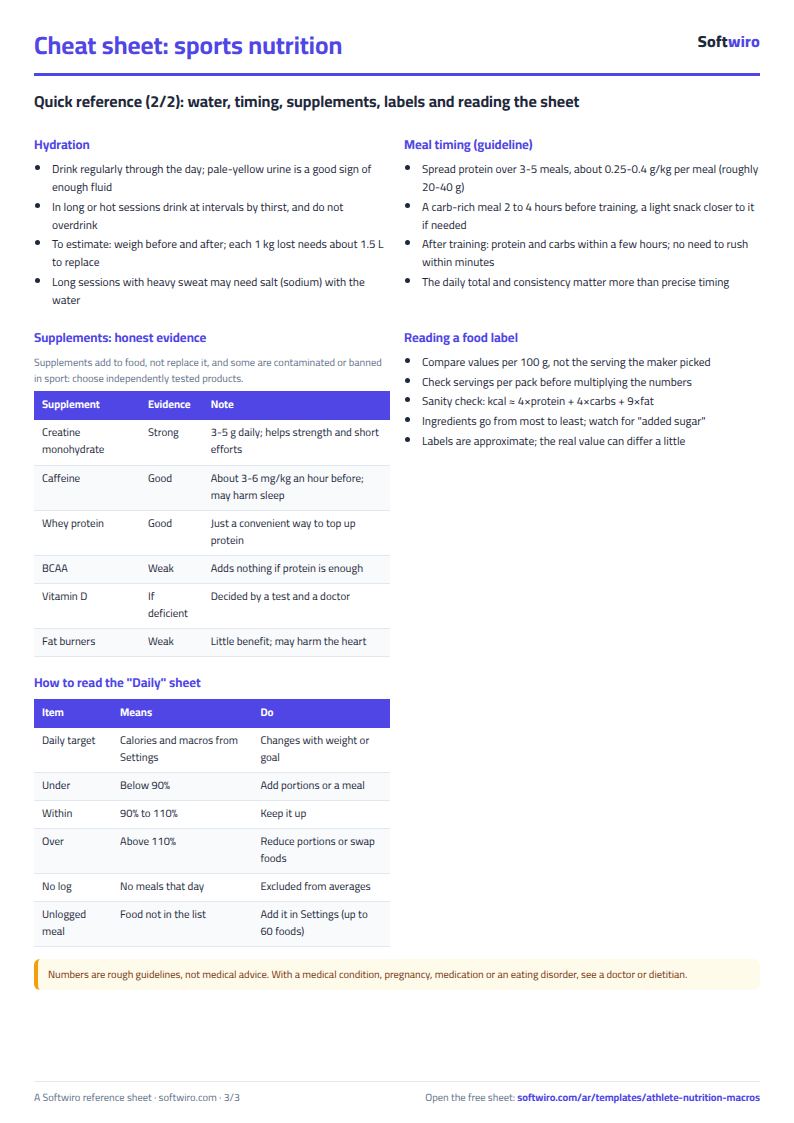
Free cheat sheet for this field
Terms, abbreviations, tables and diagrams over several pages, in Arabic and English. Download it as a PDF or images, including a phone-size version.
Still running this on Excel?
This sheet suits a start and a limited amount of data. If your way of working grows, or you need more than one person working on it at the same time, Softwiro can build you a program that fits the way you work.
| In this sheet | In Custom Software from Softwiro |
|---|---|
| One file that one person edits at a time, and copies reach you on WhatsApp. | A program with a login for each user and permissions you define, and everyone sees the same data. |
| You type everything and check the numbers by hand. | We design the screens around your work steps, so each person records only what concerns them. |
| Columns and formulas are fixed as the sheet was designed. | We build what you need: reports, alerts and screens your way. |
| Backups and security are your own responsibility. | The program runs on a secured server with regular backups. |
Frequently asked questions
How does the sheet calculate calorie and macro targets?
It works out your basal metabolic rate with the Mifflin-St Jeor equation from your weight, height, age and sex, multiplies it by an activity factor, then adds 10% for a bulk, subtracts 15% for a cut, or leaves it unchanged to maintain. Protein is 1.6, 2.0 or 2.2 g per kg depending on the goal, fat is 25% of calories, and carbs are the remainder. All figures are estimates; adjust them to how your body responds.
Can the sheet replace a coach, doctor or dietitian?
No. The sheet calculates, adds up and compares, but it does not know your health, injuries or type of training. If you have a medical condition, are pregnant, take medication or want to lose a lot of weight, see a doctor or dietitian and show the plan to your coach.
What do I do with a restaurant meal or a food that is not in the list?
Add the food to the food list with its values per 100 g from the package label or a reliable source. If you log a name that is not in the list, the sheet shows "food not in list" beside it and does not calculate its macros, so it is left out of that day's total until you fix the name.
How does the sheet handle a day with no meals logged?
The day shows "no log" and is left out of the averages, so a made-up zero does not pull your average down. A day where you logged only some meals shows "under", because the sheet cannot know you forgot to log. Check it before you change your plan.
Is the template free?
Yes, with no sign-up and no email address. Use it, edit it and share it as you like.
Does it work in Google Sheets and on mobile?
The sheet uses formulas supported by Excel 2016 and later, Google Sheets and LibreOffice, so you can upload it to Google Drive and open it with Google Sheets on a computer or a phone.
What is the difference between the white and the gray cells?
You type in the white cells; the gray cells are calculated automatically. Don't type in a gray cell, or you will erase its formula.
Can I use the sheet from an AI assistant?
Yes. Add our MCP server (URL https://softwiro.com/api/mcp, no key needed) to your assistant and ask it to do the calculation in this template. The numbers come from the sheet's own formulas, and we do not store your data. The steps and a ready-made prompt are in this article: https://softwiro.com/blog/mcp-excel-templates-ai-agent-guide.html
More free templates for: Gyms and fitness
More free templates
- Gym memberships tracker (Excel)
- Strength workout log
- Running, cycling and swimming log
- Training load sheet for any sport (session-RPE)
- Football player match stats sheet
- Basketball player game stats
- Swimming times and personal bests
- Martial arts and boxing training log
- Tennis and padel match log
- Athletics results and personal bests log
- Padel and 5-a-side court booking sheet (hourly)
- Ad budget media plan across platforms
- Ad campaign performance tracker
- Ads A/B test log
- Ads break-even and unit economics sheet
- Ad agency client management and reports
- UTM link builder and campaign naming
- Ad account audit checklist
- Ads creative production calendar