Try the sheet here, on the example
The sheet is open below with sample numbers. Change any white cell and watch the results update, or press the blank-copy button to type your own data from scratch. Nothing you type leaves your browser.
Example from the sheet
| وحدة الطول (اختر من القائمة) | cm | |
|---|---|---|
| المتر في وحدتك | 0.01 | |
| 1) مكعب | ||
| طول الحرف a | 5 | |
| المساحة الجانبية 4a² | 100 | cm² |
| المساحة الكلية 6a² | 150 | cm² |
| الحجم a³ | 125 | cm³ |
| قطر الوجه a√2 | 7.07 | cm |
| قطر المكعب a√3 | 8.66 | cm |
Example from the “حاسبات” tab (Arabic), with the numbers and formulas that are in the file.
What is inside
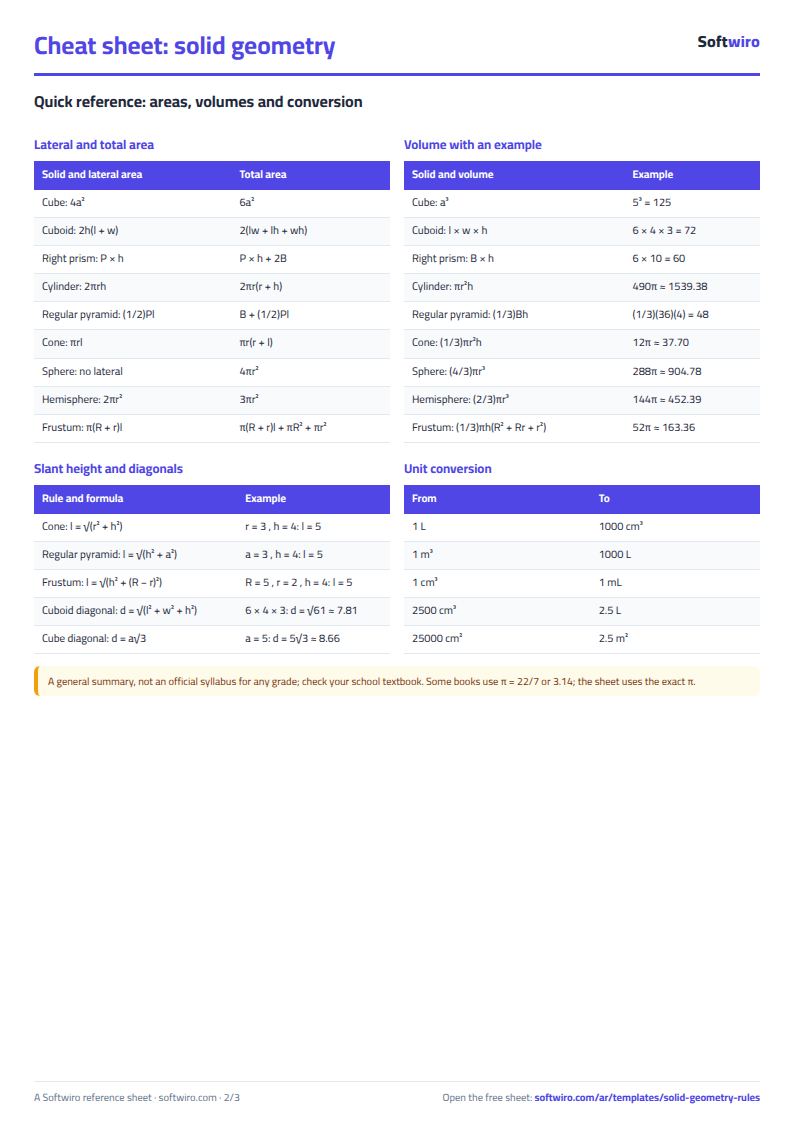
- المجسمات: Solids: 9 solids with their symbols, lateral area, total area, volume, diagonal or slant height, and a solved example with numbers for each. Formulas are written in symbols, left to right.
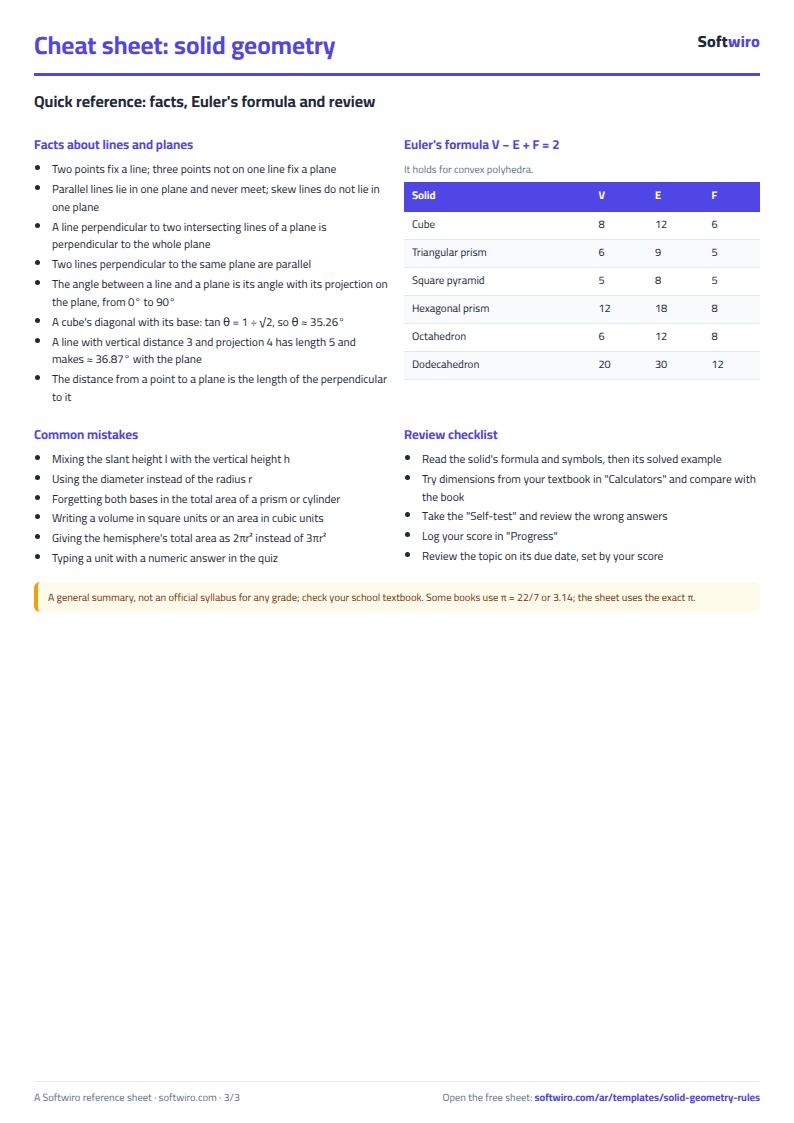
- حقائق وأويلر: Facts and Euler: 14 facts about lines and planes (determining a plane, parallel, skew and perpendicular lines, angles and distance), each with an example, and a table of ten polyhedra that works out V - E + F and checks that it is 2.
- بحث: Lookup: choose a solid from the list to see its formulas and example, or choose a polyhedron to see its vertices, edges and faces.
- حاسبات: Calculators: 13 calculators. Nine give the areas and volume of a solid, with volume in litres, in a length unit you choose (mm, cm, dm or m). The others are an angle between a line and a plane, Euler's formula, a volume converter and an area converter.
- اختبار ذاتي: Self-test: 40 questions in four branches. The answer is a number without a unit or a choice from a list. A ✔ or ✘ appears with your score at the top. The answer key is in hidden columns.
- المتابعة: Review tracker: the topic, review date and your score. The sheet works out the next review date from the score and highlights topics that are due, with a chart of your scores.
- الملخص: Summary: the volume of each solid from the calculator examples, how the volume of a cone, sphere and cylinder grows with radius, and your quiz result for each branch, with four charts.
The file opens on a start tab (“ابدأ هنا”, Start here) that explains how to use it.
What makes it different
The sheet does more than state the formula. Each solid has its symbols and a solved example with numbers, and there is a calculator where you try your own dimensions and see areas and volume in litres in the unit you choose. A table checks Euler's formula and a quiz marks itself. You learn how to substitute values and check the unit, which is where most exam mistakes happen.
How to use it
- Open "المجسمات" (Solids) and review each solid: its symbols, lateral and total area, volume, diagonal and solved example.
- Open "حقائق وأويلر" (Facts and Euler) to review facts about lines, planes and angles, and the table of vertices, edges and faces that checks V - E + F = 2.
- In "بحث" (Lookup) choose a solid or a polyhedron from the list and its formulas and details appear straight away.
- In "حاسبات" (Calculators) choose the length unit (mm, cm, dm or m), then change the dimensions of any solid and the areas and volume appear, with volume in litres too. It also has an angle between a line and a plane, Euler's formula and unit conversions.
- Test yourself in "اختبار ذاتي" (Self-test), 40 questions. Type the result as a number without a unit or pick from the list, and record your score in "المتابعة" (Review tracker).
- Open "الملخص" (Summary) to see the volume of each solid from the examples, a comparison of the volume of a cone, sphere and cylinder as the radius grows, and your result.
Before you start:
- This is a general summary and not an official syllabus for any particular grade, so check your school textbook. Some books use pi = 22/7 or 3.14, while the sheet uses the exact value of pi (the PI function).
- Formulas are written in Latin symbols, left to right. Unless stated otherwise, solids are right and regular: the cylinder, cone and prism are right, and the pyramid is regular.
- Areas are in a square unit (such as cm²) and volumes in a cubic unit (such as cm³). Every 1,000 cm³ equals one litre, and 1 m³ equals 1,000 litres.
- The calculators hold 9 solids, an angle calculator, Euler's formula and two converters; the quiz holds 40 questions and the review tracker holds 20 topics. The reference tables are fixed and read-only: 9 solids, 14 facts and 10 polyhedra in the Euler table.
- In the quiz, a numeric answer is accepted within a tolerance of 0.02, so type the result to two decimal places (or as a multiple of pi where asked) without a unit. The volume of the sphere, cylinder and others is calculated with pi = PI().
- Euler's formula V - E + F = 2 holds for convex polyhedra, including prisms, pyramids and every solid in the table.
Free cheat sheet for this field
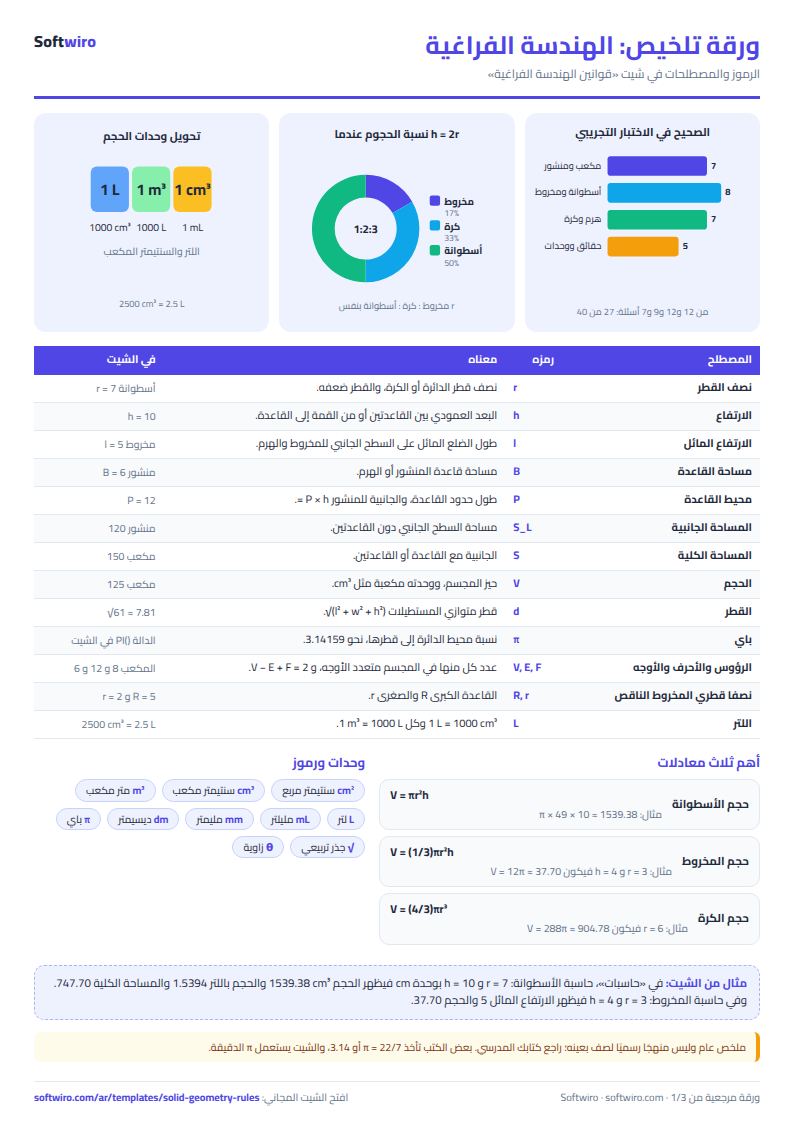
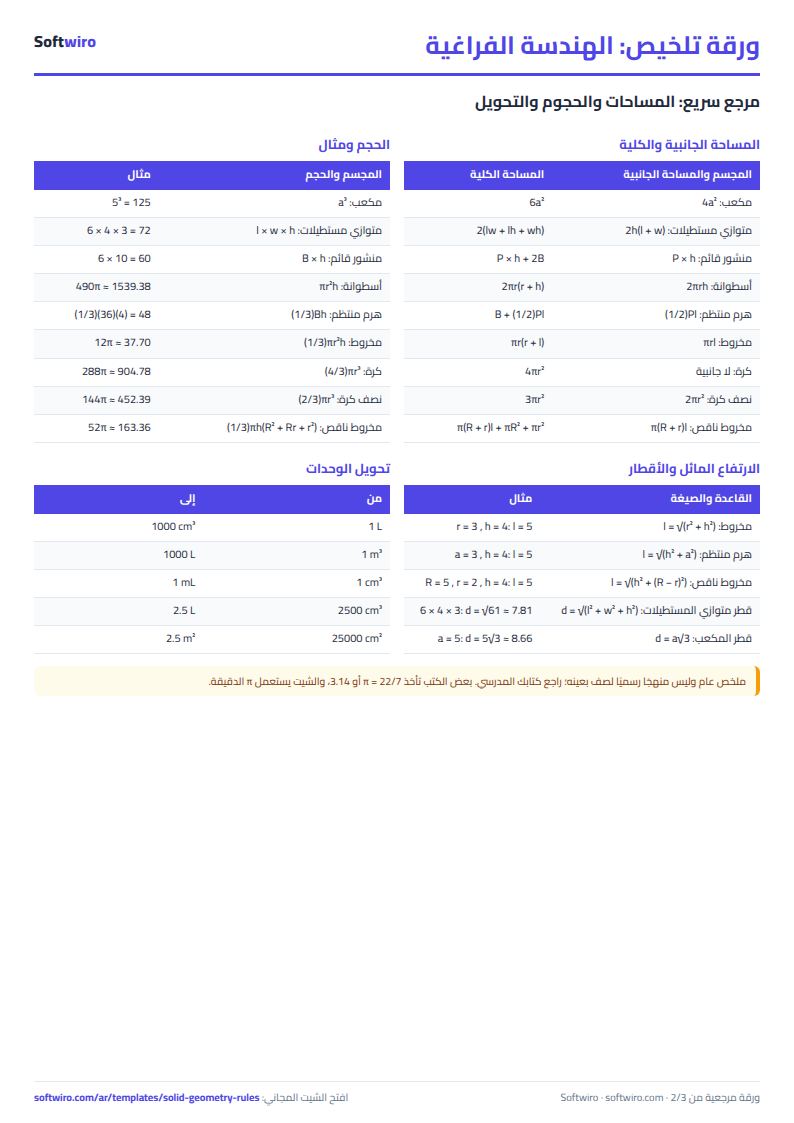
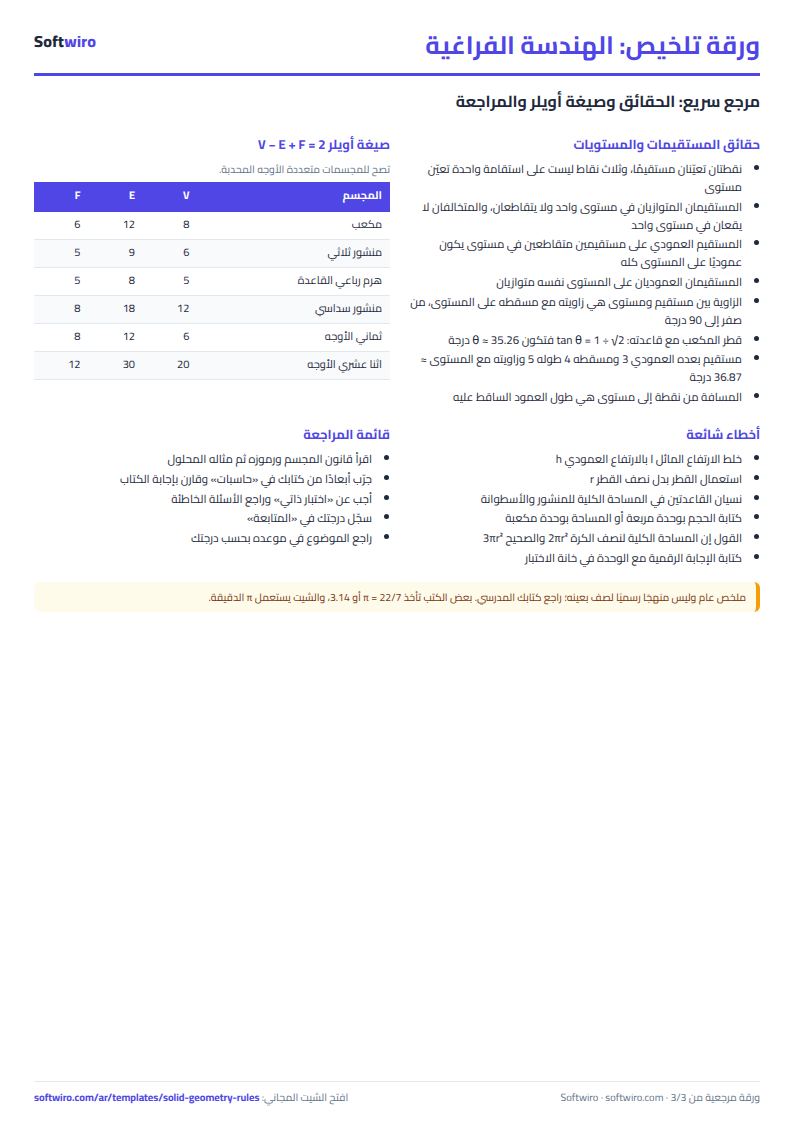
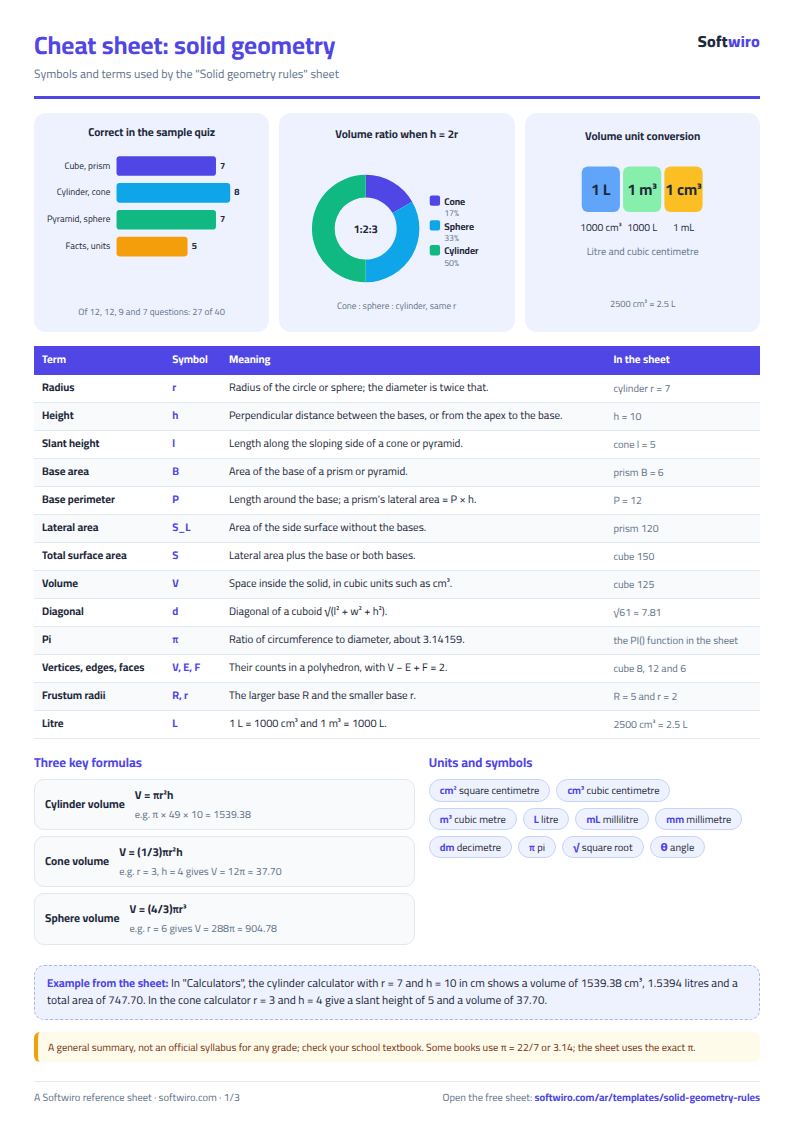
Terms, abbreviations, tables and diagrams over several pages, in Arabic and English. Download it as a PDF or images, including a phone-size version.
Still running this on Excel?
This sheet suits a start and a limited amount of data. If your way of working grows, or you need more than one person working on it at the same time, Softwiro can build you a program that fits the way you work.
| In this sheet | In Custom Software from Softwiro |
|---|---|
| One file that one person edits at a time, and copies reach you on WhatsApp. | A program with a login for each user and permissions you define, and everyone sees the same data. |
| You type everything and check the numbers by hand. | We design the screens around your work steps, so each person records only what concerns them. |
| Columns and formulas are fixed as the sheet was designed. | We build what you need: reports, alerts and screens your way. |
| Backups and security are your own responsibility. | The program runs on a secured server with regular backups. |
Frequently asked questions
Does this sheet match my grade's syllabus?
It is a general summary and not an official syllabus for any particular grade, so check your school textbook. Some books use pi = 22/7 or 3.14, while the sheet uses the exact value of pi, so the last decimals may differ from your book's answer.
How do I change the length unit?
In "حاسبات" (Calculators) choose the unit (mm, cm, dm or m) in the top cell. Areas then appear in a square unit such as cm² and volumes in a cubic unit such as cm³, and the volume in litres is worked out from the unit you chose.
Which solids does Euler's formula work for?
V - E + F = 2 holds for convex polyhedra, including prisms, pyramids and the ten solids in the table. You can also type the counts for any other solid into the Euler calculator to check.
How do I enter my answer in the quiz?
Type the result as a number without a unit, to two decimal places, or as a multiple of pi where the question asks for that. An answer is accepted within a tolerance of 0.02. For multiple-choice questions, pick from the list.
Is the template free?
Yes, with no sign-up and no email address. Use it, edit it and share it as you like.
Does it work in Google Sheets and on mobile?
The sheet uses formulas supported by Excel 2016 and later, Google Sheets and LibreOffice, so you can upload it to Google Drive and open it with Google Sheets on a computer or a phone.
What is the difference between the white and the gray cells?
You type in the white cells; the gray cells are calculated automatically. Don't type in a gray cell, or you will erase its formula.
Can I use the sheet from an AI assistant?
Yes. Add our MCP server (URL https://softwiro.com/api/mcp, no key needed) to your assistant and ask it to do the calculation in this template. The numbers come from the sheet's own formulas, and we do not store your data. The steps and a ready-made prompt are in this article: https://softwiro.com/blog/mcp-excel-templates-ai-agent-guide.html
All the templates in this group: Free study summaries: rules, formulas and self-tests
More free templates for: Study summaries
More free templates
- Periodic table in Excel (Arabic names): lookup, molar mass calculator and quiz
- Science formulas cheat sheet: physics, chemistry and biology with examples
- Arabic grammar summary sheet: rules, i'rab and a self-test with examples
- English grammar rules sheet in Excel: tenses and structures with examples
- Algebra rules summary sheet: laws, identities and solving equations with examples
- English vocabulary and expressions sheet in Excel: words by topic and spaced review
- Livestock and dairy farm sheet
- Complete farm management sheet in Excel: plots, workers, crops and sales
- Agricultural waste management sheet: rice straw, residues, compost and recycling
- Trip organizer sheet: participants, instalments, costs and itinerary
- Building maintenance sheet: flat fees, expenses, elevator and pump
- Canteen management sheet
- Lending library management sheet
- Study groups management sheet for a private teacher