Try the sheet here, on the example
The sheet is open below with sample numbers. Change any white cell and watch the results update, or press the blank-copy button to type your own data from scratch. Nothing you type leaves your browser.
Example from the sheet
| م | الاسم | النوع | المستحق | المدفوع | المتبقي | حالة الدفع |
|---|---|---|---|---|---|---|
| 1 | أحمد سمير | بالغ | 6,500.00 | 6,500.00 | 0.00 | كامل |
| 2 | هالة محمود | بالغ | 6,500.00 | 6,500.00 | 0.00 | كامل |
| 3 | محمد رضا | بالغ | 6,000.00 | 6,000.00 | 0.00 | كامل |
| 4 | منى عادل | بالغ | 6,500.00 | 6,500.00 | 0.00 | كامل |
| 5 | كريم يوسف | بالغ | 6,500.00 | 6,500.00 | 0.00 | كامل |
| 6 | سلمى حسن | بالغ | 6,500.00 | 2,000.00 | 4,500.00 | جزئي |
| 7 | عمر فتحي | بالغ | 6,500.00 | 6,500.00 | 0.00 | كامل |
| 8 | نادية صلاح | بالغ | 5,500.00 | 5,500.00 | 0.00 | كامل |
| 9 | ياسر إبراهيم | بالغ | 6,500.00 | 6,500.00 | 0.00 | كامل |
| 10 | دعاء مصطفى | بالغ | 6,500.00 | 6,500.00 | 0.00 | كامل |
| 11 | هشام عبد الله | بالغ | 6,500.00 | 4,000.00 | 2,500.00 | جزئي |
Example from the “المشتركون” tab (Arabic), with the numbers and formulas that are in the file.
What is inside
- "الرحلة" (Trip): Trip name, destination, departure and return dates, last payment date, number of bus seats, adult price, child price and the contingency percentage.
- "المشتركون" (Participants): Name, phone, type (adult or child), status (confirmed or cancelled) and discount. It shows the price, amount due, paid, balance and payment status, along with room, bus, seat and emergency contact, and a warning for a duplicate seat, a full room or a missing emergency contact. Room for 200 participants.
- "الدفعات" (Payments): Each payment with the participant's number, date, amount, payment method (cash, transfer, InstaPay or Vodafone Cash) and instalment (deposit, second or final). Room for 800 payments.
- "المتأخرون عن الدفع" (Late payers): A list that sorts itself by the largest balance owed: name, phone, amount due, paid, balance and percentage paid. It shows the first 40 participants.
- "التكاليف" (Costs): Cost items by type (fixed for the trip, or per person), unit price, quantity and number of times, plus what you have paid the supplier and what is left, then the total, contingency and cost per person. Room for 80 items.
- "الغرف" (Rooms): Each room's code, type, capacity, number of occupants, empty beds and status (full, has space, or over capacity). Room for 40 rooms.
- "البرنامج" (Itinerary): The trip day by day: enter the day number and the date appears, then the time, activity, place and person responsible. Room for 80 rows.
- "قائمة التجهيز" (Checklist): What must be done before departure, with the person responsible and the deadline. Each item shows its status: done, upcoming or late. Room for 80 items.
- "تقسيم المصروفات" (Expense split): For friends: their names and each person's share, and a log of what each person paid. It shows each person's portion and net balance (owed to them or by them). Room for 12 friends and 300 expenses.
- "من يدفع لمن" (Who pays whom): A table that spreads each debtor's debt across the creditors in proportion to what they are owed, so you know how much each friend pays and to whom.
- "الملخص" (Summary): Participants, buses and rooms; revenue, collected, balance and collection rate; cost, cost per person, break-even and surplus; checklist progress; and three charts.
The file opens on a start tab (“ابدأ هنا”, Start here) that explains how to use it.
What makes it different
The sheet does more than collect names. It works out what each participant has paid and still owes, sorts those who have not finished paying by largest balance, and tells you how many participants you need to cover the cost. It also warns you of a duplicate seat, a full room or a participant with no emergency contact before departure day. For friends, it splits shared expenses and shows who pays whom. If you run a travel agency, use the travel agency bookings sheet.
How to use it
- In "الرحلة" (Trip) enter the trip name, destination, departure and return dates, today's date, the last payment date, number of bus seats, adult price, child price and contingency percentage.
- In "المشتركون" (Participants) enter each participant: number, name, phone, type (adult or child), status (confirmed or cancelled) and any discount, then their room, bus, seat and emergency contact.
- In "الدفعات" (Payments) record every payment with the participant's number, amount and payment method. The sheet works out the paid amount, balance and status of each participant, and the "المتأخرون عن الدفع" (Late payers) list.
- In "التكاليف" (Costs) enter each item as fixed for the trip (bus, hotel, guide) or per person (meals, tickets, insurance) with its unit price, quantity and number of times. Cost per person and break-even then appear.
- In "الغرف" (Rooms), "البرنامج" (Itinerary) and "قائمة التجهيز" (Checklist) enter the rooms, the day-by-day schedule and what must be done before departure.
- For friends: in "تقسيم المصروفات" (Expense split) enter the names and who paid each expense, and you get each person's net balance and the "من يدفع لمن" (Who pays whom) table. Open "الملخص" (Summary) to see everything when you make decisions.
Before you start:
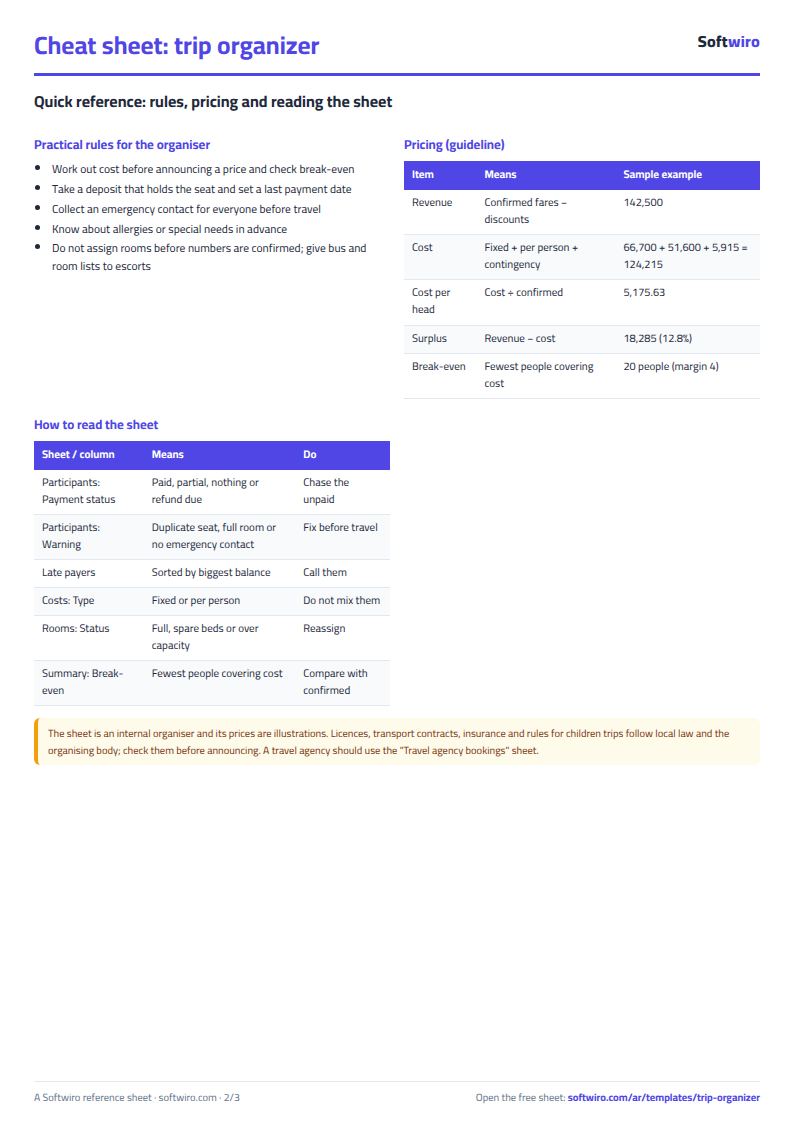
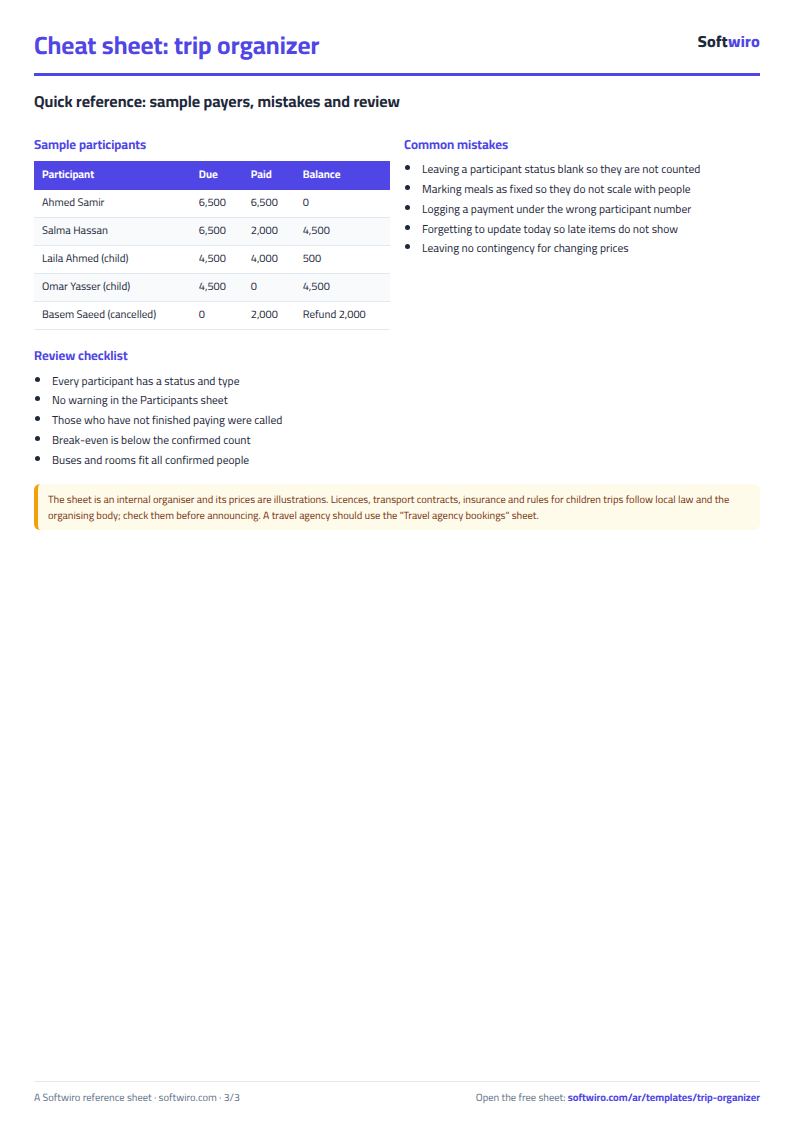
- A person counts toward cost and revenue only if their status is "مؤكد" (confirmed). A "ملغي" (cancelled) participant is not counted, and what they paid appears under "refund due" so you can review it against the agreed cancellation policy.
- A "fixed" cost item is counted once = unit price × quantity × times (for example, minibus × 2 × 4 days). A "per person" item is also multiplied by the number of confirmed participants (for example, meal × 2 × 4 days × number of people).
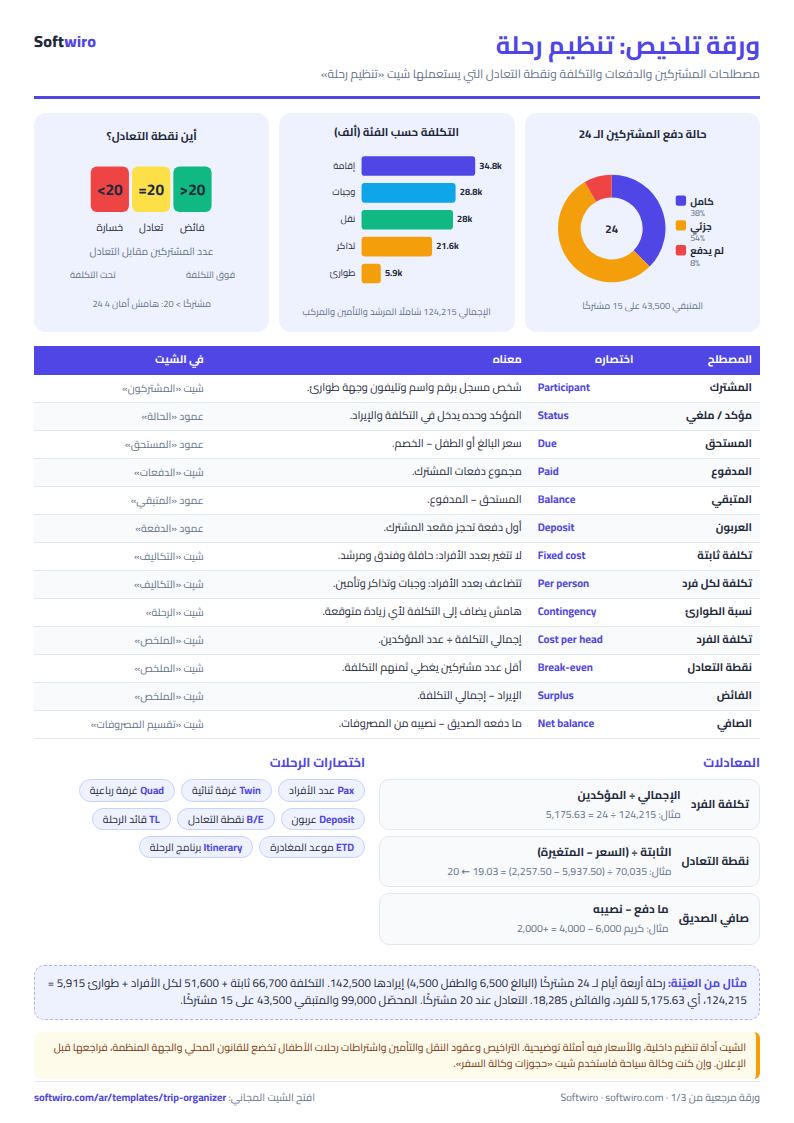
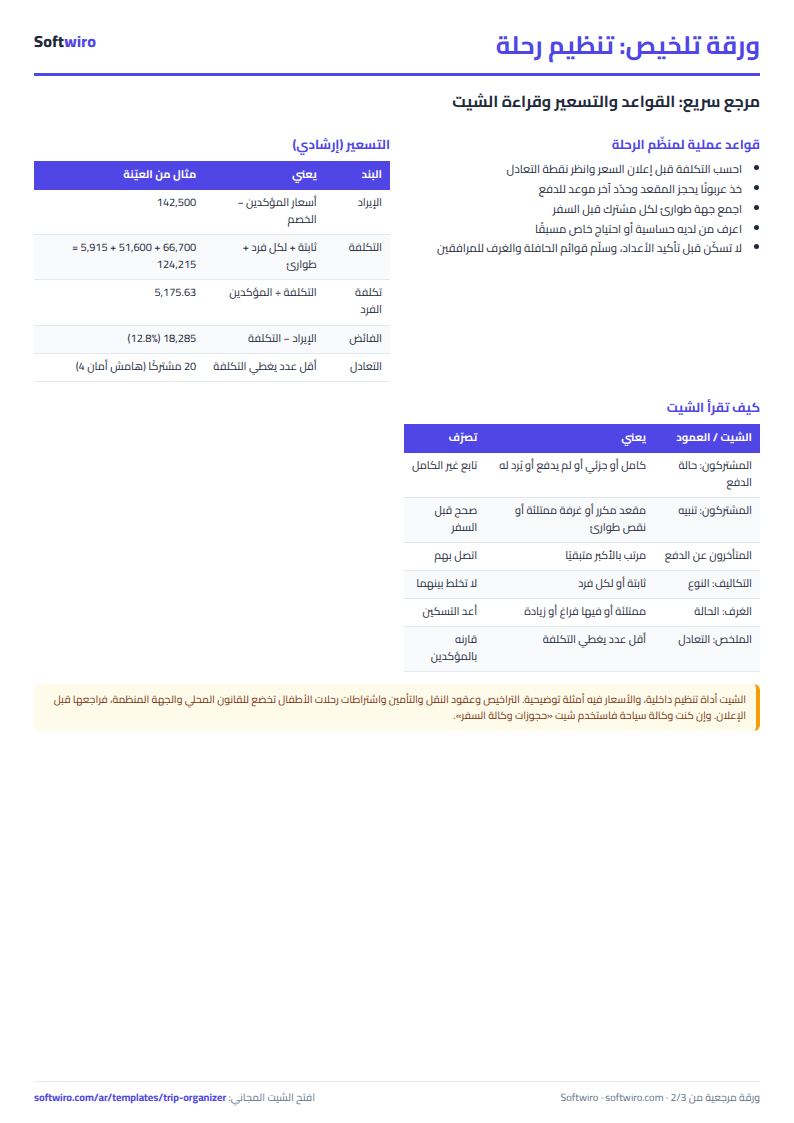
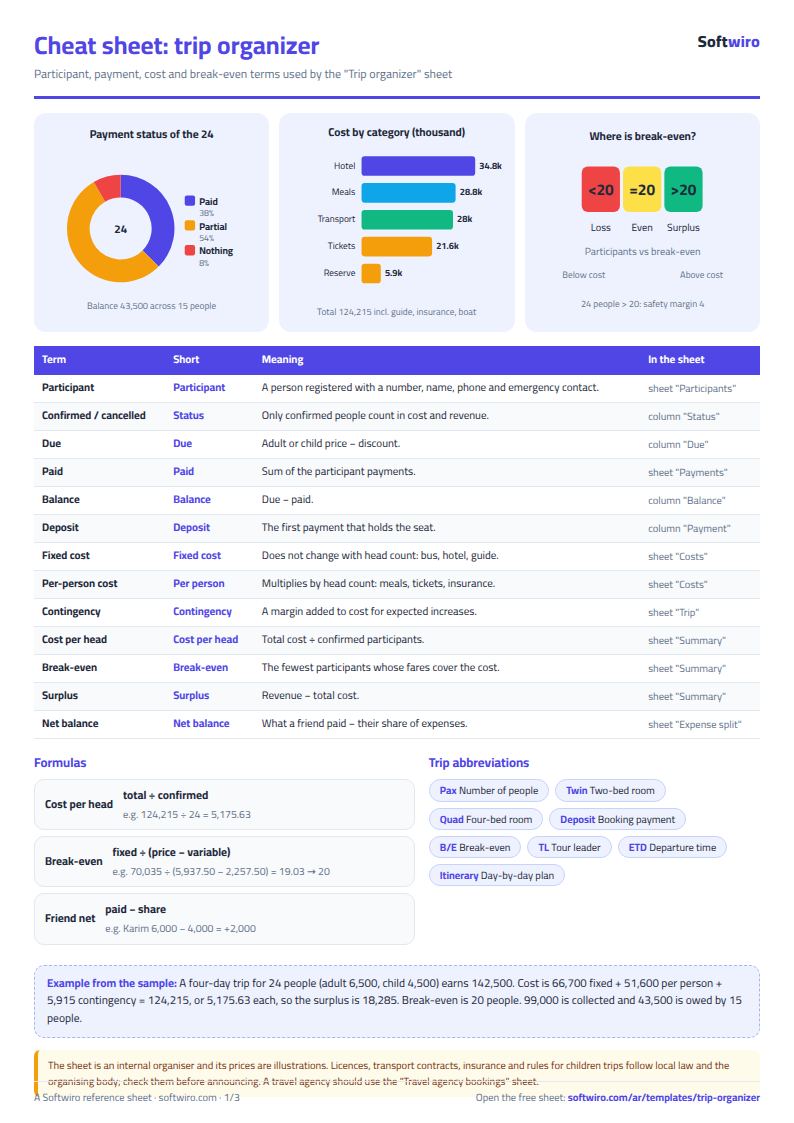
- Break-even = fixed costs including contingency ÷ (average price per person − variable cost per person including contingency), rounded up. It is an estimate because the average price changes with the share of children and discounts.
- The prices and costs in the example are illustrative, to explain the calculation, and are not price quotes. Enter your suppliers' actual prices, and check licences, insurance and trip requirements under local law and with the organising body.
- The expense split for friends uses equal shares; if one person comes with a family, give them two shares, for example. The "من يدفع لمن" (Who pays whom) sheet spreads each debtor's debt across the creditors in proportion to what they are owed, and is a simple suggested distribution.
- The sheet has room for 200 participants, 800 payments, 80 cost items, 40 rooms, 80 itinerary rows, 80 checklist items, 12 friends and 300 shared expenses. The late payers list shows the first 40 participants, sorted by largest balance. If you run a travel agency, use the travel agency bookings sheet.
Free cheat sheet for this field
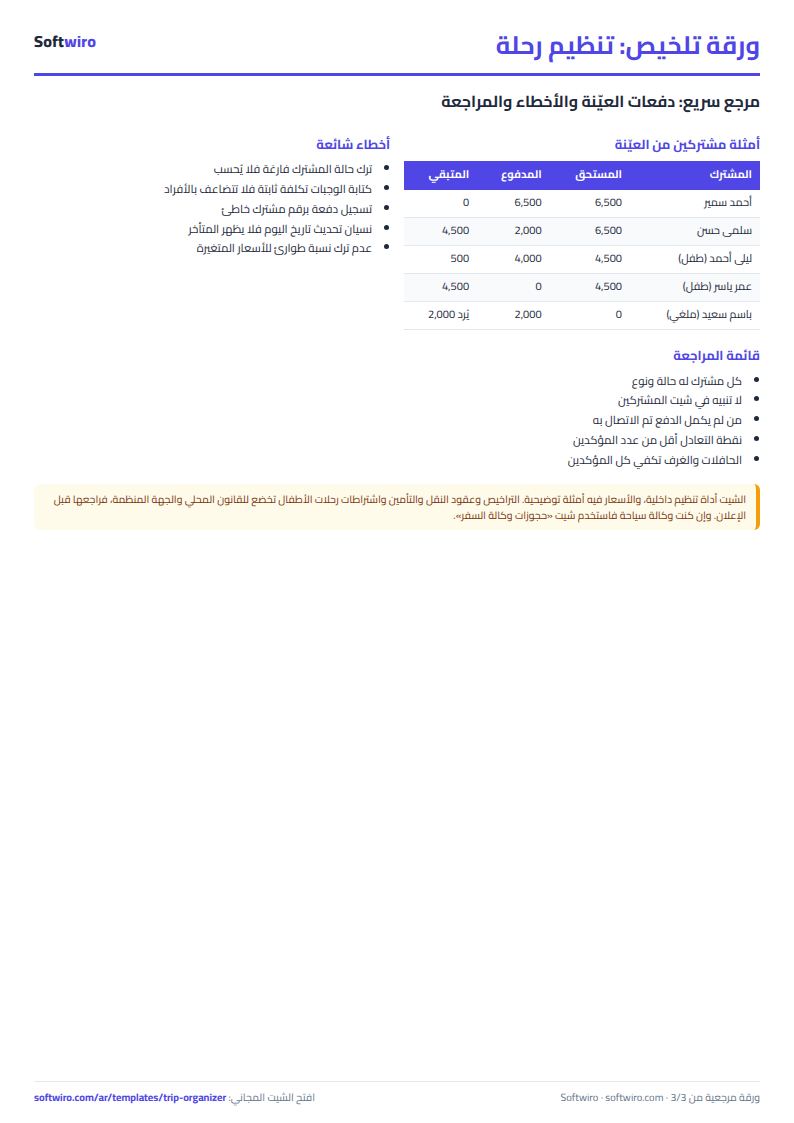
Terms, abbreviations, tables and diagrams over several pages, in Arabic and English. Download it as a PDF or images, including a phone-size version.
Still running this on Excel?
This sheet suits a start and a limited amount of data. If your way of working grows, or you need more than one person working on it at the same time, Softwiro can build you a program that fits the way you work.
| In this sheet | In Custom Software from Softwiro |
|---|---|
| One file that one person edits at a time, and copies reach you on WhatsApp. | A program with a login for each user and permissions you define, and everyone sees the same data. |
| You type everything and check the numbers by hand. | We design the screens around your work steps, so each person records only what concerns them. |
| Columns and formulas are fixed as the sheet was designed. | We build what you need: reports, alerts and screens your way. |
| Backups and security are your own responsibility. | The program runs on a secured server with regular backups. |
Frequently asked questions
How do I calculate the cost per person for a group trip?
Enter the cost items in "التكاليف" (Costs) and mark each as fixed for the trip (such as the bus and the guide) or per person (such as meals and tickets). The sheet adds up the costs, adds the contingency percentage and divides the total by the number of confirmed participants to give the cost per person.
What does break-even mean in the sheet?
It is the smallest number of participants whose fees cover the cost. Break-even = fixed costs including contingency ÷ (average price per person − variable cost per person including contingency), rounded up. It is an estimate, and it changes with the share of children and the discounts.
How do I see who has not finished paying?
Record every payment under the participant's number in "الدفعات" (Payments). "المشتركون" (Participants) calculates each person's balance, and "المتأخرون عن الدفع" (Late payers) lists those who owe money, largest balance first, with their phone numbers.
How do I split trip expenses between friends?
In "تقسيم المصروفات" (Expense split) enter the names (two shares for someone bringing a family), then who paid each expense. The sheet works out each person's portion and net balance, and "من يدفع لمن" (Who pays whom) shows the amount between each debtor and creditor.
Is the template free?
Yes, with no sign-up and no email address. Use it, edit it and share it as you like.
Does it work in Google Sheets and on mobile?
The sheet uses formulas supported by Excel 2016 and later, Google Sheets and LibreOffice, so you can upload it to Google Drive and open it with Google Sheets on a computer or a phone.
What is the difference between the white and the gray cells?
You type in the white cells; the gray cells are calculated automatically. Don't type in a gray cell, or you will erase its formula.
Can I use the sheet from an AI assistant?
Yes. Add our MCP server (URL https://softwiro.com/api/mcp, no key needed) to your assistant and ask it to do the calculation in this template. The numbers come from the sheet's own formulas, and we do not store your data. The steps and a ready-made prompt are in this article: https://softwiro.com/blog/mcp-excel-templates-ai-agent-guide.html
More free templates for: Travel agencies
More free templates
- Travel agency bookings tracker
- Building maintenance sheet: flat fees, expenses, elevator and pump
- Canteen management sheet
- Lending library management sheet
- Study groups management sheet for a private teacher
- Graduation project manager sheet: tasks, team, phases and deliverables
- English vocabulary and expressions sheet in Excel: words by topic and spaced review
- Accounting rules and equations summary sheet: double entry, statements and financial ratios
- Media buyer rules sheet: ad formulas, scaling rules and testing discipline