Try the sheet here, on the example
The sheet is open below with sample numbers. Change any white cell and watch the results update, or press the blank-copy button to type your own data from scratch. Nothing you type leaves your browser.
Example from the sheet
| القاعدة | القسم | الحكم أو العلامة | مثال | إعراب كلمة الشاهد |
|---|---|---|---|---|
| أقسام الكلمة | الكلمة والبناء | الكلمة ثلاثة أقسام: اسم وفعل وحرف. | ذهبَ الطالبُ إلى المدرسةِ | ذهبَ: فعل ماضٍ مبني على الفتح |
| الاسم وعلاماته | الكلمة والبناء | الاسم يدل على إنسان أو حيوان أو نبات أو جماد أو مكان أو فكرة دون زمن. يُعرف بقبوله «أل» أو التنوين أو حرف الجر أو النداء. | الكتابُ مفيدٌ | الكتابُ: مبتدأ مرفوع وعلامة رفعه الضمة الظاهرة |
| الفعل وأنواعه | الكلمة والبناء | الفعل يدل على حدث مقترن بزمن: ماضٍ (كتبَ) ومضارع (يكتبُ) وأمر (اكتبْ). يُعرف بقبوله «قد» أو السين أو سوف أو تاء الفاعل أو تاء التأنيث الساكنة. | كتبتُ الدرسَ | كتبتُ: فعل ماضٍ مبني على السكون لاتصاله بتاء الفاعل، والتاء ضمير متصل مبني على الضم في محل رفع فاعل |
| الحرف | الكلمة والبناء | كلمة لا يظهر معناها كاملًا إلا مع غيرها، ولا تقبل علامات الاسم ولا علامات الفعل، كحروف الجر والعطف. | الكتابُ في الحقيبةِ | في: حرف جر مبني على السكون |
| المعرب والمبني | الكلمة والبناء | المعرب ما تتغير علامة آخره بتغير موقعه في الجملة، كأغلب الأسماء والمضارع الذي لم تتصل به نون النسوة ولا نون التوكيد. المبني ما يلزم حالة واحدة، كالحروف والماضي والأمر والضمائر وأسماء الإشارة والأسماء الموصولة. | هذا الكتابُ لي | هذا: اسم إشارة مبني على السكون في محل رفع مبتدأ |
| بناء الفعل الماضي | الكلمة والبناء | يُبنى على الفتح (كتبَ)، وعلى الضم إذا اتصلت به واو الجماعة (كتبوا)، وعلى السكون إذا اتصلت به ضمائر الرفع المتحركة (كتبتُ، كتبنا، كتبنَ). | كتبوا الدرسَ | كتبوا: فعل ماضٍ مبني على الضم لاتصاله بواو الجماعة، والواو ضمير متصل مبني في محل رفع فاعل |
| بناء فعل الأمر | الكلمة والبناء | يُبنى على ما يُجزم به مضارعه: السكون (اكتبْ)، أو حذف حرف العلة (ادعُ)، أو حذف النون (اكتبوا، اكتبي). | اكتبْ درسَكَ | اكتبْ: فعل أمر مبني على السكون |
| الأسماء المبنية | الكلمة والبناء | الضمائر وأسماء الإشارة والأسماء الموصولة وأسماء الاستفهام والشرط تلزم في الغالب حالة واحدة. | الذي اجتهدَ نجحَ | الذي: اسم موصول مبني على السكون في محل رفع مبتدأ |
Example from the “قواعد النحو” tab (Arabic), with the numbers and formulas that are in the file.
What is inside
- قواعد النحو (Grammar rules): 49 rules in 7 sections. Each rule has its ruling or sign, an example, the i'rab of the key (witness) word and a note, and you can filter the table by section.
- علامات الإعراب (Case signs): A table of 12 word types (singular, dual, sound masculine and feminine plurals, the five nouns, diptotes, words ending in a long vowel, defective nouns, the present-tense verb and its kinds) across four cases: nominative (raf'), accusative (nasb), genitive (jarr) and jussive (jazm), with an example for the three noun cases.
- الأدوات والقوائم (Particles and lists): 11 lists to memorize: prepositions, subjunctive particles, jussive particles, conditional particles, the sisters of kana, the sisters of inna, conjunctions, pronouns and demonstratives, with what each list does and an example.
- بحث (Lookup): Three tools: pick a rule name and its details appear; pick a word type and a case and the sign and a full example appear; or pick a list of particles.
- اختبار ذاتي (Self-test): 36 questions on case signs, i'rab of positions, particles and numbers. You choose the answer from a list, a tick or cross appears, your score shows at the top, and the answer key is in hidden columns.
- المتابعة (Review tracker): Enter the topic, review date and your score. The sheet calculates the next review date from the score and highlights topics that are due, with a chart of your scores.
- الملخص (Summary): The number of rules per section, your test score per branch, and the average of your review scores, with three charts.
The file opens on a start tab (“ابدأ هنا”, Start here) that explains how to use it.
What makes it different
The sheet does more than state each rule. Every rule has an example with vowel marks (tashkeel) at the key word, the i'rab of that word in the usual school format, and a note that warns about the common mistake. Beside them is a sign table that answers in seconds a question such as "what marks the accusative of a sound feminine plural?", plus a self-marking test and a tracker that tells you when to return to each topic. You move from reading to practice and recall, which is what the exam needs.
How to use it
- Open «قواعد النحو» (Grammar rules) and review each rule with its ruling, example, i'rab of the key word and note. Filter the table by the «القسم» (Section) column to study one section.
- In «علامات الإعراب» (Case signs) review the table that combines word type and case (nominative, accusative, genitive, jussive) and the sign for each.
- In «بحث» (Lookup) pick a rule name, or pick a word type and a case to see the sign and a full example, or pick a list of particles such as prepositions, subjunctive or jussive particles.
- Review «الأدوات والقوائم» (Particles and lists) to memorize the members of each list (sisters of kana and inna, prepositions, subjunctive and jussive particles) and what they do.
- Test yourself in «اختبار ذاتي» (Self-test), 36 questions: choose the answer from the list or type it, and a tick or cross appears with your score at the top.
- In «المتابعة» (Review tracker) record the topic, review date and your score, and the sheet sets the next review date. Open «الملخص» (Summary) to see your progress.
Before you start:
- A general summary, not the official curriculum of a particular grade; check your textbook. Schools differ in wording and in the order of chapters, and disputed topics are not included in this summary.
- The i'rab statements are written in the usual school format, and your teacher may ask for a longer or shorter one; what matters is that you know the position, the sign and the reason.
- Examples carry vowel marks (tashkeel) at the key word to show the sign. The test does not require vowel marks, so choose your answer from the list.
- In the test, multiple-choice answers are chosen from the drop-down list, numeric answers are typed as numbers, and text is compared after removing extra spaces.
- The fixed reference tables hold 49 rules, 12 word types and 11 lists of particles. The test holds 36 questions and the tracker holds 20 topics.
Free cheat sheet for this field
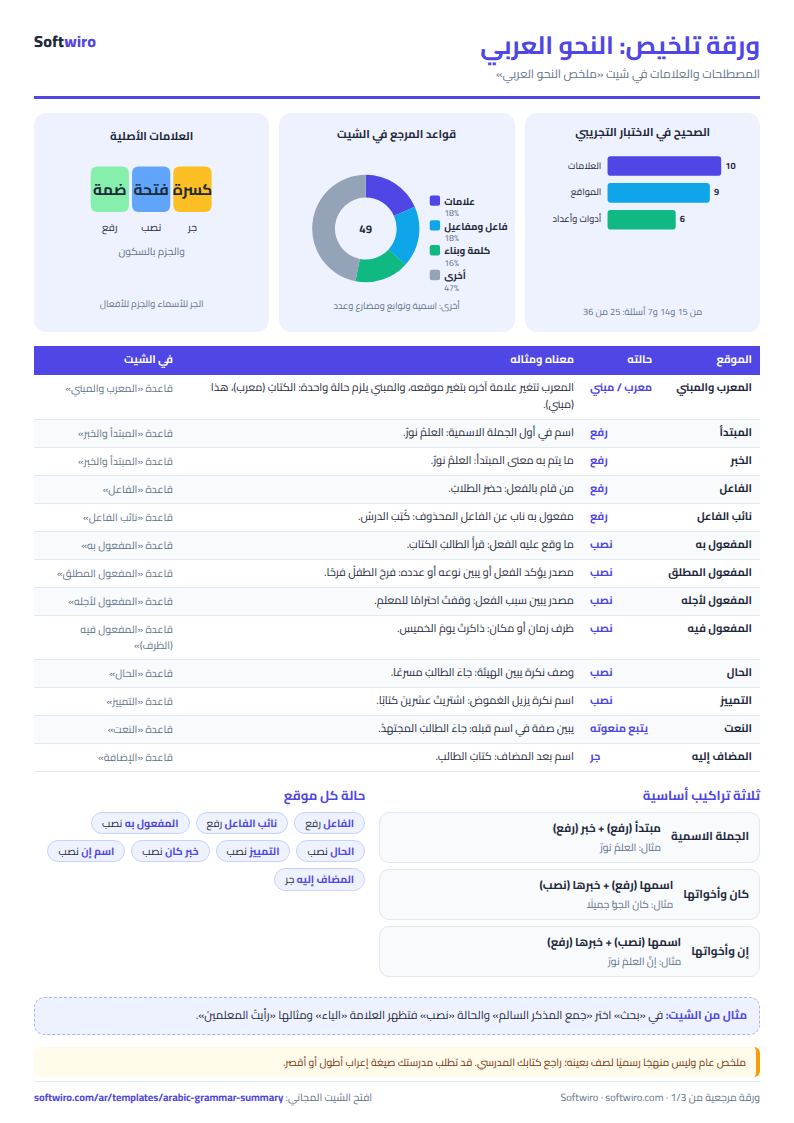
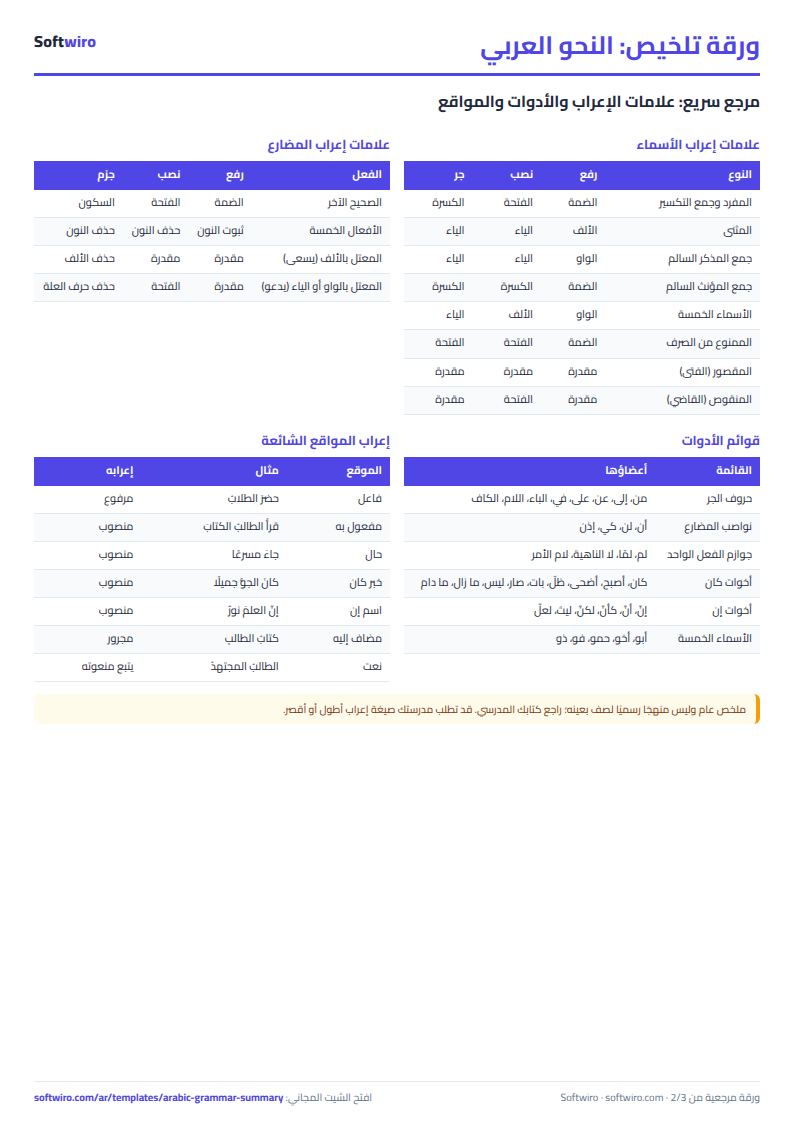
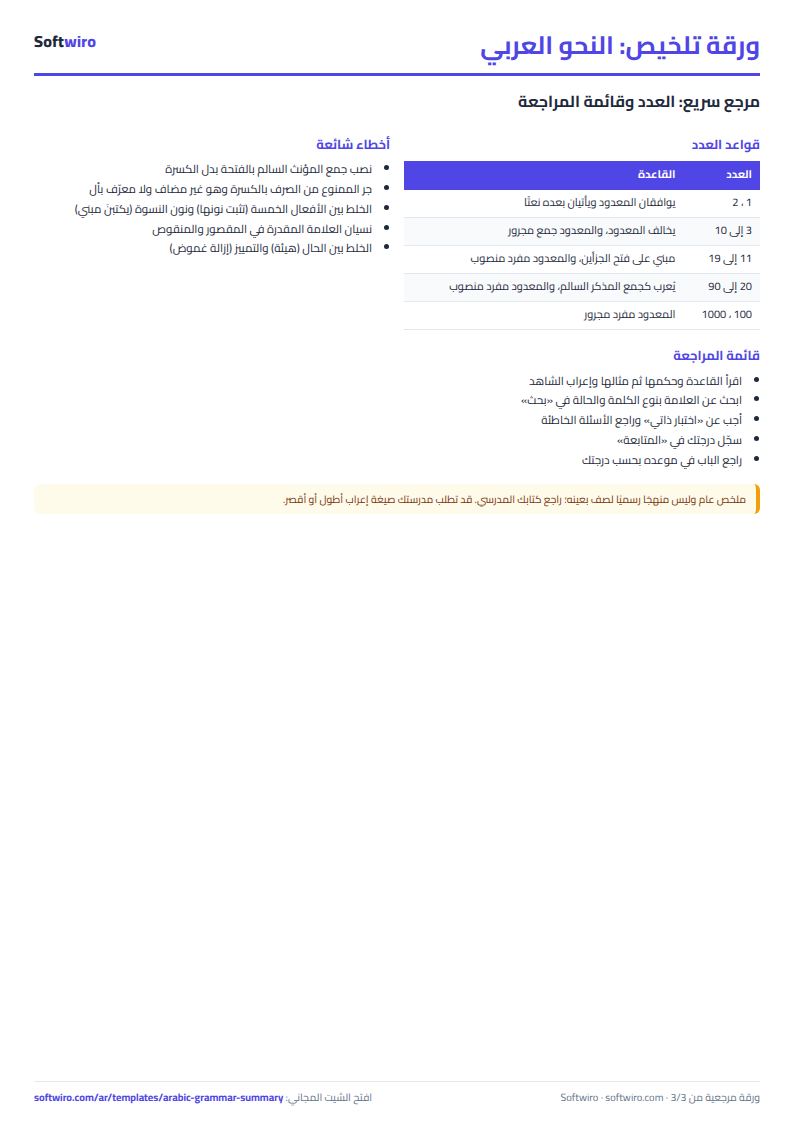
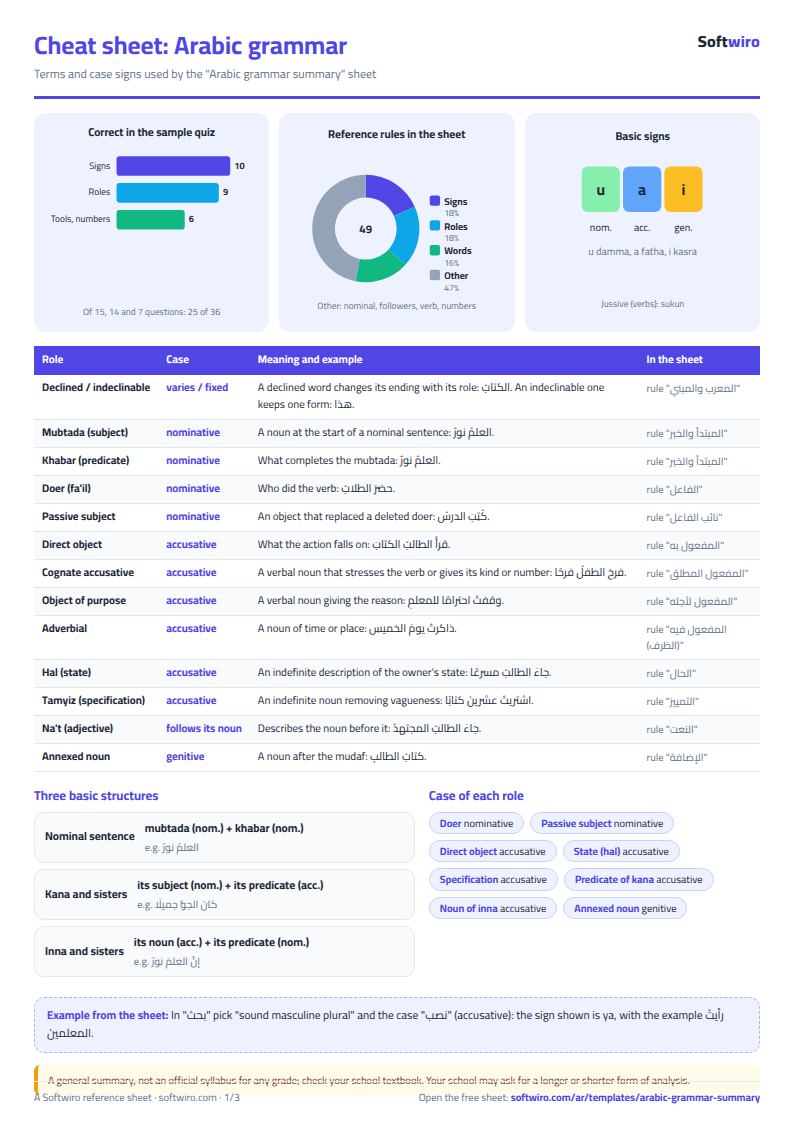
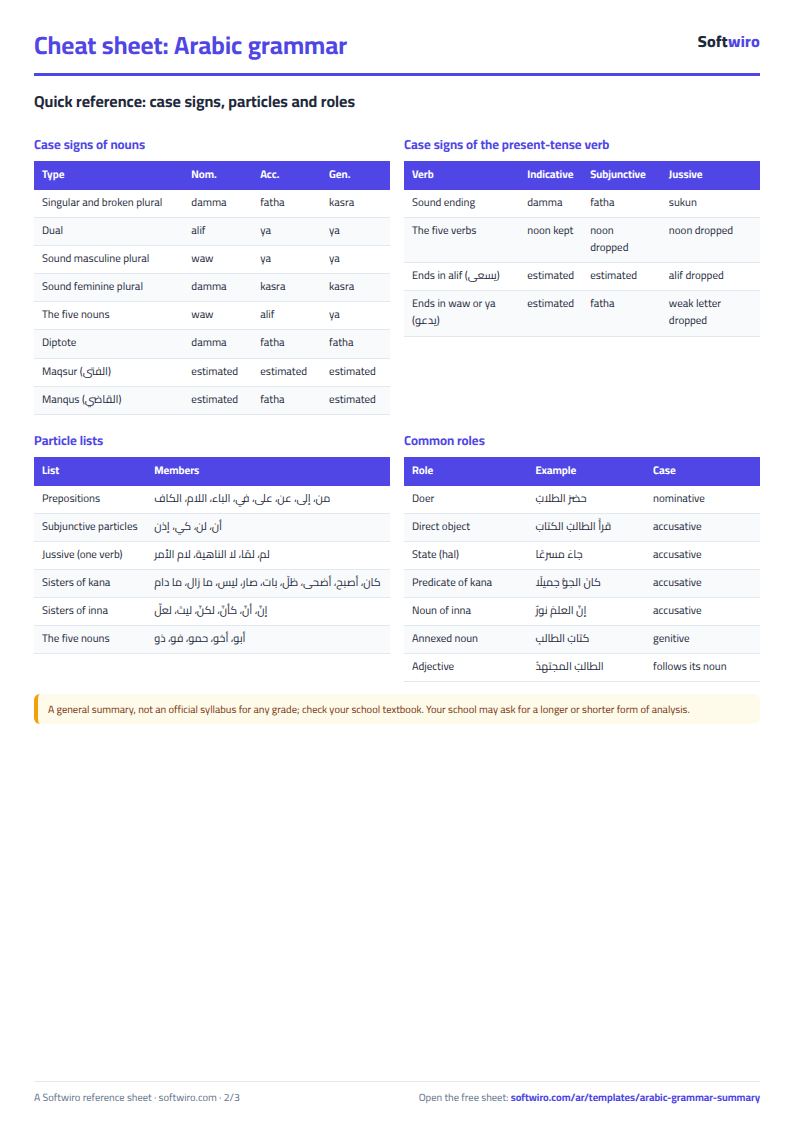
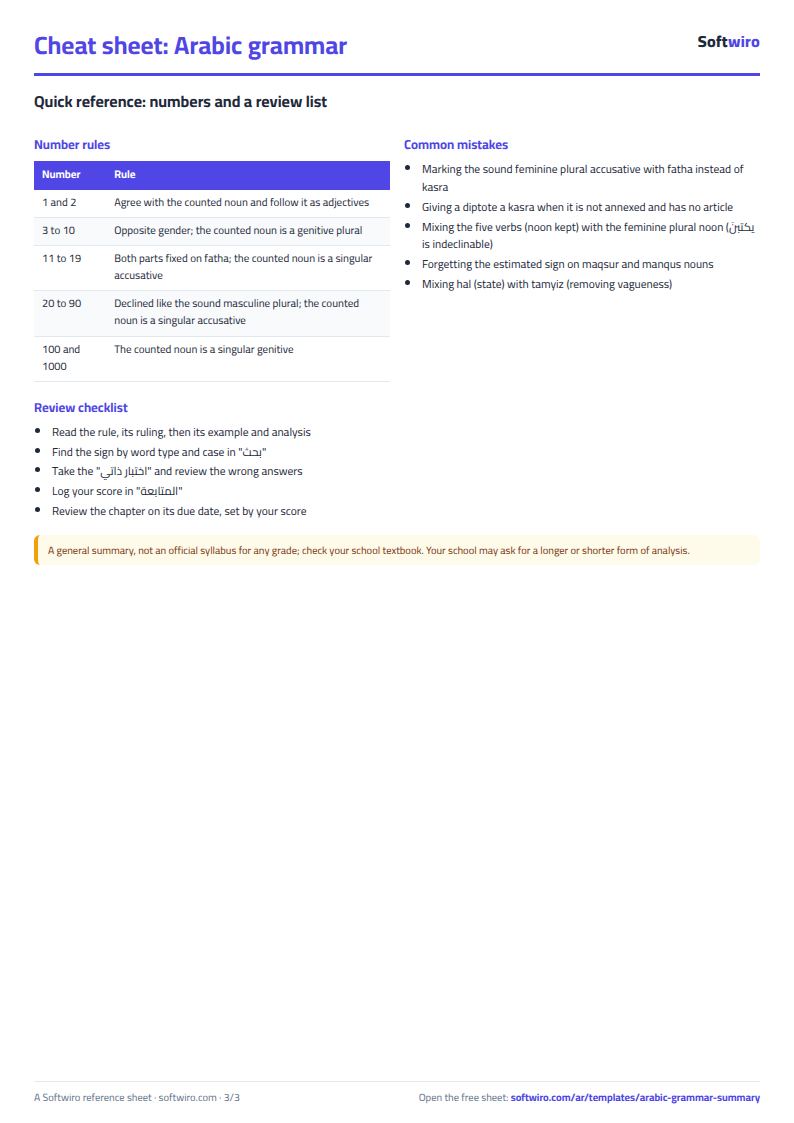
Terms, abbreviations, tables and diagrams over several pages, in Arabic and English. Download it as a PDF or images, including a phone-size version.
Still running this on Excel?
This sheet suits a start and a limited amount of data. If your way of working grows, or you need more than one person working on it at the same time, Softwiro can build you a program that fits the way you work.
| In this sheet | In Custom Software from Softwiro |
|---|---|
| One file that one person edits at a time, and copies reach you on WhatsApp. | A program with a login for each user and permissions you define, and everyone sees the same data. |
| You type everything and check the numbers by hand. | We design the screens around your work steps, so each person records only what concerns them. |
| Columns and formulas are fixed as the sheet was designed. | We build what you need: reports, alerts and screens your way. |
| Backups and security are your own responsibility. | The program runs on a secured server with regular backups. |
Frequently asked questions
Does the sheet match my grade's curriculum?
It is a general summary, not the official curriculum of a particular grade; check your textbook. Schools differ in wording and in the order of chapters, and disputed topics are left out, so follow what your teacher asks for.
Is the i'rab wording the format my teacher expects?
It is the usual school format (the word, then its position, then the sign and the reason for it). Your teacher may ask for a longer or shorter format, but the content is the same: the position, the sign and why.
How do I enter my answer in the test?
Choose your answer from the drop-down list in the white cell so it matches the key. Numeric questions are typed as numbers. The sheet compares the text after removing extra spaces.
Can I add my own rules and questions?
Yes. The reference tables hold what is in them and you can edit the text of any rule. The test holds a fixed 36 questions, and the tracker holds 20 topics.
Is the template free?
Yes, with no sign-up and no email address. Use it, edit it and share it as you like.
Does it work in Google Sheets and on mobile?
The sheet uses formulas supported by Excel 2016 and later, Google Sheets and LibreOffice, so you can upload it to Google Drive and open it with Google Sheets on a computer or a phone.
What is the difference between the white and the gray cells?
You type in the white cells; the gray cells are calculated automatically. Don't type in a gray cell, or you will erase its formula.
Can I use the sheet from an AI assistant?
Yes. Add our MCP server (URL https://softwiro.com/api/mcp, no key needed) to your assistant and ask it to do the calculation in this template. The numbers come from the sheet's own formulas, and we do not store your data. The steps and a ready-made prompt are in this article: https://softwiro.com/blog/mcp-excel-templates-ai-agent-guide.html
All the templates in this group: Free study summaries: rules, formulas and self-tests
More free templates for: Study summaries
More free templates
- Periodic table in Excel (Arabic names): lookup, molar mass calculator and quiz
- Science formulas cheat sheet: physics, chemistry and biology with examples
- English grammar rules sheet in Excel: tenses and structures with examples
- Algebra rules summary sheet: laws, identities and solving equations with examples
- Solid geometry formulas sheet: areas and volumes with examples and a calculator
- English vocabulary and expressions sheet in Excel: words by topic and spaced review
- Taxi, Uber and ride-hailing driver income sheet (trips, fuel, commission, daily net)
- Personal car maintenance log (oil and filter dates by kilometre and months)
- Parking garage management sheet (hourly and monthly)
- Car wash management sheet (packages, cards, workers, materials)
- Food factory sheet in Excel: recipes, batches, cost and shelf life
- Biscuit factory sheet: dough, lines, packing and scrap
- Detergent factory sheet: formulas, batches, cost and filling
- Detergent ingredients and their names: function, chemical name and use