Try the sheet here, on the example
The sheet is open below with sample numbers. Change any white cell and watch the results update, or press the blank-copy button to type your own data from scratch. Nothing you type leaves your browser.
Example from the sheet
| السيارة | البند | كل كم | كل (شهر) | آخر تغيير: التاريخ | آخر تغيير: العداد | الموعد القادم (كم) | الموعد القادم (تاريخ) | المتبقي (كم) | الحالة |
|---|---|---|---|---|---|---|---|---|---|
| كورولا | زيت المحرك | 10,000 | 6 | 46283 | 85,647 | 95,647 | 46464 | 8,551 | سليم |
| كورولا | فلتر الزيت | 10,000 | 6 | 46283 | 85,647 | 95,647 | 46464 | 8,551 | سليم |
| كورولا | فلتر الهواء | 20,000 | 12 | 45996 | 78,500 | 98,500 | 46361 | 11,404 | يستحق قريبًا |
| كورولا | فلتر المكيف | 15,000 | 12 | 45879 | 76,500 | 91,500 | 46244 | 4,404 | متأخر |
| كورولا | شمعات الإشعال | 40,000 | 48 | 45342 | 62,000 | 102,000 | 46803 | 14,904 | سليم |
| كورولا | تيل الفرامل | 30,000 | 0 | 45787 | 58,000 | 88,000 | 904 | يستحق قريبًا | |
| كورولا | ترحيل الإطارات | 10,000 | 6 | 46129 | 81,556 | 91,556 | 46312 | 4,460 | متأخر |
| كورولا | سائل التبريد | 40,000 | 24 | 45621 | 70,000 | 110,000 | 46351 | 22,904 | يستحق قريبًا |
| كورولا | البطارية | 0 | 36 | 45309 | 68,000 | 46405 | سليم | ||
| توسان | زيت المحرك | 10,000 | 6 | 46240 | 49,160 | 59,160 | 46424 | 6,601 | سليم |
| توسان | فلتر الزيت | 10,000 | 6 | 46240 | 49,160 | 59,160 | 46424 | 6,601 | سليم |
Example from the “جدول الصيانة” tab (Arabic), with the numbers and formulas that are in the file.
What is inside
- الإعدادات (Settings): Today's date and the year you are reviewing, how many kilometres or days before the due point you want the sheet to warn you, and the lists of maintenance items and document types that appear in the drop-downs, which you can edit as you like.
- السيارات (Cars): Each car with its name, model, plate, odometer at the start of tracking and current odometer. The highest recorded reading, the odometer used, the year's maintenance, fuel and renewals, cost per kilometre, consumption and the number of overdue and soon-due items appear beside it. Holds 10 cars.
- جدول الصيانة (Maintenance schedule): For each car and item: every how many km and every how many months (examples you set from your car's manual) and the last change before the sheet. The sheet calculates the last change from the log, the next due point by kilometre and by date, the remainder, the status and the share of the item's life used. Holds 120 items.
- سجل الصيانة (Maintenance log): One line per service: date, car, item, odometer, workshop, cost and a note. Holds 600 records.
- الوقود (Fuel): Each fill-up with its date, car, odometer, litres and price per litre. The sheet calculates the cost, the kilometres since the last fill-up of the same car, consumption per 100 km and cost per kilometre. Holds 600 fill-ups.
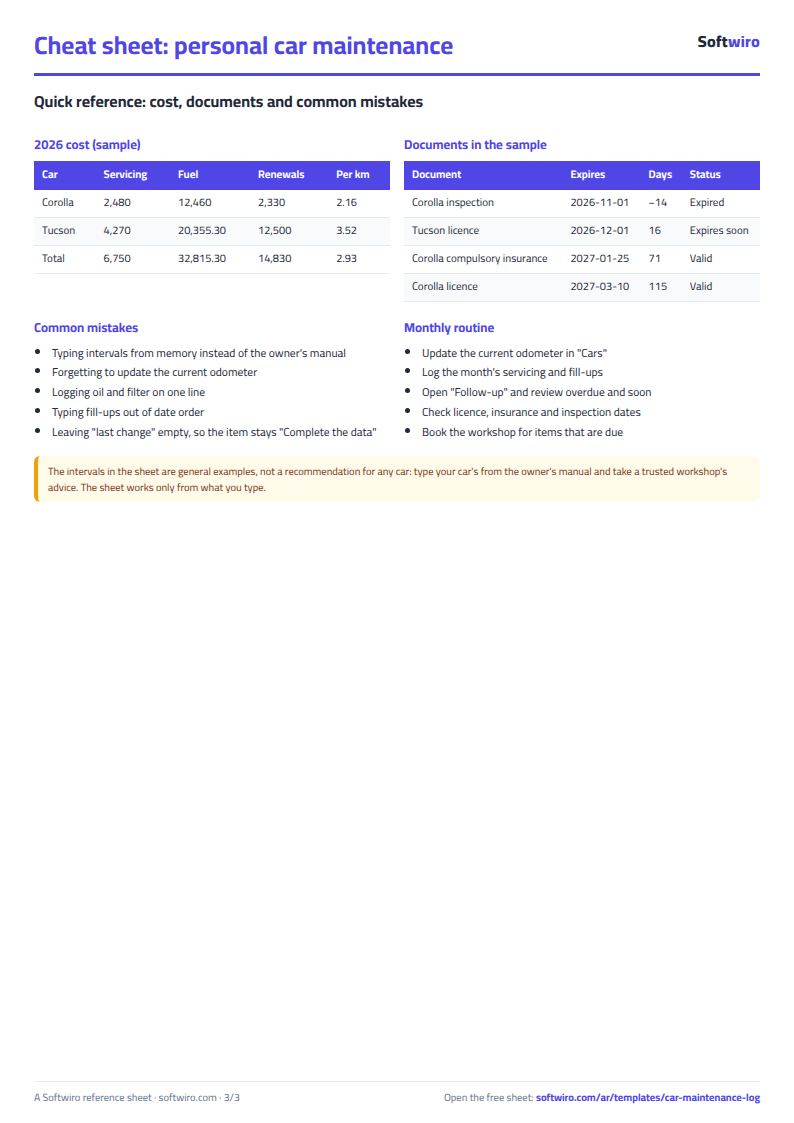
- التراخيص (Documents): Car licence, insurance, technical inspection and so on, with the last renewal date and amount and the expiry date. The days remaining and the status appear: expired, expiring soon or valid. Holds 60 documents.
- المتابعة (Follow-up): A list of the 20 items that have used up the most of their life across all cars, sorted from nearest to the change point or furthest past it.
- الملخص (Summary): The number of overdue, soon-due and OK items, the status of documents, the year's cost (maintenance, fuel and renewals), cost per kilometre and consumption, and a monthly table, with four charts.
The file opens on a start tab (“ابدأ هنا”, Start here) that explains how to use it.
What makes it different
The sheet turns "I don't remember when I changed the oil" into a due point calculated by kilometre and date together, so you do not rely on memory or the windscreen sticker. It shows which item has already passed its due point and which is approaching, what your car costs per year and per kilometre, and when its licence and insurance expire.
How to use it
- In «الإعدادات» (Settings) enter today's date and the year you are reviewing, and how many kilometres or days before the due point you want the sheet to warn you. Edit the lists of maintenance items and document types if you wish.
- In «السيارات» (Cars) enter each car: name, model, plate and the odometer reading when you start tracking, then the current odometer. This sheet sets the list of cars used in the other sheets.
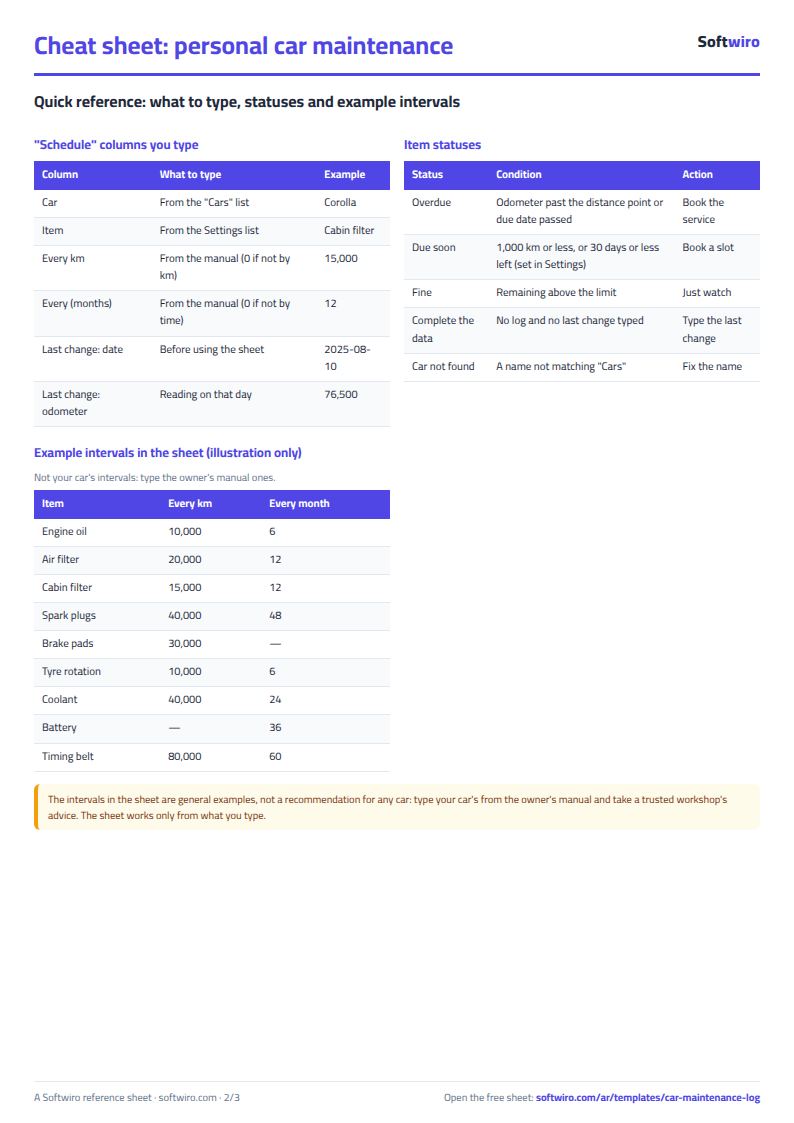
- In «جدول الصيانة» (Maintenance schedule) choose the car and item, and enter every how many km and every how many months it is changed (from your car's manual) and the last time you changed it (date and odometer) if you know it. The intervals shown are examples, so edit them.
- In «سجل الصيانة» (Maintenance log) record every service you do: date, car, item, odometer, workshop and cost. The sheet takes the latest record for each item and calculates the next due point from it.
- In «الوقود» (Fuel) record each fill-up in time order for each car: date, odometer, litres and price per litre, and consumption and cost per kilometre are calculated.
- In «التراخيص» (Documents) enter the licence, insurance and technical inspection and their expiry dates, then open «المتابعة» (Follow-up) to see the items nearest to due and «الملخص» (Summary) for the year's cost and charts.
Before you start:
- The maintenance intervals in the sheet are general examples, not a recommendation for a particular car. The right interval is set by your car's owner's manual and your conditions of use, so enter the intervals from it.
- Next due point for an item = last change + interval. By kilometre: odometer at last change + every km. By date: date of last change + number of months. Leave the interval blank or zero if the item is not measured that way, such as a battery in months only.
- The status is "متأخر" (overdue) if the current odometer is past the kilometre due point or the due date has passed. It is "يستحق قريبًا" (due soon) if less than the limit in «الإعدادات» (Settings) remains, in kilometres or in days. It is "أكمل البيانات" (complete the data) for an item whose last change the sheet does not know.
- The current odometer is the largest of what you entered in «السيارات» (Cars) and the highest reading you recorded in fuel and maintenance. Update it whenever you look at the car's odometer, or items will appear more recent than they are.
- An item's last change is taken from the log by its latest date. If the item is not in the log, the sheet uses the date and odometer written in the «جدول الصيانة» (Maintenance schedule).
- Cost per kilometre for the year = (maintenance + fuel + licence and insurance fees renewed in the year) ÷ the kilometres between fill-ups in the same year. It is approximate because the kilometres are calculated from fill-ups only.
- The sheet holds 10 cars, 120 items in the schedule, 600 maintenance records, 600 fill-ups and 60 documents. For a fleet of drivers and vehicles, use the fleet fuel and maintenance sheet («وقود وصيانة الأسطول»).
Free cheat sheet for this field
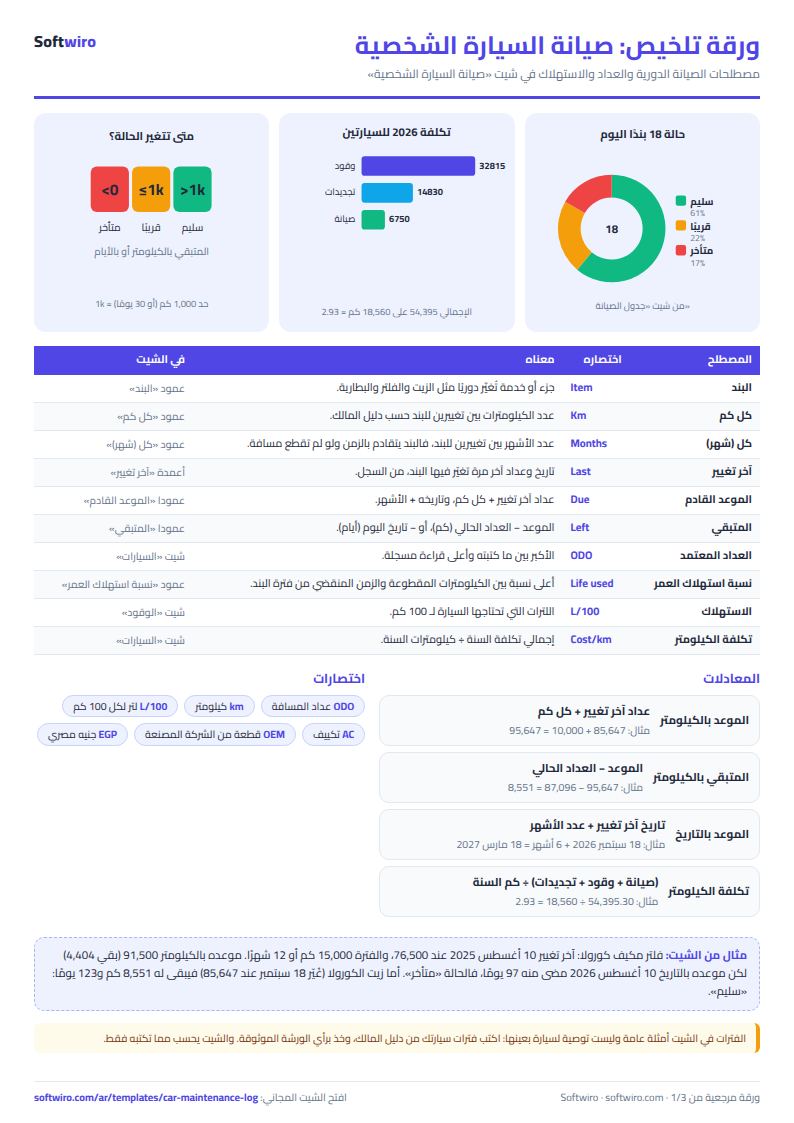
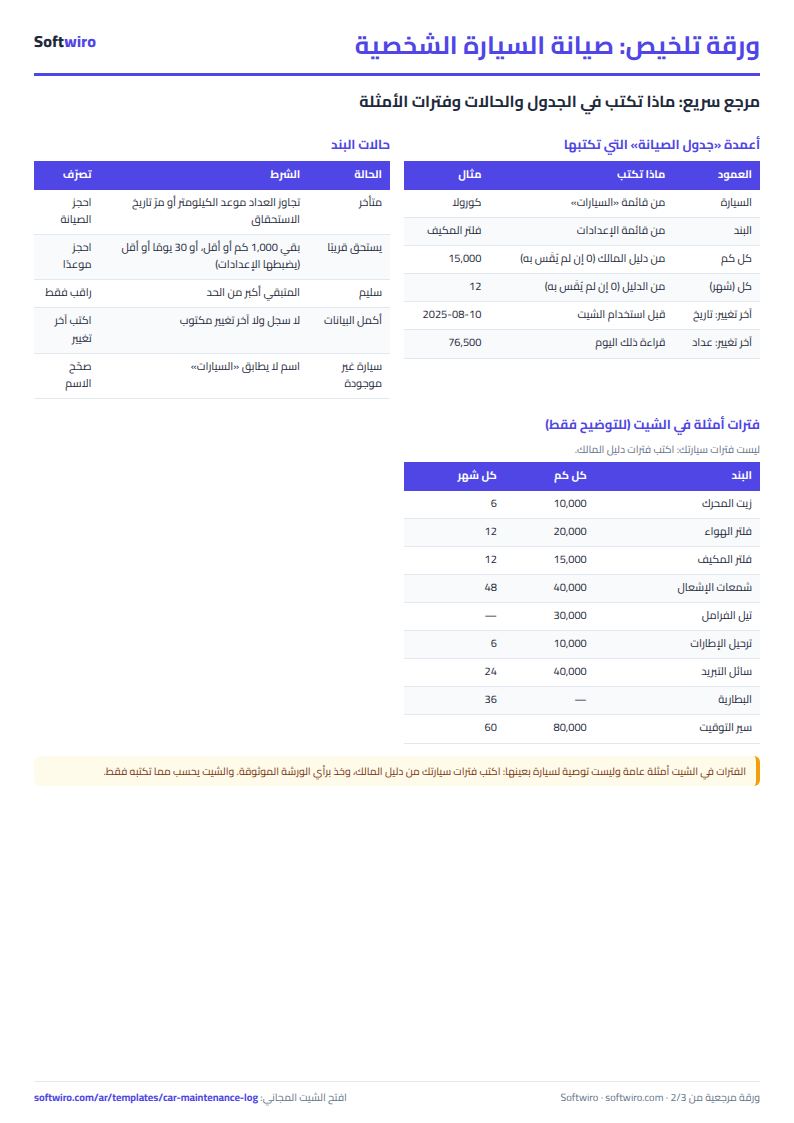
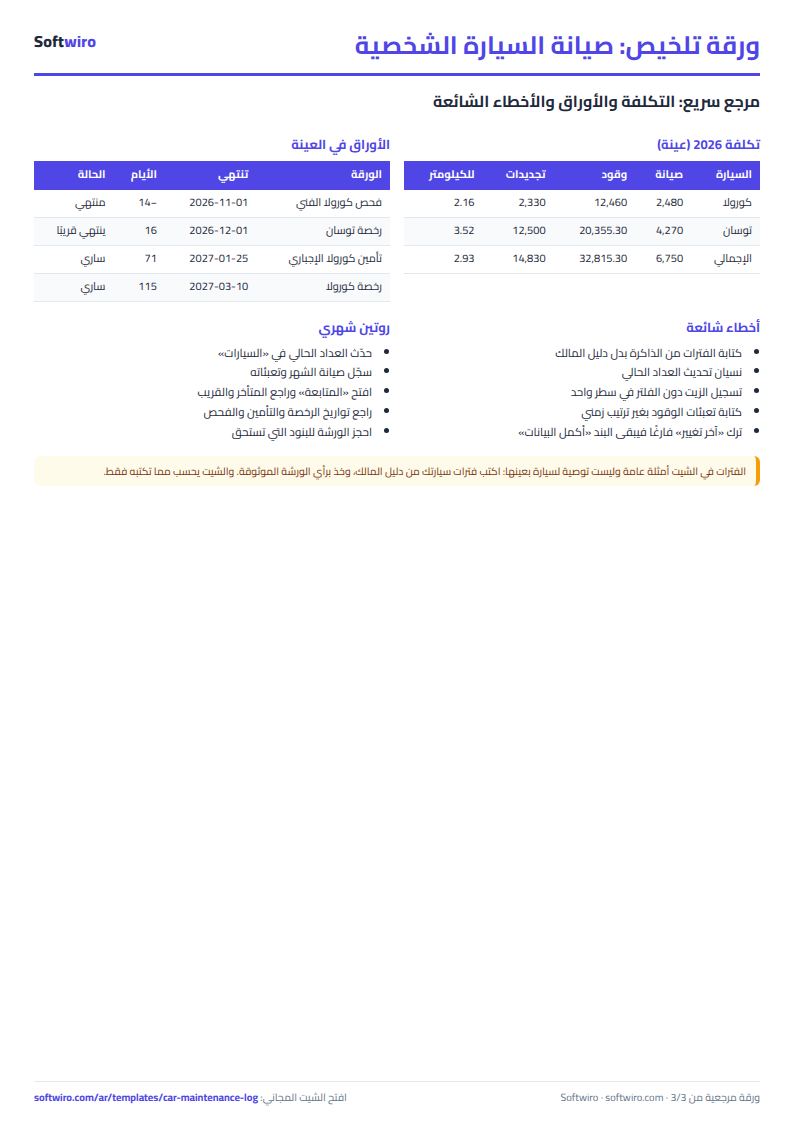
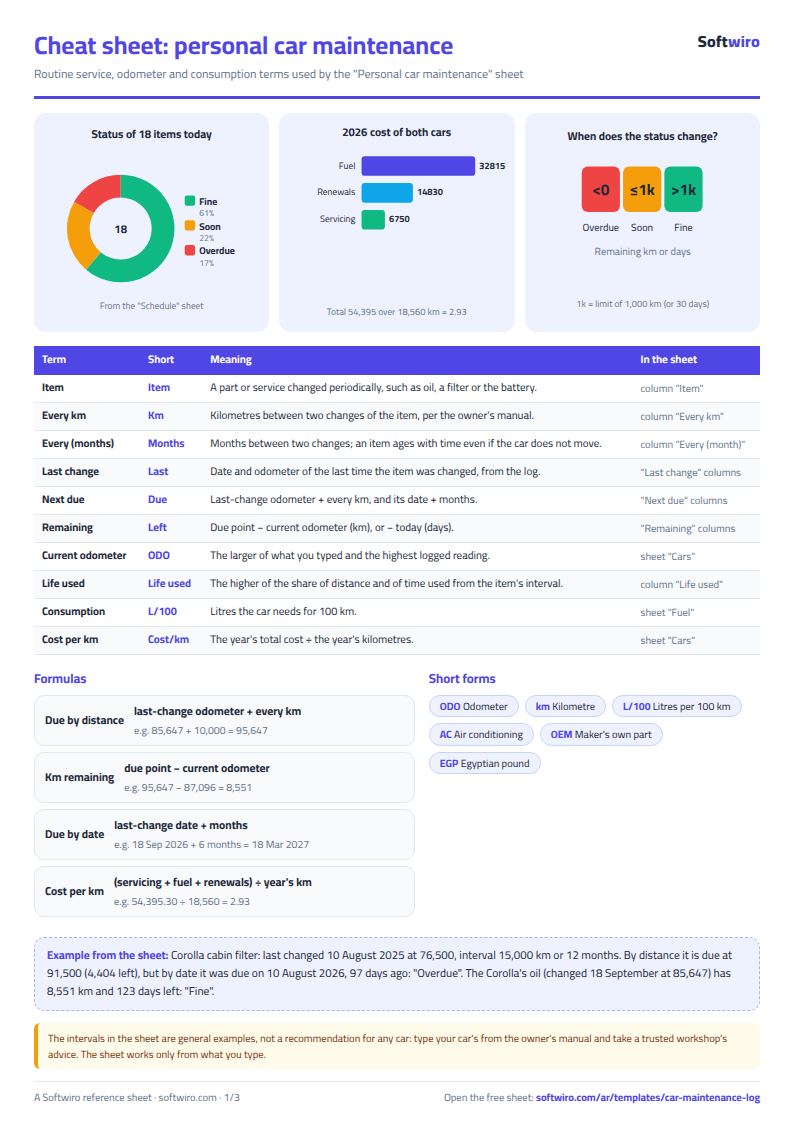
Terms, abbreviations, tables and diagrams over several pages, in Arabic and English. Download it as a PDF or images, including a phone-size version.
Still running this on Excel?
This sheet suits a start and a limited amount of data. If your way of working grows, or you need more than one person working on it at the same time, Softwiro can build you a program that fits the way you work.
| In this sheet | In Custom Software from Softwiro |
|---|---|
| One file that one person edits at a time, and copies reach you on WhatsApp. | A program with a login for each user and permissions you define, and everyone sees the same data. |
| You type everything and check the numbers by hand. | We design the screens around your work steps, so each person records only what concerns them. |
| Columns and formulas are fixed as the sheet was designed. | We build what you need: reports, alerts and screens your way. |
| Backups and security are your own responsibility. | The program runs on a secured server with regular backups. |
Frequently asked questions
Are the intervals in the sheet the right ones for my car?
No, they are general examples. The right interval for each item comes from your car's owner's manual and suits your conditions of use, so edit them in the maintenance schedule.
How does the sheet know the next service date?
It takes the item's latest change from the maintenance log and adds the interval: odometer at last change + every km for the kilometre due point, and date of last change + number of months for the date. If the item is not in the log, the sheet uses the date and odometer you entered in the maintenance schedule.
When does the status show "متأخر" or "يستحق قريبًا"?
"متأخر" (overdue) if the current odometer is past the kilometre due point or the due date has passed. "يستحق قريبًا" (due soon) if less than the limit set in Settings remains (1,000 km and 30 days in the example). An item whose last change the sheet does not know shows "أكمل البيانات" (complete the data).
Does the sheet hold more than one car?
Yes, it holds ten cars, each with its own items, odometer and fill-ups. For a fleet of vehicles with drivers, the better fit is the fleet fuel and maintenance sheet («وقود وصيانة الأسطول»).
Is the template free?
Yes, with no sign-up and no email address. Use it, edit it and share it as you like.
Does it work in Google Sheets and on mobile?
The sheet uses formulas supported by Excel 2016 and later, Google Sheets and LibreOffice, so you can upload it to Google Drive and open it with Google Sheets on a computer or a phone.
What is the difference between the white and the gray cells?
You type in the white cells; the gray cells are calculated automatically. Don't type in a gray cell, or you will erase its formula.
Can I use the sheet from an AI assistant?
Yes. Add our MCP server (URL https://softwiro.com/api/mcp, no key needed) to your assistant and ask it to do the calculation in this template. The numbers come from the sheet's own formulas, and we do not store your data. The steps and a ready-made prompt are in this article: https://softwiro.com/blog/mcp-excel-templates-ai-agent-guide.html
More free templates for: Transport and cars
More free templates
- Car rental fleet tracker (Excel)
- Fleet fuel and maintenance tracker (Excel)
- Car showroom accounts sheet
- Taxi, Uber and ride-hailing driver income sheet (trips, fuel, commission, daily net)
- Parking garage management sheet (hourly and monthly)
- Car wash management sheet (packages, cards, workers, materials)
- Food factory sheet in Excel: recipes, batches, cost and shelf life
- Biscuit factory sheet: dough, lines, packing and scrap
- Detergent factory sheet: formulas, batches, cost and filling
- Detergent ingredients and their names: function, chemical name and use
- Pharma factory sheet: batch records, materials, QC and release
- Industrial waste management sheet: quantities, classification, recycling and cost
- Algebra rules summary sheet: laws, identities and solving equations with examples