Try the sheet here, on the example
The sheet is open below with sample numbers. Change any white cell and watch the results update, or press the blank-copy button to type your own data from scratch. Nothing you type leaves your browser.
Example from the sheet
| رقم التشغيلة | كود المنتج | الإنتاج الفعلي (وحدات) | سليم للبيع | تاريخ الانتهاء | تكلفة الوحدة السليمة |
|---|---|---|---|---|---|
| B-2601 | P01 | 1,200 | 1,182 | 46840 | 24.17 |
| B-2602 | P02 | 600 | 588 | 46667 | 49.25 |
| B-2603 | P03 | 4,000 | 3,960 | 46338 | 9.87 |
| B-2604 | P01 | 800 | 780 | 46849 | 24.42 |
| B-2605 | P03 | 2,950 | 2,891 | 46350 | 10.11 |
| B-2606 | P02 | 880 | 827 | 46688 | 52.36 |
| B-2607 | P02 | 600 | 0 | 46693 | |
| B-2608 | P01 | 1,200 | 1,188 | 46871 | 24.05 |
Example from the “التشغيلات” tab (Arabic), with the numbers and formulas that are in the file.
What is inside
- "الإعدادات" (Settings): The cost of a labor hour and its share of overhead, today's date, the alert days before expiry, the waste limit, and the lists of inspection results, units and customers.
- "المواد الخام" (Raw materials): Each material with its unit, cost, opening balance, minimum level and supplier. Beside it: received, consumed, balance, balance value, status (available, reorder or negative balance) and the number of lots that are expired or near expiry. It holds 60 materials.
- "المنتجات" (Products): Each product with its standard batch units, shelf life, packaging cost, labor hours and selling price. Beside it: batch cost (materials, labor and overhead), standard unit cost and margin, then actual output, waste and the actual cost of a good unit. It holds 20 products.
- "الوصفات" (Recipes): One line per material in a product, with the quantity in kilos or liters per batch. It shows the line cost, the material's share of the recipe and the quantity actually consumed, with a warning for a missing code or a duplicate line. It holds 120 lines.
- "الوارد" (Receipts): The log of receipts by date, quantity, price, supplier, lot number and expiry date. Beside it: days remaining and an "expired" or "near expiry" alert. It holds 200 lots.
- "التشغيلات" (Batches): Each production run with its number, date, product, number of batches, actual output, waste rate and inspection result. Beside it: expected output, good units for sale, expiry date, cost of materials, packaging and labor, cost of a good unit, and an alert. It holds 200 runs.
- "مخزون الجاهز" (Finished goods): The balance of each batch (good units minus units issued), its days remaining and its status: good, near expiry, expired, sold out or not approved, and its value at cost.
- "المبيعات" (Sales): One line per sale or issue, with the batch it was issued from, the customer, quantity and price. It works out the total, cost and profit, and warns about issuing from an unapproved, expired or oversold batch. It holds 500 lines.
- "الملخص" (Summary): Indicators for materials, production, finished goods and sales, and tables by product, cost components, month, customer and stock status, with five charts.
The file opens on a start tab (“ابدأ هنا”, Start here) that explains how to use it.
What makes it different
A batch is more than a count. The sheet deducts its materials using recipe quantity × number of batches, works out its expiry date from the product's shelf life, charges its waste to the good units, and shows you before you sell what has expired, is close to expiry or has not passed inspection.
How to use it
- In the "الإعدادات" (Settings) sheet, enter the cost of a labor hour, the hour's share of overhead, today's date, the alert days before expiry and the waste limit, and review the lists (inspection results, units and customers).
- In "المواد الخام" (Raw materials), enter for each material: code, name, unit, unit cost, opening balance, minimum level and supplier.
- In "المنتجات" (Products), enter each product: standard batch units, shelf life in days, packaging cost per unit, labor hours per batch and selling price.
- In "الوصفات" (Recipes), enter one line per material in the product: product code, material code and the quantity in kilos (or liters) for one batch. The materials cost per batch appears in "المنتجات" (Products).
- Record each receipt in "الوارد" (Receipts) with quantity, price, lot number and its expiry date. The material balance rises by itself, and expired and near-expiry lots appear.
- Record each run in "التشغيلات" (Batches): number, date, product, number of batches, actual output, waste rate and inspection result. The sheet works out the expiry date, the materials consumed and the cost of a good unit.
- Record each sale or issue in "المبيعات" (Sales) against the batch it was issued from. It is deducted from "مخزون الجاهز" (Finished goods), profit is calculated, and you are warned if you issue from an expired or unapproved batch.
- Open "مخزون الجاهز" (Finished goods) to see each batch's balance and days remaining, and "الملخص" (Summary) for the indicators and charts.
Before you start:
- Materials consumed by a batch = the material's quantity per batch (from "الوصفات" (Recipes)) × the number of batches. Materials are counted for all runs, including rejected ones, because their materials were actually used.
- Good units for sale = actual output − waste units, provided the inspection result is "ناجح" (passed). A batch marked "مرفوض" (rejected) or "قيد الفحص" (under inspection) has zero balance for sale until you change its result.
- Expiry date = production date + the product's shelf life in days. You enter this period yourself, "according to the requirements of the competent authority" and your product. The sheet does not set a shelf life or storage conditions.
- Run cost = materials (batches × materials cost per batch) + packaging (actual output × packaging cost) + labor and overhead (batches × batch hours × hourly cost and its share). Cost of a good unit = run cost ÷ good units, so the good units carry the run's waste. In the product sheet and in the summary, the actual cost of a good unit is calculated only from runs marked "ناجح" (passed) and "مرفوض" (rejected), so rejected runs are charged to the good units, and runs under inspection are excluded until their result is known.
- Raw materials are tracked by lot in "الوارد" (Receipts) (date and expiry), but the material balance is a total, not per lot. Change a lot's status to "مستهلك" (consumed) when it is used up and its alert stops.
- The sheet is for records and calculations only. It does not set valid recipes, legal limits or food safety requirements; these are taken "according to the requirements of the competent authority".
- Capacity: 60 materials, 20 products, 120 recipe lines, 200 received lots, 200 runs and 500 sales lines. The summary shows the first 8 products, 8 customers and 6 months.
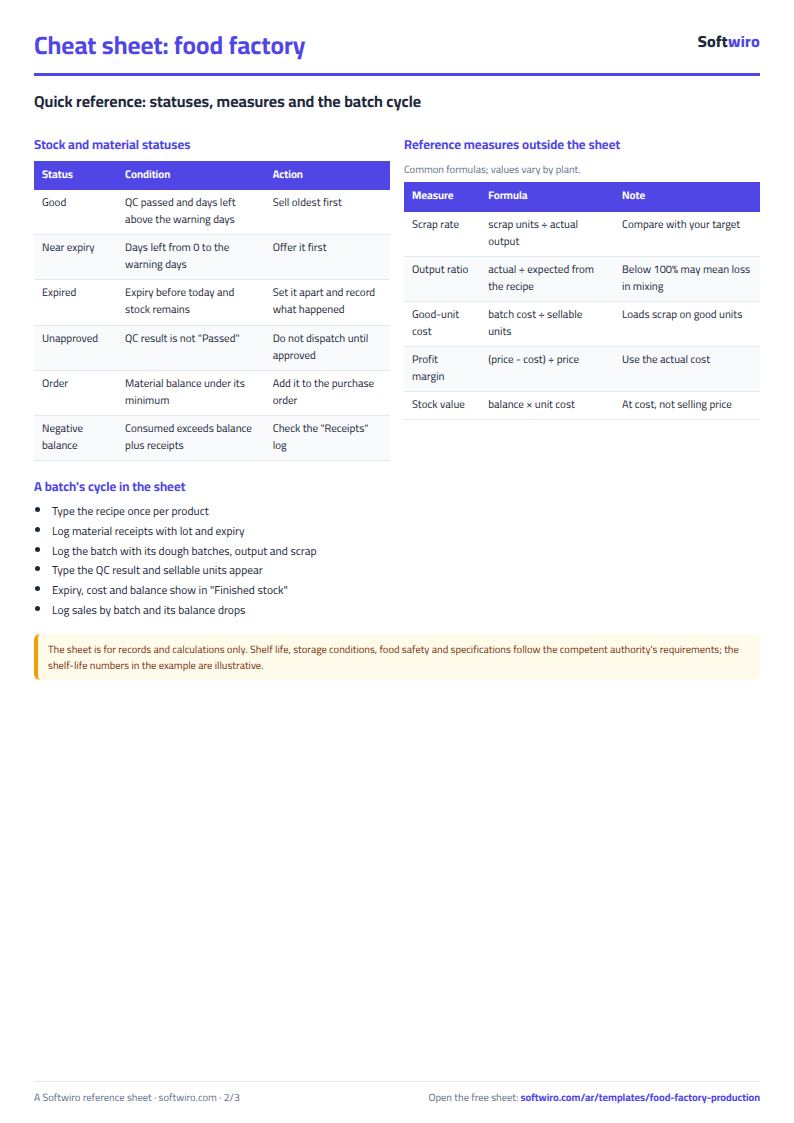
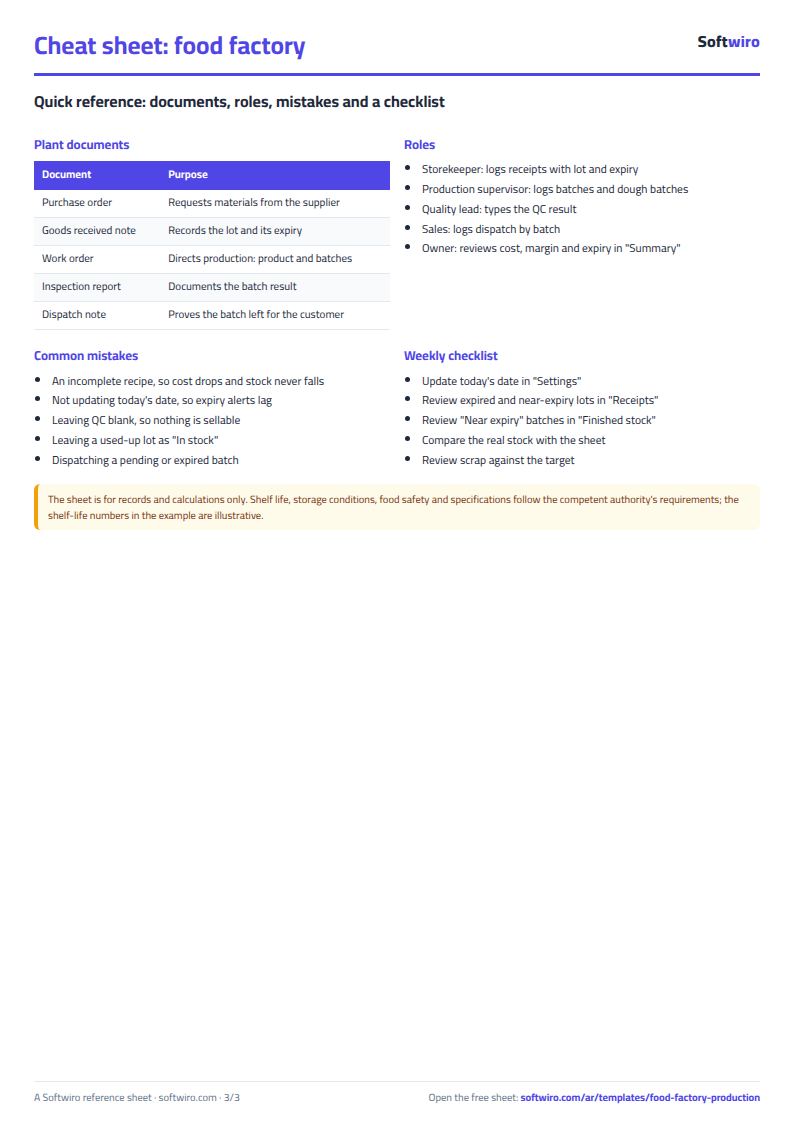
Free cheat sheet for this field
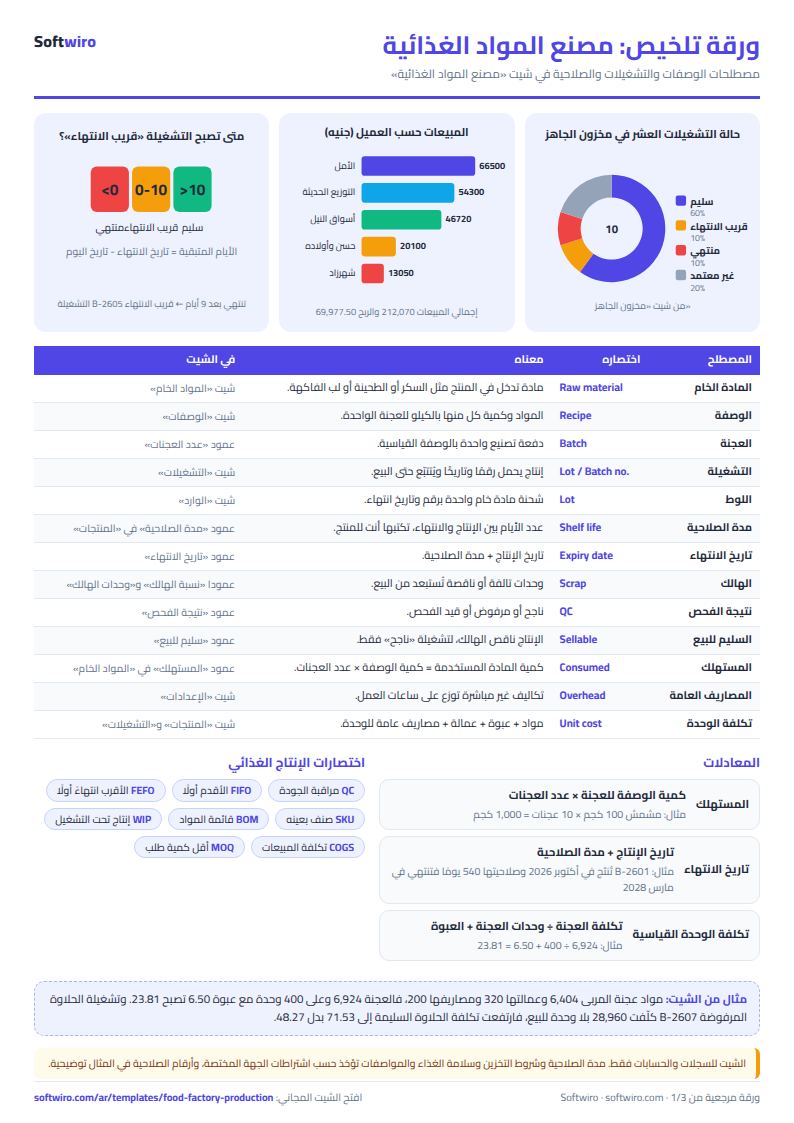
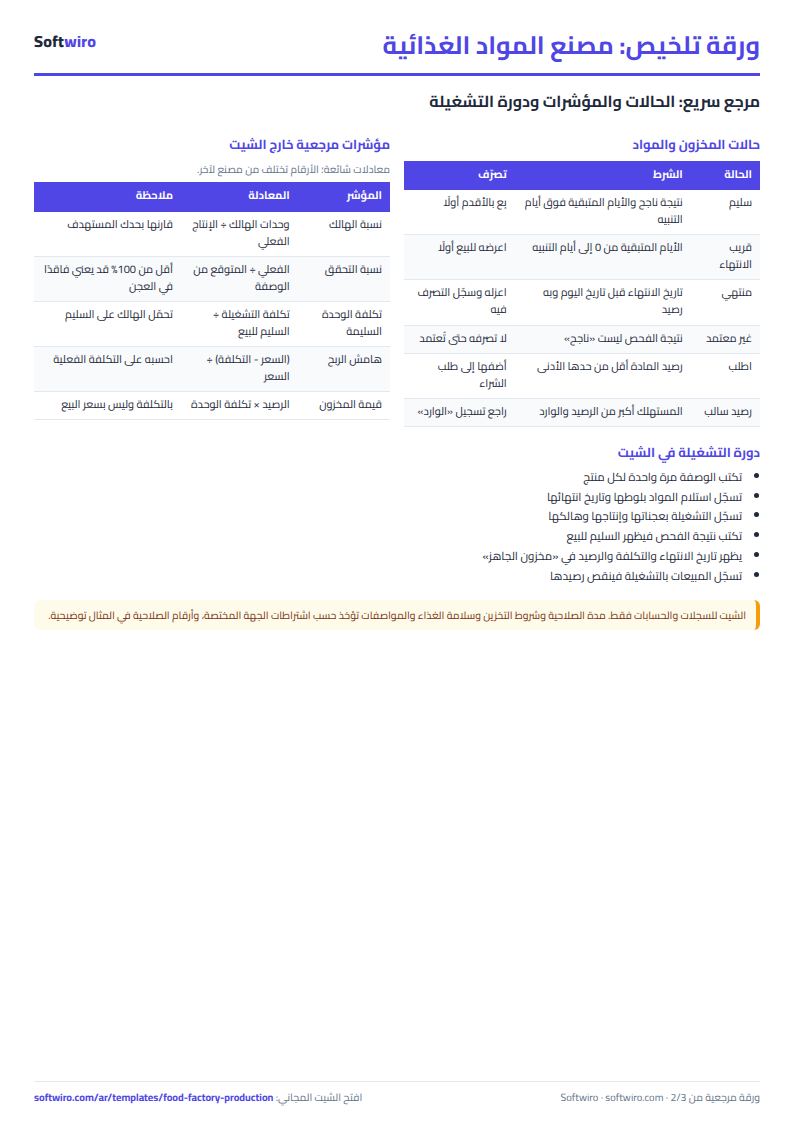
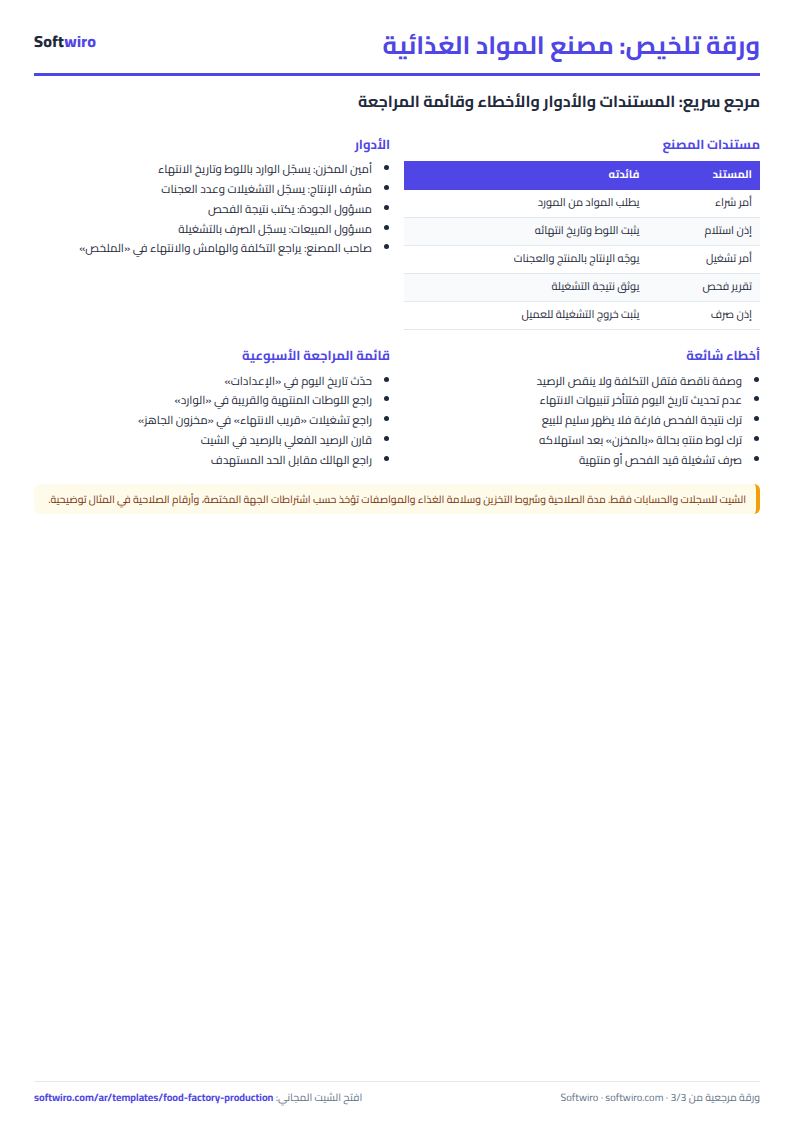
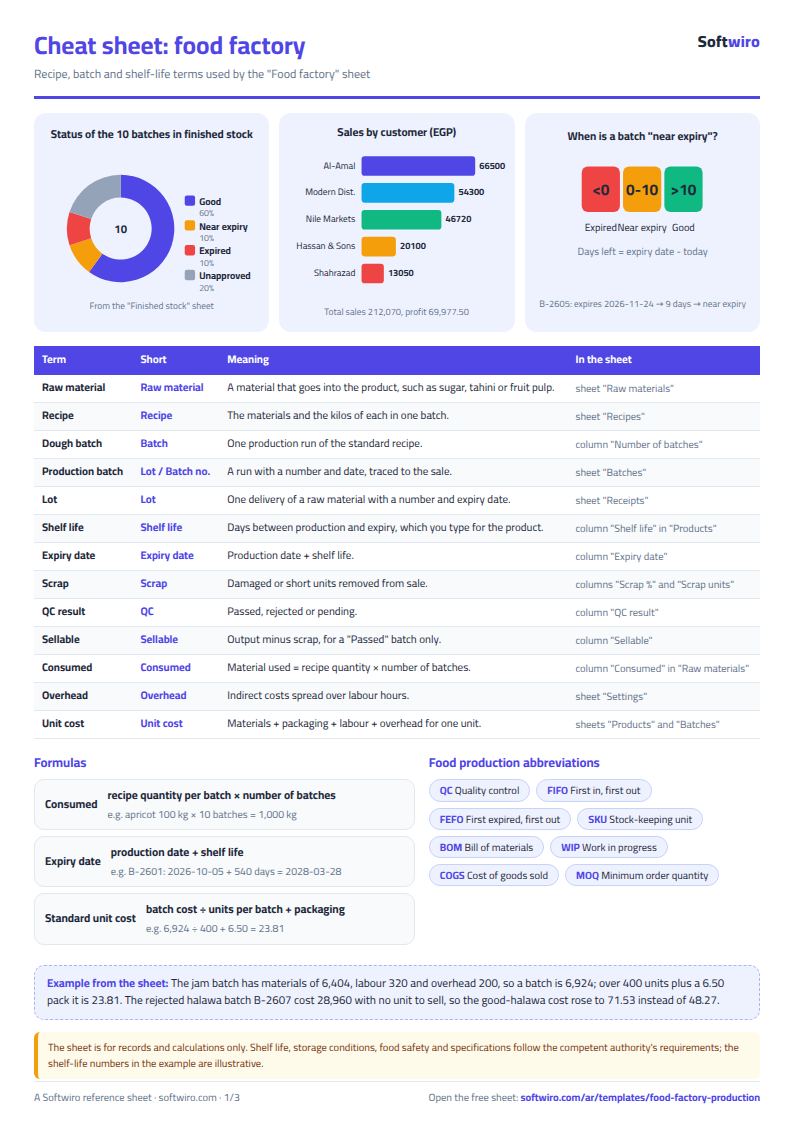
Terms, abbreviations, tables and diagrams over several pages, in Arabic and English. Download it as a PDF or images, including a phone-size version.
Still running this on Excel?
This sheet calculates requirements for the orders you type in yourself. In MESwiro, material requirements planning (MRP) breaks planned production orders down into their components and works out shortages against stock.
| In this sheet | In MESwiro |
|---|---|
| You type in every order and every balance by hand. | Material requirements planning (MRP) breaks planned production orders down into their components and calculates shortages against stock. |
| You ask suppliers for quotes by phone. | It requests quotes from several suppliers and compares price, lead time and minimum order side by side. |
| Line scheduling in a sheet hides conflicts. | It assigns work orders to lines and shifts by drag and drop, with a Gantt chart and a panel for unscheduled orders. |
| Efficiency and order cost are guesswork. | It calculates OEE for each line automatically and shows the material, labor and machine cost of each order. |
Frequently asked questions
How are raw materials deducted from stock?
The sheet multiplies the material's quantity per batch (from "الوصفات" (Recipes)) by the number of batches in each run (from "التشغيلات" (Batches)) and adds them up for each material in the "المستهلك" (Consumed) column. Balance = opening balance + received − consumed.
How is the expiry date calculated?
Expiry date = production date + the product's shelf life in days, which you enter in "المنتجات" (Products). The sheet does not decide a shelf life. Enter it for your product and according to the requirements of the competent authority.
How is unit cost calculated?
Batch run cost = materials for the batches + packaging for the actual output + labor and overhead by batch hours. Cost of a good unit = run cost ÷ good units, so the good units carry the run's waste.
Does the sheet set food safety requirements or permitted recipes?
No. The sheet is for records and calculations only. It does not set specifications, legal limits or storage conditions; these are taken "according to the requirements of the competent authority".
Is the template free?
Yes, with no sign-up and no email address. Use it, edit it and share it as you like.
Does it work in Google Sheets and on mobile?
The sheet uses formulas supported by Excel 2016 and later, Google Sheets and LibreOffice, so you can upload it to Google Drive and open it with Google Sheets on a computer or a phone.
What is the difference between the white and the gray cells?
You type in the white cells; the gray cells are calculated automatically. Don't type in a gray cell, or you will erase its formula.
Can I use the sheet from an AI assistant?
Yes. Add our MCP server (URL https://softwiro.com/api/mcp, no key needed) to your assistant and ask it to do the calculation in this template. The numbers come from the sheet's own formulas, and we do not store your data. The steps and a ready-made prompt are in this article: https://softwiro.com/blog/mcp-excel-templates-ai-agent-guide.html
All the templates in this group: Factory management sheets: production, cost and quality
More free templates for: Factories and production
More free templates
- Electronics factory sheet: BOM, production and quality
- Biscuit factory sheet: dough, lines, packing and scrap
- Detergent factory sheet: formulas, batches, cost and filling
- Detergent ingredients and their names: function, chemical name and use
- Pharma factory sheet: batch records, materials, QC and release
- Industrial waste management sheet: quantities, classification, recycling and cost
- Algebra rules summary sheet: laws, identities and solving equations with examples
- Solid geometry formulas sheet: areas and volumes with examples and a calculator
- Livestock and dairy farm sheet
- Complete farm management sheet in Excel: plots, workers, crops and sales
- Agricultural waste management sheet: rice straw, residues, compost and recycling
- Trip organizer sheet: participants, instalments, costs and itinerary
- Building maintenance sheet: flat fees, expenses, elevator and pump
- Canteen management sheet