You are running a project (a flat fit-out, a build, an event, an IT or marketing project) with a budget, and you want to know at any moment how much you have signed for, how much you have paid, how much is really done, and whether you will finish within budget. The free project budget vs actual sheet answers this from three logs you type: budget items, contracts and purchase orders, and payments. (The workbook and its page are in Arabic.)
The problem it solves
Most projects track one number: "how much have we spent". That number lags reality. If you signed a contract for 112,000 on an item budgeted at 108,000 but have paid only half so far, the item looks fine until the last payment, when it is too late to negotiate. The opposite happens too: you may have paid a large advance for work that is not yet done. Three different numbers (committed, paid, done) need a record each, and that is what the sheet gives you.
How the sheet works, step by step
- In Settings you write the project name, the review date, the start month, the contingency reserve, the alert percentage and the item categories.
- In Items you write each item's code, category, name, unit, quantity and unit cost; the budget is multiplied for you. You also write the planned start and end month numbers (1 is the first month of the project).
- In Commitments you log every contract or purchase order you signed: date, number, item code, supplier and value.
- In Payments you log every actual payment and pick the contract it belongs to. For a direct purchase with no contract you type the item code, and the payment counts as both a commitment and a spend.
- You update the progress column for each item from what you see on site.
- Summary pulls everything together, and Monthly curve charts actual spend against the plan.
What is in each sheet
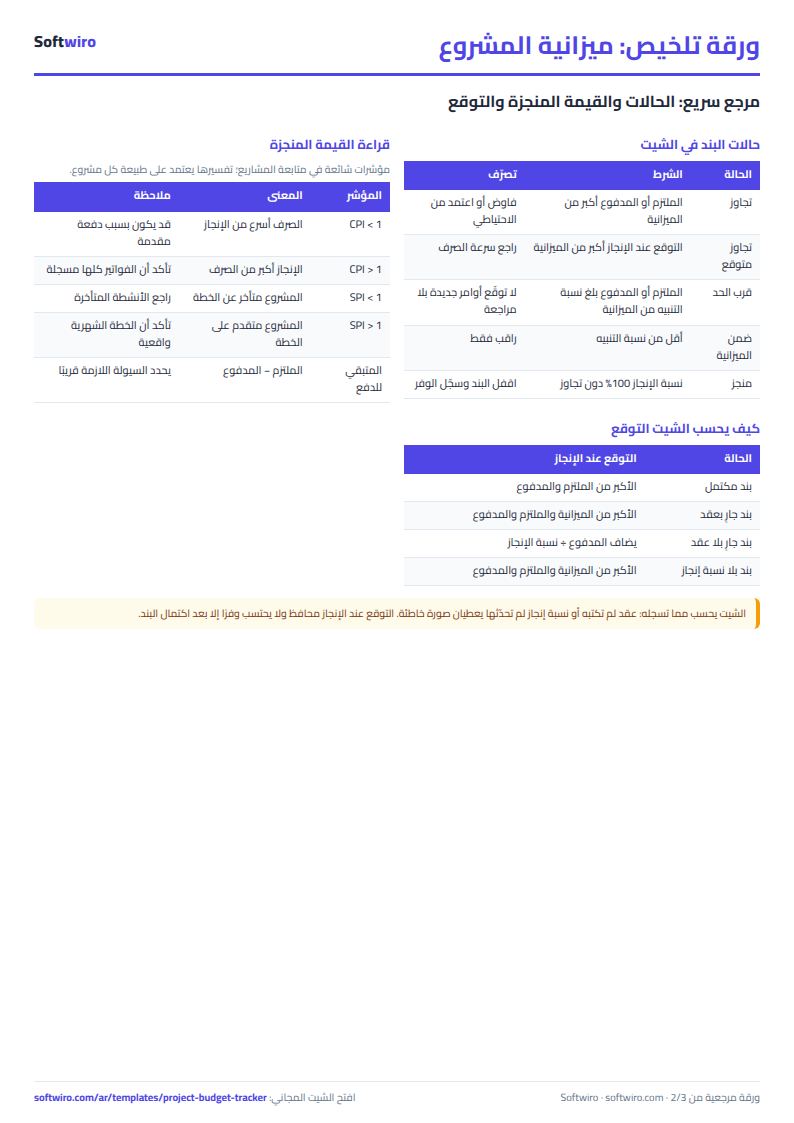
- Items: budget, committed, paid, left to pay, uncommitted budget, earned value, forecast at completion, expected overrun and status; over-budget items turn red.
- Commitments: for each contract, the amount paid against it, what is left and its status, with warnings for an unknown code, a duplicate number or overpaying a contract.
- Monthly curve: planned, paid and committed amounts for each of twelve months, cumulative totals and the gap against plan.
- Summary: the headline numbers, the two performance indexes, contingency, the five biggest overruns, a table by category and five charts.
A walk-through on the sample numbers
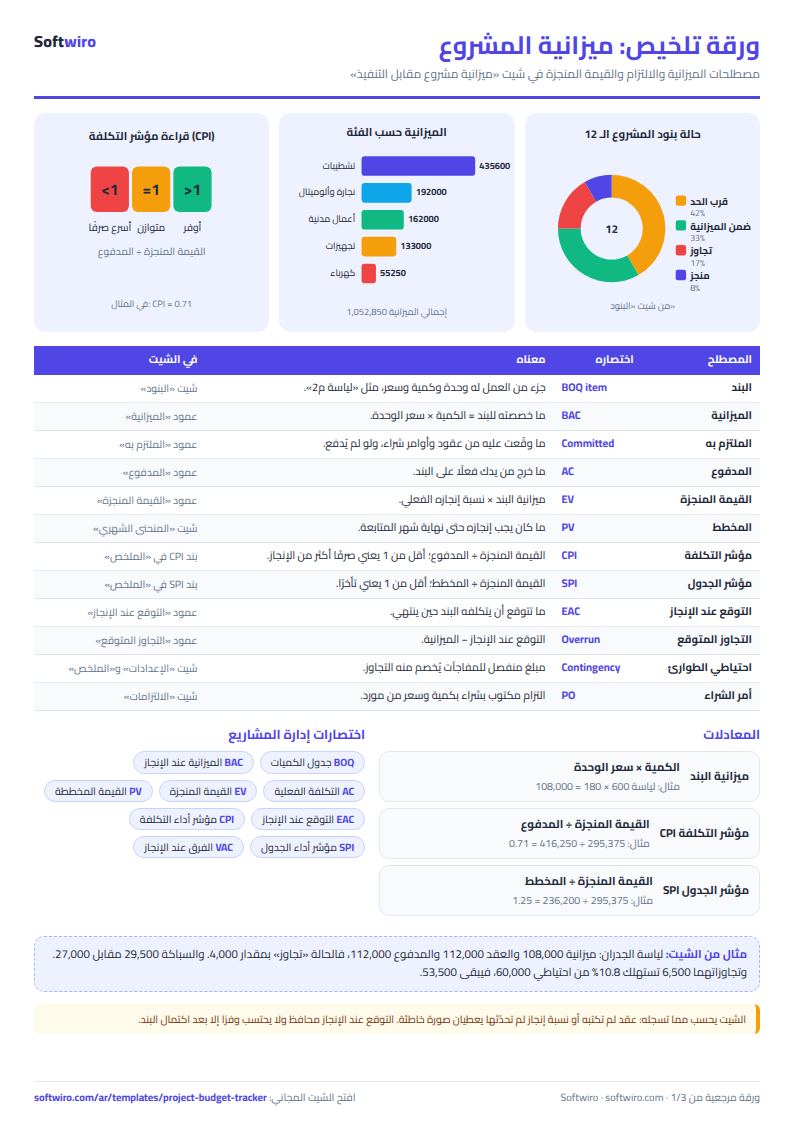
The numbers below are sample data inside the sheet for an imaginary fit-out, not a real project. It has 12 items, 8 contracts and 17 payments, with a review date of 13 November 2026:
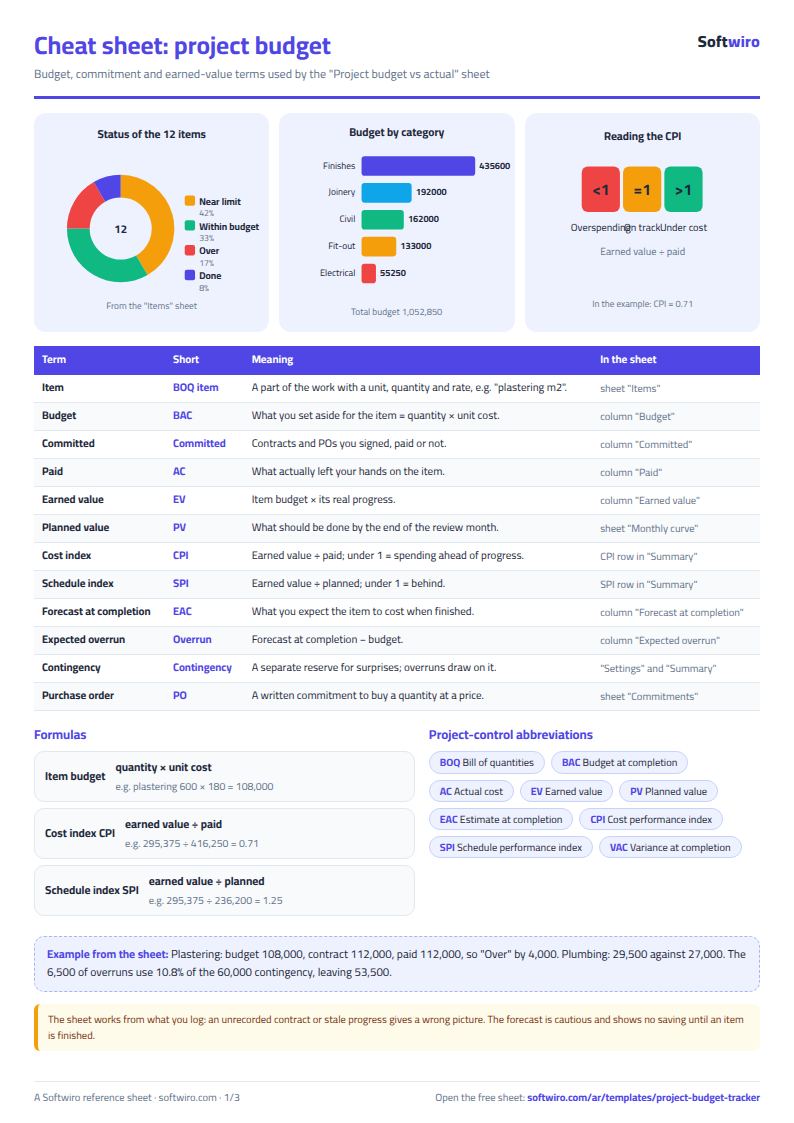
- Budget 1,052,850, with a contingency of 60,000.
- Committed 766,750, which is 72.8% of the budget, and paid 416,250, which is 39.5%. So 350,500 is left to pay on contracts and 292,600 has not yet been committed.
- Wall plastering: budget 108,000 (600 m2 × 180), but its contract is 112,000 and fully paid, so the status is "Over" by 4,000. Plumbing is contracted at 29,500 against a budget of 27,000, so it is over by 2,500.
- Demolition and blockwork finished at 52,000 against 54,000, saving 2,000.
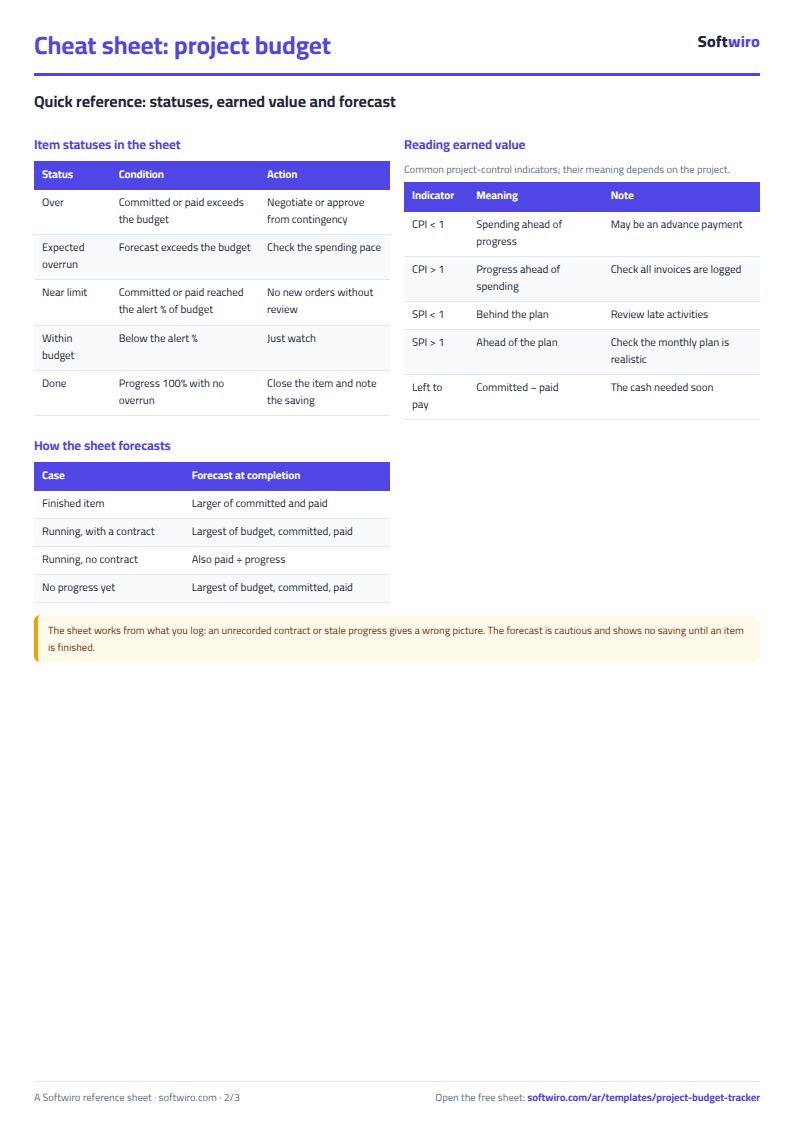
- Earned value is 295,375, meaning the project has done 28.1% of its budget. Since 416,250 has been paid, the cost index (CPI) is 0.71: spending is ahead of progress, here because of large advance payments. The plan to the end of November is 236,200, so the schedule index (SPI) is 1.25.
- Forecast at completion is 1,057,350, which is 4,500 above budget: the two overruns add to 6,500, and the demolition saving of 2,000 reduces the gap.
- Contingency: the 6,500 of overruns uses 10.8% of the 60,000, leaving 53,500, which is enough.
- Alerts: two items are over, and five are near the 90% alert level, such as the tiles, where 190,000 of the 197,600 budget is committed.
Cumulative paid (416,250) is ahead of the cumulative plan (236,200) by 180,050, because of advances on contracts.
Features and why they matter
- Three numbers, not one: committed, paid and done, so you see an overrun when the contract is signed, not at the last payment.
- A cautious forecast: it shows expected overruns and counts no saving until an item is finished.
- Contingency: overruns are drawn from it so you can see whether it is enough.
- Works in Excel 2016+, Google Sheets and LibreOffice, free, no sign-up. Holds 100 items, 500 commitments, 1,500 payments.
Common mistakes
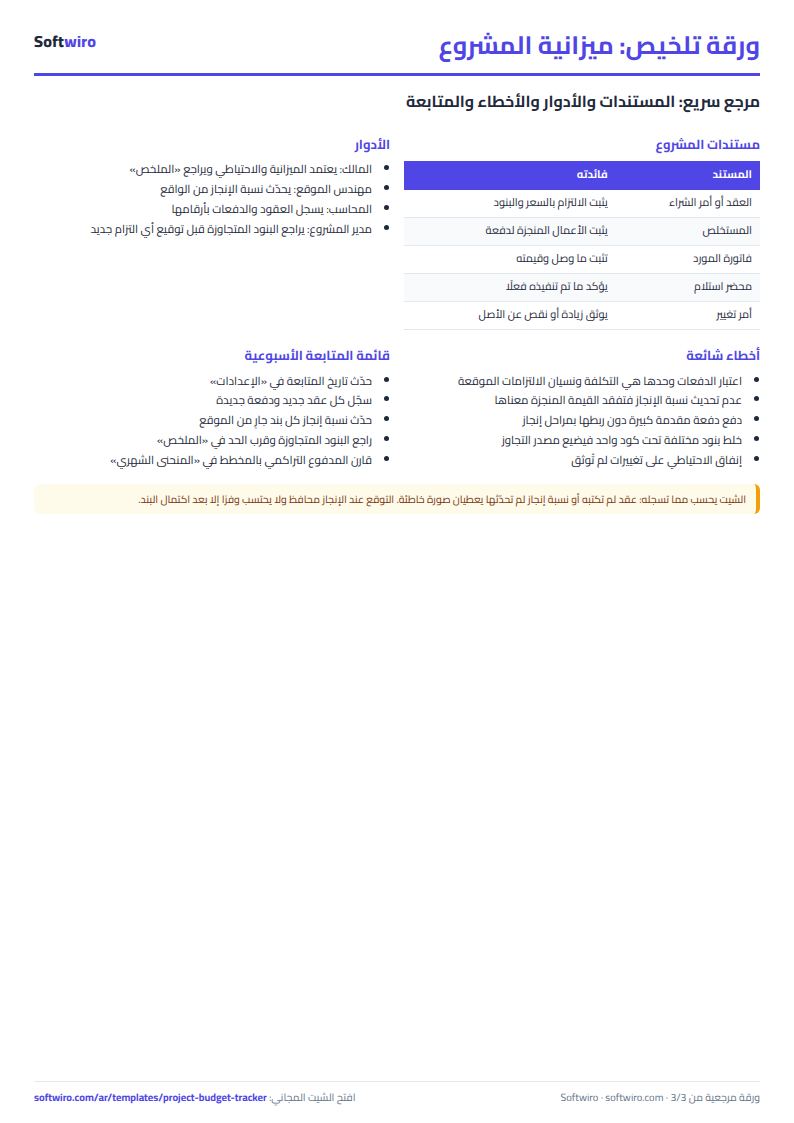
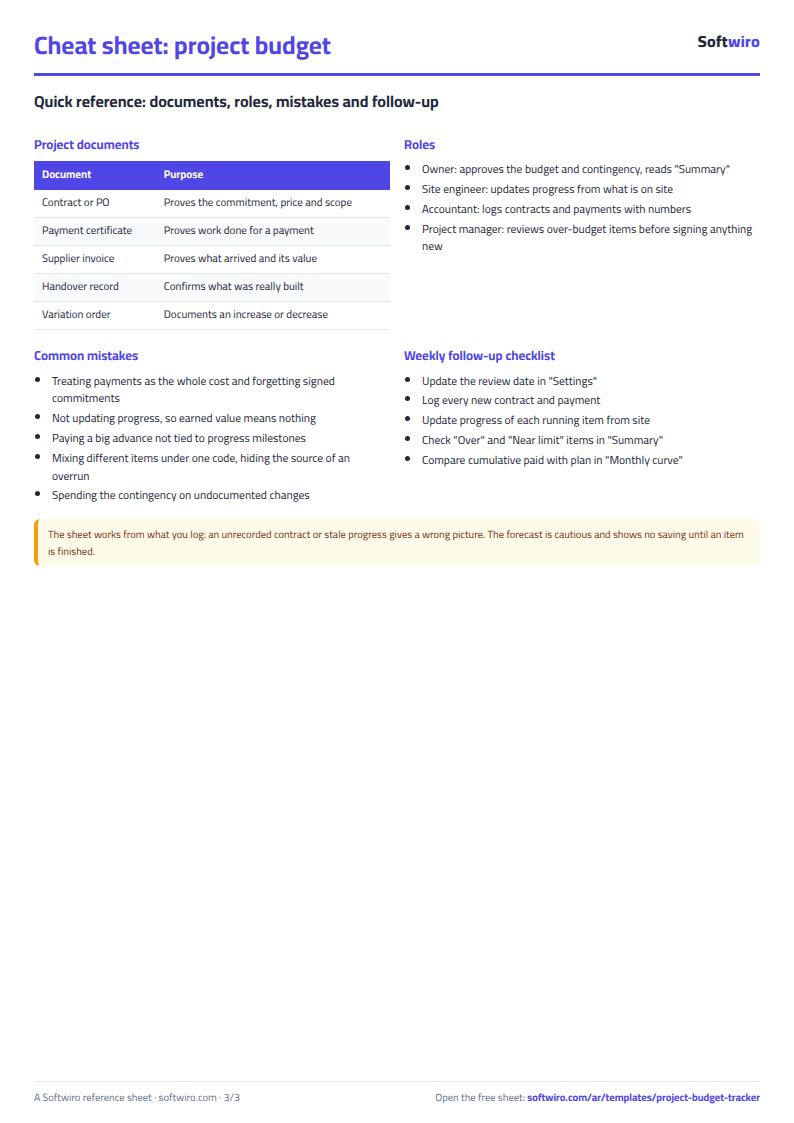
- Logging payments only: you miss signed contracts that are not yet paid.
- Leaving progress stale: earned value and CPI then mean nothing.
- A big advance with no milestones: it lowers CPI and sends cash out before the work is done.
- One code for several items: you cannot tell where an overrun came from.
How it differs from the project-tracking sheet
If you are a contractor following several projects with contract values, profit and client payments, use the finishing and contracting projects sheet. This sheet is for one project, followed item by item. And if you follow a business's monthly spending, see the business expenses and budget sheet.
Who it suits and when it is not enough
It suits a homeowner finishing a flat, a site engineer, an event organiser or a small-project manager who types the contracts and payments personally. It always needs someone to type every contract and payment and update progress. If several engineers and accountants need to record at once, or payment certificates need approval before paying and a photo of each invoice, Softwiro can build you a program around your way of working.
Frequently asked questions
What is the difference between committed and paid? Committed is what you signed in contracts and purchase orders; paid is what has actually left.
How is the forecast at completion worked out? For a finished item it is the larger of committed and paid; otherwise the largest of budget, committed and paid, and for an item with no contract paid ÷ progress is added.
Does it work outside construction? Yes: an item can be a hall, an advert or a licence.
Your next step
Download the sheet, open "Items" and copy your project's bill of quantities into it. Then log the contracts you have signed so far, update the progress figures, and open "Summary" to see where you stand.