You want to make ad decisions with written rules instead of instinct: when to scale an ad set, when to kill it, when to wait, how much you can pay for one conversion without losing money, and how to test and pace the budget. The free media buyer rules sheet gathers this in 61 rules, each with its formula and an example using trial numbers, plus calculators and a decision helper whose limits you set. These are general rules; reference numbers vary by business, market and platform, and the sheet gives no benchmark CTR or CPM figures.
The problem it solves
A media buyer sees dozens of numbers in a platform report, then kills an ad a few hours after launch, doubles the budget of an apparent winner that then collapses, or judges a test on a handful of conversions. The cause is usually missing written limits before launch: which ROAS means break-even? How much spend is enough to judge? The sheet puts the formulas in one place, asks you to write your limits, and applies them to every ad set the same way.
How the sheet works, step by step
- Open المرجع (the reference) to review the metrics, formulas and examples; filter by the "section" column, or pick a metric in بحث عن قاعدة (rule lookup).
- In حاسبات (calculators) compute your campaign metrics, then breakeven ROAS and max CPA from your product margin.
- Type your targets into the settings of قرار الإعلانات (ad decisions): the ROAS target, the minimum acceptable ROAS, the minimum spend before judging, minimum conversions, maximum frequency, minimum CTR and the scaling step.
- Enter up to 10 ad sets from the platform report. The sheet suggests scale, keep and watch, kill or wait, with a creative-fatigue warning and a proposed budget.
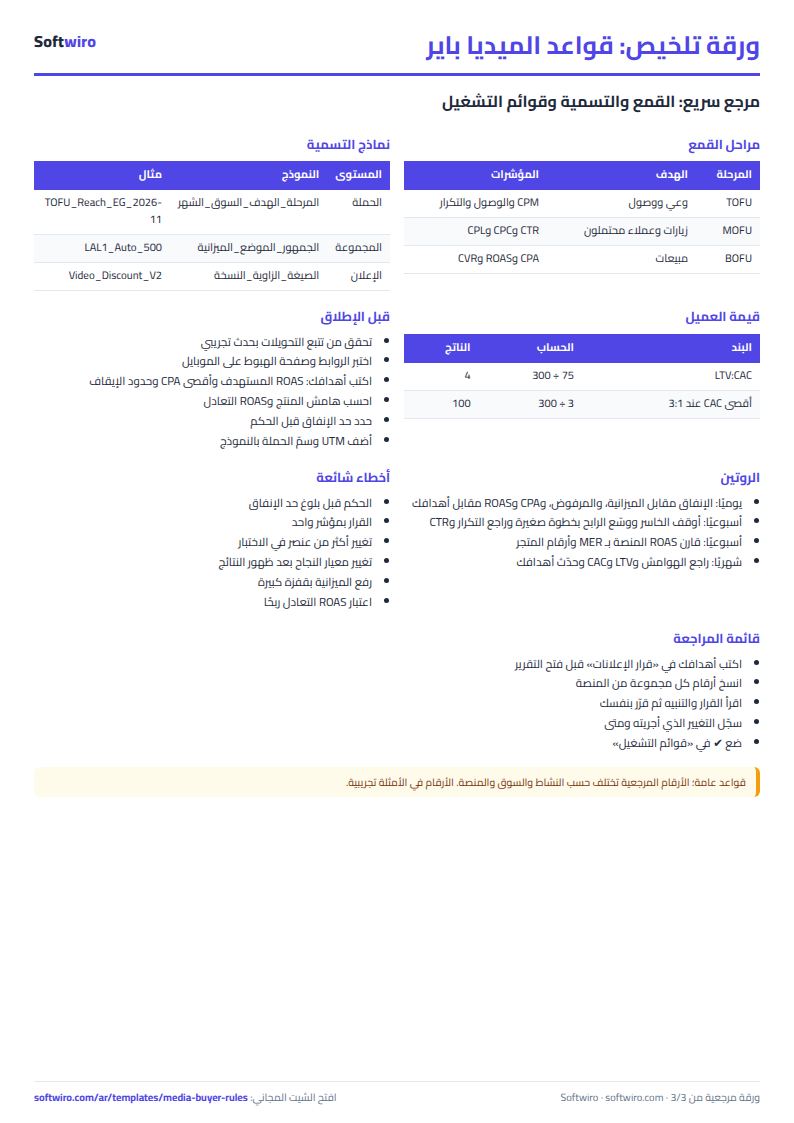
- Use قوائم التشغيل (the checklists) before launch and daily, weekly and monthly.
- Take اختبار ذاتي (the self-test), log your score in المتابعة (progress), then open الملخص (the summary).
What is in each sheet
- Reference: 61 rules in 8 sections: core metrics (15), relations between metrics (5), profitability and break-even (7), decision rules (8), scaling and budget (6), testing (6), creative fatigue (5), funnel and naming (9).
- Calculators: five: campaign metrics; breakeven ROAS, max CPA and LTV:CAC; a budget funnel; spend pacing; and converting CPM, CTR and CVR to CPC, CPA and ROAS.
- Ad decisions: a decision helper for ten ad sets against your own targets.
- Checklists: 28 items in four lists.
- Self-test, progress and summary: 40 questions, review dates and six charts.
A walk-through on the numbers (sample data)
These figures come from the sample copy inside the sheet. They are illustrative, not market averages.
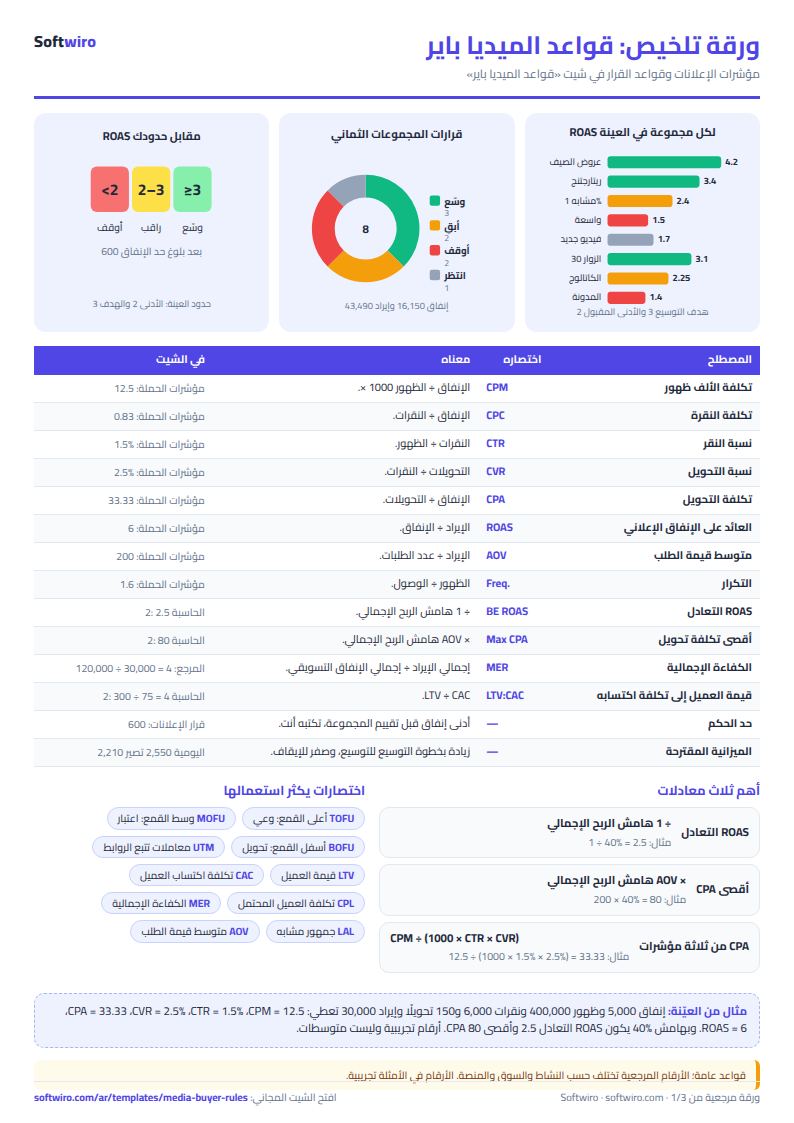
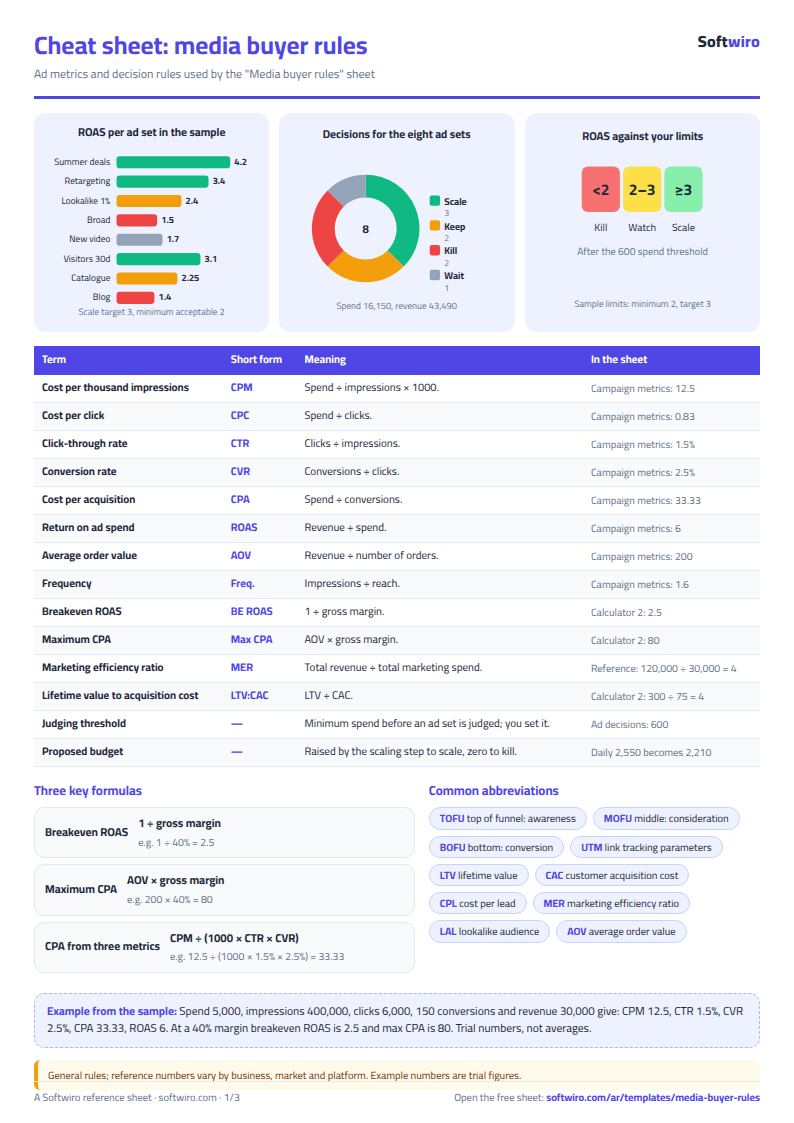
- Campaign metrics: spend 5,000, impressions 400,000, clicks 6,000, 150 conversions and revenue 30,000 give CPM 12.5, CPC 0.83, CTR 1.5%, CVR 2.5%, CPA 33.33, ROAS 6 and AOV 200; at a 40% margin the ad profit is 7,000.
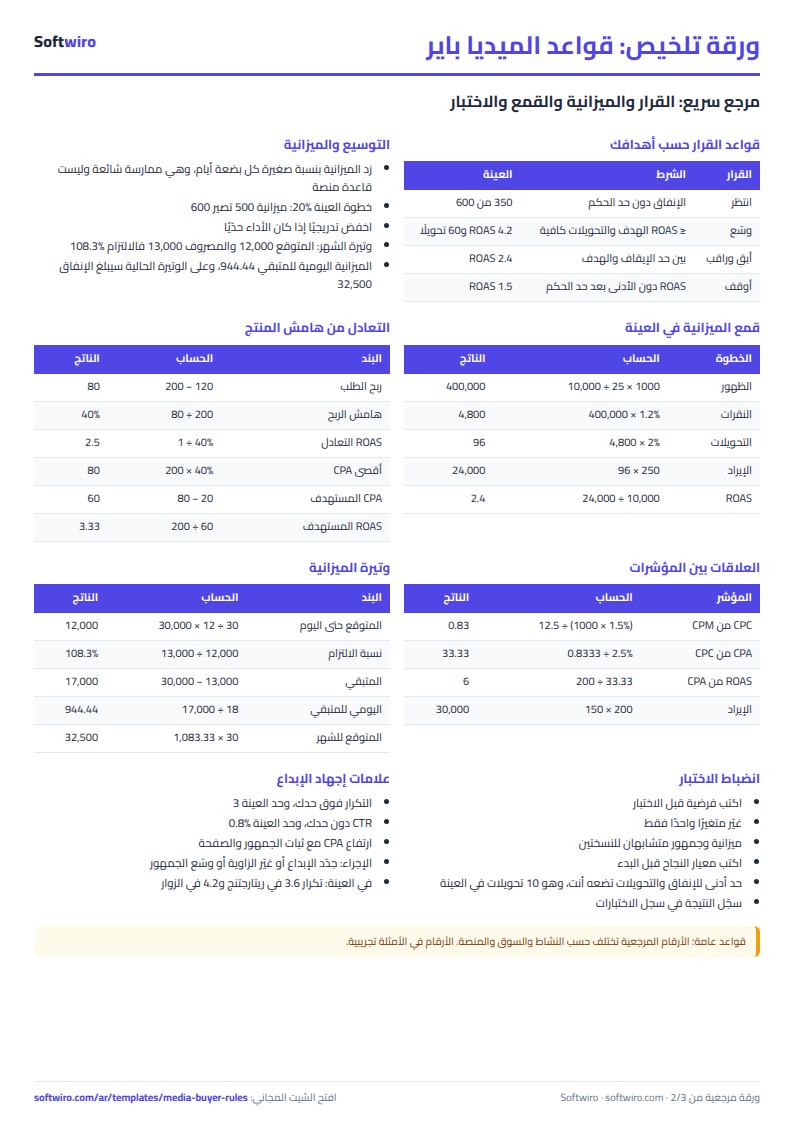
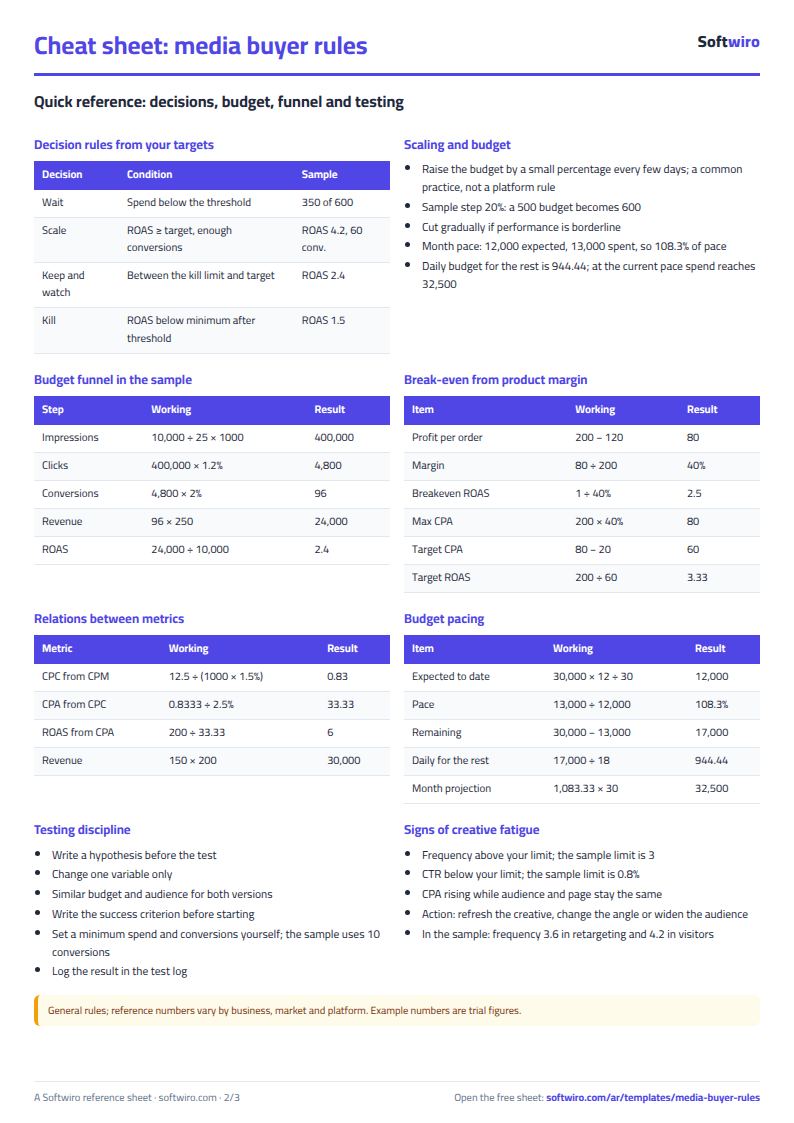
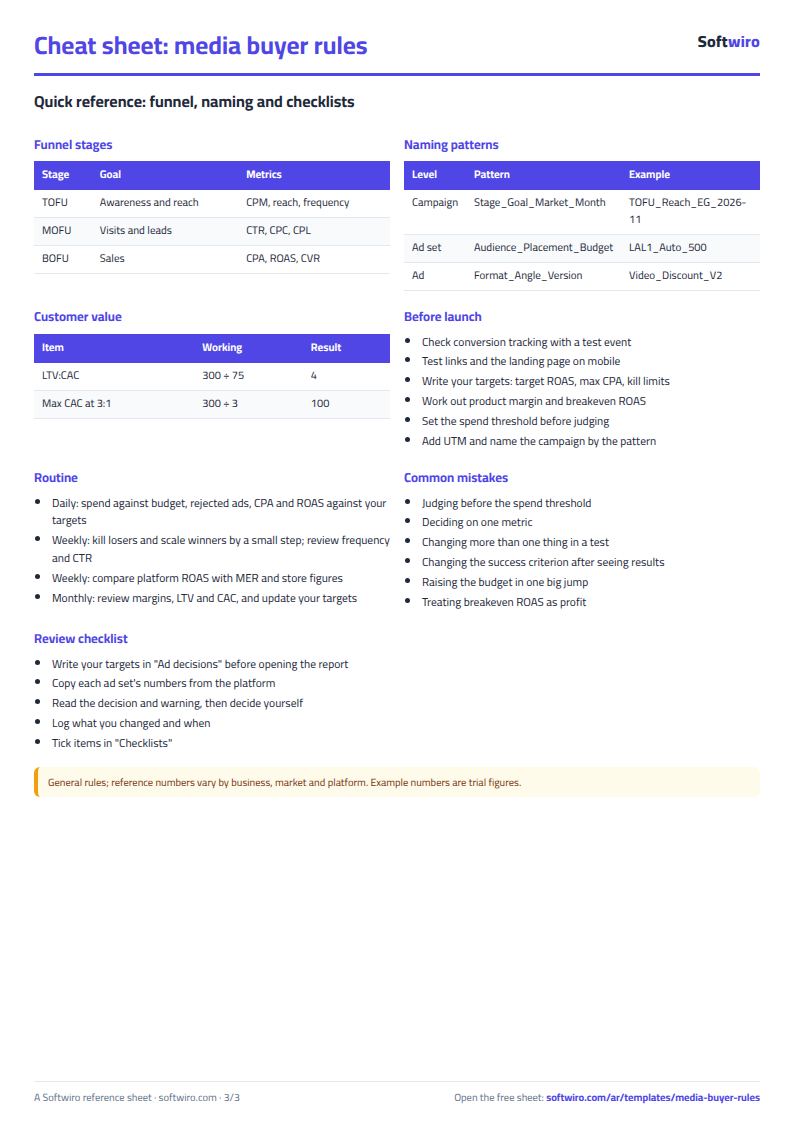
- Break-even: AOV 200 with variable costs of 120 gives 80 profit per order and a 40% margin, so breakeven ROAS is 2.5 and max CPA is 80. With a 20 target profit per order the target CPA is 60 and the target ROAS 3.33; with LTV 300 and CAC 75, LTV:CAC is 4 and the max CAC at 3:1 is 100.
- Funnel: a 10,000 budget with CPM 25, CTR 1.2%, CVR 2% and AOV 250 gives 400,000 impressions, 4,800 clicks, 96 conversions, revenue 24,000, ROAS 2.4 and CPA 104.17: below the 2.5 breakeven, for an expected profit of −400.
- Pacing: a 30,000 monthly budget, 12 days gone and 13,000 spent: 12,000 expected, so pace is 108.3% ("faster than pace" with a 5% tolerance); 17,000 remain for 18 days, 944.44 a day, and at the current pace spend will reach 32,500.
- Ad decisions: with the sample targets (ROAS target 3, minimum 2, spend 600, conversions 10, frequency 3, CTR 0.8%, step 20%), eight ad sets give three "scale", two "keep and watch", two "kill" and one "wait". Total spend is 16,150, revenue 43,490 and ROAS 2.69, and daily budget moves from 2,550 to a proposed 2,210. Two ad sets show high frequency (possible fatigue).
- Checklists and quiz: 16 of 28 items done (57.1%); 37 of 40 questions answered and 29 correct, a score of 72.5%; two topics were due for review on 2026-11-15.
Common mistakes
- Judging before the spend threshold: an ad set with 350 spent against a 600 threshold waits; do not evaluate it.
- Deciding on one metric: a good CTR with a weak ROAS is not success.
- Changing more than one thing in a test: it hides the cause; change one variable.
- Changing the success criterion after seeing results: write it down before you start.
- Raising the budget in one big jump: gradual scaling is a common practice, not a platform rule, so set your own step.
- Treating breakeven ROAS as profit: it is break-even at ad level before fixed costs and labour; aim above it.
- Relying only on platform numbers: compare them with MER and your store's figures.
When to move from the sheet to a system
The sheet is enough for a media buyer running a few campaigns and copying numbers by hand. When accounts and clients multiply and copying eats hours, you need automatic data pulls, alerts and ready reports, and Softwiro can build a system around your way of working. Meanwhile use the breakeven and unit economics sheet, the ads performance tracker and the A/B test log; all ad sheets are on the ads templates page (Arabic).
Next step
Download the sheet, enter your product margin in حاسبات to see your breakeven ROAS, then write your targets in قرار الإعلانات before you open the platform report, and enter your ad sets. You will have your first written decision made by your own rules.
FAQ
Does the sheet give benchmark CTR or CPM numbers? No. These are general rules; reference numbers vary by business, market and platform, and all example numbers are trial figures.
Is scaling by 20% a platform rule? No. It is a common practice and you set your own step.
How do I calculate breakeven ROAS? It is 1 ÷ gross margin, so a 40% margin gives 2.5.