Try the sheet here, on the example
The sheet is open below with sample numbers. Change any white cell and watch the results update, or press the blank-copy button to type your own data from scratch. Nothing you type leaves your browser.
Example from the sheet
| الطالب (اسم أول أو كود) | الفصل | عدد التواصلات | آخر تواصل | متابعات مفتوحة | متابعات متأخرة | الحالة |
|---|---|---|---|---|---|---|
| يوسف | 1/أ | 3 | 46326 | 0 | 0 | لا شيء مفتوح |
| نور | 1/أ | 2 | 46320 | 2 | 1 | متابعة متأخرة |
| عمر | 1/ب | 3 | 46327 | 0 | 0 | لا شيء مفتوح |
| ليلى | 1/ب | 2 | 46323 | 2 | 1 | متابعة متأخرة |
| آدم | 2/أ | 1 | 46317 | 0 | 0 | لا شيء مفتوح |
| هدى | 2/أ | 1 | 46322 | 1 | 0 | متابعة قادمة |
| كريم | 2/أ | 2 | 46324 | 2 | 2 | متابعة متأخرة |
| سلمى | 1/أ | 0 | 0 | 0 | لا يوجد تواصل |
Example from the “الطلاب” tab (Arabic), with the numbers and formulas that are in the file.
What is inside
- "الإعدادات" (Settings): Today's date (the example date, or =TODAY() so it updates by itself), the list of topics (up to 10, 7 in the example) and the list of contact means (up to 6, 4 in the example). The sheet also carries a reminder not to enter sensitive data.
- "الطلاب" (Students): First name or code and class. For each student the sheet calculates the number of contacts, last contact, days since last contact, open and overdue follow-ups, and a status (overdue follow-up, upcoming follow-up, nothing open, or no contact). It holds up to 200 students.
- "السجل" (Log): One row per contact: date, student, means, topic, summary, needs follow-up?, follow-up date and follow-up done?. The sheet calculates the class and the follow-up status (overdue, upcoming, no date, or done) and days overdue. It holds up to 500 contacts.
- "للمتابعة" (To follow up): Overdue follow-ups, most overdue first, with the due date, student, class, topic, means, days overdue and summary. It shows the first 50 follow-ups.
- "طالب وموضوع" (Student and topic): A table that counts contacts for each student and each topic, with a total per student. It follows the topics written in the settings.
- "الملخص" (Summary): Number of students and contacts and students with no contact logged; follow-ups required, done, overdue, upcoming and without a date; contacts and open follow-ups per topic; and contacts per means.
- "ابدأ هنا" (Start here): How to use the sheet, the sensitive-data reminder, what the colors mean and notes on the calculations.
- "لماذا ما زلت على إكسل؟" (Why am I still on Excel?): What a custom program from Softwiro adds if your needs grow or you need more than one user.
The file opens on a start tab (“ابدأ هنا”, Start here) that explains how to use it.
What makes it different
Instead of relying on memory to recall which parent you promised to call back, you open "للمتابعة" (To follow up) and see the most overdue first, with a summary of what was discussed. From "الطلاب" (Students) you see which students have had no contact from you, and from "طالب وموضوع" (Student and topic) you see where the same issues keep recurring.
How to use it
- In the "الإعدادات" (Settings) sheet, enter today's date (or =TODAY() so it updates by itself) and edit the topic and contact-means lists if you want.
- In the "الطلاب" (Students) sheet, enter for each student a first name or a code of your choosing, and the class. Do not enter full names or phone numbers.
- In the "السجل" (Log) sheet, add a row for each contact: date, student, means, topic, and a one-line summary.
- If the matter needs a follow-up, choose "yes" under "needs follow-up?" and enter its date, then choose "yes" under "follow-up done?" when you complete it.
- Overdue follow-ups are listed in order in the "للمتابعة" (To follow up) sheet, and each student's contact count and status are in "الطلاب" (Students).
- The "طالب وموضوع" (Student and topic) sheet counts each student's contacts per topic, and "الملخص" (Summary) shows the overall picture.
Before you start:
- Warning: do not enter sensitive data in this log, such as health, family or financial circumstances or any private data about the student or the family. Keep to a short, general academic or behavior summary.
- Enter only the student's first name or a code, and no phone numbers or addresses. Follow your school's rules on record keeping.
- A follow-up is overdue if you chose "yes" under "needs follow-up?", did not choose "yes" under "follow-up done?", and its date passed. A follow-up due today counts as "upcoming".
- A follow-up with no date shows "no date" and does not count as overdue until you give it a date.
- Student status: "overdue follow-up" first, then "upcoming follow-up", then "nothing open", and "no contact" for students with no contact logged.
- The sheet holds 200 students and 500 contacts, and "للمتابعة" (To follow up) shows the first 50 overdue follow-ups.
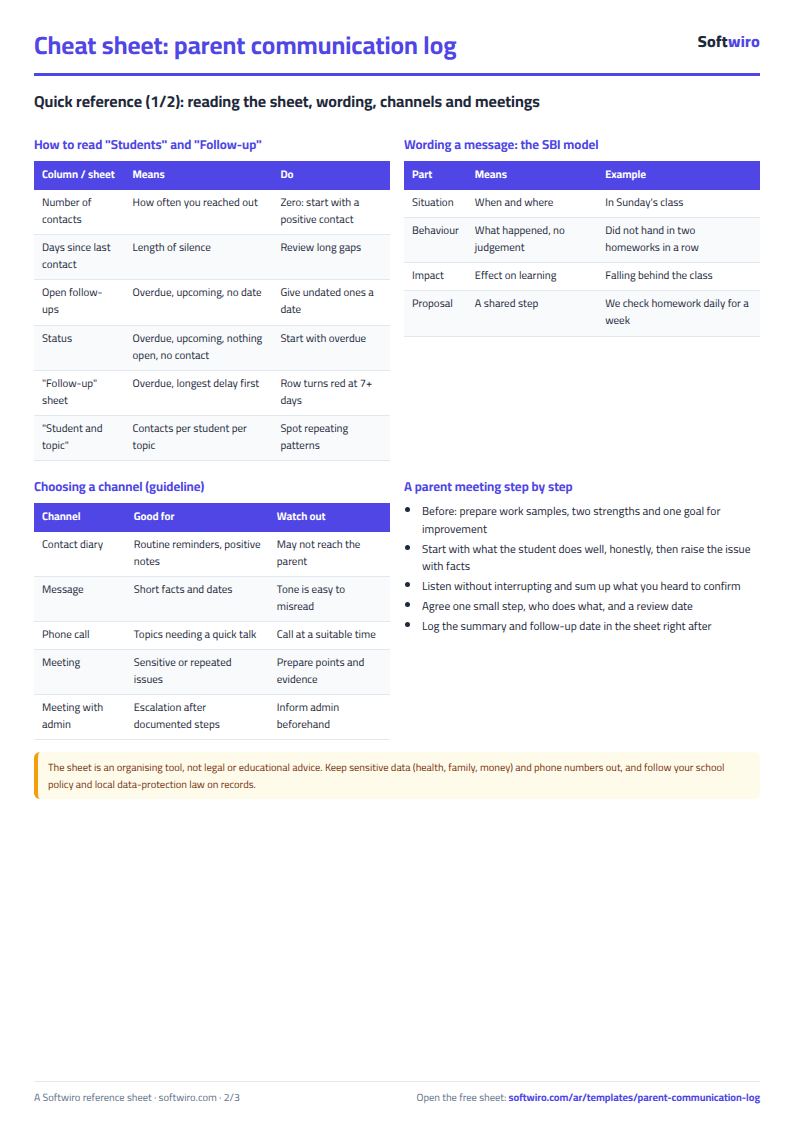
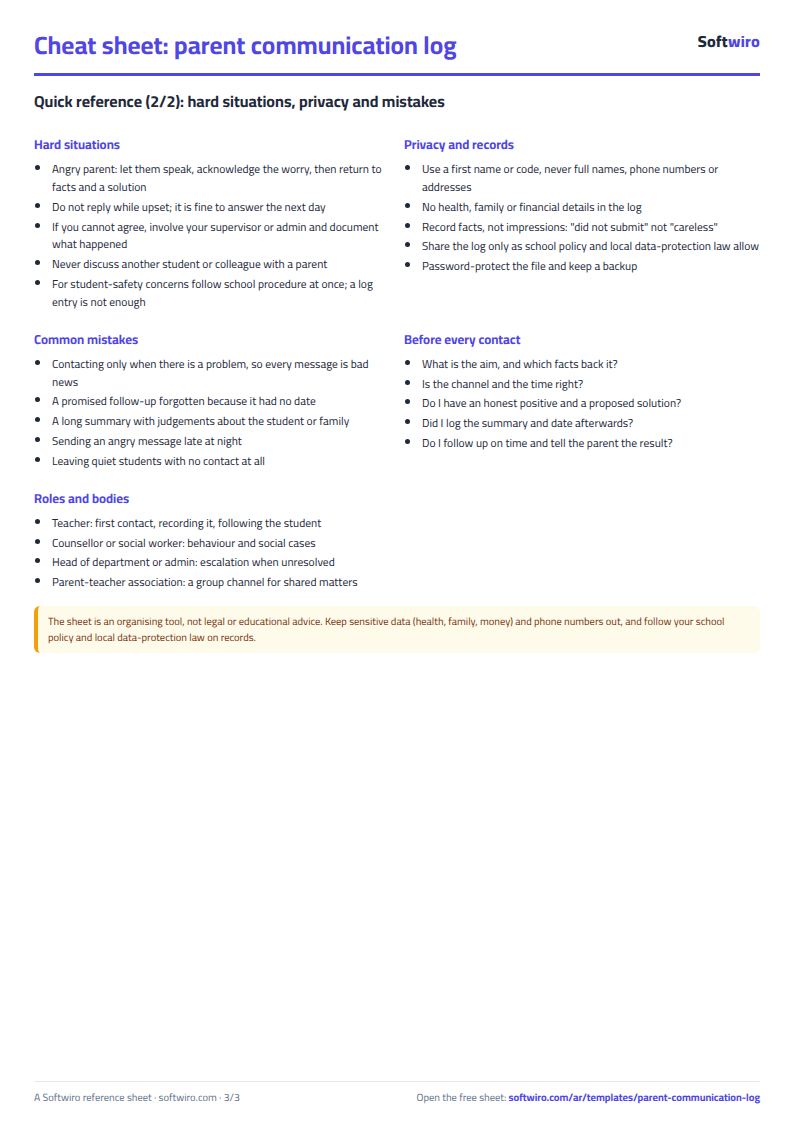
Free cheat sheet for this field
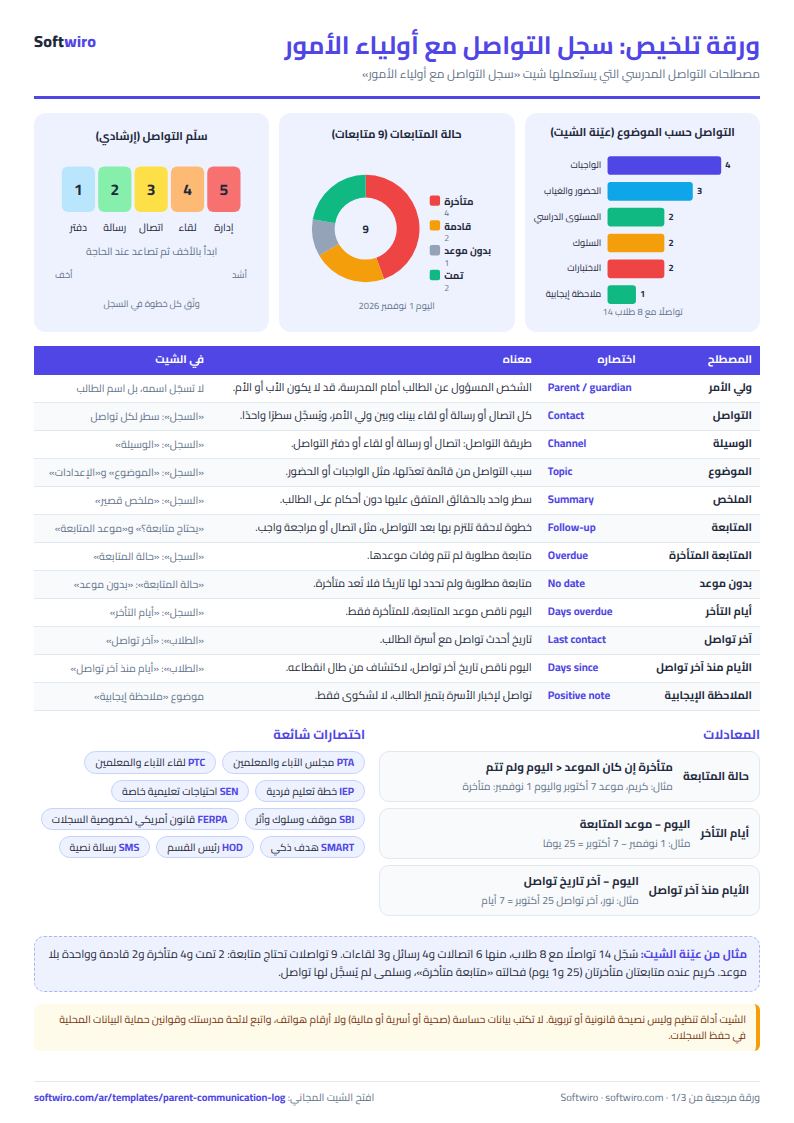
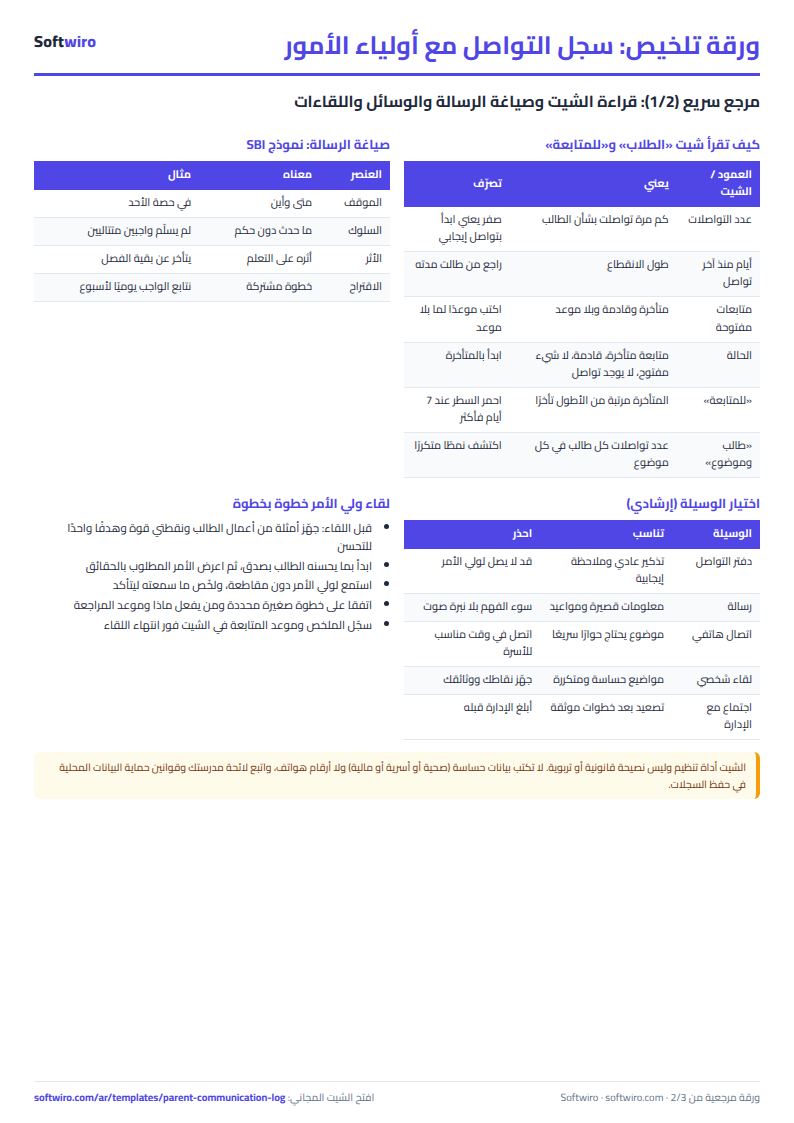
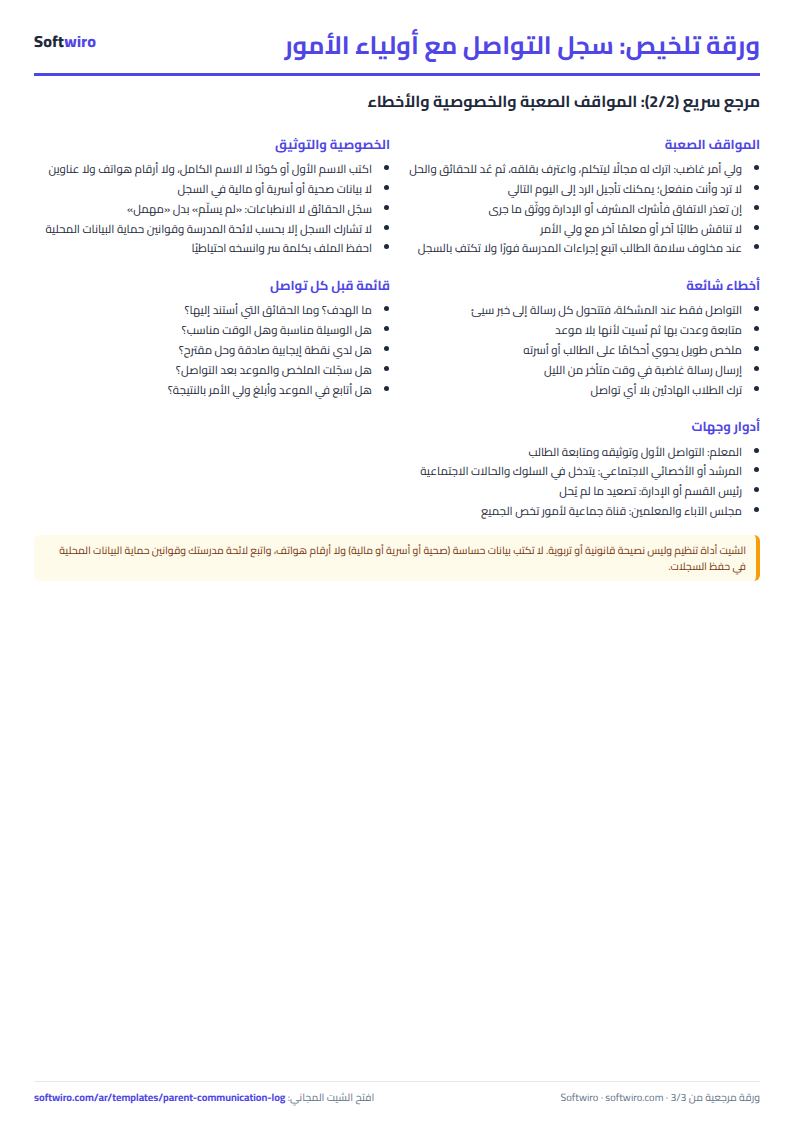
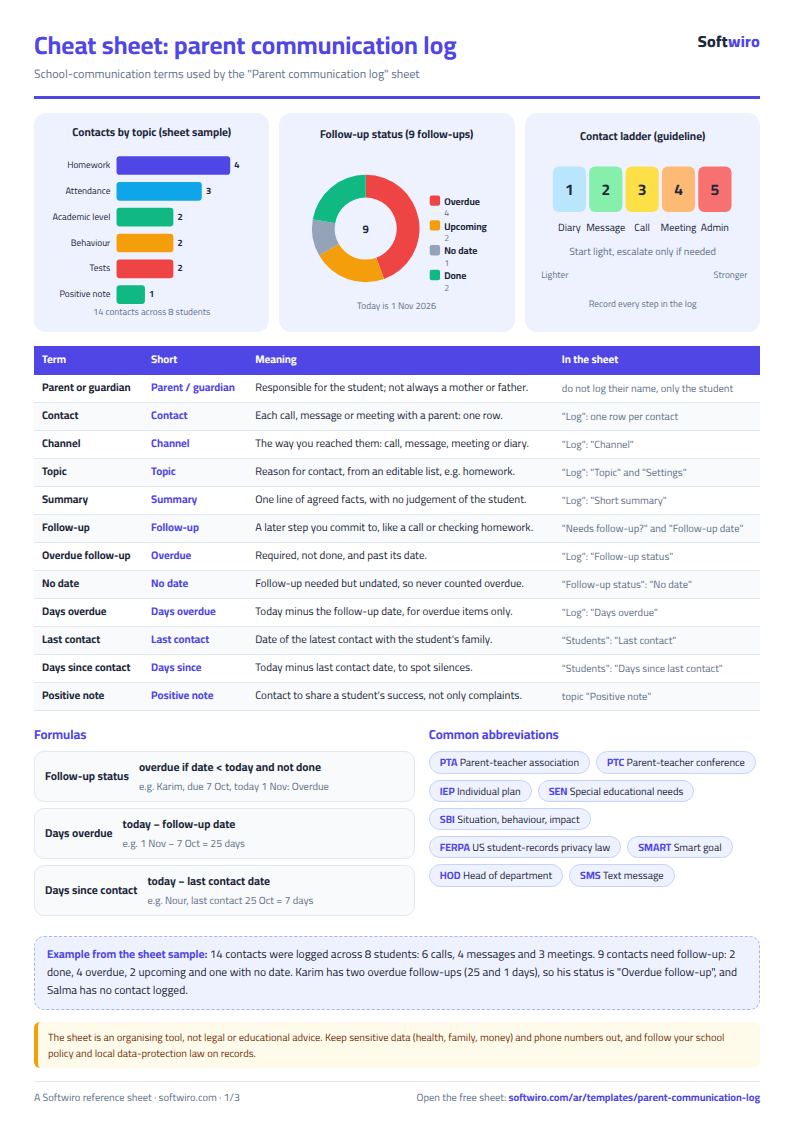
Terms, abbreviations, tables and diagrams over several pages, in Arabic and English. Download it as a PDF or images, including a phone-size version.
Still running this on Excel?
This sheet suits a start and a limited amount of data. If your way of working grows, or you need more than one person working on it at the same time, Softwiro can build you a program that fits the way you work.
| In this sheet | In Custom Software from Softwiro |
|---|---|
| One file that one person edits at a time, and copies reach you on WhatsApp. | A program with a login for each user and permissions you define, and everyone sees the same data. |
| You type everything and check the numbers by hand. | We design the screens around your work steps, so each person records only what concerns them. |
| Columns and formulas are fixed as the sheet was designed. | We build what you need: reports, alerts and screens your way. |
| Backups and security are your own responsibility. | The program runs on a secured server with regular backups. |
Frequently asked questions
Should I enter phone numbers or family details?
No. Enter only a first name or a code, and a short, general academic or behavior summary. Do not enter health, family or financial details: the sheet is an ordinary file that may be copied or sent.
When is a follow-up overdue?
When you chose "yes" under "needs follow-up?", did not choose "yes" under "follow-up done?", and the date passed compared with today's date in the settings. One due today is "upcoming", and one with no date shows "no date".
Can I change the topics and contact means?
Yes. Edit the two lists in the settings and the dropdowns in the log and the summary tables change with them. The sheet holds 10 topics and 6 means.
How do I find which parents I have not contacted?
In the "الطلاب" (Students) sheet, the status "no contact" appears for any student with no row in the log, and the summary counts them. In the example, one student out of eight has no contact.
Is the template free?
Yes, with no sign-up and no email address. Use it, edit it and share it as you like.
Does it work in Google Sheets and on mobile?
The sheet uses formulas supported by Excel 2016 and later, Google Sheets and LibreOffice, so you can upload it to Google Drive and open it with Google Sheets on a computer or a phone.
What is the difference between the white and the gray cells?
You type in the white cells; the gray cells are calculated automatically. Don't type in a gray cell, or you will erase its formula.
Can I use the sheet from an AI assistant?
Yes. Add our MCP server (URL https://softwiro.com/api/mcp, no key needed) to your assistant and ask it to do the calculation in this template. The numbers come from the sheet's own formulas, and we do not store your data. The steps and a ready-made prompt are in this article: https://softwiro.com/blog/mcp-excel-templates-ai-agent-guide.html
All the templates in this group: Excel templates for teachers: gradebook, lesson planning and follow-up
More free templates for: Teachers
More free templates
- Teacher weighted gradebook (Excel)
- Lesson plan and curriculum coverage tracker for teachers (Excel)
- Remedial sessions tracker for teachers (Excel)
- Study groups management sheet for a private teacher
- Charity accounts by fund
- Strength workout log
- Running, cycling and swimming log
- Training load sheet for any sport (session-RPE)
- Athlete nutrition and macros sheet
- Football player match stats sheet
- Basketball player game stats
- Swimming times and personal bests