Try the sheet here, on the example
The sheet is open below with sample numbers. Change any white cell and watch the results update, or press the blank-copy button to type your own data from scratch. Nothing you type leaves your browser.
Example from the sheet
| الحاسبة | قيمة 1 | قيمة 2 | قيمة 3 | الناتج | الوحدة |
|---|---|---|---|---|---|
| وزن الخام لنسبة فعالة مطلوبة | 10 | 1000 | 70 | 142.86 | كجم |
| النسبة الفعالة الناتجة | 150 | 70 | 1000 | 10.5 | % |
| وزن خامة من نسبتها | 2 | 800 | 16 | كجم | |
| وزن الخام للتخفيف | 35 | 5 | 100 | 14.29 | كجم |
| كجم من اللتر | 3 | 1.03 | 3.09 | كجم | |
| لتر من الكجم | 1030 | 1.03 | 1000 | لتر | |
| تكلفة الخامة في كجم المنتج | 8 | 58 | 4.64 | جنيه/كجم منتج |
Example from the “حاسبات” tab (Arabic), with the numbers and formulas that are in the file.
What is inside
- المرجع: A table of 69 common raw materials: common name, English name, chemical name (INCI), class, main function, products, the commonly known commercial concentration where there is one, and general safety notes. Holds 80 materials.
- المنتجات والأدوار: For each product (dishwashing liquid, laundry powder, chlorine bleach, fabric softener and so on), the roles it usually needs: a tick for the essential role and a half-filled circle for a role that appears in some formulas. These are general roles, not recipes. Holds 12 products.
- بحث عن مكون: Pick a material's name or type it in Arabic or English and all its data appears; pick a product to read its essential and optional roles.
- فك الملصق: Type the ingredients of a product from its label, one per line, and the sheet finds each name by chemical, English or Arabic name, shows its class, function and safety note, and counts the ones it did not find. Holds 25 ingredients.
- حاسبات: Seven calculators with ready numbers you can change: weight of raw material for a required active percentage, the resulting percentage, weight of a material from its percentage, dilution, litre to kg conversion and back, and the cost of a material in a kg of product.
- اختبار ذاتي: 32 questions in four branches (names and classes, functions, safety, calculations) with a blank answer cell, a tick or cross mark and a result at the top of the sheet. In the sample version some answers are right and some are wrong.
- المتابعة: The topic, its review date and your score, and the sheet sets the next review date using spaced intervals that you can adjust, with a chart of your scores. Holds 20 topics.
- الملخص: The number of materials in each class, the test result in each branch and the average of your scores, with three charts.
The file opens on a start tab (“ابدأ هنا”, Start here) that explains how to use it.
What makes it different
It is more than a table of names: you type a product label and the sheet breaks down the roles of its ingredients, each material has its class, function and safety note, you can calculate the weight of raw material needed for an active percentage, and you can test yourself and track your review.
How to use it
- Open the "المرجع" (Reference) sheet and browse the materials by class. Each material has its Arabic and English name, its chemical (INCI) name, its function, the products it goes into and a general safety note.
- In the "بحث عن مكون" (Ingredient lookup) sheet, pick a material's name from the list or type it in Arabic or English, and all its data appears in one place.
- In the "المنتجات والأدوار" (Products and roles) sheet, you see for each product (dishwashing liquid, floor cleaner, bleach...) the roles of the ingredients it usually needs, and you pick the product to read its roles. These are general roles, not recipes.
- In the "فك الملصق" (Label reader) sheet, type the ingredients of a product from its label, one per line, and the role and class of each one appears, along with any the reference did not find.
- In the "حاسبات" (Calculators) sheet, change the numbers to calculate the weight of raw material needed for an active percentage, dilution, litre to kg conversion and the cost of a material per kilogram.
- Test yourself in the "اختبار ذاتي" (Self-test) sheet of 32 questions, and record your review in "المتابعة" (Tracking) so the sheet sets the next review date, then open "الملخص" (Summary).
Before you start:
- A general reference for learning; always refer to the technical data sheet (TDS) and the safety data sheet (SDS) from each material's supplier. The reference is for learning and recognising names, not a manufacturing recipe and not a substitute for the SDS from each material's supplier.
- Safety, registration, licensing, usage limits and legal requirements follow the requirements of the competent authority. Never mix chlorine bleach with acids or ammonia.
- Commercial concentrations differ by supplier and grade, so refer to the certificate of analysis (COA) for your own material. A usage range is written only where it is generally known.
- The chemical name written is the INCI name approved for ingredient lists where one exists, and the naming of a commercial grade may differ from one supplier to another.
- Capacity: 80 materials in "المرجع" (Reference), 12 products in "المنتجات والأدوار" (Products and roles), 25 ingredients in "فك الملصق" (Label reader), 7 calculators, 32 test questions and 20 topics in the tracker.
- In the test: a numeric answer is accepted within a small tolerance, and for text the case of English letters does not matter. Pick the answer from the list or type it.
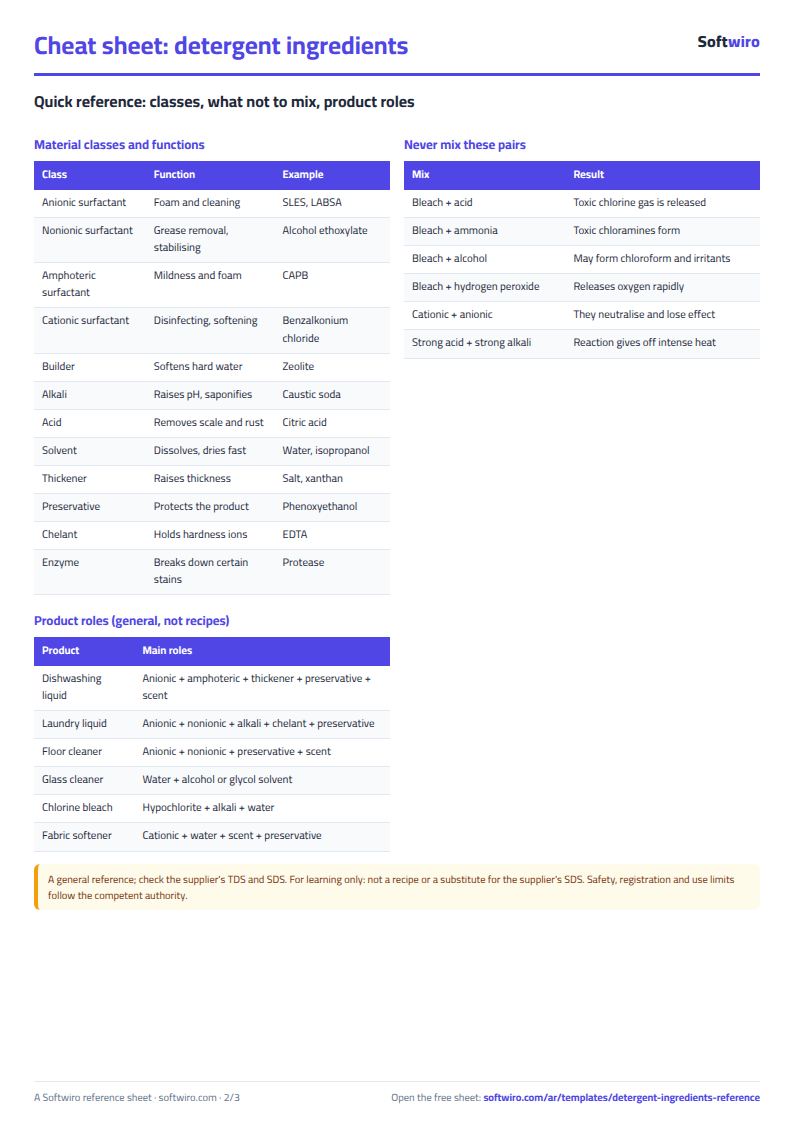
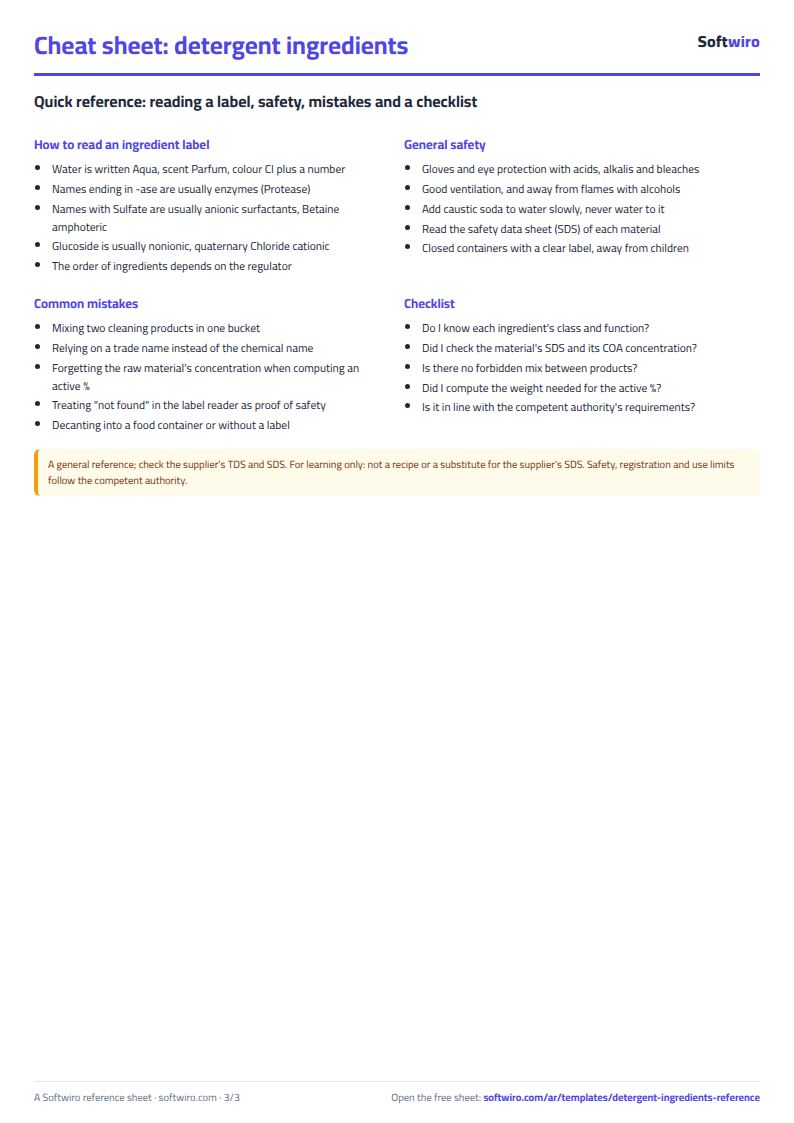
Free cheat sheet for this field
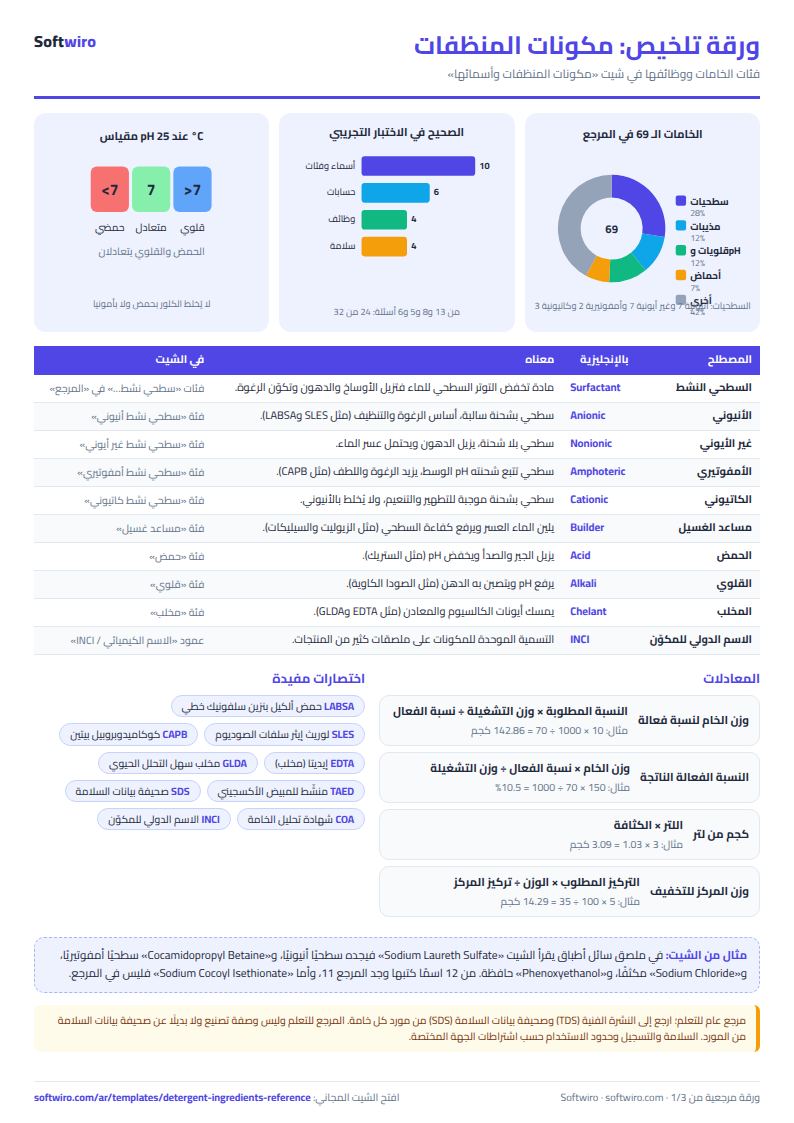
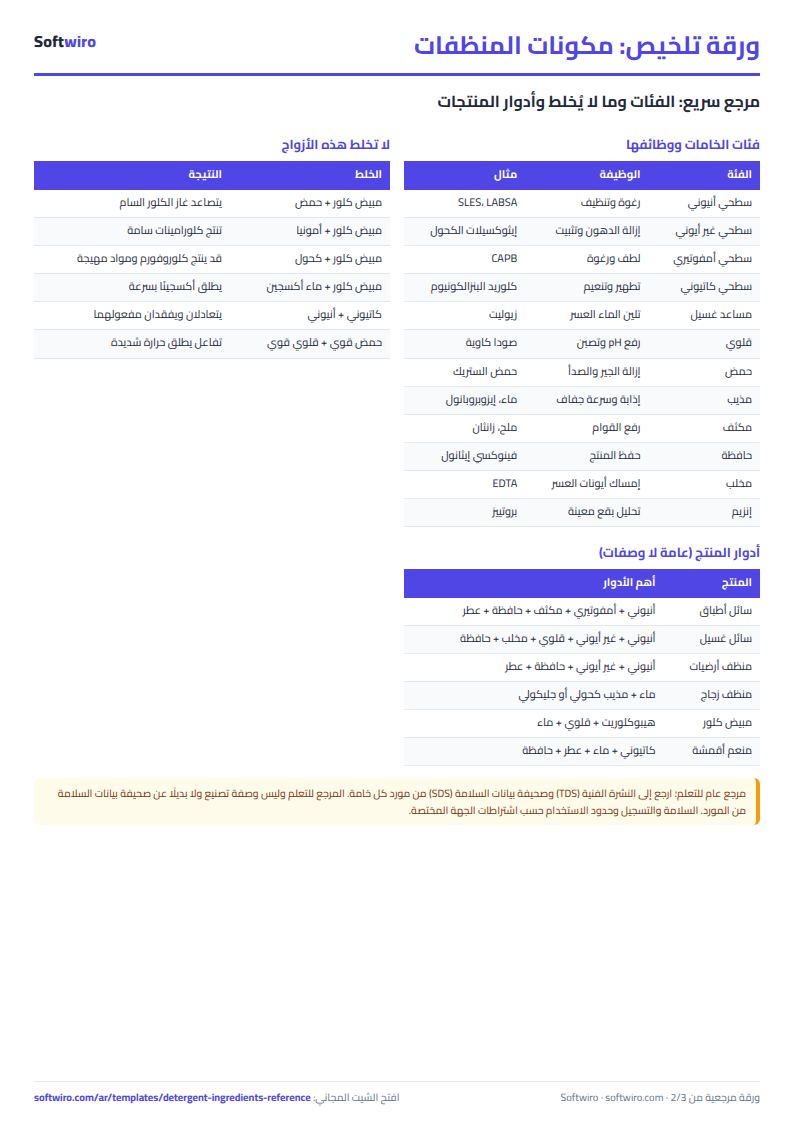
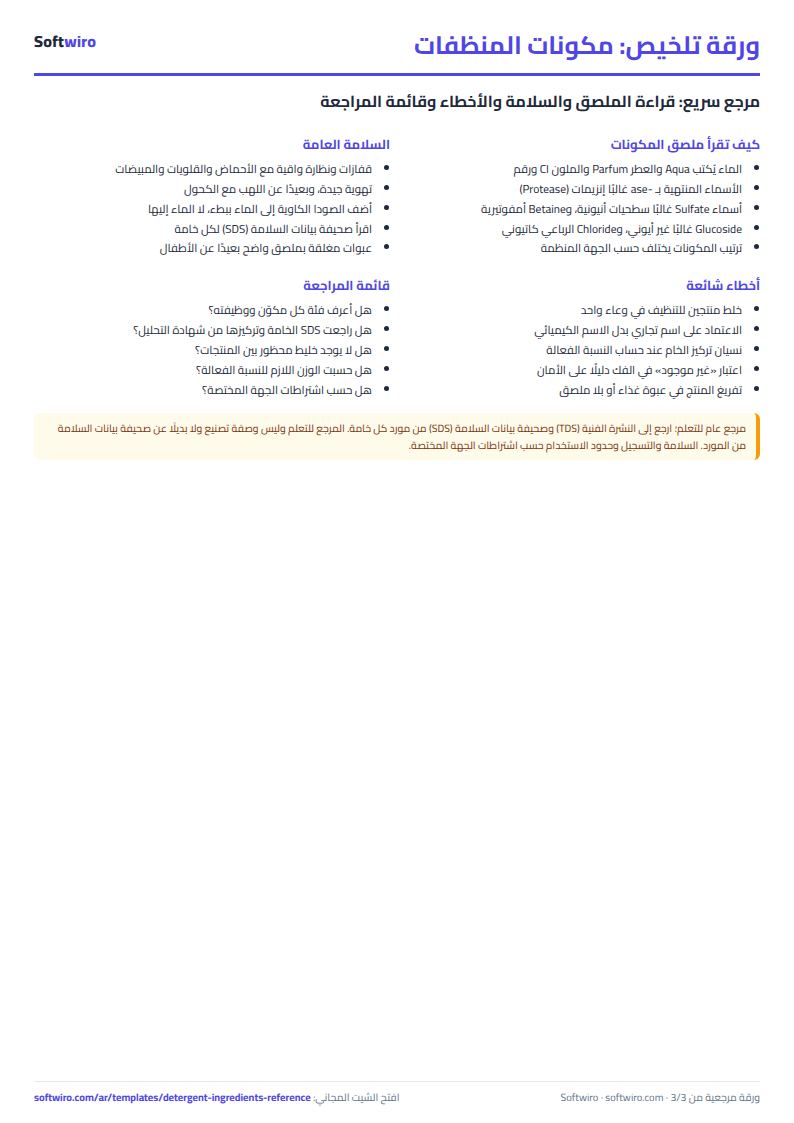
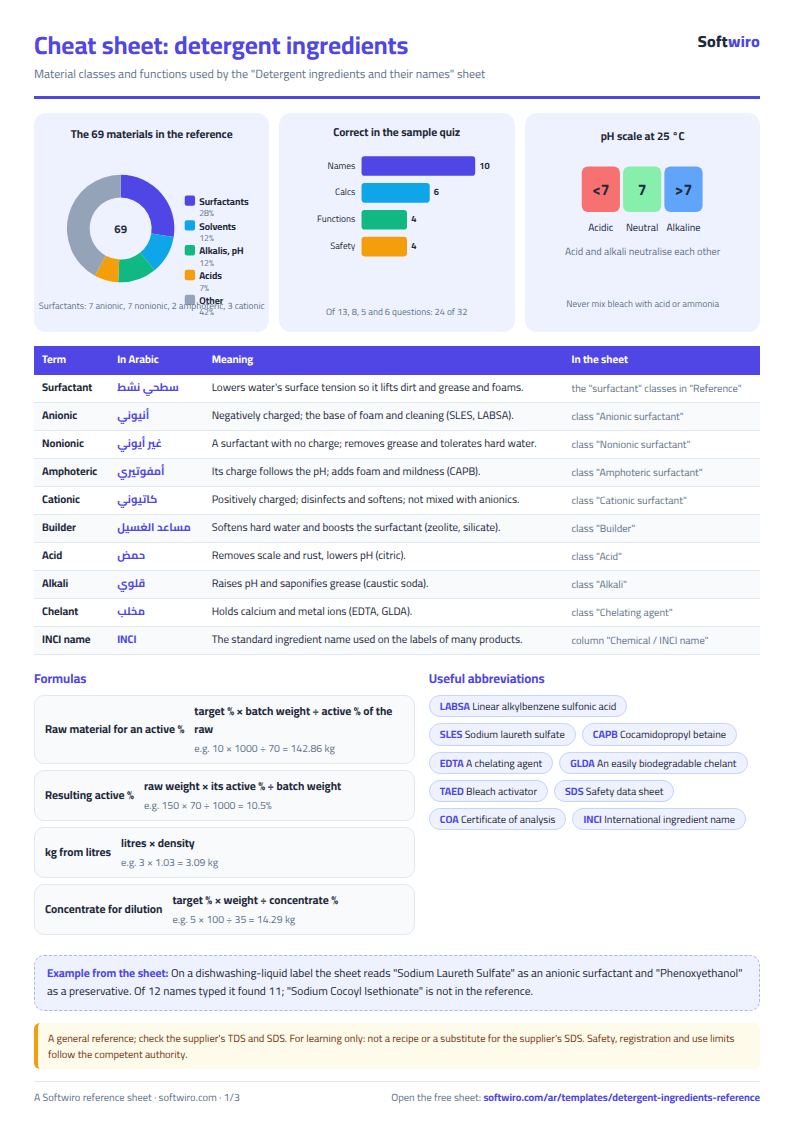
Terms, abbreviations, tables and diagrams over several pages, in Arabic and English. Download it as a PDF or images, including a phone-size version.
Still running this on Excel?
This sheet suits a start and a limited amount of data. If your way of working grows, or you need more than one person working on it at the same time, Softwiro can build you a program that fits the way you work.
| In this sheet | In Custom Software from Softwiro |
|---|---|
| One file that one person edits at a time, and copies reach you on WhatsApp. | A program with a login for each user and permissions you define, and everyone sees the same data. |
| You type everything and check the numbers by hand. | We design the screens around your work steps, so each person records only what concerns them. |
| Columns and formulas are fixed as the sheet was designed. | We build what you need: reports, alerts and screens your way. |
| Backups and security are your own responsibility. | The program runs on a secured server with regular backups. |
Frequently asked questions
Is the reference an official syllabus or a manufacturing recipe?
No. It is a general reference for learning; always refer to the technical data sheet (TDS) and the safety data sheet (SDS) from each material's supplier. It is for learning and recognising names, not a manufacturing recipe and not a substitute for the SDS from each material's supplier.
Where do the concentrations come from?
A concentration range is written only where it is generally known, such as about 70% for SLES paste. Commercial concentrations differ from one supplier to another, so refer to the certificate of analysis for your own material.
What does "غير موجود" (not found) mean in the label reader?
It means the name is not in the current reference, not that it is safe or dangerous. You can add the material to "المرجع" (Reference) and the sheet will then find it.
Should I mix two cleaners for a stronger effect?
No. Never mix chlorine bleach with an acid, ammonia or alcohol, and do not mix a cationic surfactant with an anionic one. Safety follows the requirements of the competent authority.
Is the template free?
Yes, with no sign-up and no email address. Use it, edit it and share it as you like.
Does it work in Google Sheets and on mobile?
The sheet uses formulas supported by Excel 2016 and later, Google Sheets and LibreOffice, so you can upload it to Google Drive and open it with Google Sheets on a computer or a phone.
What is the difference between the white and the gray cells?
You type in the white cells; the gray cells are calculated automatically. Don't type in a gray cell, or you will erase its formula.
Can I use the sheet from an AI assistant?
Yes. Add our MCP server (URL https://softwiro.com/api/mcp, no key needed) to your assistant and ask it to do the calculation in this template. The numbers come from the sheet's own formulas, and we do not store your data. The steps and a ready-made prompt are in this article: https://softwiro.com/blog/mcp-excel-templates-ai-agent-guide.html
All the templates in this group: Factory management sheets: production, cost and quality
More free templates for: Factories and production
More free templates
- Electronics factory sheet: BOM, production and quality
- Food factory sheet in Excel: recipes, batches, cost and shelf life
- Biscuit factory sheet: dough, lines, packing and scrap
- Detergent factory sheet: formulas, batches, cost and filling
- Pharma factory sheet: batch records, materials, QC and release
- Industrial waste management sheet: quantities, classification, recycling and cost
- Algebra rules summary sheet: laws, identities and solving equations with examples
- Solid geometry formulas sheet: areas and volumes with examples and a calculator
- Livestock and dairy farm sheet
- Complete farm management sheet in Excel: plots, workers, crops and sales
- Agricultural waste management sheet: rice straw, residues, compost and recycling
- Trip organizer sheet: participants, instalments, costs and itinerary
- Building maintenance sheet: flat fees, expenses, elevator and pump
- Canteen management sheet