You run a small plant that assembles electronic products (power banks, chargers and smart bulbs, say) and want to know before an order starts whether the components are enough, and after it ends how many units came out good, which defect repeats most, and what a good unit really cost. The free electronics factory sheet answers this from three tables you type, components, a bill of materials (BOM) and production orders, plus a quality-check log.
The problem it solves
In an assembly plant an order lives or dies at the missing component. You start the line, find the charging board is short, the workers stand idle and you buy at a rush price. After delivery you hear "300 produced" without knowing how many are good, and you cost it as if every unit sold. The sheet works out consumption from the BOM, compares need with stock, and spreads each order's cost over the good units only.
How the sheet works, step by step
- In الإعدادات (Settings) write the labour hour cost, the overhead per hour and the target yield.
- In المكونات (Components) write each component with its cost, opening stock and minimum, and in المنتجات (Products) each product with labour hours per unit and its price.
- In BOM write a row for each component in the product with its quantity per unit; the material cost per unit appears.
- Log purchases in الوارد (Receipts) and the component balance rises by itself.
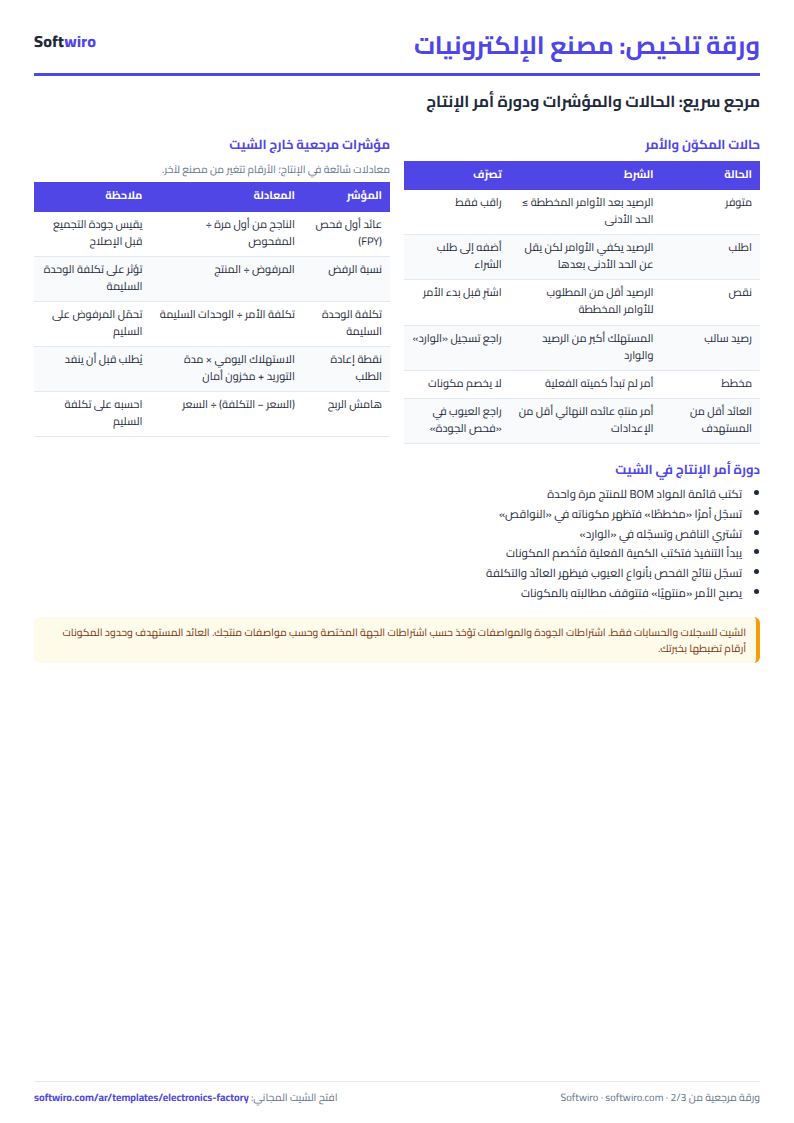
- In أوامر الإنتاج (Production orders) write the order with date, product, planned quantity and status, and the actual quantity as work advances. Components are deducted as BOM × actual quantity.
- In فحص الجودة (QC) log first-pass passes, rework, rejects and the defect type, and the units that passed after rework.
- Open النواقص (Shortages) to see what to buy before the planned orders start, and الملخص (Summary) for yield, cost and defects.
What is in each sheet
- المنتجات (Products): material, labour and overhead cost per unit and its margin, actual output, yield and good-unit cost.
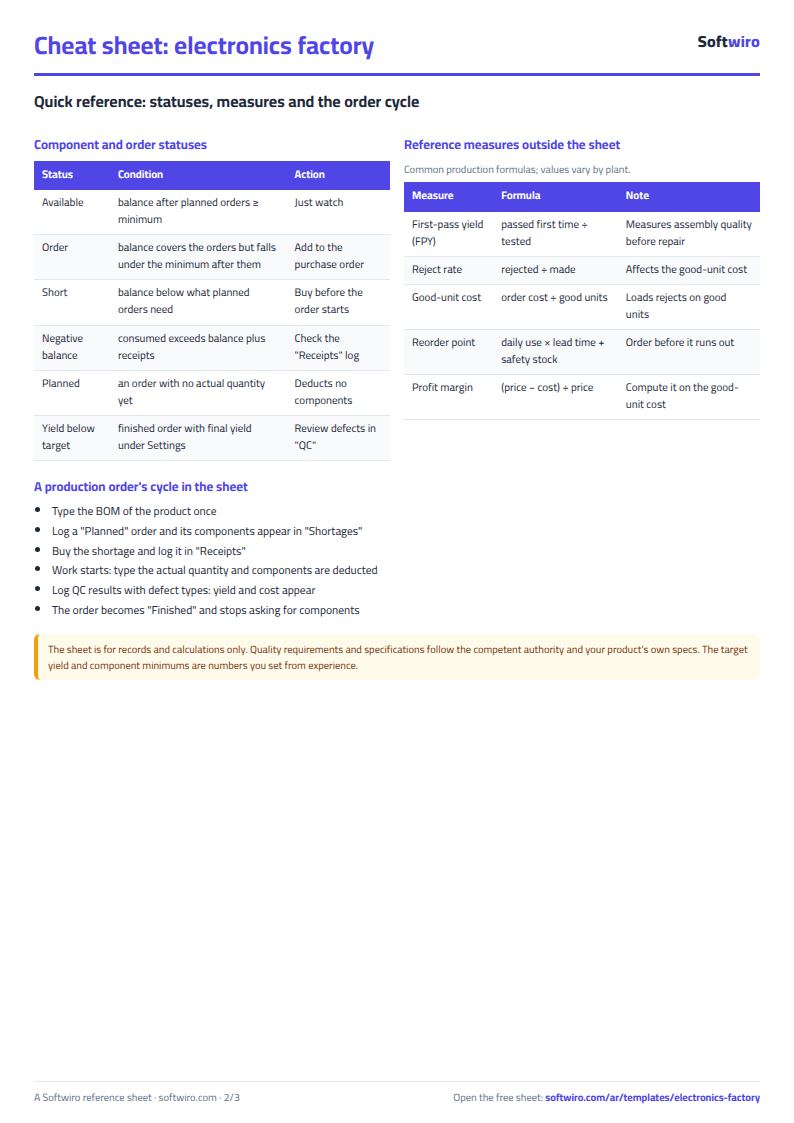
- المكونات (Components): balance, requirement for planned orders, shortage, suggested quantity and status (available, order, short or negative).
- BOM: each line's cost, consumed and required quantity, and an alert for an unknown code.
- أوامر الإنتاج (Orders): good units, first-pass and final yield, order cost, and an alert when yield falls under target.
- فحص الجودة (QC): test results by defect type. الوارد (Receipts): purchases. النواقص (Shortages): the buying list. الملخص (Summary): numbers and charts.
Walk-through on the sample numbers
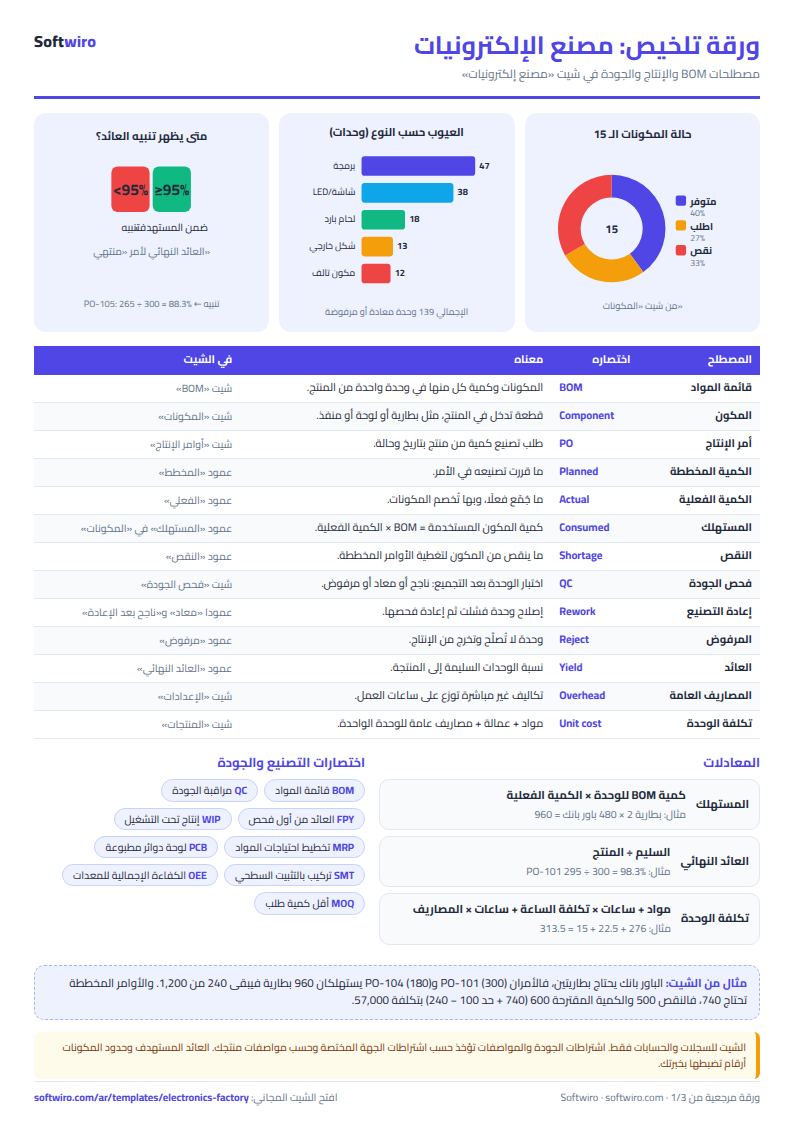
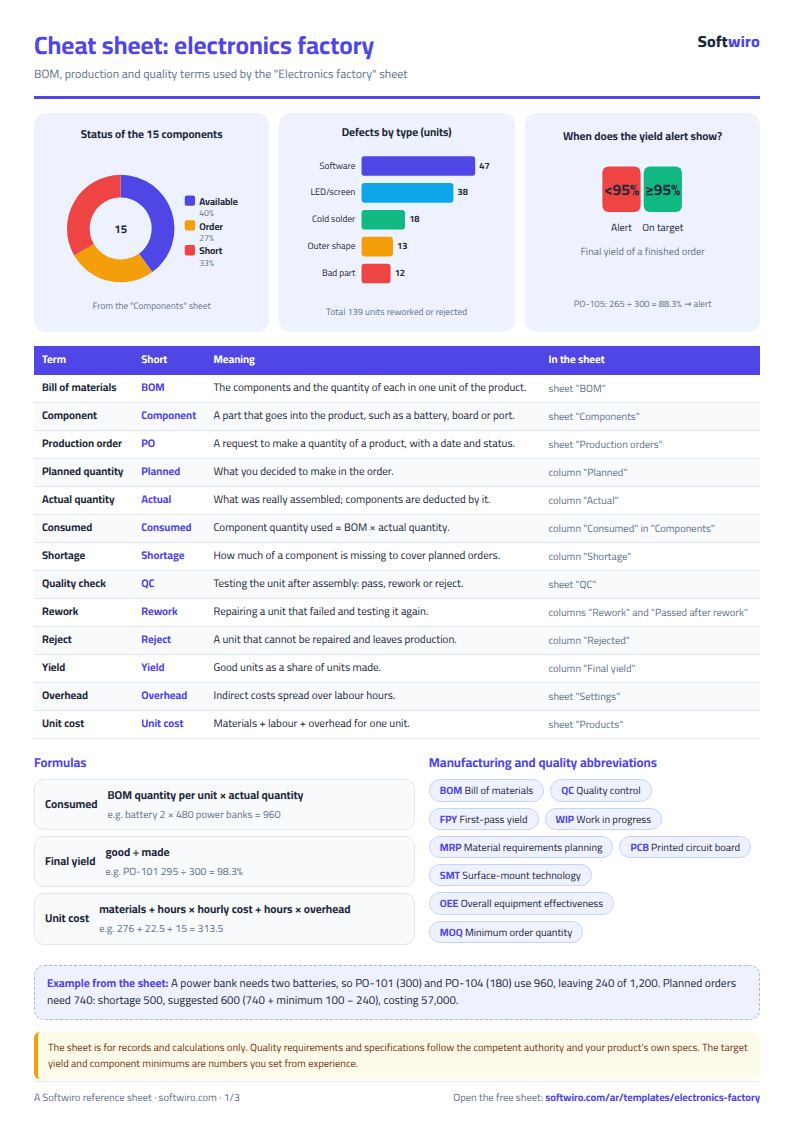
The numbers below are sample data inside the sheet, not a real plant. The example has 15 components, 3 products, 18 BOM lines and 8 production orders, with labour at 45 per hour, overhead at 30 per hour and a 95% target yield:
- Power bank 10000: materials 276 (two batteries at 190, a board, a casing, ports and a box), labour 22.50 for half an hour and overhead 15, so a unit costs 313.50 and sells at 390.
- 20 W charger: cost 99.50, price 145. Smart bulb: cost 97.05, price 135.
- Order PO-101 (300 power banks): 287 passed first time, 8 sent to rework and 5 rejected; 8 passed after rework, so 295 are good and final yield is 98.3%. The order cost 94,050, so a good unit costs 318.81.
- Order PO-105 (300 smart bulbs): 250 passed, 22 to rework, 28 rejected; 15 passed after rework, so 265 are good and yield is 88.3%, under 95%, which raises "yield below target". 7 units remain unfixed.
- All orders: 1,680 units made, 1,582 good: a final yield of 94.2%, first-pass yield of 91.7% and 62 rejected units. Production cost is 268,165. The most frequent defect is "software fault" with 47 units (33.8%), then "LED or screen fault" with 38.
- Actual cost of a good unit: power bank 338.16 (not 313.50 on paper), so its margin is 13.3%, not 19.6%, because the running order is not finished. Charger 102.58 with a 29.3% margin, bulb 104.19 with 22.8%.
Shortages: 1,470 planned units remain (70 from the running order, 600 chargers, 500 bulbs and 300 power banks). Five components are short: the battery (need 740, balance 240), the smart control board, the power bank charging board, the charger board and the power bank casing. Four more need an order because their balance after the orders falls under the minimum. The suggested order costs 112,635, the battery being the largest at 57,000 (suggested 600 = 740 + minimum 100 − balance 240).
Why it helps
- Consumption by formula: nobody subtracts components by hand, so stock does not drift from reality.
- Shortages before you start: you find the late component before the line stops.
- First-pass and final yield: the gap between them is what rework saves.
- Good-unit cost: the effect of rejects on cost and margin shows.
- Defect types: you see where to focus; software faults beat soldering in the example.
- Works in Excel 2016 and later, Google Sheets and LibreOffice, with room for 100 components, 30 products, 200 orders and 500 QC rows.
Common mistakes
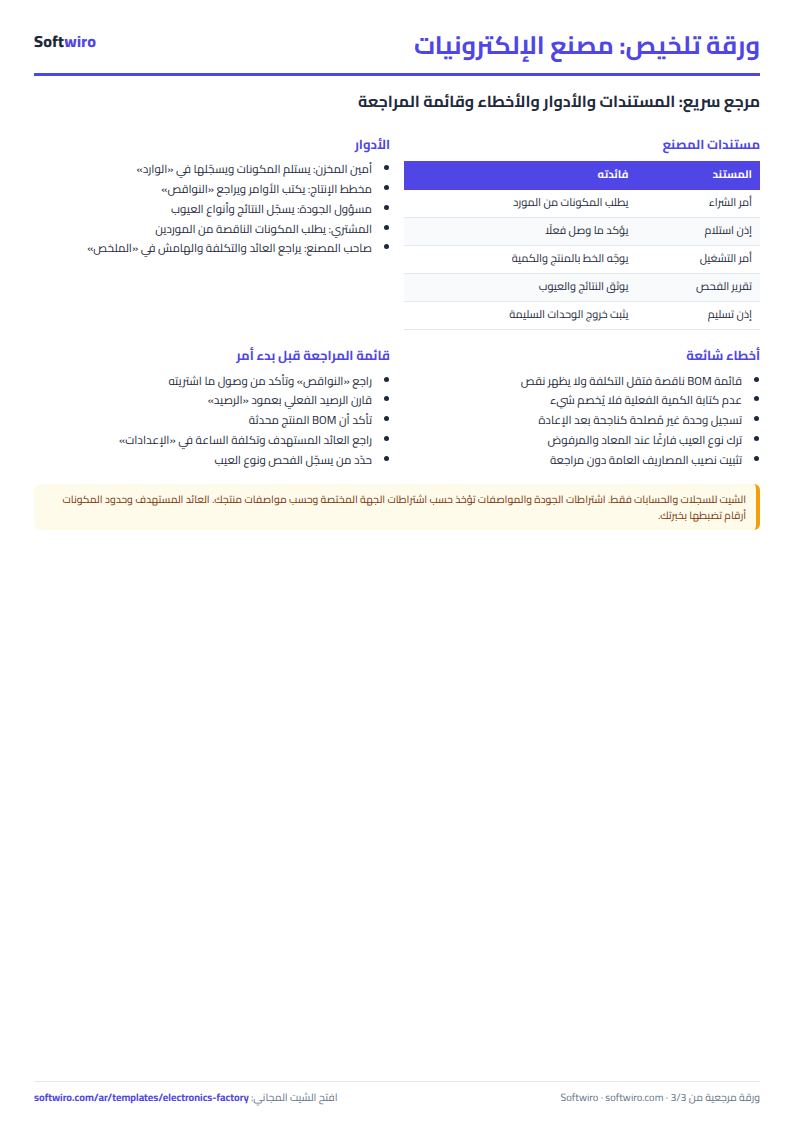
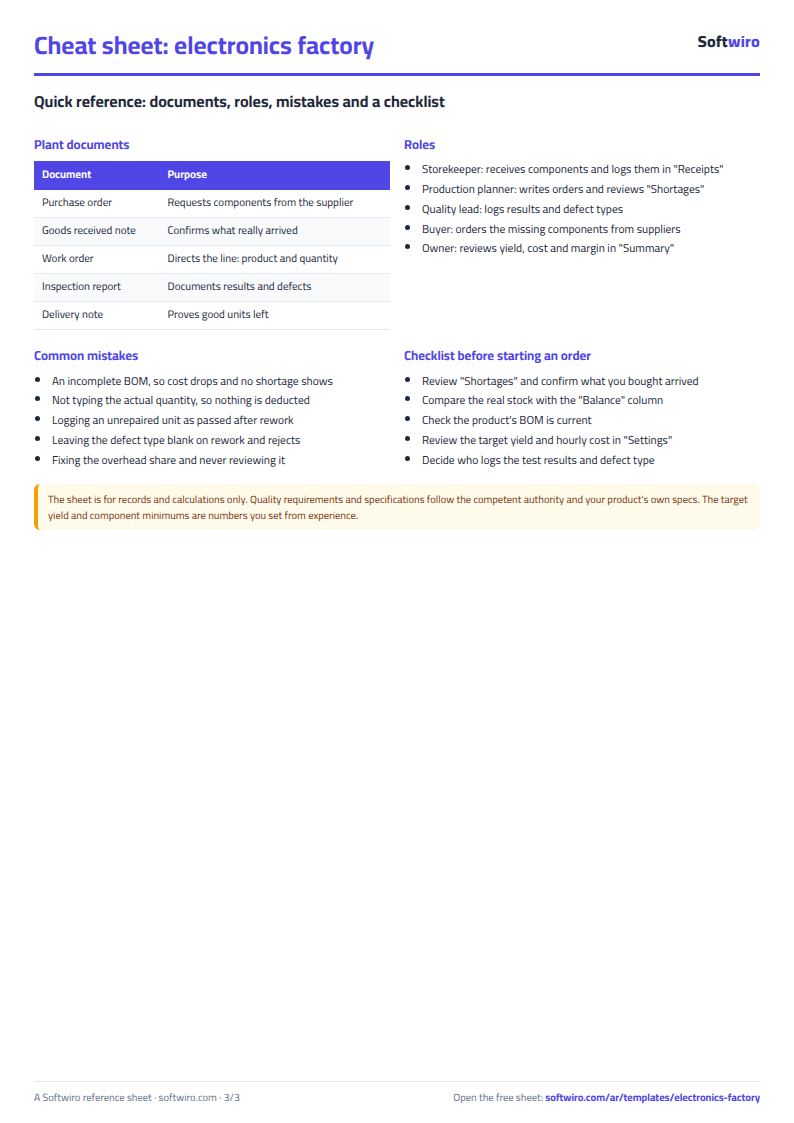
- An incomplete BOM: a forgotten component means a lower cost than reality and a shortage that never shows.
- Not typing the actual quantity: nothing is deducted until you do.
- Logging an unrepaired unit as passed: log "passed after rework" only for units you fixed.
- Skipping the defect type: the sheet asks for it on rework and rejects because it drives quality analysis.
- Treating overhead as fixed: recompute the hourly share now and then.
The sheet is for records and calculations only; quality requirements and specifications follow the competent authority and your product's own specs. If you also track assembly stages see the production tracking sheet, and for parts the machines consume the spare parts inventory sheet.
Who it suits and when it is not enough
It suits a small plant with dozens of components and a few products, typed by one person; it always needs someone to log every receipt, order and test. With several lines and shifts, or when you need planned orders broken into components automatically and quotes from several suppliers, MESwiro runs material requirements planning (MRP) and works out shortages against stock.
Next step
Open the sheet page, try the example or download it. Type the BOM of one of your products with its components, then your first production order, and check "النواقص".