You run a neighbourhood grocery or a small supermarket and at the end of each day you want five answers: how much the shop sold, how much should be in the cash drawer, how much you really earned, how much customers owe on the notebook (the «نوتة» credit book), and what is missing from the shelves. The free grocery store management sheet (the page is in Arabic) answers them from three things you type daily: item sales, customer payments and supplier deliveries.
The problem: the notebook, the drawer and the stock live in three places
In many groceries the credit book is a paper notebook at the till, the cash is counted by eye, and the stock sits in the owner's head. A customer buys on credit and the name goes on a slip; a part-payment comes in and nobody knows the exact balance. The cashier says the oil is «there» and the customer finds the shelf empty. At month end nobody knows the profit, because profit is not sales alone but sales minus what the goods cost you. The sheet puts the three in one file that calculates each from the others.
How it works, step by step
- In الإعدادات (Settings) type today's date (or =TODAY()), any date inside the month you want summarised, and how many days a credit customer may go without paying.
- In الأصناف (Items) write each item's code, name, category, unit, buying price, selling price, minimum level, opening balance and usual supplier.
- In النوتة (Notebook) and الموردون (Suppliers) list the people you deal with on credit, with a credit limit for each customer that raises a flag when exceeded.
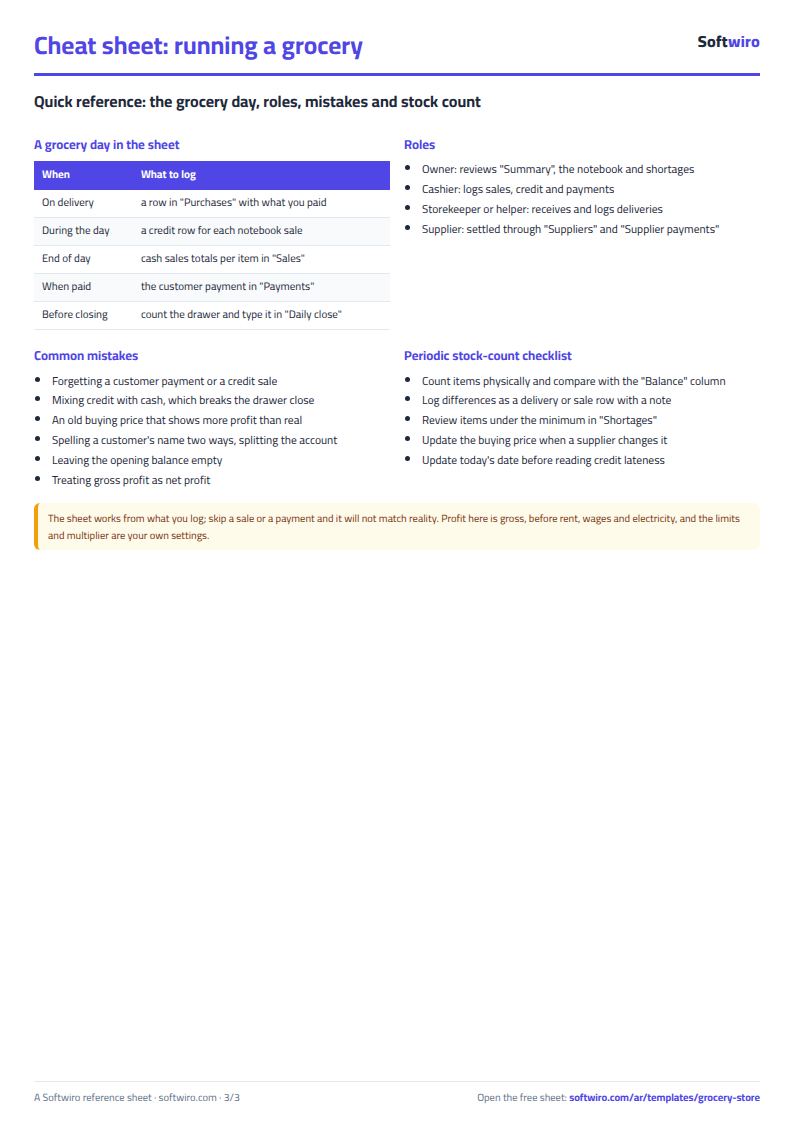
- In المشتريات (Purchases) log each delivery with quantity, price and what you paid. In المبيعات (Sales) put one row per item per day for cash sales, and one row per credit sale with the customer's name.
- In الدفعات (Payments) log what customers pay, and in دفعات الموردين (Supplier payments) what you pay.
- At closing open قفل اليوم (Daily close): type the drawer at the start of the day, expenses and the cash you counted, and the sheet shows the difference between expected and actual.
- Open النواقص (Shortages) to see what to order and الملخص (Summary) for the month's profit and the notebook position.
What each sheet does
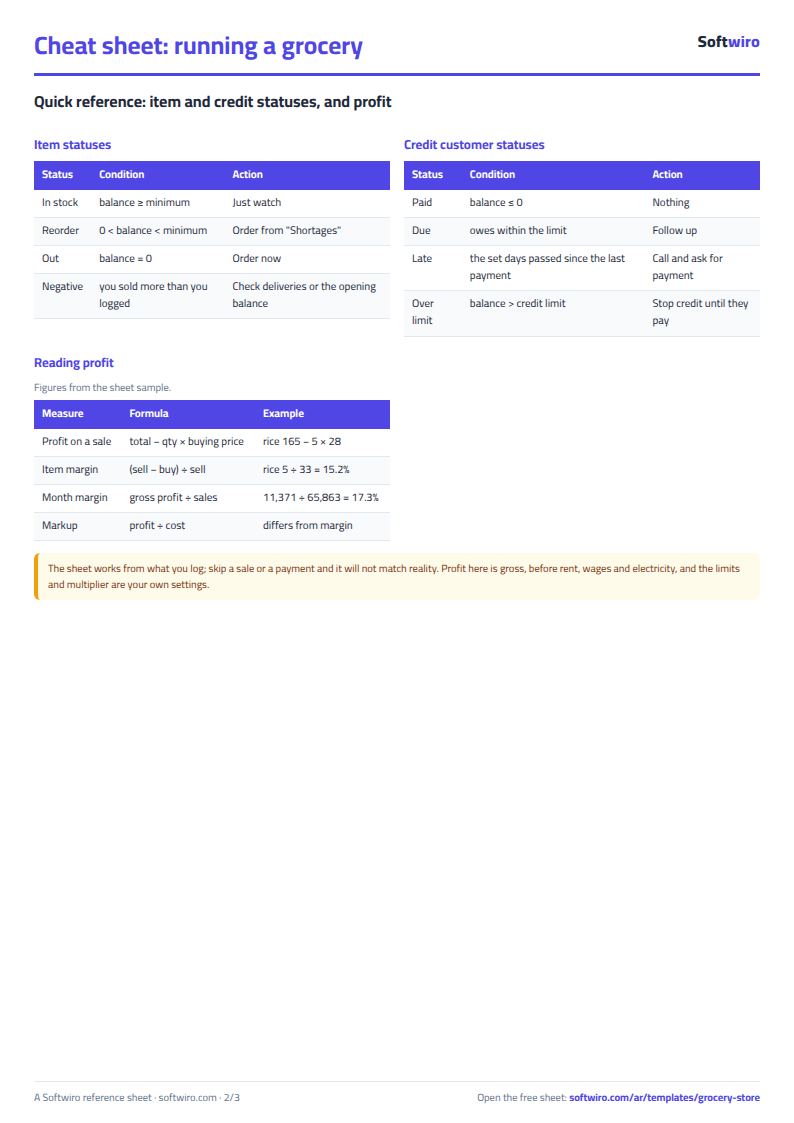
- Items: balance = opening + purchases − sales, its value at cost, margin, status and suggested order quantity.
- Sales and purchases: the movement logs, with the item name, totals and profit filled in, and flags for an unknown code or an unregistered customer.
- Notebook and payments: a customer's balance = previous balance + credit purchases − payments, plus the last payment and a status.
- Suppliers and supplier payments: what you owe each supplier and what is short at their side.
- Shortages: what to buy, ranked by quantity, with its cost.
- Daily figures, daily close and summary: sales per day, the drawer, and the month's numbers with profit by category.
A walk-through with the sample numbers
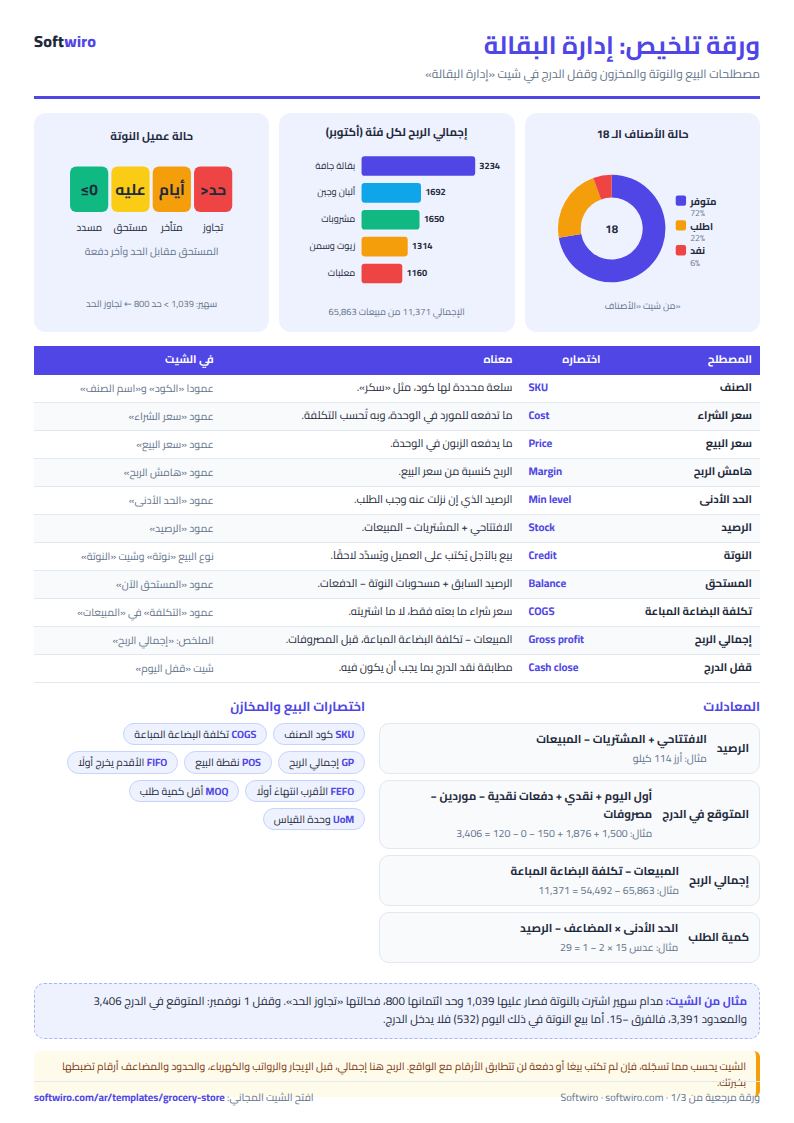
These figures are sample data inside the sheet, not a real shop: 18 items, 5 suppliers, 8 credit customers, today is 1 November 2026 and the month is October 2026.
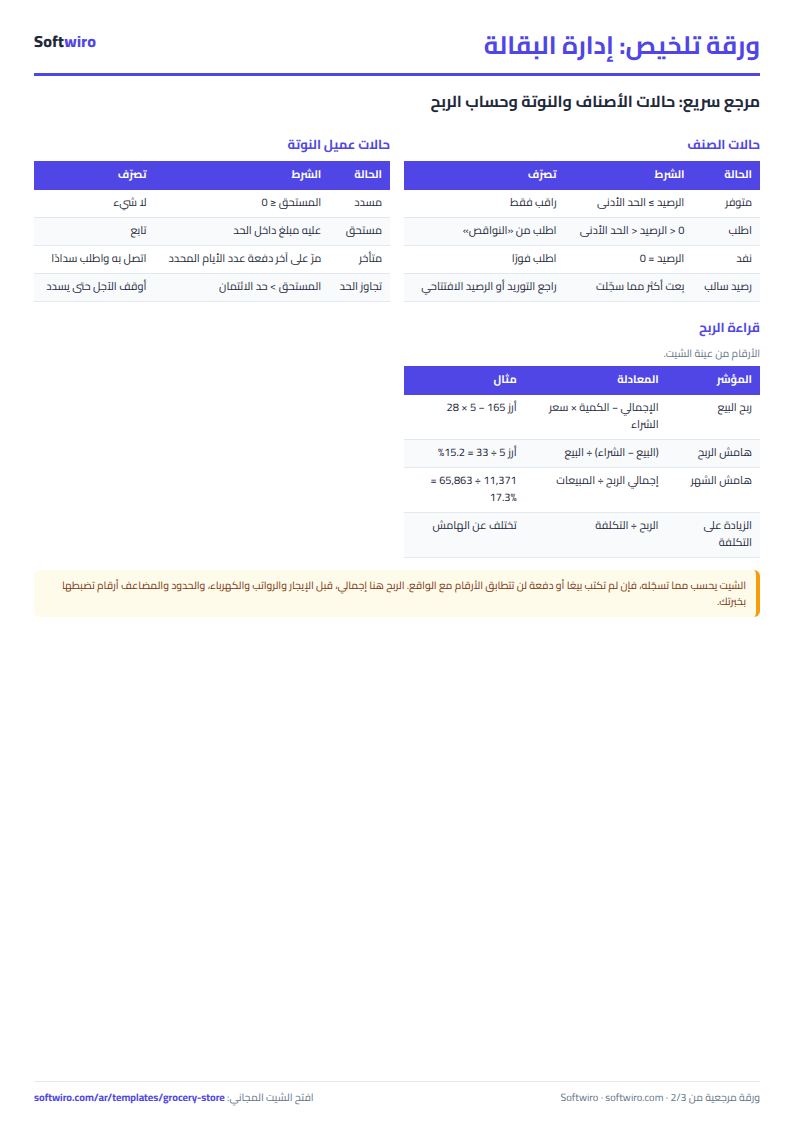
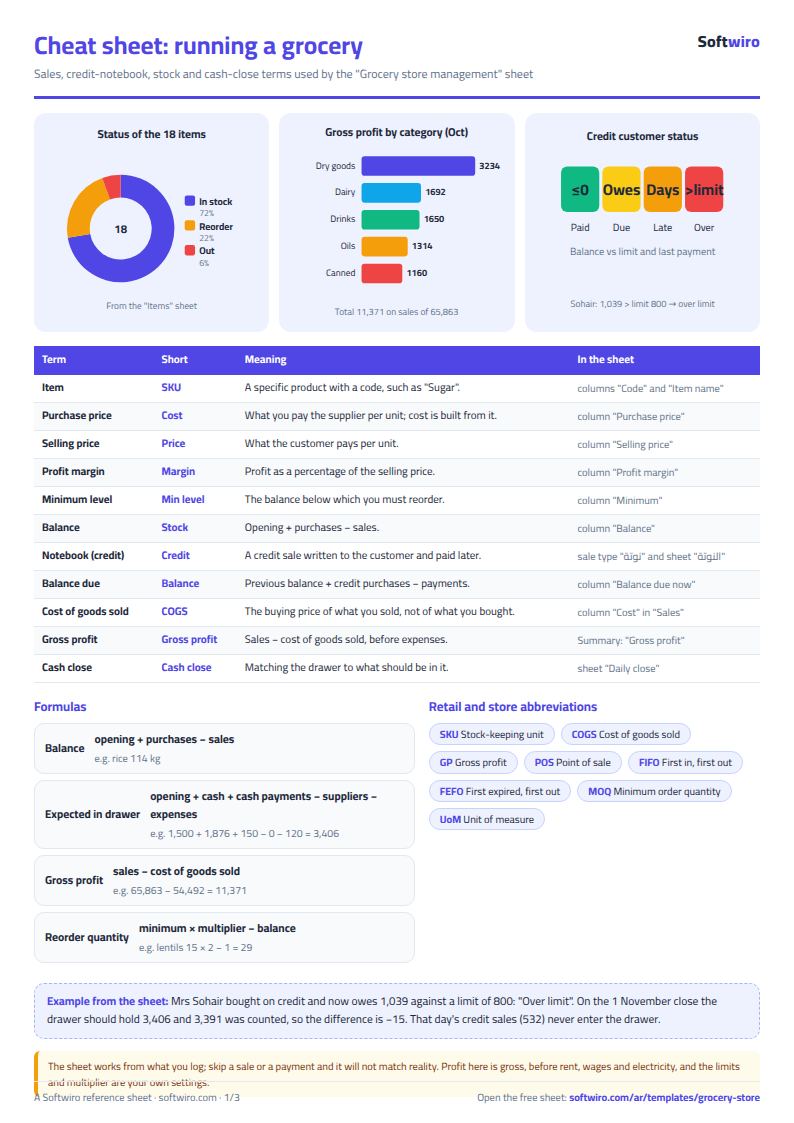
- Sales: 65,863 for the month, 60,083 cash and 5,780 on the notebook. The goods sold cost 54,492, so gross profit is 11,371, a margin of 17.3%. That is before rent, wages and electricity.
- Categories: dry groceries earn the most, 3,234, but at a 15.5% margin, while drinks run at 23.5% and sweets and snacks at 24.5%.
- Notebook: customers owe 5,732 in total. One customer owes 1,039 against a limit of 800, so her status is «تجاوز الحد» (over the limit), and another last paid 37 days ago, so she is «متأخر» (late).
- Stock: worth 26,644 at cost. Four items are below their minimum and one is out (dish-washing liquid); ordering the shortages costs 3,805. Lentils have a balance of 1 against a minimum of 15, so the suggestion is 15 × 2 − 1 = 29 kg, costing 1,595.
- Suppliers: you owe them 2,983 in total, 1,959 of it to one supplier.
- Close on 1 November: cash sales 1,876, credit sales 532 (these do not enter the drawer), cash payments from customers 150 (a mobile-wallet payment does not enter the drawer), 1,500 in the drawer at the start and 120 in expenses. Expected in the drawer 3,406, counted 3,391, so the difference is −15.
Common mistakes
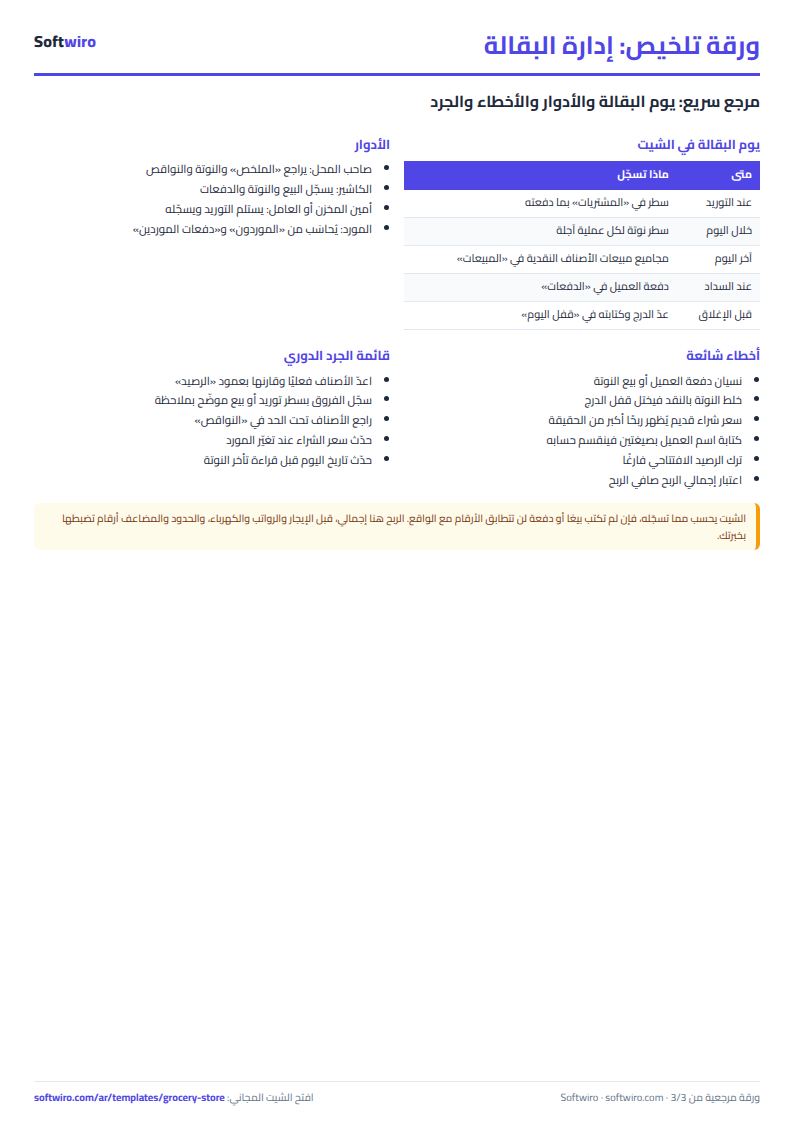
- Forgetting to log a payment or a credit sale, so a customer looks like they owe more or less than they do.
- Leaving an old buying price in the item list after the supplier raised it, which makes profit look bigger than it is.
- Counting profit from sales alone without cost, or mixing credit sales into the cash drawer.
- Spelling a customer's name two ways, which splits the account. Pick the name from the list.
- Leaving the opening balance empty, so items show as out or negative.
When to move to a system
The sheet suits a grocery where the owner or one cashier types the day's totals. When you have several cashiers, hundreds of invoices a day, or want a barcode scan to deduct stock at the moment of sale, that is the job of a till system such as Accsys, not a spreadsheet.
Your next step
Download the sheet, type your first ten items in the item list, log today's sales and try the daily close tonight. For a stand-alone customer credit book see the credit customers account sheet; for stock on its own, the general shop inventory sheet.
FAQ
Do I log every cash customer? No. Add up a day's cash sales of each item into one row, and write one row per credit sale.
What if I sell an item that is not in the list? An «unknown code» flag appears. Add the item to the item list and log the sale again.
Does it work on a phone? Yes, in Excel, Google Sheets and LibreOffice.