You drive for Uber, Didi, inDrive or a street taxi, and at the end of the day you want to know what is really left after the platform's commission, fuel and the car rent, and which days, periods and platforms deserve your hours. The free taxi and Uber driver income sheet does that: you type one line per shift and the sheet works out the rest.
The problem it solves
What the platform app shows is the fare, not what you keep. A commission that differs from platform to platform comes off the fare, the car's daily rent goes to its owner if you rent it, fuel is paid in lumps that do not show day by day, and upkeep arrives as large surprise amounts. So a day can look big in the app and be weak after deductions, while another day is unfairly judged because it contained a fill-up. The sheet puts all of this in one place and gives you the net of each shift, week and month.
How the sheet works, step by step
- In Settings type today's date, any date in the month you are reviewing, the daily car rent (type 0 if the car is yours), and the first day of week one.
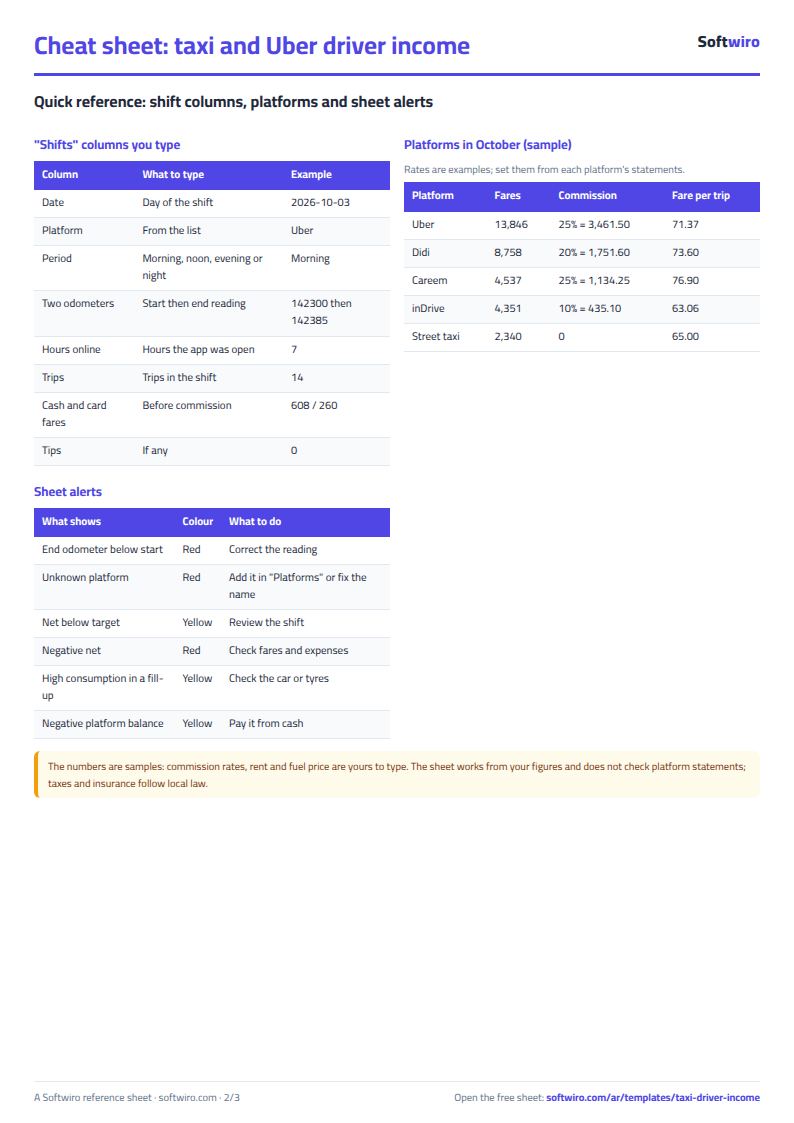
- In المنصات (Platforms) type the platforms you drive for and each one's commission rate as shown in its statements. The names and rates in the file are examples, so change them.
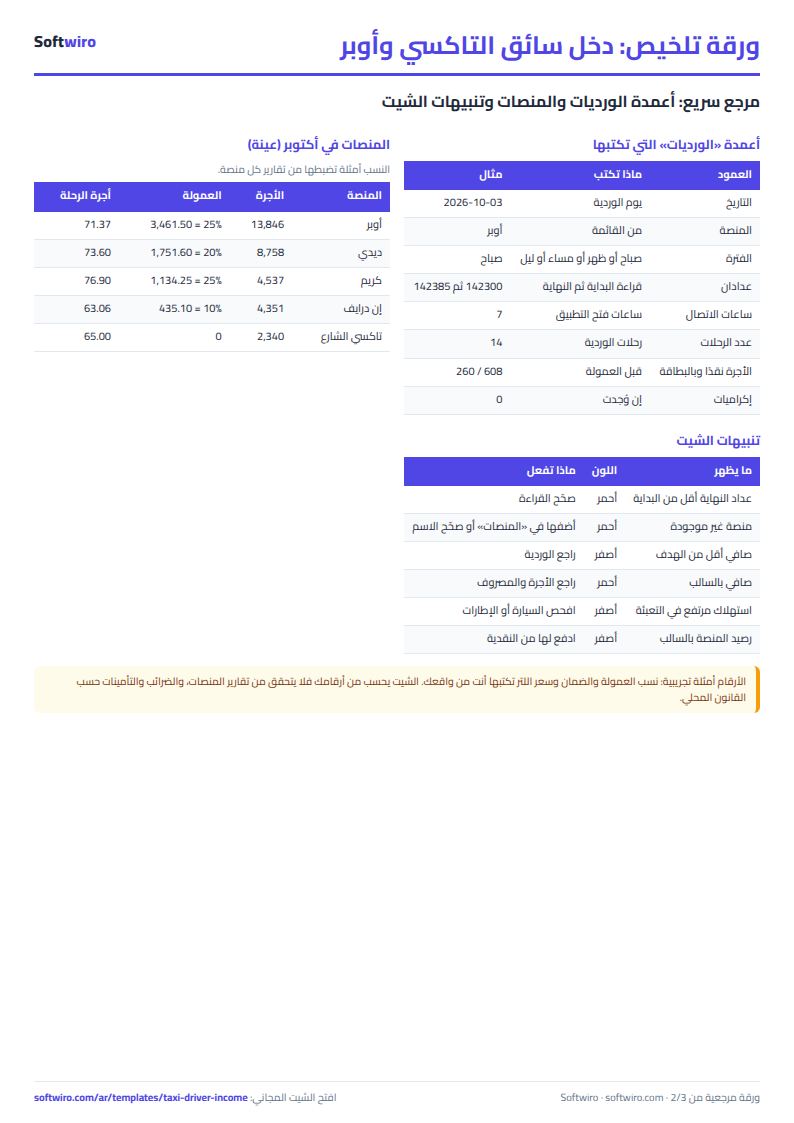
- In الورديات (Shifts) add a line per platform per day: date, platform, period (morning, noon, evening or night), odometer start and end, hours online, trips, cash fares, card fares and tips.
- In الوقود (Fuel) type each fill-up in order: date, odometer, litres and price per litre.
- In المصروفات (Expenses) type upkeep, washing, tyres, insurance and any other car expense.
- Open الأسابيع (Weeks), الشهور (Months) and الملخص (Summary) to read the result.
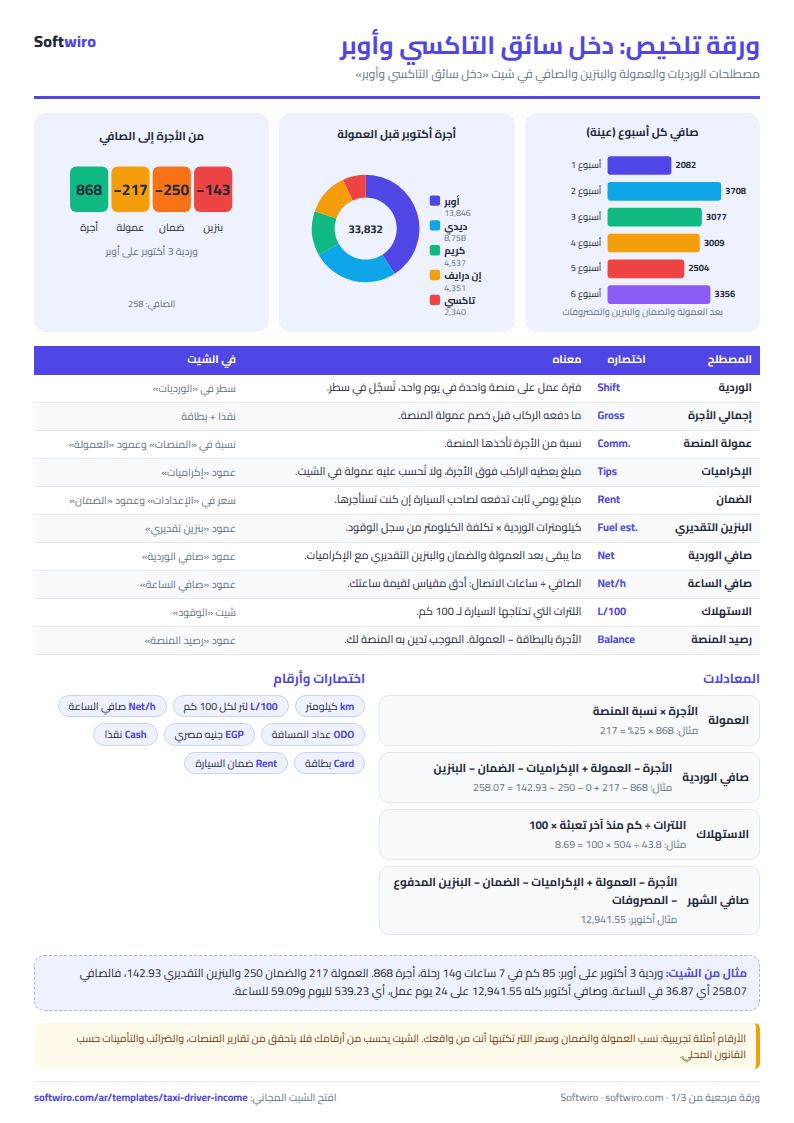
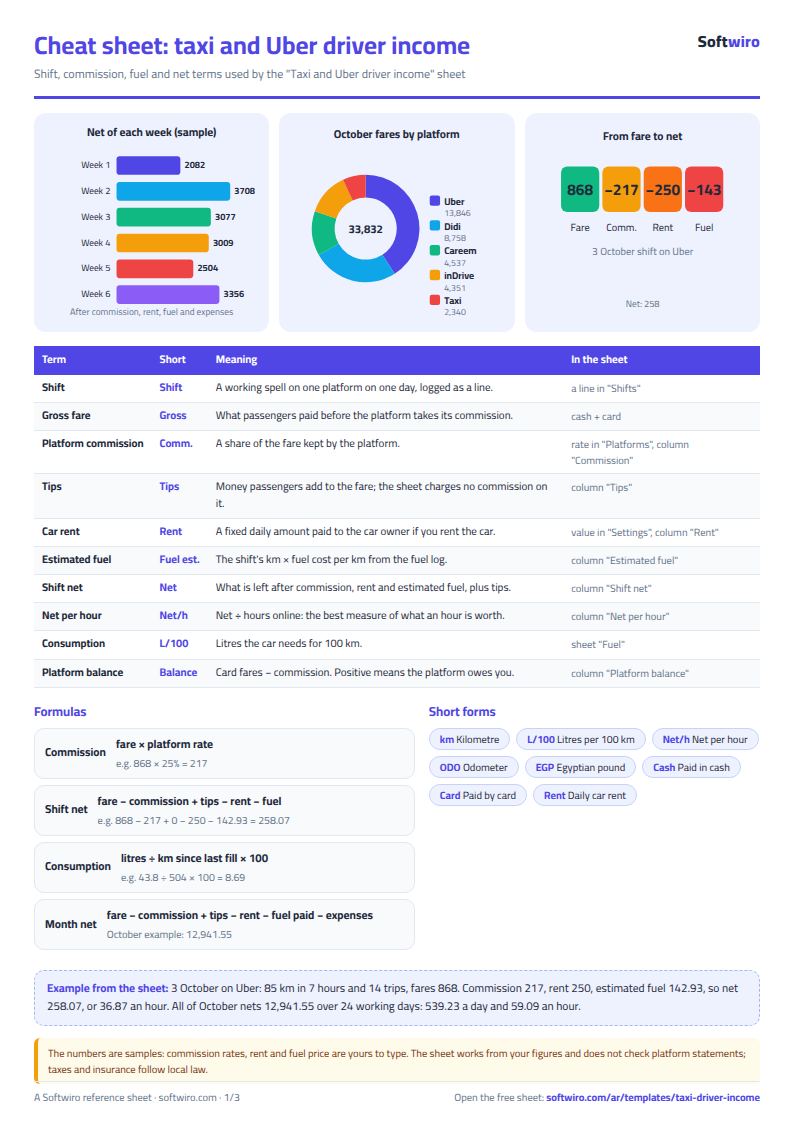
The core rules: commission = gross fare × the platform's rate (it is not charged on tips), shift net = fare − commission + tips − car rent − estimated fuel, estimated fuel = the shift's km × fuel cost per km taken from the fuel log, and month net = fare − commission + tips − rent − fuel actually paid − expenses.
What each sheet holds
- Settings: the dates, the daily rent and net-per-day target, the fuel cost per km and the average consumption.
- Platforms: each platform's commission rate with the month's trips, fares, commission, net and balance with the platform.
- Shifts: one line per shift, with km, commission, rent, net and net per hour calculated.
- Fuel: the fill-ups, litres per 100 km and cost per km.
- Expenses: everything you spend on the car except fuel.
- Weeks and Months: the totals and net of each period.
- Summary: the month's net, the best day and period, and four charts.
Walk-through on the sample numbers
The figures below are sample data for October 2026 inside the sheet, not a real driver, and the fuel price (20), the rent (250) and the commission rates are examples.
- The 3 October shift on Uber: 85 km in 7 hours and 14 trips, fares 868 (608 cash and 260 card). Commission 25% = 217, rent 250, estimated fuel 85 × 1.68 = about 142.93. Net = 868 − 217 − 250 − 142.93 = 258.07, about 36.87 an hour.
- The car: ten fill-ups logged, average consumption 8.41 litres per 100 km and a fuel cost of 1.68 per km.
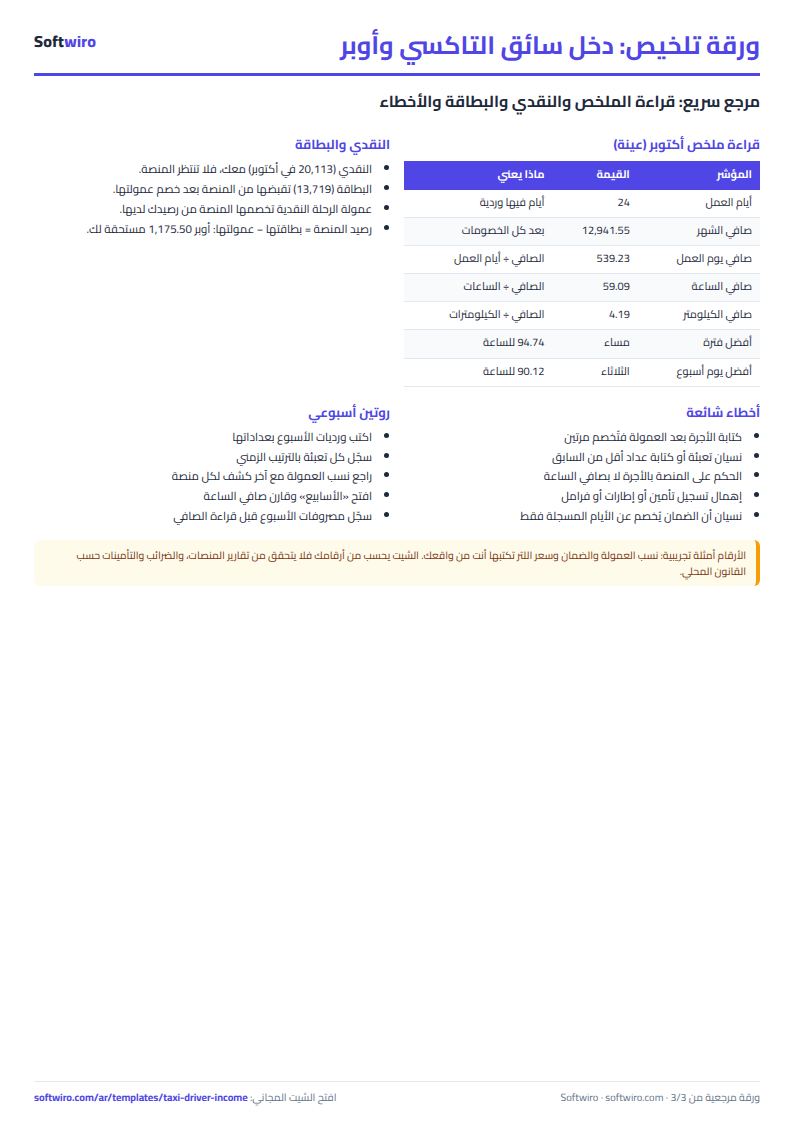
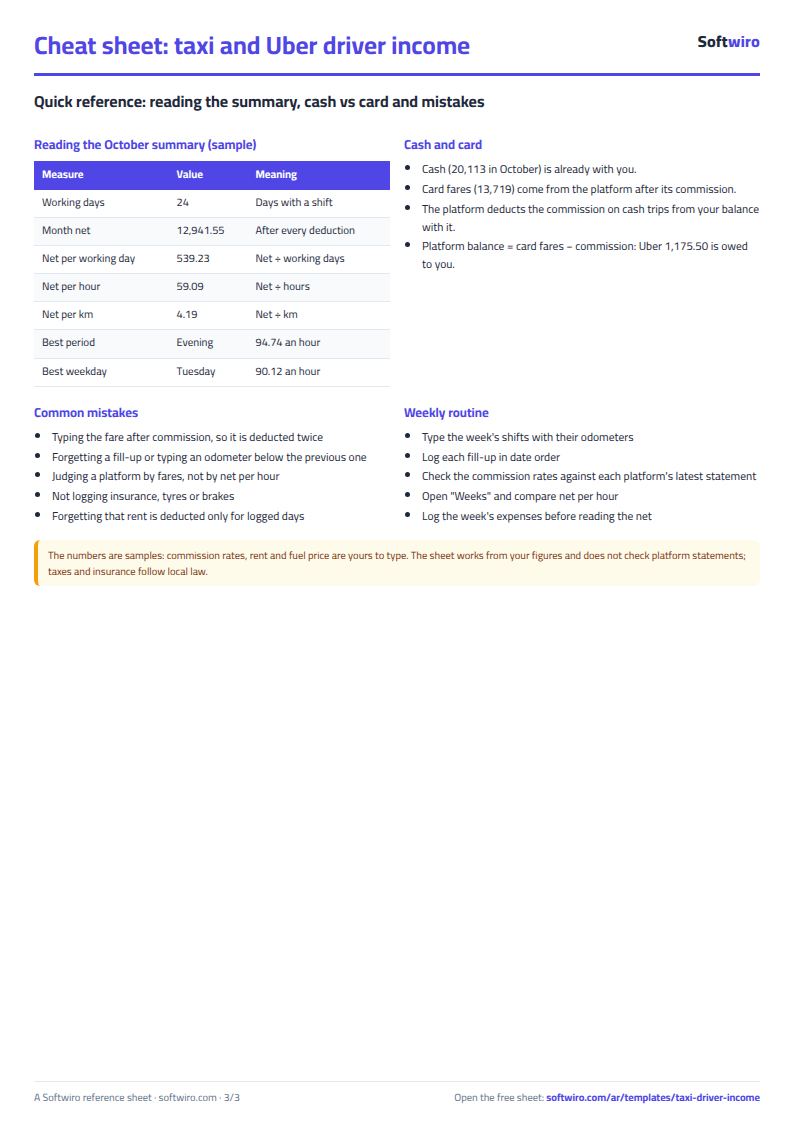
- All of October: 24 working days, 27 shifts, 219 hours, 477 trips and 3,086 km. Fares total 33,832 (20,113 cash and 13,719 card). Commission is 6,782.45 (about 20% of fares), tips 530 and rent 6,000, so net before fuel and expenses is 21,579.55. Fuel paid was 5,938 and expenses 2,700, giving a month net of 12,941.55.
- Indicators: net per working day 539.23, per hour 59.09, per km 4.19 and an average fare of 70.93.
- Platforms: Uber 194 trips, fares 13,846, commission 3,461.50 and a platform balance (card 4,637 − commission) of 1,175.50 owed to you. Didi fares 8,758, commission 1,751.60, balance 2,906.40. The street taxi 2,340 with no commission.
- Days and periods: the best day is 10 October at a net of 1,033.49, the weakest 3 October at 258.07, and five days fell under the target of 450. Evening is the best period for net per hour (94.74 against 64.86 in the morning) and Tuesday the best weekday (90.12). These are differences in a small sample, so read your own pattern after two or three months.
Common mistakes
- Typing the fare after commission: type the gross fare, otherwise commission is deducted twice.
- Forgetting a fill-up or typing an odometer lower than the previous one: consumption goes wrong, and the sheet turns the cell red so you correct it.
- Judging a platform by its big fares: compare net per hour after commission, not the fare.
- Skipping big expenses: insurance, tyres or brakes change the month's net, so log them on their day.
- Assuming a rest day is free: rent is deducted only for logged days, so if the owner charges you for every day, add an empty line for those days.
When to move to a system
The sheet suits one driver with one car. Once you have several cars and drivers, want each driver to log from a phone, settle each one's rent and see profit per car, a system Softwiro builds around your way of working fits better. To track oil and filter dates by kilometre use the personal car maintenance sheet, and for a fleet the fleet fuel and maintenance sheet and its guide.
Your next step
Download the sheet, open Platforms and type your platforms with each commission from the latest statement, then log today's shift on one line. After two weeks open the Summary and read net per hour by period before you change your working hours. Taxes and insurance follow local law and are not calculated by the sheet.