You run a garage or car park and you want to know without a notebook and calculator: what each car that left should pay, how many cars are inside right now against your capacity, which monthly subscribers have fallen behind, and whether every attendant handed over what he collected on his shift. The free parking garage management sheet answers these from one log where you type entries and exits, plus pricing rules you write once. The template is in Arabic.
The problem it solves
In a small garage the attendant works out the fee in his head: this car stayed three and a half hours so it counts four, that one stayed the night so it pays "overnight", and this one belongs to a subscriber so it pays nothing. When the calculation differs from one attendant to another you cannot tell, at the end of the day, whether a gap is a counting mistake or missing cash. Subscribers live on a paper list the owner asks about every month. The sheet applies the same rule to every car and compares what the attendant handed in with what the log says.
How the sheet works, step by step
- In Settings you type the garage capacity, the first-hour price, the extra-hour price, the cap for each 24 hours, the overnight fee, today's date and the time now.
- In Subscribers you type each subscriber's plate, monthly fee, first month and the number of months paid.
- In Attendants you type each attendant's name and shift.
- In the Log you record each car when it enters; when it leaves you type the exit time (and date if it is a later day) and pick the attendant who collected the fee.
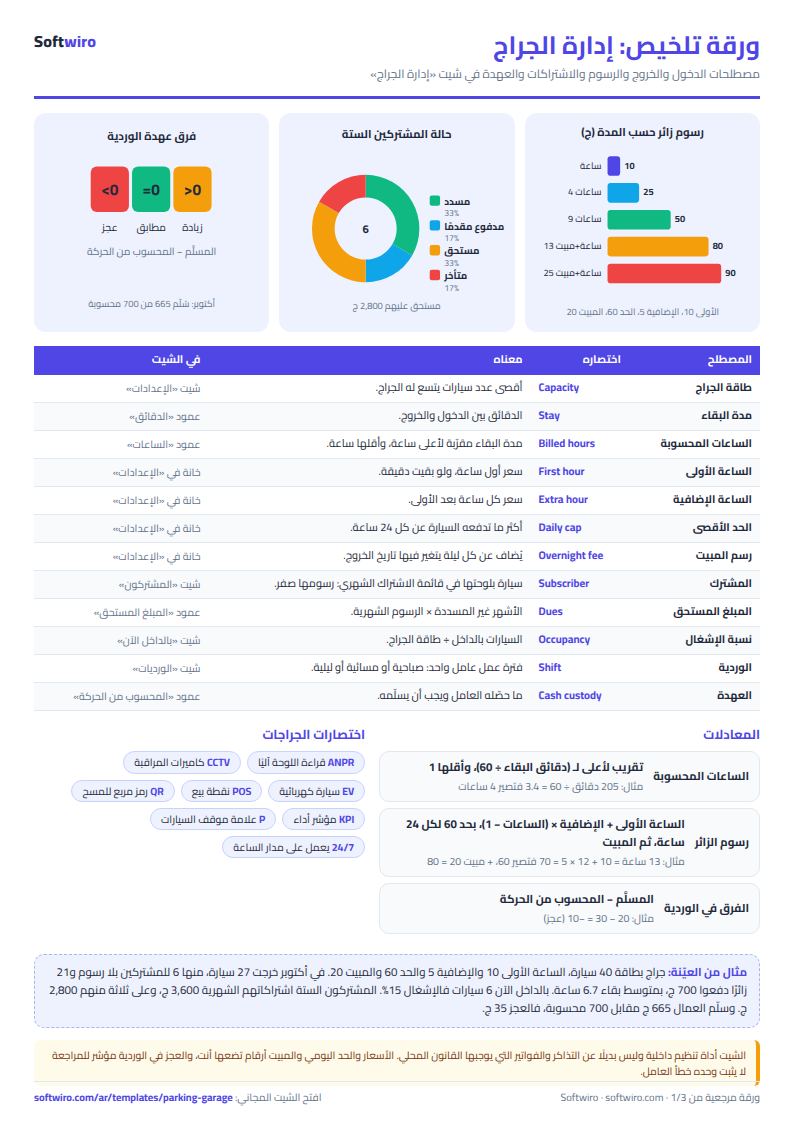
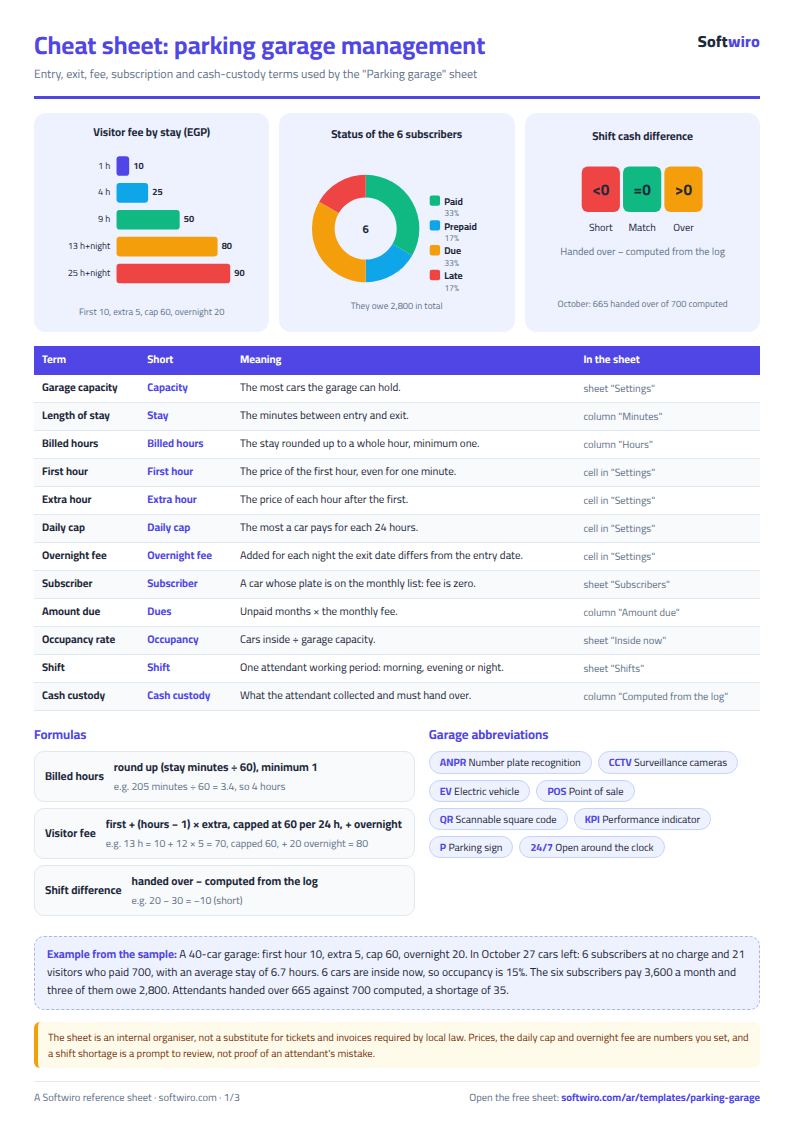
- The sheet rounds the stay up to a whole hour (minimum one) and works out the fee: the first hour, then extra hours, never above the 24-hour cap, plus the overnight fee for each night. A subscriber's car pays zero.
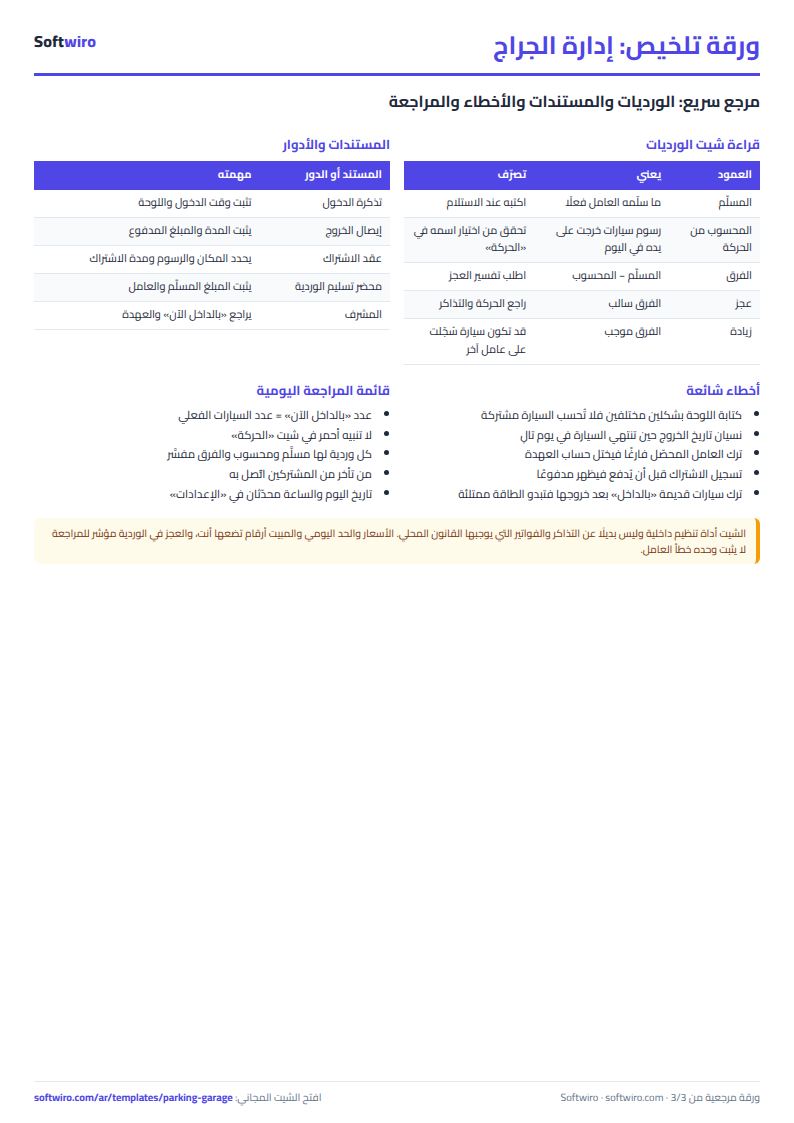
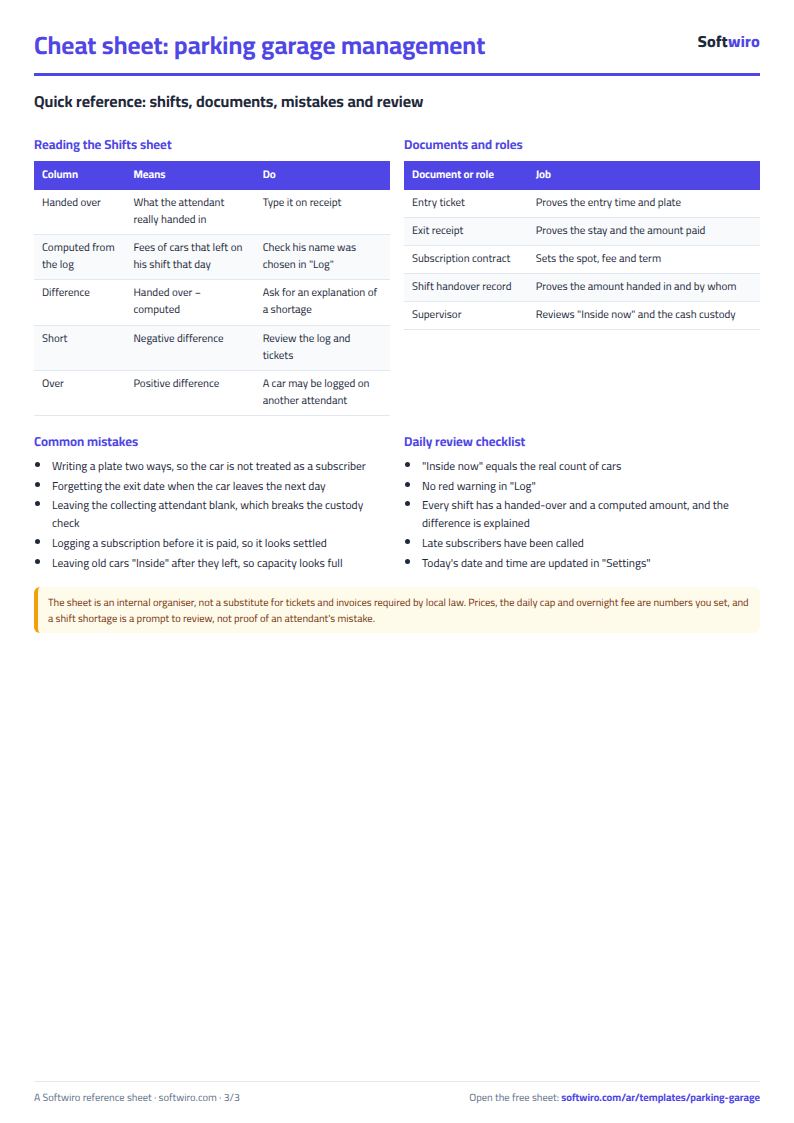
- At the end of a shift you type in Shifts what the attendant handed over; next to it appear what the sheet computed and the difference: match, short or over.
What each sheet does
- Settings: capacity, price rules, today's date and the summary month.
- Subscribers: months due, unpaid months, amount due, last month paid and status, with a warning for a duplicated plate.
- Attendants: each attendant's shifts in the month, their wages, and what the sheet computed for him against what he handed in.
- Log: the main record, with type, status, minutes, hours, fee and warnings for a missing plate or an exit before the entry.
- Inside now: cars that have not left and their hours so far, with the count, free spots and occupancy.
- Shifts, Daily revenue and Summary: cash custody, revenue for each day of the month, and the headline numbers with four charts.
Walk-through on the sample numbers
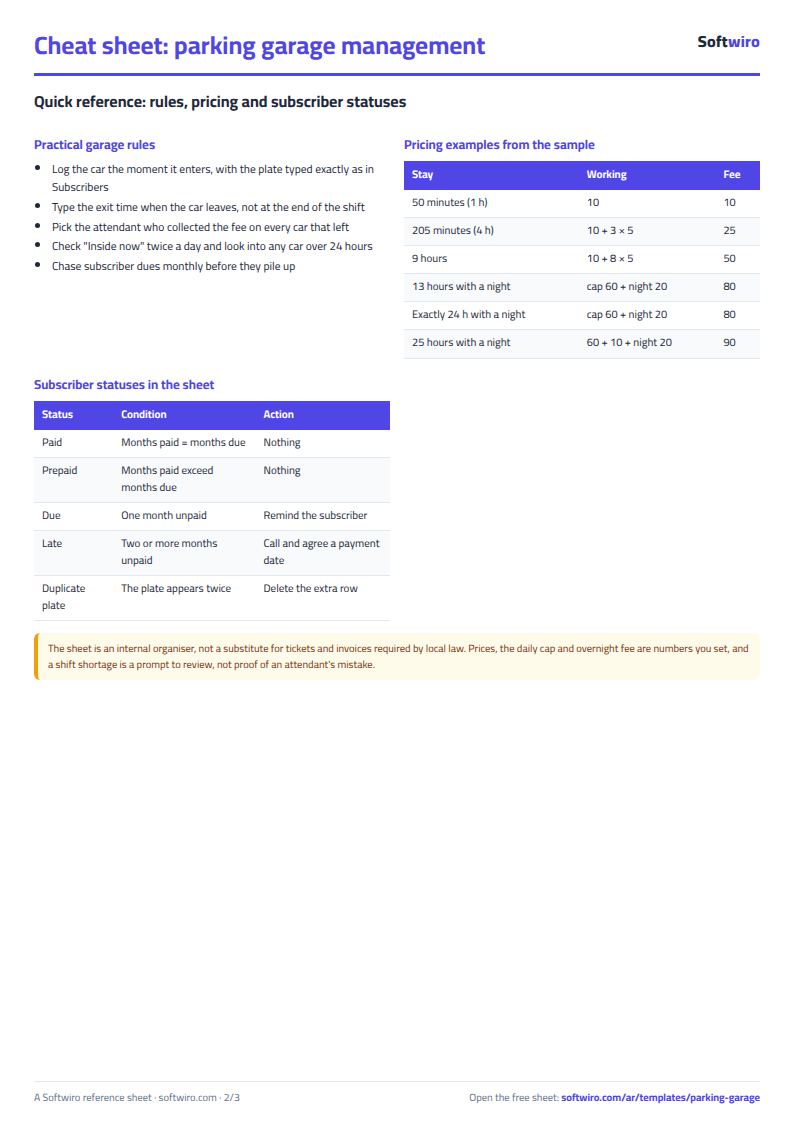
These numbers are sample data, not a real garage. The example rules: first hour 10, extra hours 5, cap 60 per 24 hours, overnight 20, capacity 40 cars, today 2 November 2026.
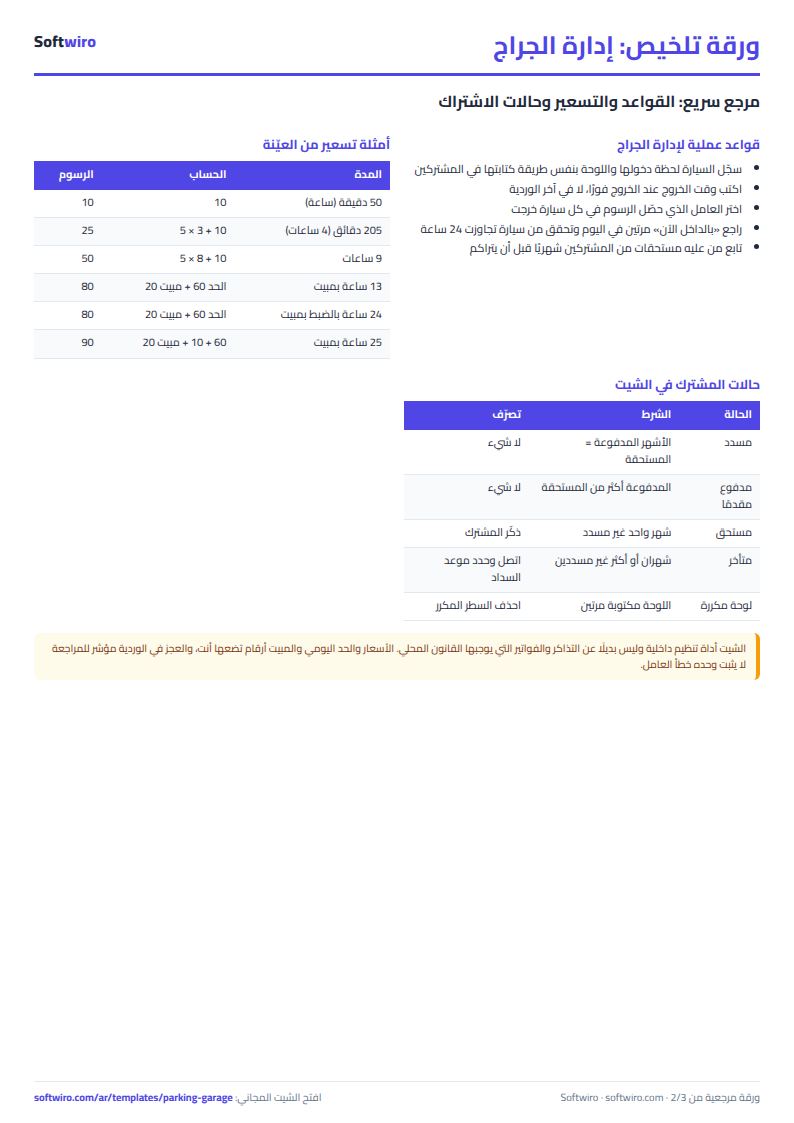
- A car that stayed 50 minutes counts one hour: 10. Another stayed 205 minutes, counted as 4 hours: 10 + 3 × 5 = 25.
- A car that stayed 510 minutes counts 9 hours: 10 + 8 × 5 = 50.
- A car that came in at 6 pm and left at 6:40 am, 13 hours: the working gives 70, which stops at the cap of 60, plus 20 overnight, so 80.
- A car that stayed exactly 24 hours: cap 60 + overnight 20 = 80. Another stayed 25 hours: 60 + 10 + 20 = 90.
- A subscriber's car that stayed 9 hours pays 0.
In October 27 cars left: 6 belonged to subscribers and 21 were visitors who paid 700 in total, an average of 33.33 per visitor, with an average stay of 6.7 hours; the best day, 3 October, brought 85. There are six subscribers whose monthly fees add up to 3,600; three of them owe 2,800 between them (one is three months behind and owes 1,500). Six cars are inside now out of 40, an occupancy of 15%; one entered on 31 October and has been there 46 hours, so it carries the warning "over 24 hours".
For the cash, the sheet records 24 shifts in October, with 700 computed and 665 handed over, a difference of −35: a shortage of 30 on one evening shift, a shortage of 10 on one night shift and an excess of 5 on one morning shift.
Features and why they matter
- The same rule for every car: the calculation does not vary between attendants.
- A subscriber is free automatically once the plate is on the list.
- Cars inside now against capacity, with a warning for a car that stayed over a day.
- Shortages show on their own day, not at a month-end count.
- It works in Excel 2016 and later, Google Sheets and LibreOffice, free and without sign-up. It holds 2000 movements, 100 subscribers and 20 attendants.
Common mistakes
- Writing the plate two ways in Subscribers and the Log, so the car is not treated as a subscriber.
- Forgetting the exit date when a car stays the night, so the sheet reads the exit on the entry day.
- Leaving the "collected by" cell empty, so the car's fee falls into no attendant's custody.
- Leaving a car "inside" after it has left, so capacity looks full.
Remember the sheet does not replace tickets and receipts that local law requires, and a shortage in it is a prompt to review, not an accusation.
When to move to a system
When you have several gates or more than one attendant recording at the same time, or you want a camera to read the plate and open the barrier on its own, one file becomes the bottleneck. For the cash itself you can use the cash book, and for the idea of hourly pricing and bookings see the hourly court booking sheet.
Your next step
Download the parking garage management sheet, type your capacity and prices in Settings, record the first day's cars, and give each attendant a custody slip on which he writes what he handed in at the end of the shift.