You run a clinic and want answers without leafing through notebooks: how much the clinic really earned this month after discounts, how much of it belongs to the doctors and to contract companies, who still owes money, what you spent, and which patients are still entitled to a follow-up consultation. The free complete clinic management sheet (the page is in Arabic) holds all of it: patient file, visits log, services price list, doctor shares, contract companies and expenses, then compares income with expenses day by day and month by month. If you only need an appointment diary, use the clinic appointments sheet.
The problem it solves
In many clinics the visit is written in the reception book, the amount paid on another sheet, the doctor's share on a calculator at month end, and the contract company's invoice in a third file. Ask "what does Mr X still owe?" or "what did the clinic keep after the doctors' share?" and the answer changes with whoever adds it up. Here a visit is typed once and the rest is calculated.
Step by step, from opening the file to the report
- Settings (الإعدادات): type today's date, any date inside the month to summarise, the first month of the monthly table, the consultation window in days after a checkup (14 in the sample) and the expense categories.
- Services (الخدمات): each service, its type (checkup, consultation or procedure) and price. In the sample a new checkup is 400, a follow-up consultation 200, an ECG 300 and an ultrasound 350.
- Doctors and companies (الأطباء، الشركات): each doctor gets a percentage of the net income of their visits (50%, 40% and 60% in the sample) and each company a percentage it covers (80%, 100% and 60%). These are settings you agree on and can edit; they are not a fixed rule.
- Patients (المرضى): code, name, phone and first visit date. Do not type diagnoses here.
- Visits (الزيارات): one row per visit: date, patient code, service, doctor, the company if any, discount and amount paid. The notes column is free text for administrative reminders, not for diagnoses.
- Expenses (المصروفات): date, category, description and amount.
- Open Follow-ups (المتابعات), Daily (اليومي), Monthly (الشهري) and Summary (الملخص); they all calculate themselves.
What each sheet does
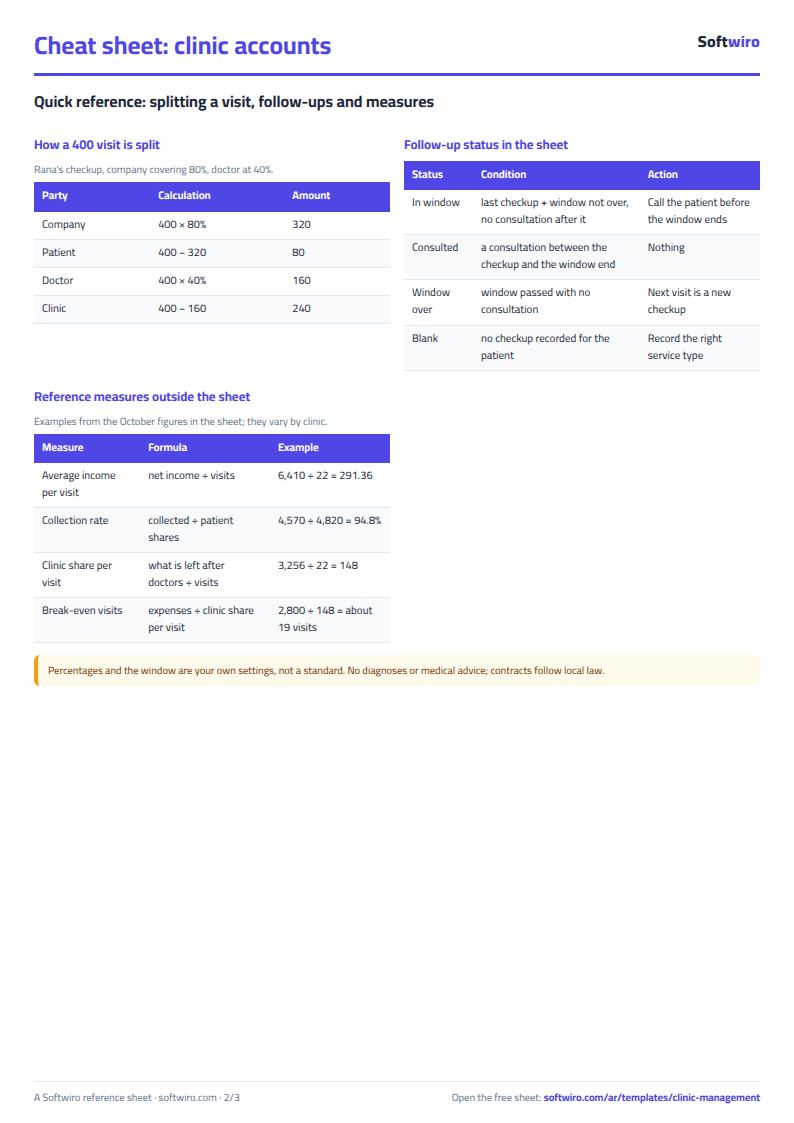
- Visits: pulls the price and type from the services list and works out net = price − discount, company share = net × its percentage, patient share = the rest, balance = patient share − paid, plus the doctor's share and the clinic's share.
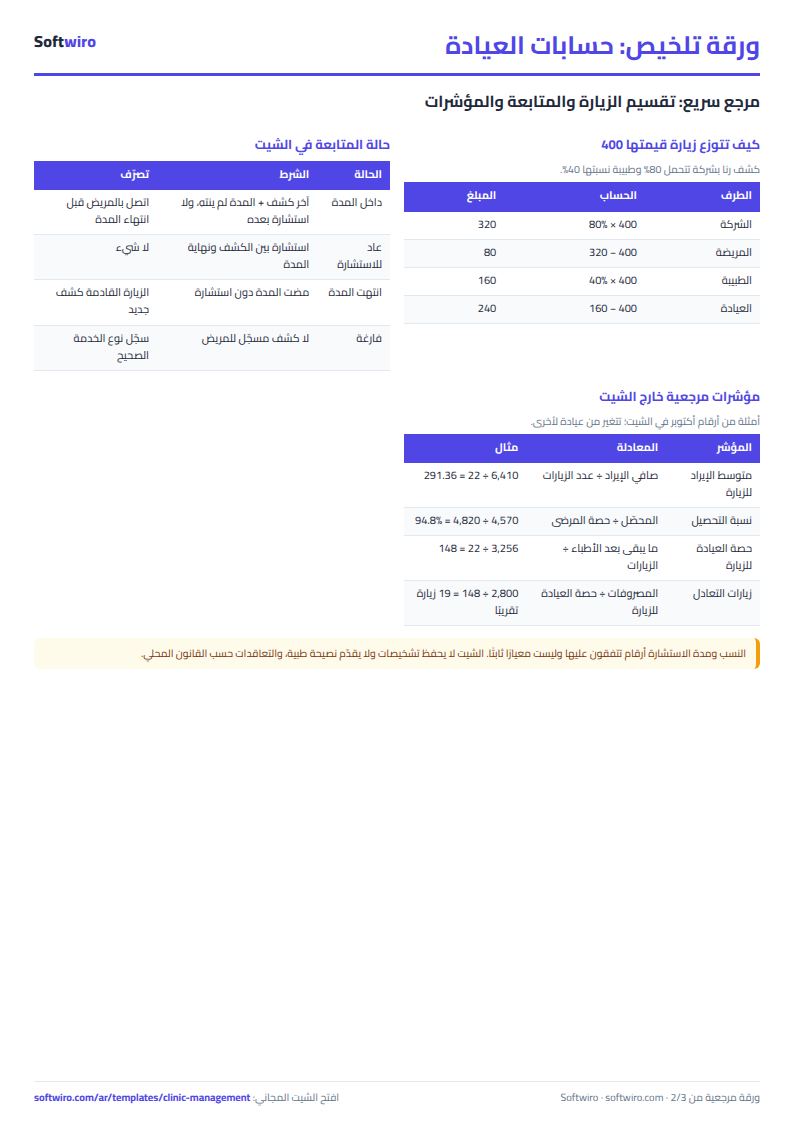
- Patients: visit count, total net bills, balance, last visit, last checkup and follow-up status (inside the window, came back for a consultation, or window over).
- Follow-ups: patients whose last checkup is within the consultation window and who have not had a consultation yet, soonest expiry first, with days left.
- Daily and Monthly: income, collected, expenses and net, per day for one month and per month for six months.
- Summary: the month's figures, what is owed, and four charts.
Walk-through on the sample numbers
The names and figures below are sample data in the workbook, not real people. The sample has 14 patients and 35 visits between October and November 2026, with "today" set to 15 November in Settings.
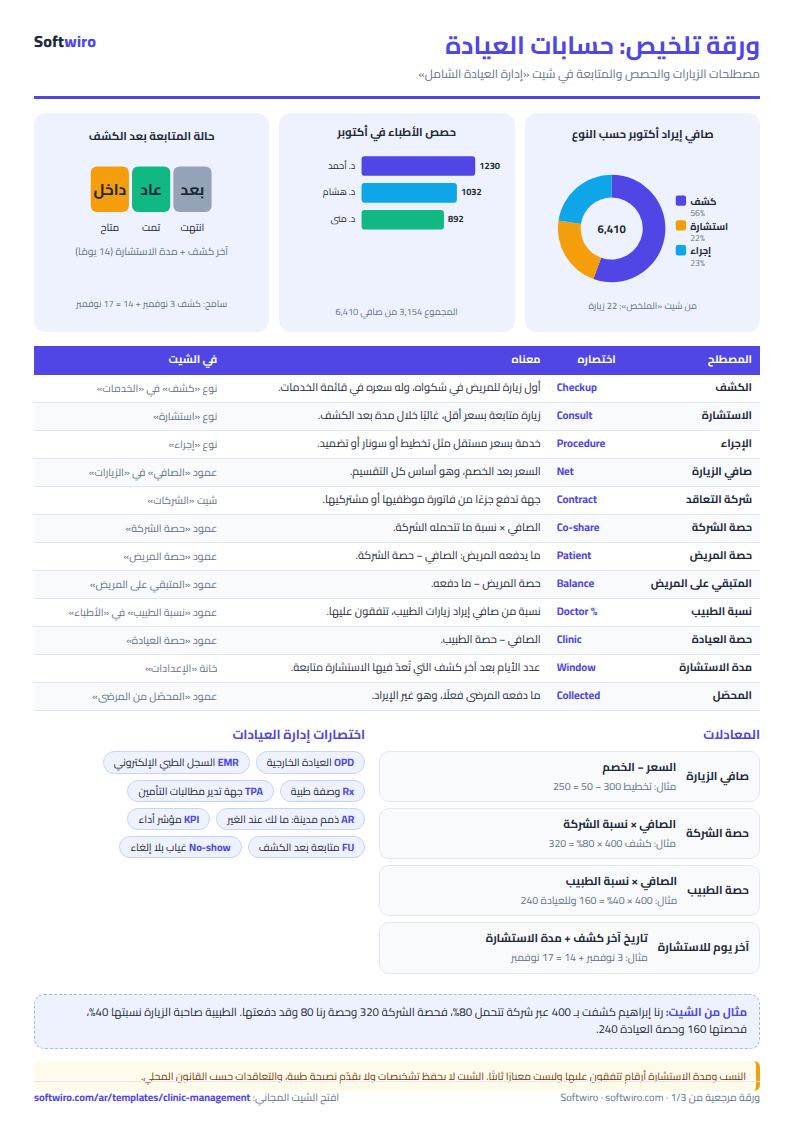
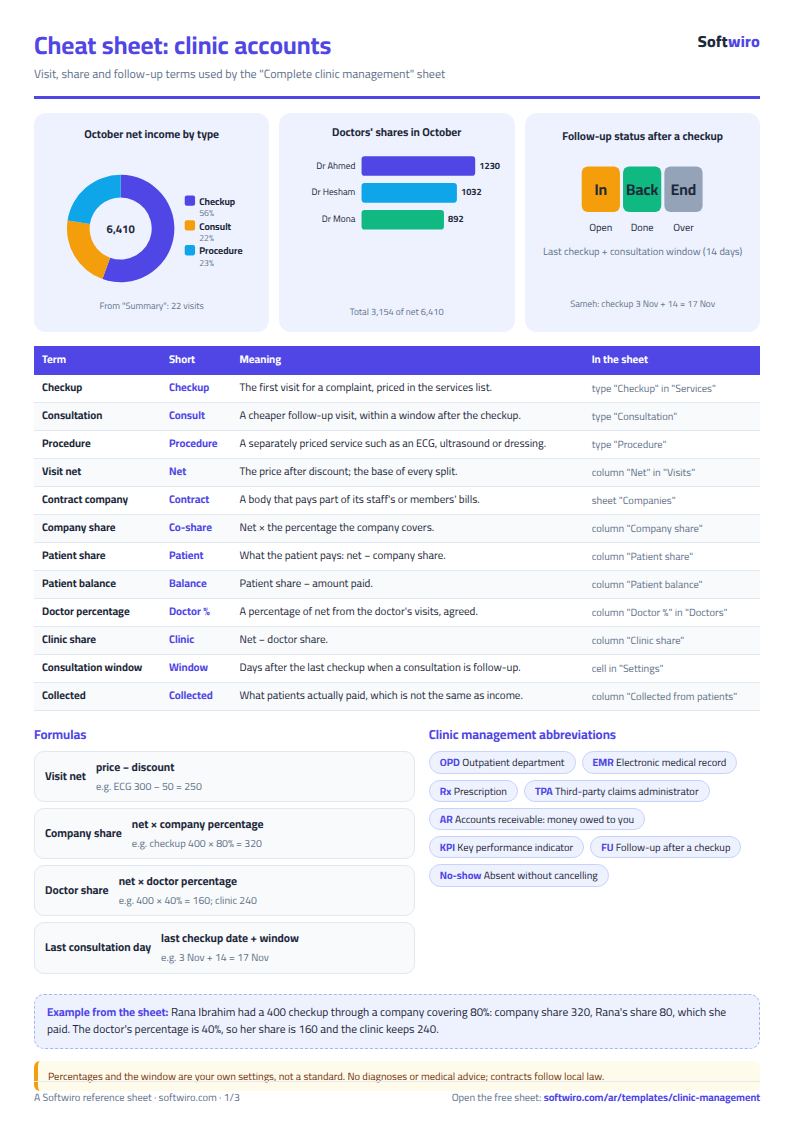
- A visit with a company: Rana Ibrahim had a 400 checkup through a company covering 80%. The company share is 320 and Rana's share is 80, which she paid, so her balance is zero. Dr Mona Fouad's 40% gives her 160 and the clinic 240.
- A visit with a discount: Karim El-Naggar had an ECG priced at 300 with a 50 discount, so the net is 250, paid in full.
- October 2026: 22 visits, list prices 6,500 and discounts 90, so net income is 6,410. Of that, 1,590 is contract companies' share and 4,820 is patients' share; patients actually paid 4,570. Average income per visit is 291.36.
- Doctors in October: Dr Ahmed Saeed 8 visits, net 2,460, share 1,230; Dr Mona Fouad 8 visits, net 2,230, share 892; Dr Hesham Raafat 6 visits, net 1,720, share 1,032. Shares total 3,154.
- Expenses and net: October expenses are 2,800, so net after expenses is 3,610, and the clinic's net after doctors' shares is 456.
- By type in October: checkups 9 for 3,560, consultations 7 for 1,400, procedures 6 for 1,450.
- What is owed: patients owe 250 (150 and 100). Contract companies owe 3,270 after what they have paid: 1,160, 1,850 and 260.
- Follow-ups: nine patients are inside the consultation window; the first, Sameh Abdullah, expires on 17 November (two days left), and two expire within three days. One patient's window ended with no consultation.
Common mistakes
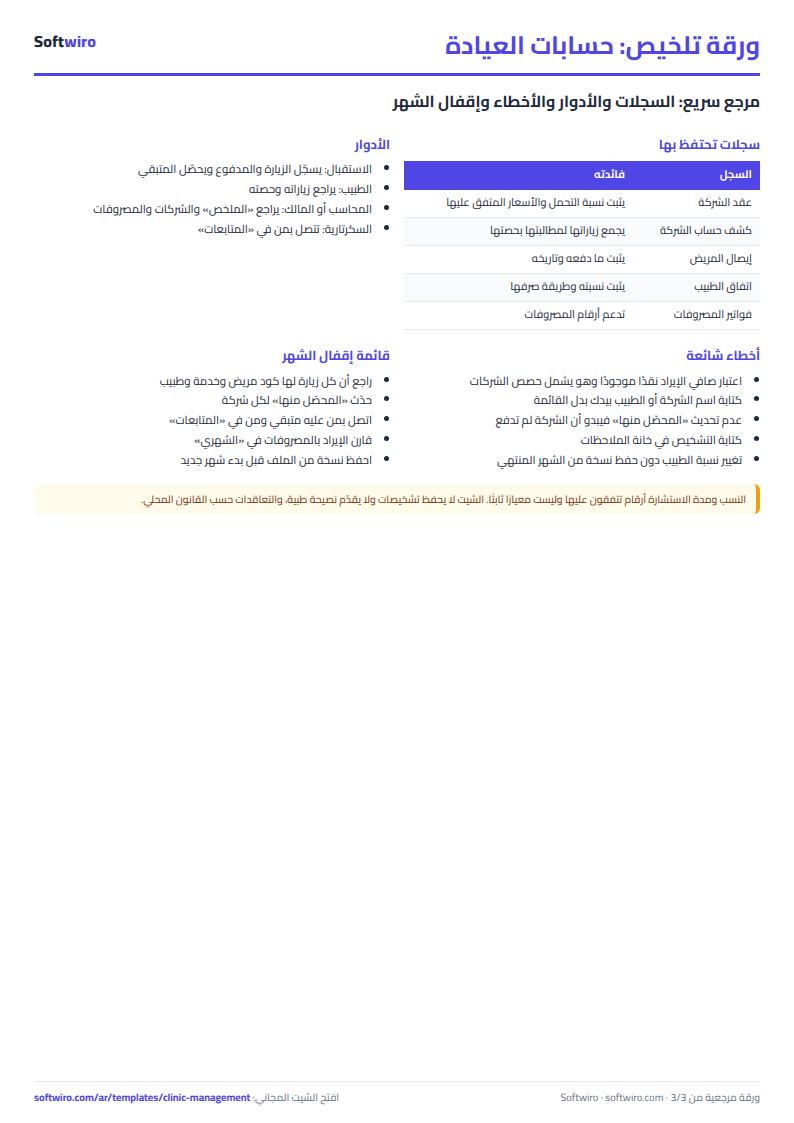
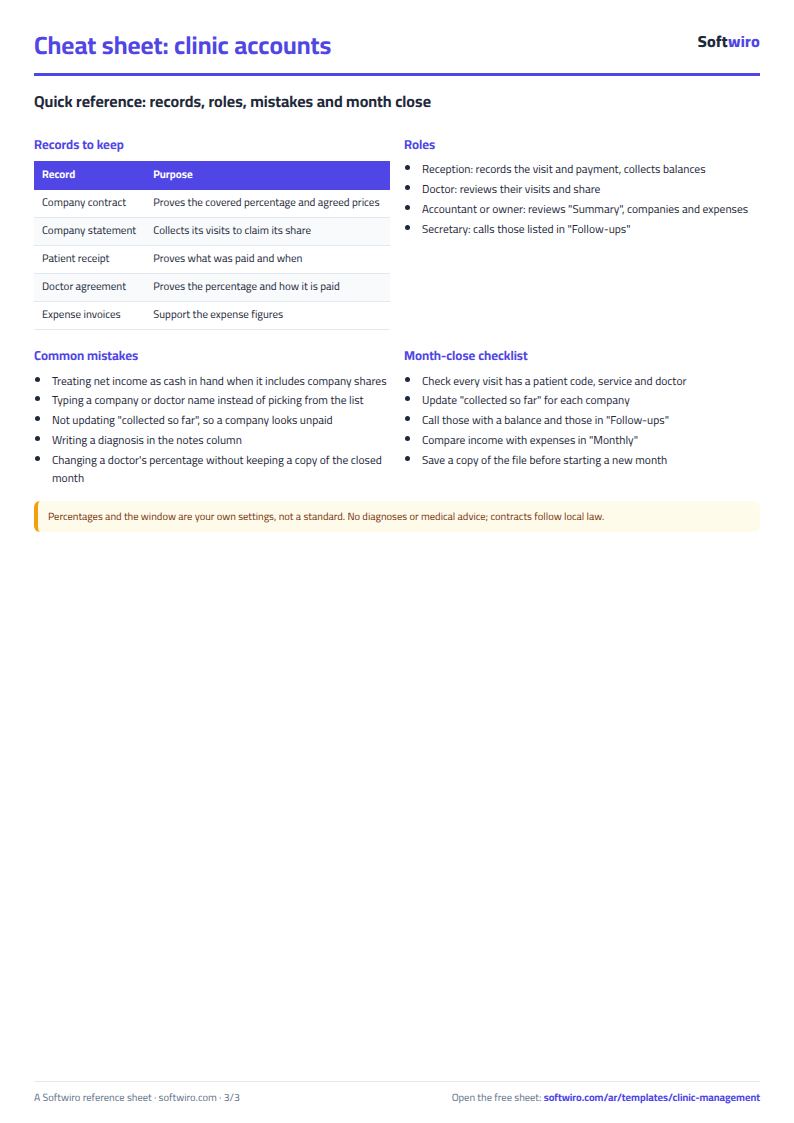
- Treating income as cash in hand: October net is 6,410 but patients paid 4,570; the rest is company shares and balances. Check "collected" and "Companies" before you spend.
- Typing the company or doctor by hand: pick them from the lists; one different letter drops the share from the calculation.
- Forgetting to update "collected so far" on the Companies sheet, which makes a company look as if it never paid.
- Putting diagnoses in the notes: the sheet is for accounts and follow-up; protecting patient data is your responsibility.
- Changing a doctor's percentage: it applies to all of their past visits, so keep a copy of finished months if your agreement changes.
When to move to a system
If reception and doctors need to record at the same time, or you want a patient medical file, e-prescriptions and booking by the patient, a spreadsheet cannot do that. Sehaty (MyClinic) from Softwiro lets patients search appointments by specialty and location and book them, and issues the e-prescription to their medical file.
Try it now
Open the sheet and try it online, or download the Excel file. Clear the sample figures, type your services and doctors first, then record today's visits. It holds 300 patients, 2000 visits and 1000 expenses. For something tailored to your clinic, request it here.