Garment Production Management System
An integrated system for managing and monitoring the entire production cycle within factories. It enables products to be tracked from creation through to completion, while managing all manufacturing stages, workers, quantities, and workflows. The system helps improve production efficiency while reducing errors and delays.
What it changes
The system helps organize the entire production workflow, providing real-time product tracking, improving communication between workers and management, reducing errors, and identifying delays at an early stage. This ultimately improves operational efficiency and increases overall factory productivity
Who it is for
- Garment factories that follow models, sizes and sets through cutting, sewing, finishing and packing
- Ready-made clothing and children's wear factories with many workers at each stage
- Production managers who spend the day asking each stage how far an order has gone
- Factory owners who want each worker's daily output recorded, not reported verbally
- Other factories with a multi-stage line that need to define their own stages
Available in: Garment and other multi-stage factories in any country, including Egypt and Saudi Arabia
What it does
Key Features
- Create production orders with an automatically generated number or enter a number manually.
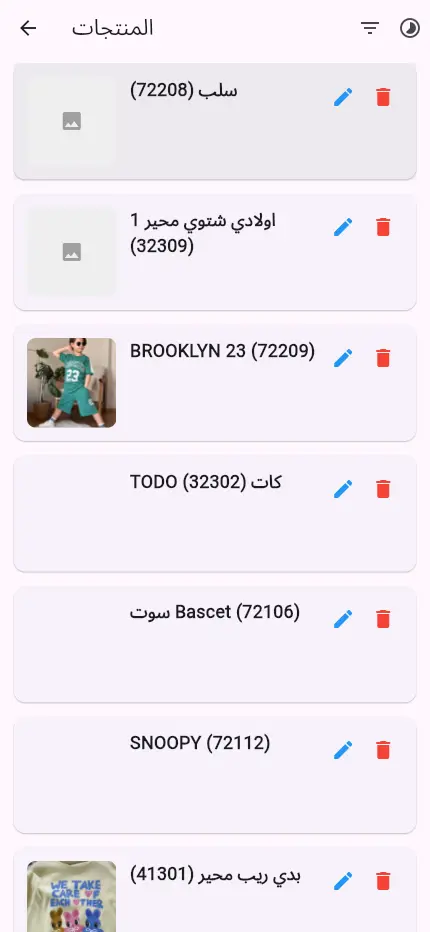
- Record all product information before production begins.
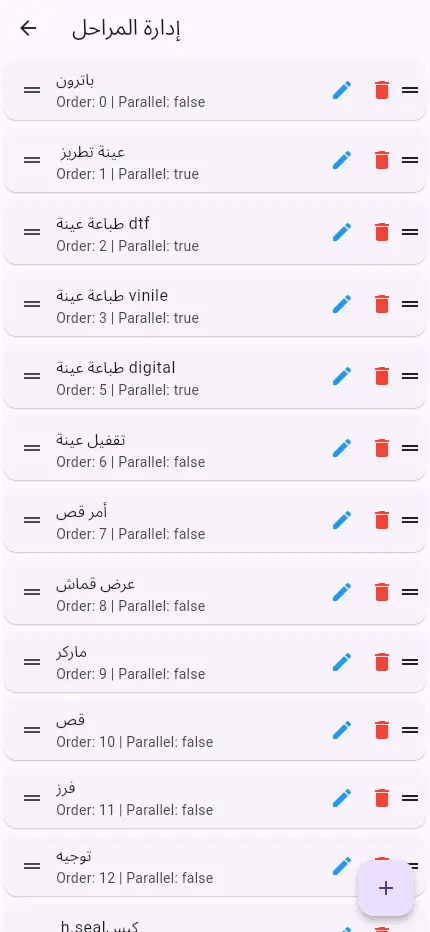
- Create an unlimited number of production stages, with support for 30 stages or more.
- Define the production workflow for each product based on its manufacturing requirements.
- Assign each production stage to the responsible worker or department.
- Implement a handover and receiving system between stages to ensure accurate product tracking.
- Track the current status and stage of each product, including all remaining stages.
- Monitor completed and remaining quantities at every production stage.
- Identify products that are paused or experiencing delays during production.
- Monitor production in real time through a centralized dashboard.
- Worker Management
- The system provides each worker with a dedicated account that allows them to:
- View their assigned tasks.
- See the quantities they are required to complete.
- View upcoming tasks assigned to them.
- Record their daily production.
- Track completed and remaining tasks.
- Communication and Notifications
- Internal news and announcements page for factory updates, instructions, and notifications.
- Problem and breakdown reporting system that allows workers to report issues directly.
- Receive and manage reports through the administration dashboard.
- Share reports directly through applications such as WhatsApp or other communication channels to speed up issue resolution.
- Monitoring Dashboard and Analytics
- The dashboard enables management to:
- Track every product and identify its current production stage.
- View the remaining stages for each product.
- Monitor production completion rates.
- Identify bottlenecks and points of delay within the production line.
- Monitor produced and remaining quantities.
- Search and filter production data by:
- Product Number, Production Stage, Worker, Department, Date, Product Status ,And other criteria
- Administration Dashboard
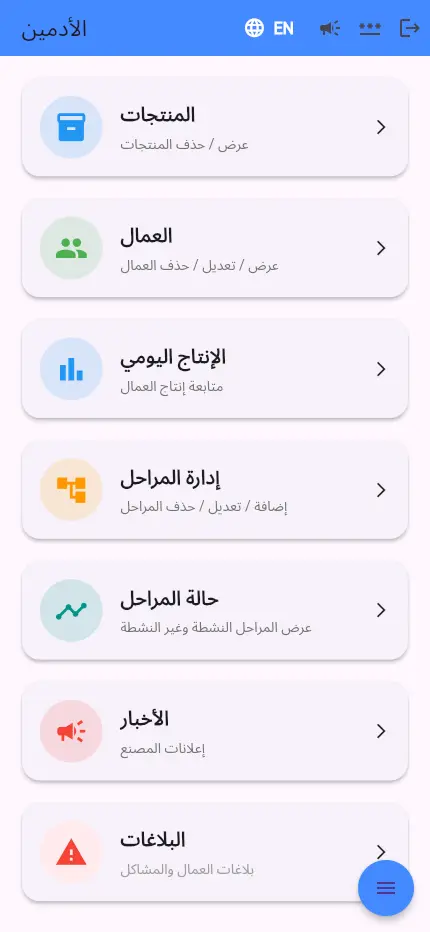
- The administration panel provides complete control over:
- Products
- Production Stages
- Production Lines
- Workers and Permissions
- Departments
- News and Announcements
- Problem Reports
- Production Reports
- Statistics and Analytics
- System Settings
How businesses use it
See where every model is on the line
Without a shared view, the manager walks the floor asking each stage what it has finished. Production Manager shows a production table with a row per model and a column per stage: each cell shows the quantity that has left that stage, or a light for work still inside it, and the table filters by season, brand, category, size, product type or stage.
Give each worker only the work that has reached them
Workers waste time waiting, or work on the wrong model because nobody told them. In Production Manager each worker sees only the products that have reached their stage, with the model picture, quantity and size, plus the products still on the way, so they can prepare materials before the work arrives.
Find the stage that slows the line
Delays are usually discovered on the delivery date, and nobody can say where the time went. Workers confirm receipt and hand over to the next stage with one tap, so every piece gets an entry and exit time at each stage, and you can see how many days a stage takes, which products are paused or late, and where the bottleneck is.
Report problems and post instructions in one place
Breakdowns and quality issues reach management late and by word of mouth. A worker reports a problem from the same screen where they record work, the report arrives in the admin dashboard and can be shared on WhatsApp to speed up the fix, and a news board carries instructions and announcements to every worker.
From the system
Questions buyers ask
What is a good system to manage a garment factory's production line and workers in Egypt?
Production Manager by Softwiro follows every piece through the stages of a garment line, from cutting and sewing to finishing, packing and delivery. Each worker records daily output and hands the work to the next stage with one tap, while management sees a live production table by model and stage. It is available to factories in Cairo, Giza, Alexandria, Mansoura and elsewhere in Egypt.
Which software tracks production stages and worker output in a clothing factory in Saudi Arabia?
Production Manager by Softwiro gives every worker their own account to see assigned work and quantities, record daily production and hand finished work to the next stage. A daily production screen lists each day by worker and quantity, and every piece gets an entry and exit time at each stage, so you can see how long a stage takes and who is holding up the line. It is available to garment factories in Riyadh, Jeddah, Dammam and across Saudi Arabia.
How do I organise the stages of a production line?
In Production Manager you create the stages, arrange them by drag and drop, and mark stages that run at the same time, such as printing and pressing. You then choose the route each product takes, link each stage to the responsible worker or department, and see the route in colour as completed, current and upcoming stages. No programming is needed: a new model or a change to the line is set up from the app itself in minutes.
Is Production Manager only for garment factories?
It is built around garment work: models, sizes, single pieces and sets, with stages such as cutting, sewing, finishing and packing. The stages are configurable, with no fixed limit (30 stages or more), and each product follows its own route, so other factories that move products through set stages can define their own. Request a demo to check the fit with your line.
What is the difference between Production Manager and ProTrack?
Both are Softwiro systems for following production. Production Manager focuses on the flow of pieces through the line: stages, workers, handover, daily output, problem reports and the production table. ProTrack also ties each stage to its cost and to the customer contract and computes expected and actual profit, so it suits factories whose main question is the cost and margin of each order.
Does Production Manager work in Arabic?
Yes. Production Manager works in Arabic with right-to-left screens, and in English as well. Admins and workers each log in with a username and password and go straight to their own screen, so a worker sees only their own work.
How do I start using Production Manager?
Start by requesting a demo from Softwiro, which shows Production Manager with your own models and stages. Before that, you can take the tour of the real screens on production.softwiro.com, from the worker login to the production table.
Is Production Manager available in Saudi Arabia?
Yes. Production Manager is available to factories in any country, including Egypt and Saudi Arabia, in cities such as Cairo, Alexandria, Riyadh, Jeddah and Dammam. It tracks stages, workers and daily output, and the line is set up to match your factory without programming.
How to start
Request a demo from Softwiro to see Production Manager with your own models and stages. You can take the tour of the real screens on production.softwiro.com first.