You run a small hotel or guesthouse, and when a guest is about to leave they ask: "how much do I owe?" You open the booking book, then the restaurant slip, then the laundry bill, and add it up by hand. What you want is to pick the guest's booking and see the full account: room, nights, extras, deposit and what is left to pay. You also want a warning before two guests arrive for one room. The free hotel guest accounts sheet (the page is in Arabic) does this in one file, in Excel or online.
The problem it solves
In a small hotel one guest's numbers are scattered across four places: the booking book, the restaurant slip, the minibar receipt and the payments record. So a service gets forgotten, a deposit is counted twice, or you find out on arrival day that a room was promised to two people. The fix is to record everything once under one booking number and let the sheet add up the rest.
Steps from opening the file to the statement
- Settings: type the hotel name, the first day of the month you want occupancy for, the year and today's date, and review the service items and payment methods.
- Rooms: record each room with its number, type, nightly rate and capacity.
- Bookings: give each booking a number that never repeats, such as H-1001, then the guest name, phone, room, check-in, check-out and status. Nights, rate and the stay total appear by themselves.
- Charges: whenever the guest orders something, log it with its date, booking number, item and amount. A discount goes under the item "خصم" (discount) with a negative amount.
- Payments: log every deposit, payment and refund with the booking number and payment method.
- Guest statement: pick the booking number from the list in cell B4 and the whole statement builds.
What is in each sheet
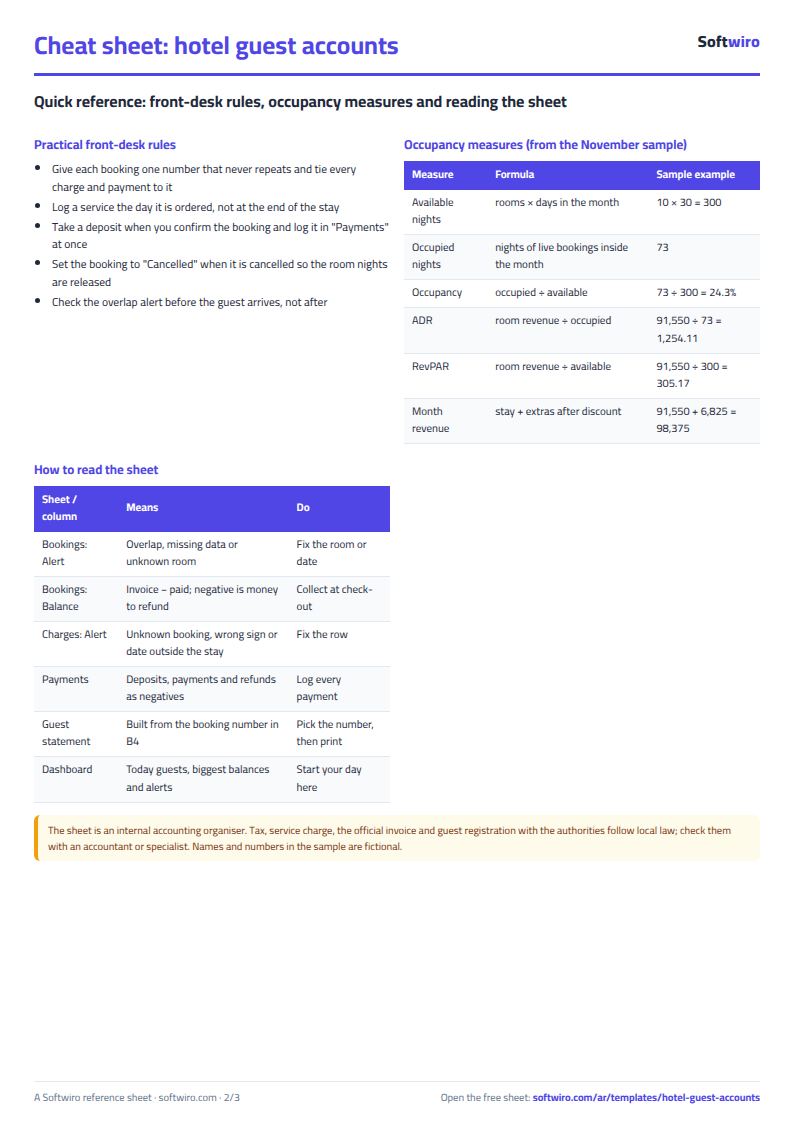
"Bookings" is the heart. Next to each booking, columns calculate by themselves: nights, the rate applied, the stay total, extras, discount, paid and balance. An "Alert" column writes "overlap" in red when another live booking on the same room has nights that overlap this one. A guest arriving on the previous guest's check-out day is not an overlap, because the check-out night is not counted.
"Charges" and "Payments" are two long logs, each tying its row to a booking, so the guest's name shows beside it and the sheet warns you if you type an unknown number, a discount as a positive, or a date outside the stay.
"Guest statement" is a printable page: guest and room details, a six-line summary, then the stay night by night (up to 31 nights), the extras (up to 25 lines) and the payments (up to 15), with two signature boxes.
"Monthly occupancy" gives twelve months, and the "Dashboard" is where your day starts: today's guests, arrivals and departures, the ten biggest balances due, and four charts.
How the sheet works out the bill
Nights = check-out date − check-in date. The stay total = nights × nightly rate, which is the room rate from the "Rooms" sheet unless you type an agreed rate in the booking, which replaces it. Invoice total = stay + extras − discount, and balance due = total − paid. If you cancel a booking, set its status to "Cancelled": its stay drops to zero, the room nights are released, and its payments stay visible so you can refund them.
Walk-through on the numbers in the sheet
The names and numbers below are sample data inside the sheet, not real people. The example has ten rooms and twenty-six bookings, and today is 20 November 2026:
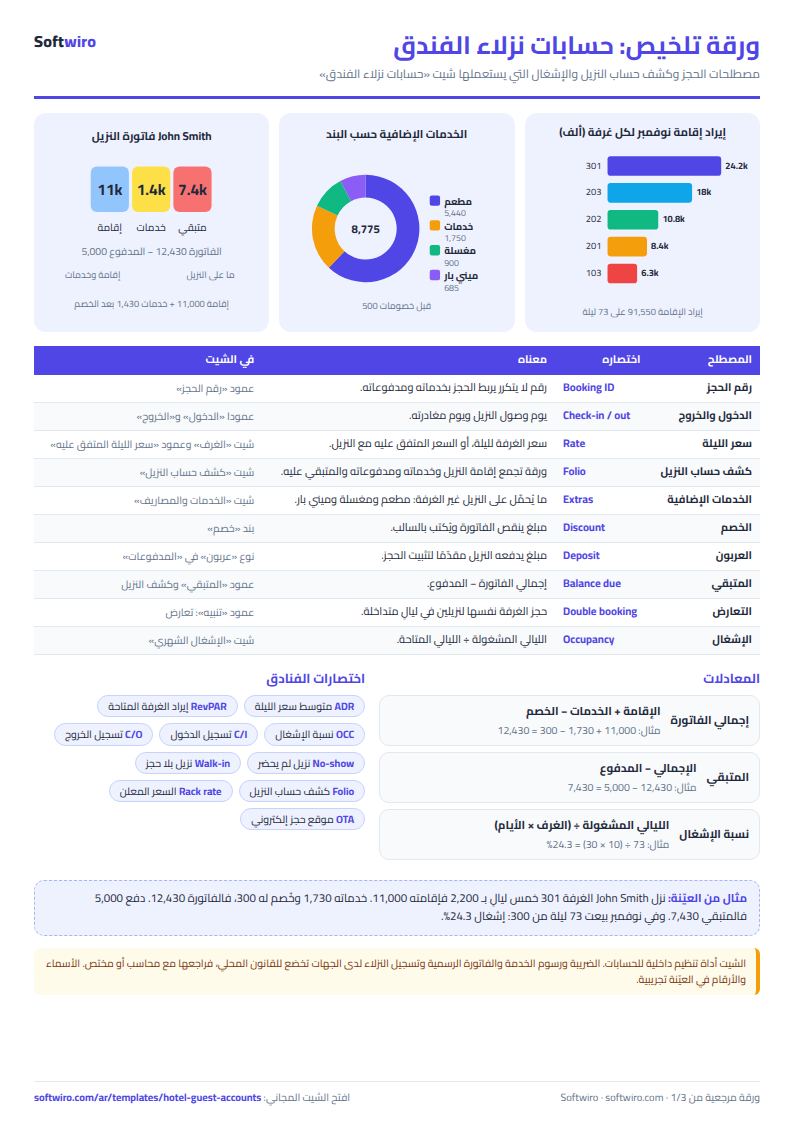
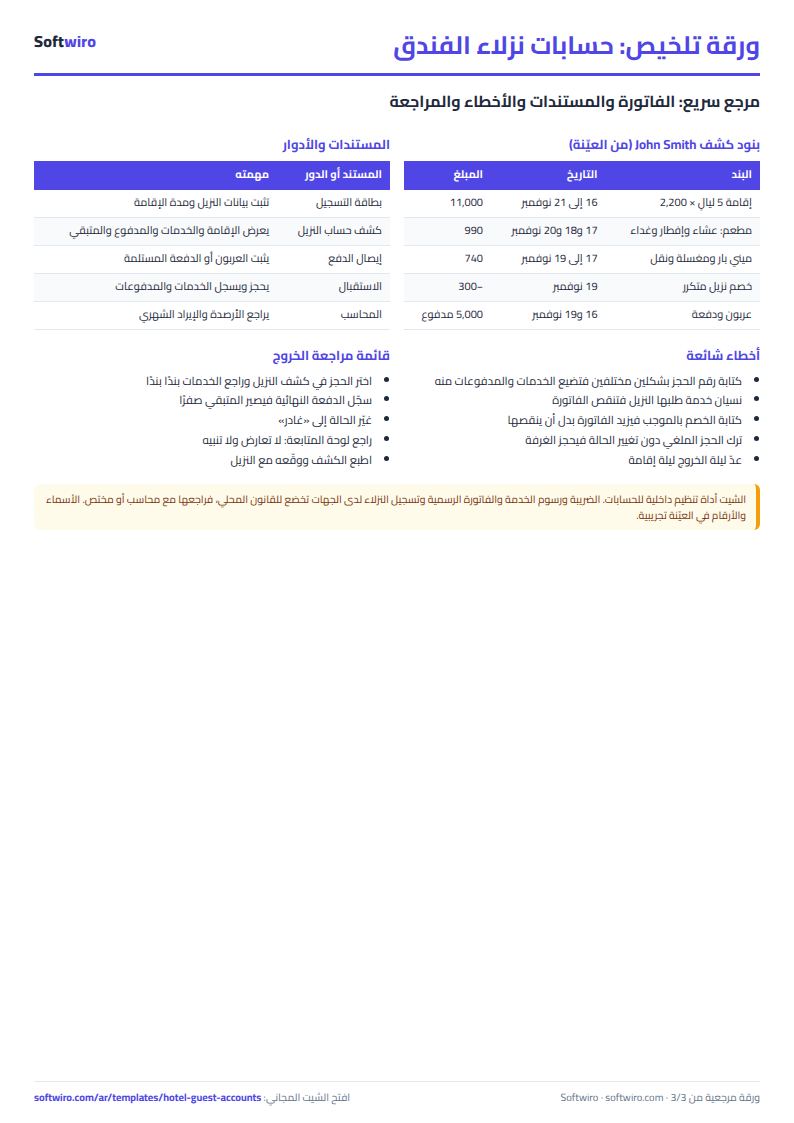
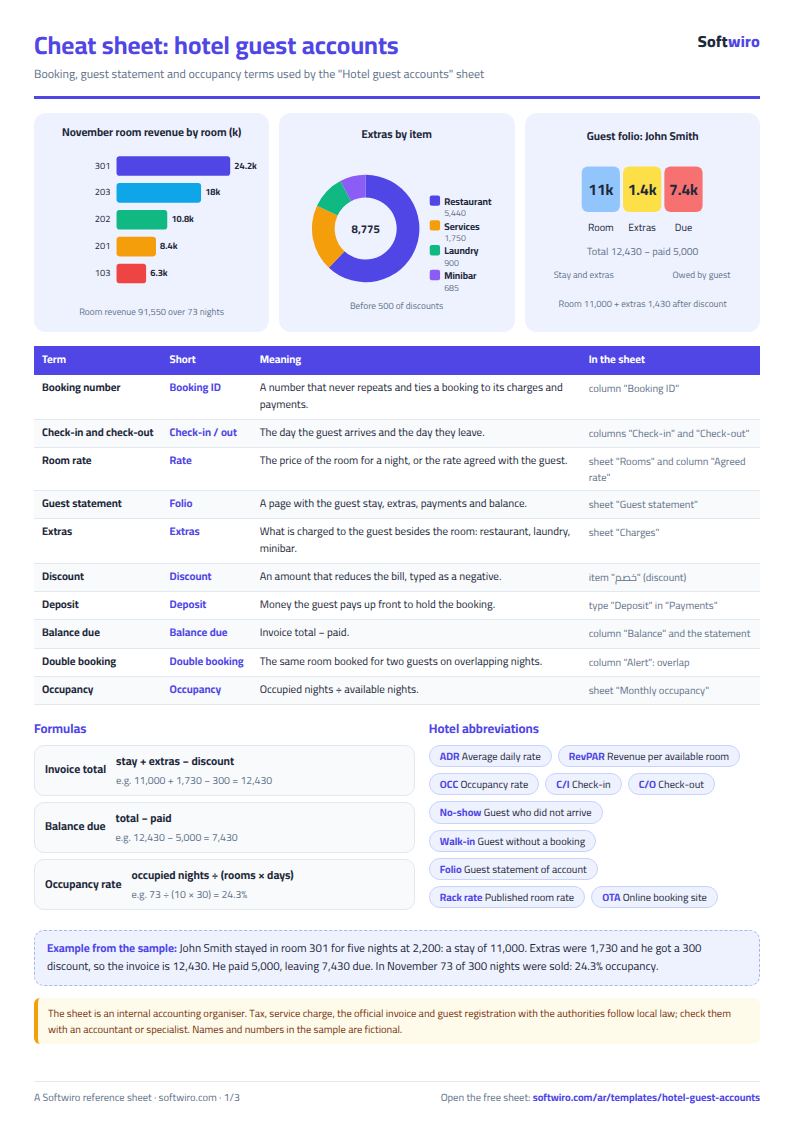
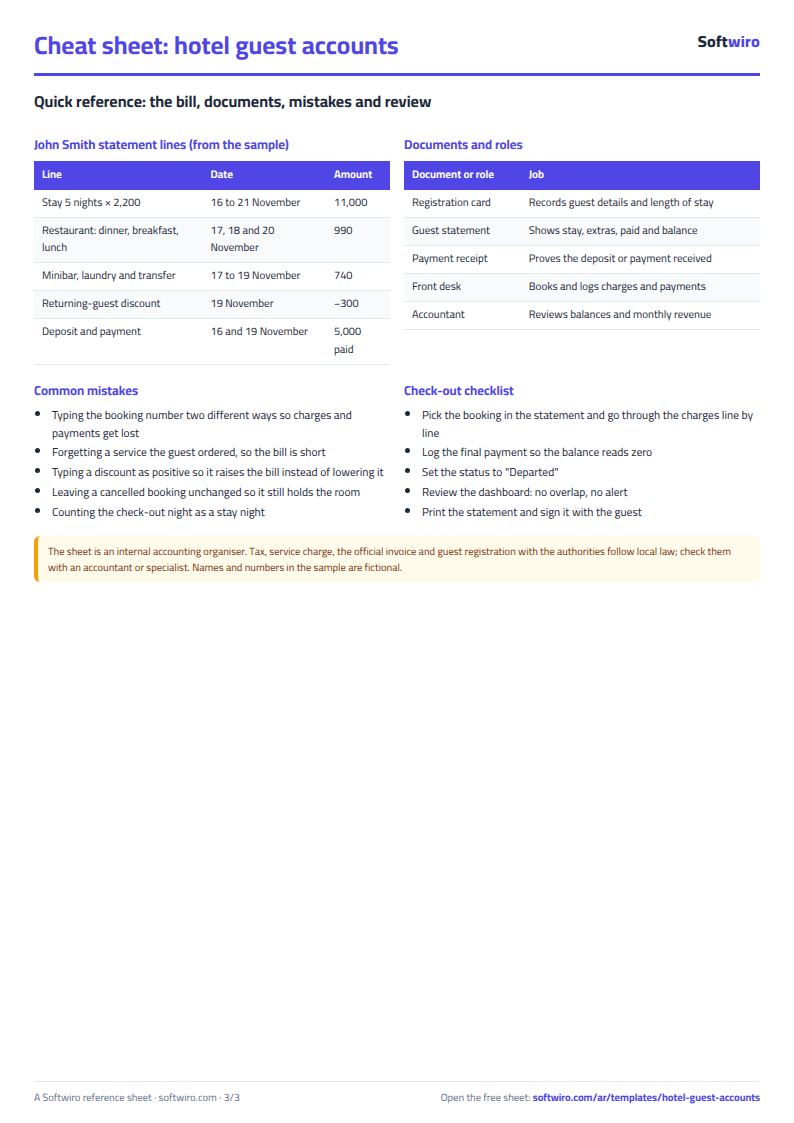
- One guest statement: John Smith's booking in room 301 from 16 to 21 November: five nights × 2,200 = 11,000. His extras (restaurant, minibar, laundry and a transfer) are 1,730 and a returning-guest discount is −300, so the invoice total is 12,430. He paid a 3,000 deposit and a 2,000 payment = 5,000, so he still owes 7,430.
- Overlap: the bookings of the Attar family (26 to 30 November) and Anna Petrova (28 November to 2 December) on room 203 overlap for two nights, so "overlap" shows on both.
- A cancelled booking: Duaa Hassan cancelled after paying a 300 deposit, so her stay is zero and the balance is −300: money to refund her.
- Today: five rooms are occupied tonight, two of them arriving today, and one guest leaves today, so today's occupancy is 50%.
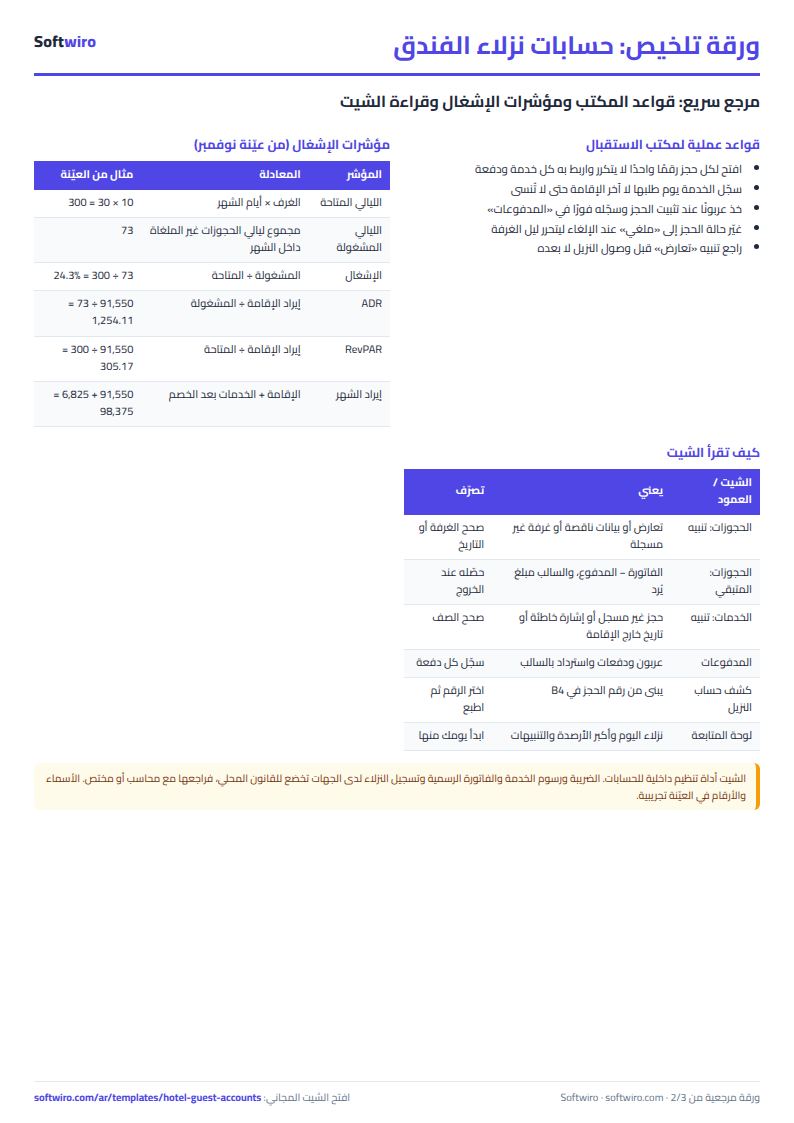
- November occupancy: 300 nights are available (10 rooms × 30 days) and 73 were sold, so occupancy is 24.3%. Room revenue is 91,550, giving an ADR of 1,254.11 and a RevPAR of 305.17. Extras after discount are 6,825, so the month's revenue is 98,375.
- A booking across two months: Lena Fischer from 29 November to 4 December: two nights fall in November, worth 4,400, and the rest in December.
- Amounts due: the total owed by guests is 46,150, the largest being Lena Fischer at 8,000 and then John Smith at 7,430.
Common mistakes
- Typing the booking number two ways: what was typed under the other spelling is cut off, so pick the number from the drop-down list.
- Typing a discount as a positive: it raises the bill instead of lowering it, and the sheet warns you.
- Leaving a cancelled booking as it is: it still holds the room and creates a false overlap.
- Counting the check-out night: a stay from 16 to 21 is five nights, not six.
- Forgetting to log a service the day it is ordered: the bill comes up short.
When to move from the sheet to a system
The sheet suits a small hotel and one person typing. When the front desk, the restaurant and the accountant all work on the accounts at once, or you want restaurant orders posted to the guest's bill from where they are taken, or you want a booked room blocked before a double booking happens, ask for a custom program from Softwiro. For furnished apartments rented by the night through several channels, try the serviced apartments bookings sheet, and for the hotel's own costs the business expenses and budget sheet.
Next step
Download the sheet from the template page, clear the sample bookings, type your rooms with their rates, then open one real booking, log its charges and payments, pick its number in "Guest statement" and see how it appears.