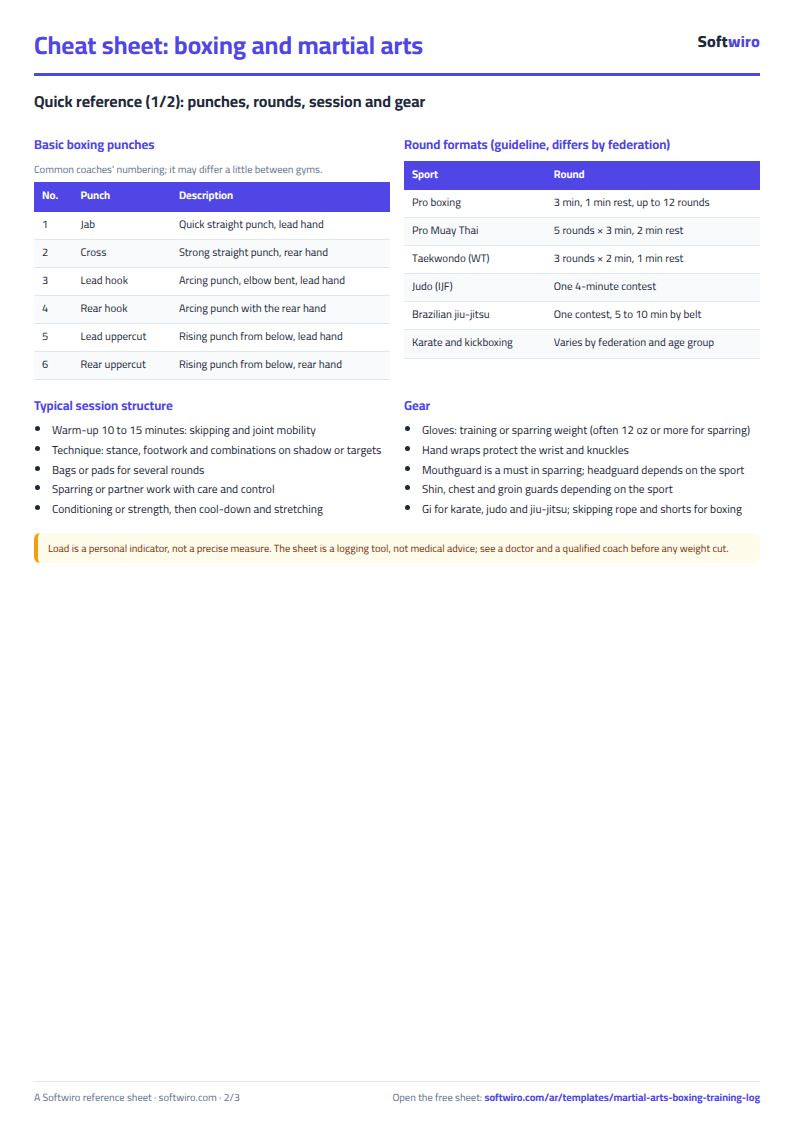
Anyone who trains in boxing, karate or judo knows a week can pass without you knowing whether you trained more or less than the week before, and that the competition weigh-in does not wait. The free martial arts and boxing training log sheet records every session and works out training load and round time from it, and tracks your weight cut to the competition class, so you see the whole picture on one page.
The problem it solves
When you jot a session in a notes app or keep it in your head, you know what you did today but not the direction of the weeks: is your load jumping, how many sparring rounds did you do, and is your weight coming down at the speed you need or faster. Here you enter each session once and the sheet summarises the rest for every week, and compares your weight with the class weight on one panel.
Steps from opening the file to the weight panel
- Settings: enter the athlete name, the sport, the target class weight, today's date and the competition date, and review the lists of session types and belts.
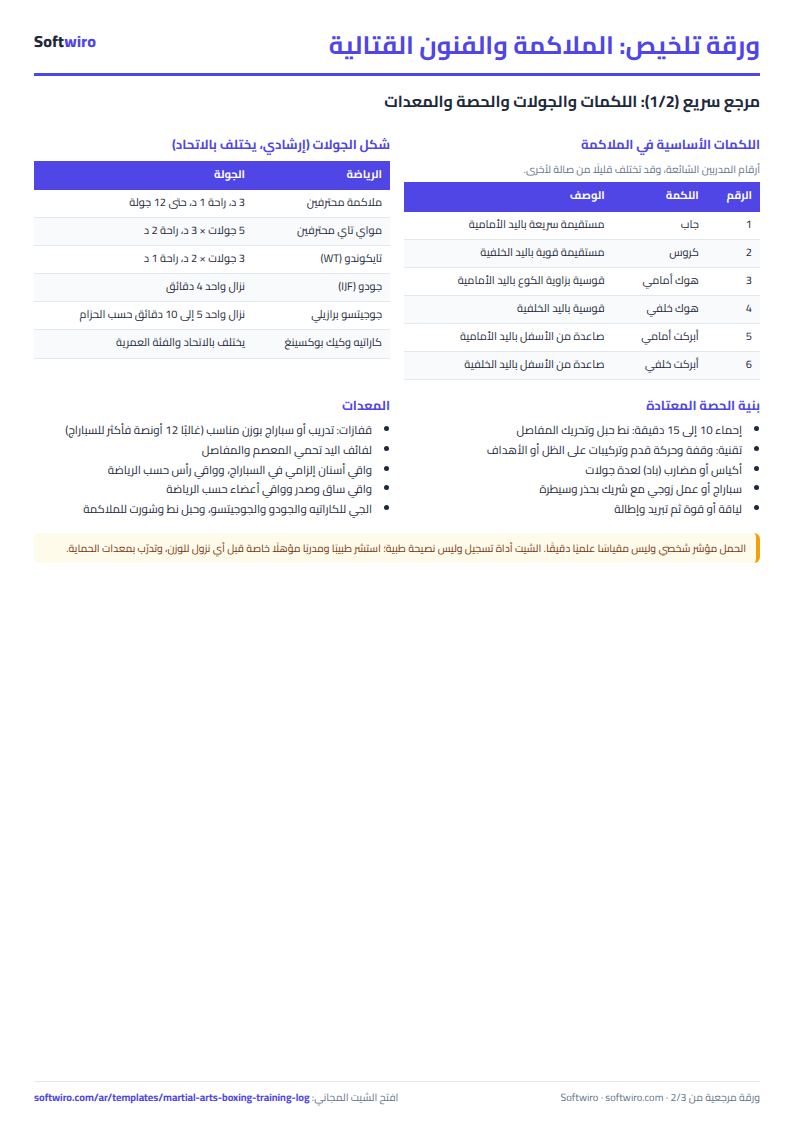
- Sessions: log each session in a row: the date, its type from the list (technique, sparring, bags, conditioning, strength or match), its length in minutes, the number of rounds and the round length (left empty it takes 3 minutes).
- Enter your perceived effort, RPE, from 1 (very light) to 10 (maximum effort), and your weight in kg on the days you weigh yourself.
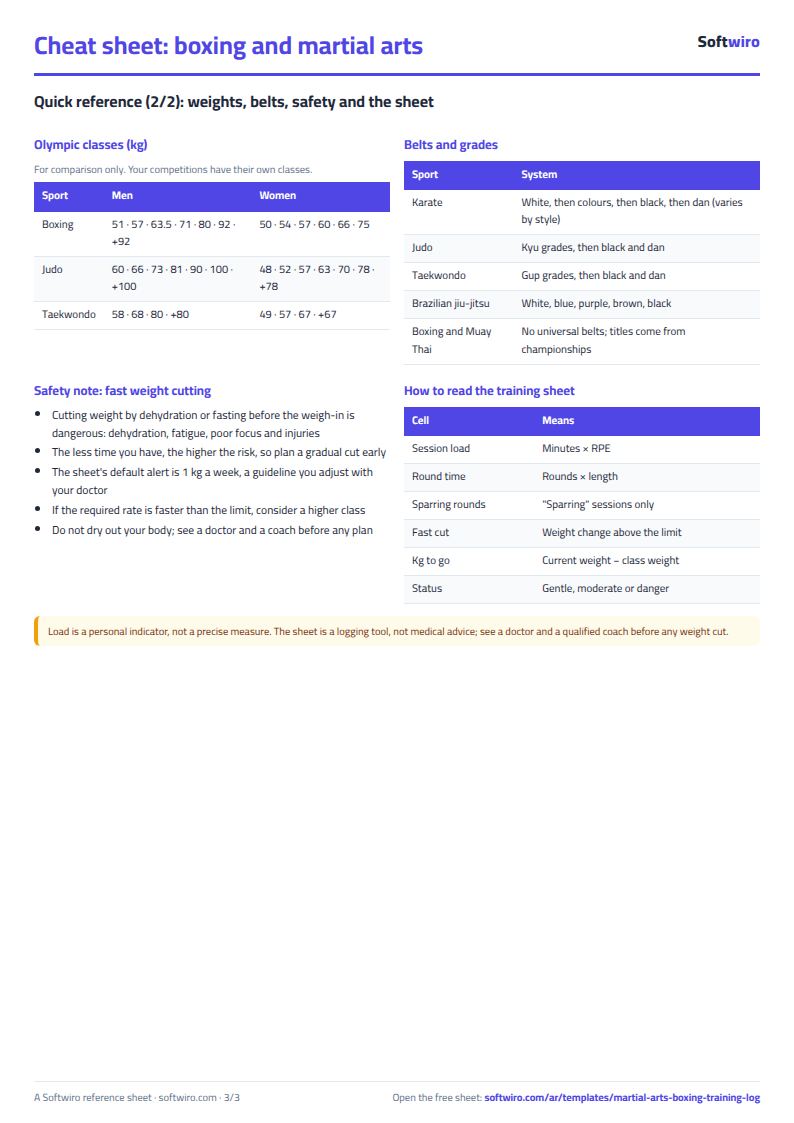
- Leave the grey columns alone: session load = minutes × RPE, and round time = rounds × round length.
- Open Weekly to see the last 10 weeks: sessions, minutes, rounds, sparring rounds, load, average weight and its change.
- On the weight panel check the kilograms left to the class, the days left and the loss needed each week, and record your belts and grades in their table below the sheet.
Worked example (sample data)
The name and figures are sample data for an example karate athlete in the "under 67 kg" class with a target class weight of 67 kg. Today's date is 13 November 2026, the competition is on 15 January 2027 and the current week started on Saturday 7 November. 61 sessions were logged, including one match on 1 October (40 minutes in 3 rounds at RPE 9, load 360):
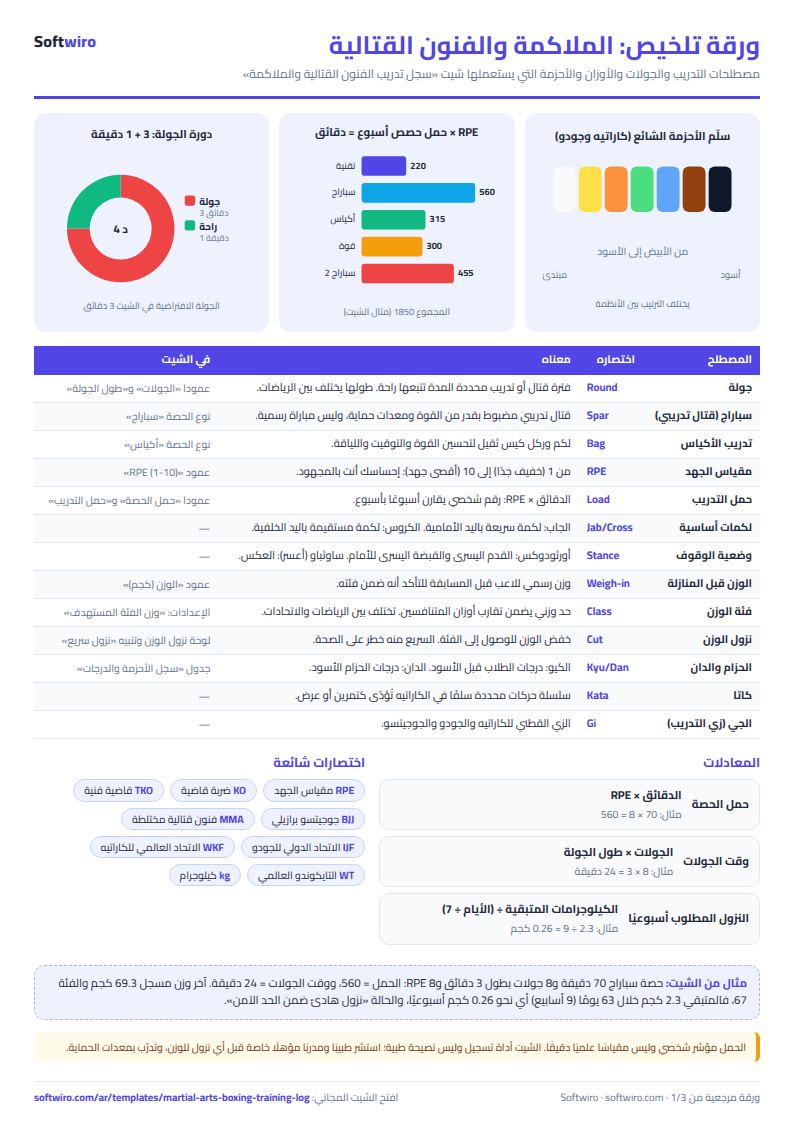
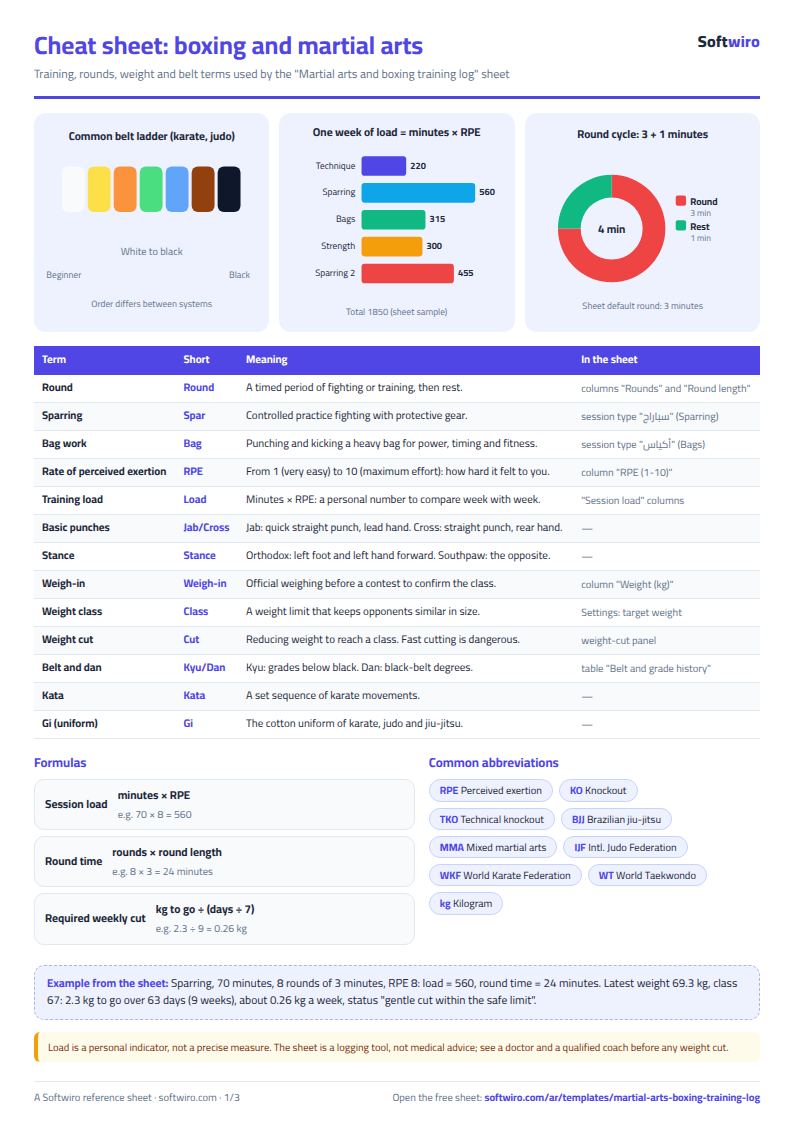
- One session: sparring on 8 November, 70 minutes in 8 rounds of 3 minutes each at RPE 8. Its load is 70 × 8 = 560 and its round time is 8 × 3 = 24 minutes.
- The current week (started 7 November): 5 sessions, 285 minutes and 26 rounds, 14 of them sparring rounds, round time 78 minutes, load 1,850, average RPE 6.4 and average weight 69.4 kg, a change of −0.20 on the previous week. The week is not over yet.
- Week of 31 October: 5 sessions, 305 minutes, load 2,135 and average weight 69.6.
- Week of 24 October: 5 sessions, 325 minutes, load 2,130 and average weight 69.8. The average before it was 71.3, so the weight fell 1.5 kg in a week, more than the 1 kg alert limit, and "fast loss" shows.
- Week of 26 September: 6 sessions, 325 minutes, 29 rounds and load 2,210; it contains the match.
- Last 10 weeks: 51 sessions and a total load of 20,555, with one week of fast loss.
- Weight panel: current weight 69.3 kg (the last logged weight, on 11 November), so 2.3 kg are left to the class, 63 days remain (9 weeks) and the loss needed is 0.26 kg a week. That is less than half the alert limit, so the status is "calm loss within the safe limit".
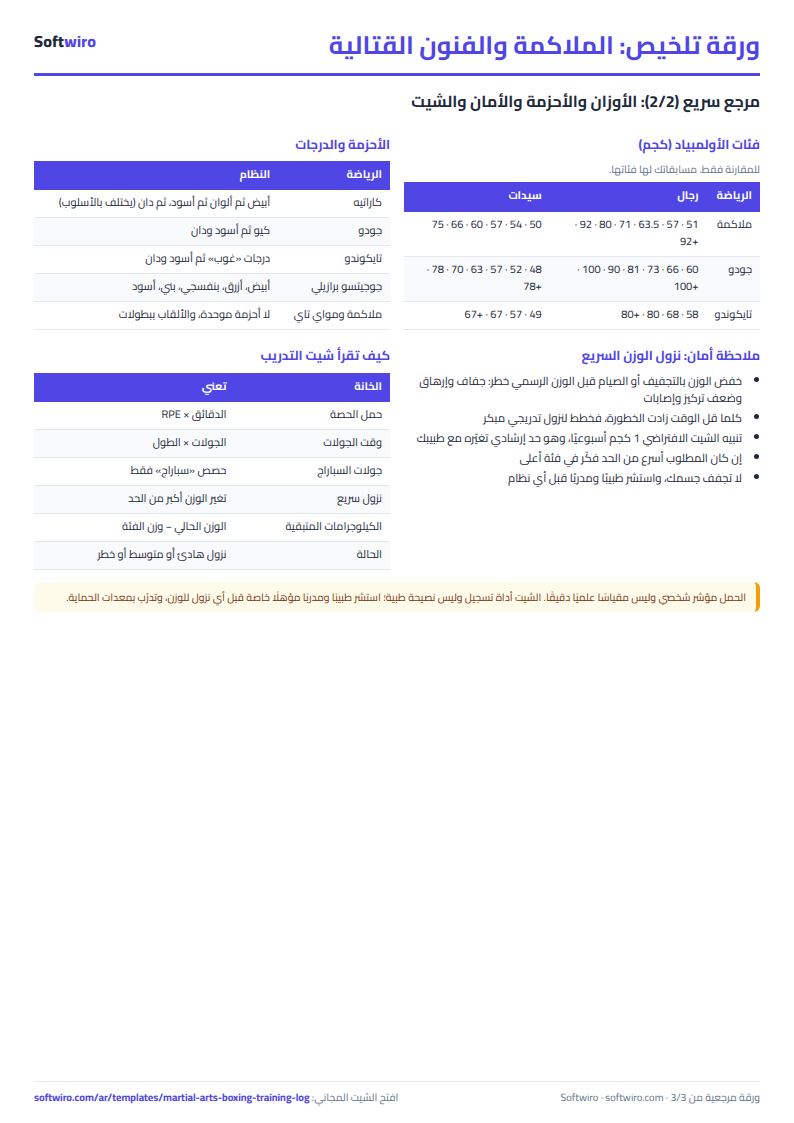
- Belts: the last promotion was to a blue belt on 23 May 2026, so the current belt is blue and 174 days have passed since the promotion.
How the numbers are worked out
- Session load = minutes × RPE. A session without an RPE gets no load.
- Round time = rounds × round length; if the round length is empty, the default length in Settings is used.
- Weight change = the week's average weight − the previous week's average weight. "Fast loss" shows if the loss is more than the alert limit.
- Loss needed per week = kilograms left ÷ weeks left to the competition.
- Status: "danger" if the required loss is above the limit, "moderate-speed loss" if it is above half of it, otherwise "calm loss within the safe limit".
Limits and tips
- Health warning: cutting weight fast before a competition is a health risk (dehydration, exhaustion and injuries). The sheet is not medical advice and does not replace a coach or a doctor; consult them before any plan.
- The default alert limit is 1 kg a week, and many people consider 0.5 to 1 kg a week a reasonable limit. Change it in Settings as your doctor advises.
- Load is a personal indicator for comparing weeks, not a precise scientific measure.
- The weekly average weight depends on the days you logged your weight, and the current weight is the weight of the last logged day.
- Sparring rounds count only sessions of type "sparring"; a match goes into total rounds, round time and load.
- Do not delete a row from the middle of the list. The sheet week starts on Saturday and ends on Friday.
- The sheet does not write you a training plan and sends no alert to your coach unless you send them the file.
Try it
Open the sheet and try it online, or download it for Excel. It holds 1500 sessions. If you want an app to follow the athletes of your gym by attendance, weight, belt and competition dates, ask for it here.