You want to know which machine is due for inspection and which is overdue, how many hours of running time breakdowns cost you and why, and what repairs cost this month. The free machine inspection and maintenance sheet answers that: an inspection schedule per machine, a breakdown log, and a dashboard with four charts. (The template page is in Arabic; the workbook itself is Arabic and right-to-left.)
The problem it solves
In many factories and workshops the inspection schedule lives in a notebook or in the maintenance supervisor's head. The noisy machine is inspected every week and the quiet one is forgotten for months, then a whole line stops over a fault a two-minute check would have caught. Nobody can say afterwards how many hours were lost or which cause keeps repeating, so the same spare part is bought a third time. The sheet makes the due date calculate itself and ties every breakdown to its machine, cause and cost.
How the sheet works, step by step
- In Settings type today's date (or
=TODAY()), how many days count as "soon", the analysis period, planned hours per day and operating days per week. - In Machines register each machine with its code, type, line, install date, criticality and how often it is inspected, in days.
- In Inspection checklists write the checklist items for each machine type.
- In Inspection log add one row per inspection: date, code, inspector and the number of failed items.
- In Breakdown log add the start and end of each breakdown with date and time, the code, cause and cost.
- Read Overdue and upcoming and the Dashboard.
What is in each sheet
- Machines: last inspection, next due date, days left and status, then breakdowns in the period, downtime hours, availability, mean hours between failures and repair cost.
- Inspection checklists: the items for each type, which set the number of items checked in every inspection.
- Inspection log: items checked and passed, pass rate and the result (clean or remarks).
- Breakdown log: downtime hours from start and end, and whether the breakdown is open or closed.
- Overdue and upcoming: a ready list to walk the machines in order of priority.
- Dashboard: indicators, causes, monthly cost and the machines that stopped most.
Walk-through on the sample numbers (sample data)
These figures come from the example data inside the sheet. It is fictional, not from a real plant. It has ten machines, the date in Settings is 20 November 2026 and the period runs from 1 October to 20 November.
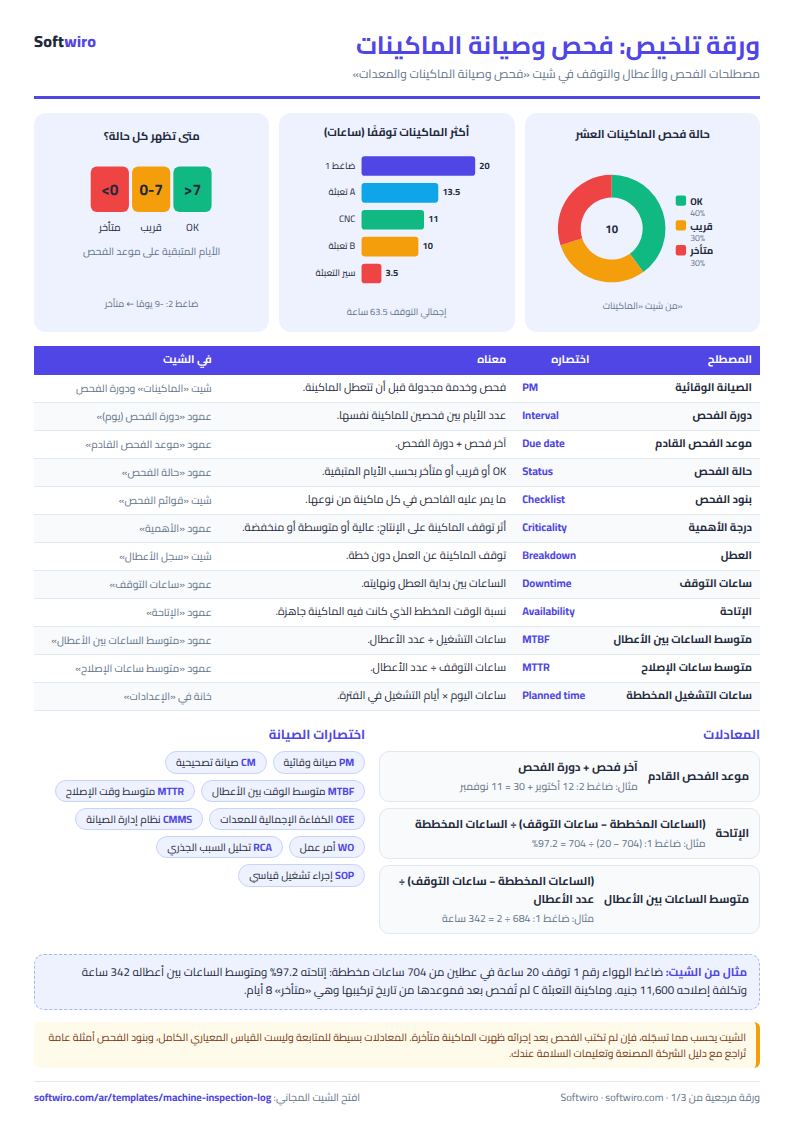
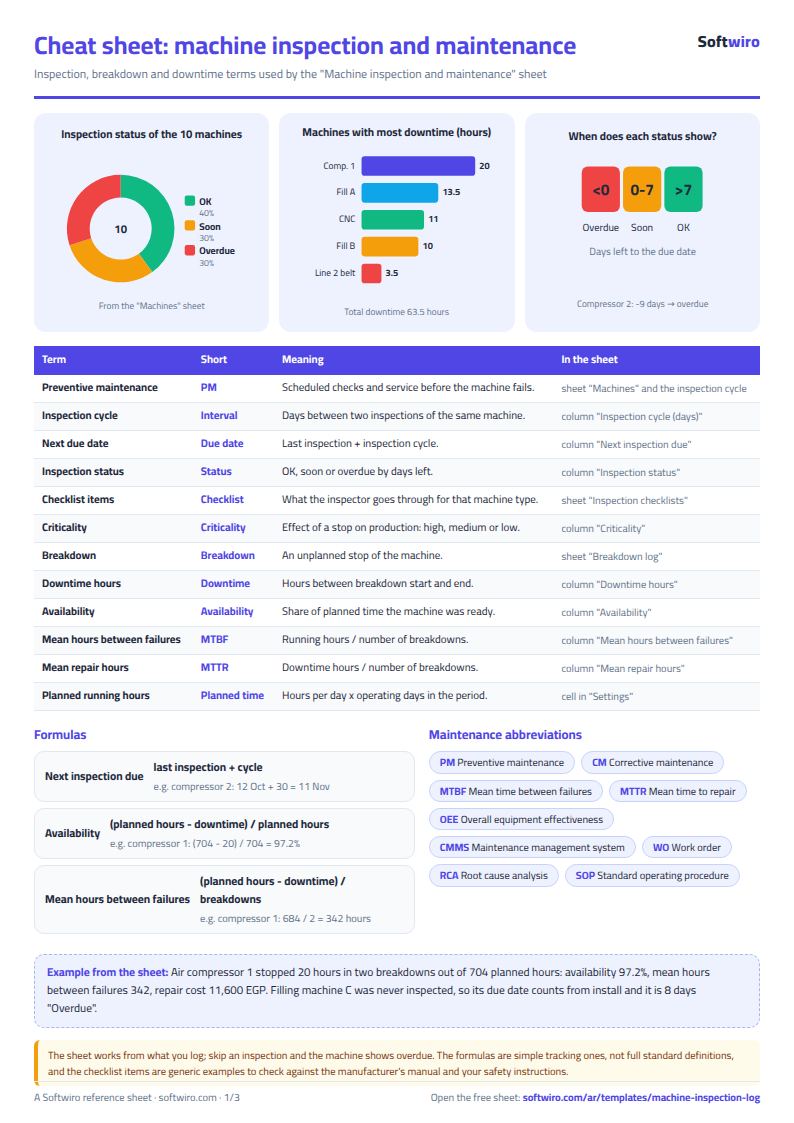
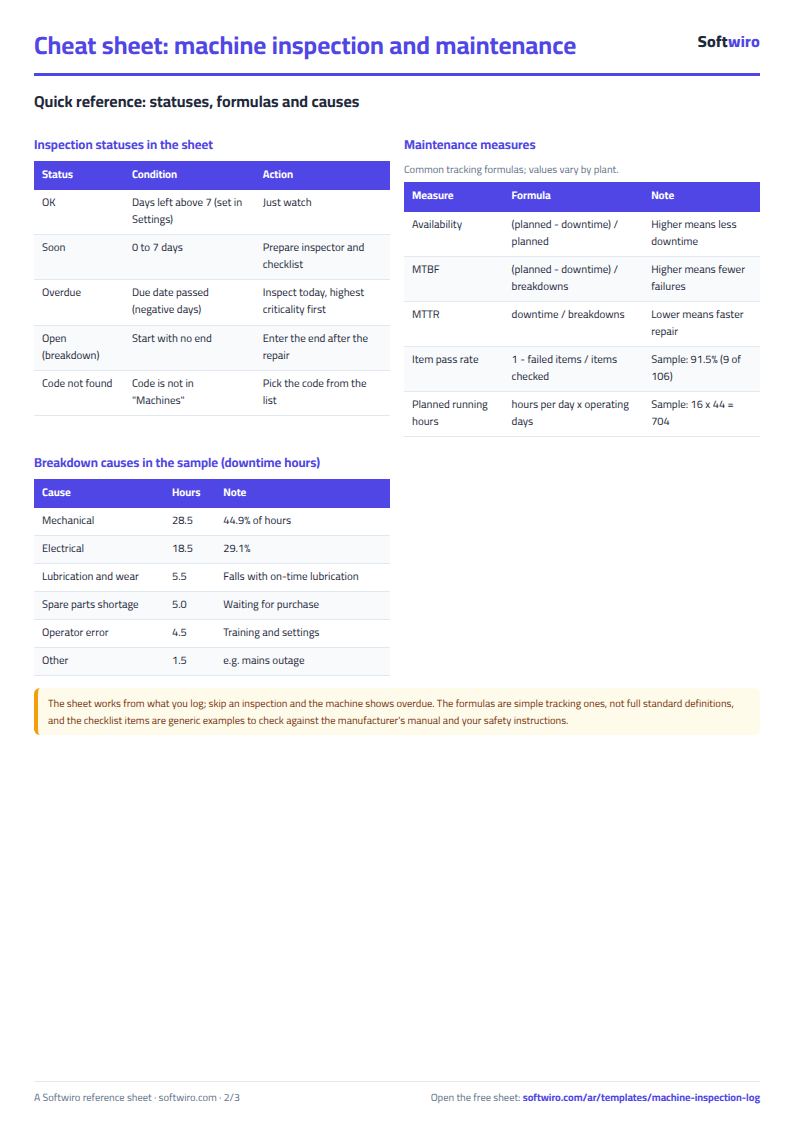
- Inspection status: four machines OK, three "soon" and three "overdue". Air compressor 2 is 9 days overdue (30-day cycle, last inspected 12 October). Filling machine C has never been inspected, so its due date counts from its install date and it is 8 days overdue.
- Two overdue machines are high criticality: filling machines B and C, shown near the top of the overdue list.
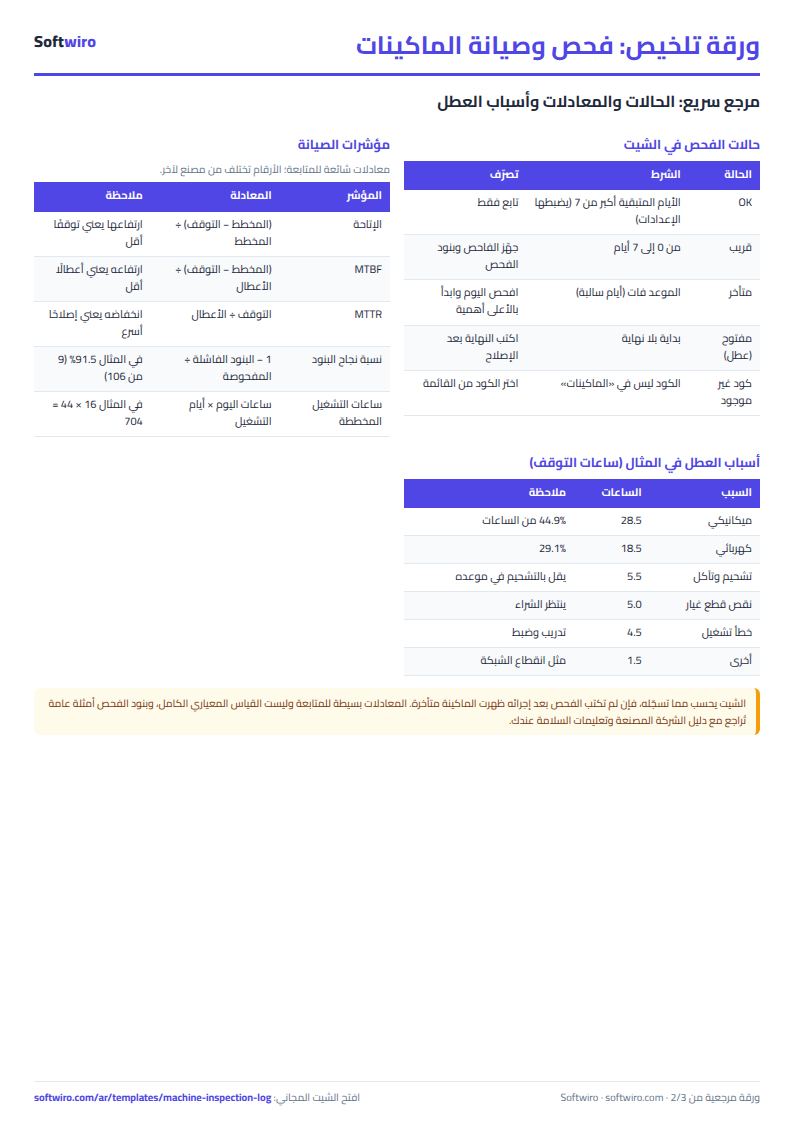
- Inspections: 19 in the period, with 9 failed items out of 106 checked, a 91.5% pass rate.
- Breakdowns: 17 in the period, one still open (filling machine B, no end time yet), with 63.5 downtime hours and 25,550 EGP in repair cost.
- Availability: planned hours are 704 per machine (16 hours x 44 operating days), so plant availability is 99.1%. Air compressor 1 has the lowest at 97.2% because it lost 20 hours in two breakdowns: mean time between failures 342 hours and mean repair time 10 hours.
- Causes: mechanical 28.5 hours (44.9% of hours), then electrical 18.5 hours (29.1%), then lubrication and wear 5.5 hours.
- Monthly cost: 16,200 EGP in October and 9,350 EGP in November.
The takeaway from this example: air compressor 1 and the two filling machines are where the inspection cycle deserves a review, because they carry the most downtime.
Common mistakes
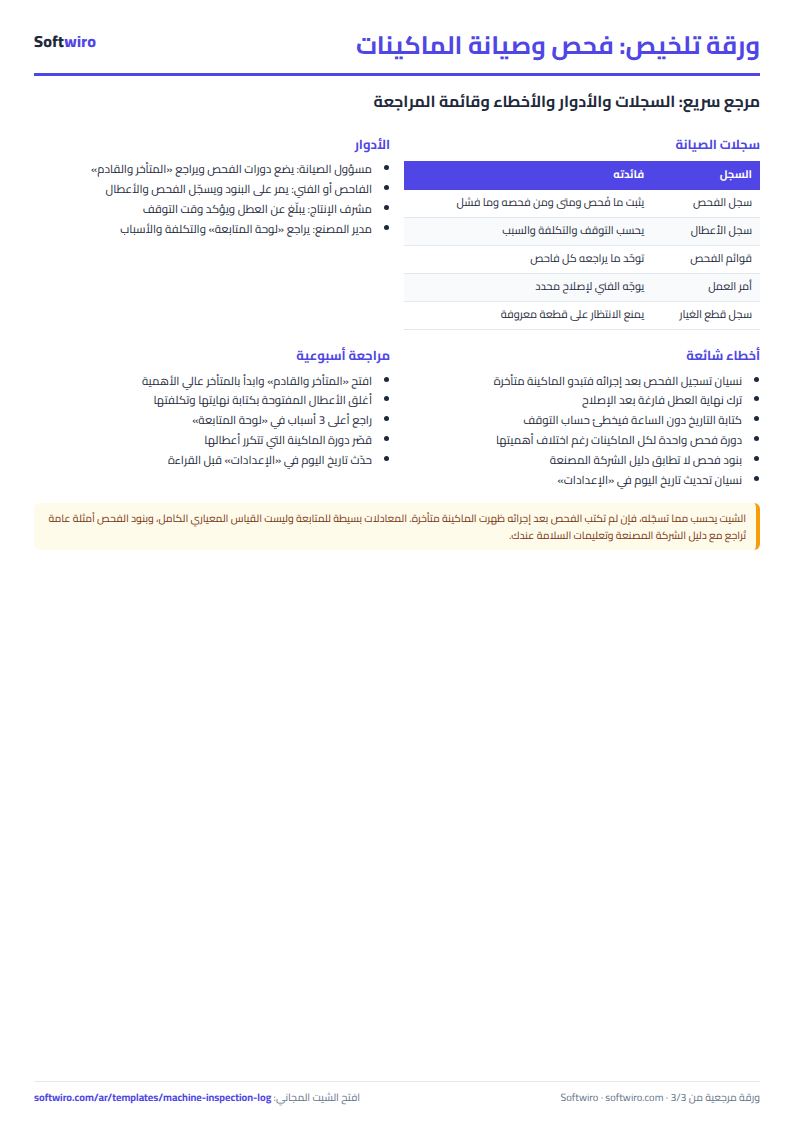
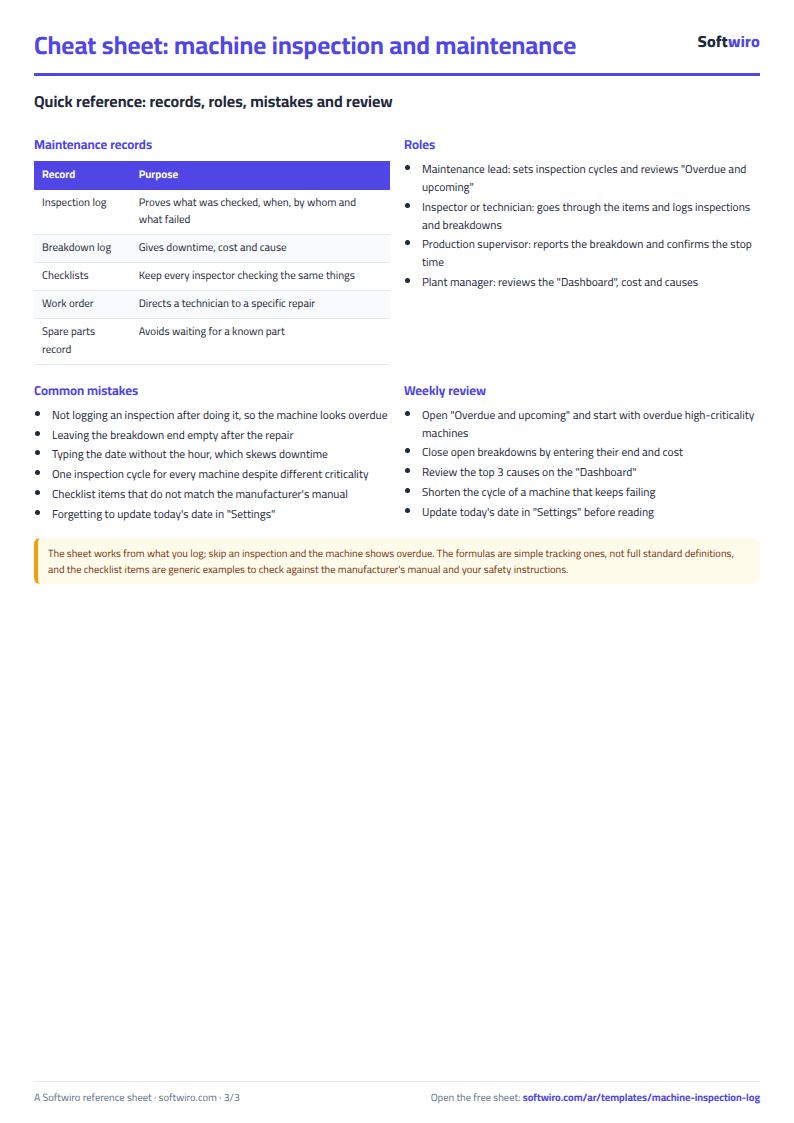
- Forgetting to log an inspection after doing it: the machine stays overdue in the sheet although it was checked.
- Leaving the end time empty after the repair: the breakdown stays "open" and its hours are not counted.
- Typing dates without times: downtime comes out too low or too high, so write the hour.
- One inspection cycle for every machine: a critical machine needs a shorter cycle than a quiet one.
- Generic checklist items that do not match the machine manual: write your items from the manufacturer's manual and your own safety instructions.
- Reading availability alone: read the cause and the number of breakdowns next to it.
When to move to a system
The sheet is enough while the machine count is limited and one or two people log inspections. When technicians multiply and each needs to see only their own tasks, or you want to tie a breakdown to the production order it stopped, ask for a custom program built around your way of working. If what you want is OEE per line calculated automatically, that is what the MESwiro system provides.
For nearby templates, see the building maintenance sheet and the biscuit factory sheet with its line availability.
Your next step
Download the sheet, open "Machines", enter your five most important machines with an inspection cycle for each, then log the last inspection done on each in "Inspection log". In a few minutes you will know which ones are overdue today.